itemsjs
Version:
Created to perform fast search on small json dataset (up to 1000 elements).
323 lines (233 loc) • 10.7 kB
Markdown


[](https://img.shields.io/npm/dm/itemsjs.svg)
[](https://github.com/itemsapi/itemsjs/blob/master/LICENSE)
# ItemsJS - search engine in javascript
Extremely fast faceted search engine in JavaScript - lightweight, flexible, and simple to use. Created to perform fast search on json dataset (up to 100K items).
## Demo
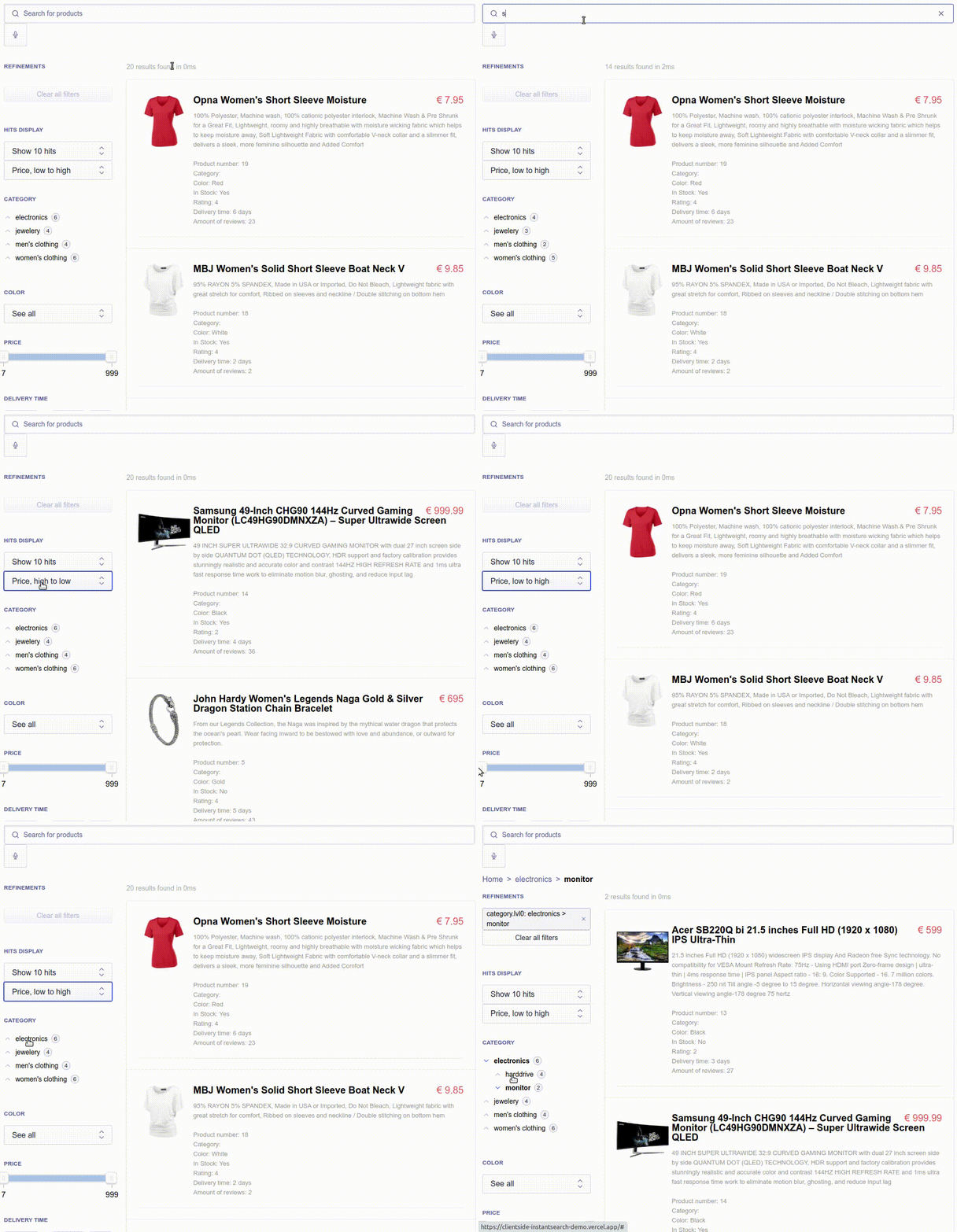
[See another demo examples](/docs/demo.md)
## Use cases
Itemsjs is being used mostly for data classification of companies, products, publications, documents, jobs or plants
The solution has been implemented by people from Amazon, Hermes, Apple, Microsoft, James Cook University, Carnegie Mellon University and more.
You can find a list of real implementations - [here](/docs/who-use-it.md)
## Features
- Ultra-fast faceted search: Process and filter data with blazing speed.
- Simple full-text search: Intuitive and straightforward text searching.
- Relevance scoring: Rank search results based on relevance.
- Facet filtering and sorting: Filter and order results by various facets.
- Pagination
- Works on both backend and frontend
- Integration with custom full-text search engines
## Getting Started
### NPM
```bash
npm install itemsjs
```
#### Using CommonJS syntax
```js
const itemsjs = require('itemsjs')(data, configuration);
const items = itemsjs.search();
```
#### Using ES Module syntax
```js
import itemsjs from 'itemsjs';
const searchEngine = itemsjs(data, configuration);
const items = searchEngine.search();
```
### Client side
##### To use as an UMD in the browser:
```html
<!-- CDN -->
<!-- unpkg: use the latest release -->
<script src="https://unpkg.com/itemsjs@latest/dist/index.umd.js"></script>
<!-- unpkg: use a specific version -->
<script src="https://unpkg.com/itemsjs@2.1.24/dist/index.umd.js"></script>
<!-- jsdelivr: use a specific version -->
<script src="https://cdn.jsdelivr.net/npm/itemsjs@2.1.24/dist/index.umd.js"></script>
```
```html
<script>
itemsjs = itemsjs(data, configuration);
itemsjs.search()
</script>
```
##### To use as an ES module in the browser:
```html
<!-- Include as ES Module -->
<script type="module">
import itemsjs from 'https://unpkg.com/itemsjs@2.1.24/dist/index.module.js';
// Initialize and use itemsjs here
const searchEngine = itemsjs(data, configuration);
searchEngine.search();
</script>
```
## Example usage
```bash
npm install itemsjs
# download json data
wget https://raw.githubusercontent.com/itemsapi/itemsapi-example-data/master/items/imdb.json -O data.json
```
Next, create a search.js file with the following content:
```js
const data = require('./data.json');
const itemsjs = require('itemsjs')(data, {
sortings: {
name_asc: {
field: 'name',
order: 'asc'
}
},
aggregations: {
tags: {
title: 'Tags',
size: 10,
conjunction: false
},
actors: {
title: 'Actors',
size: 10
},
genres: {
title: 'Genres',
size: 10
}
},
searchableFields: ['name', 'tags']
});
/**
* get filtered list of movies
*/
const movies = itemsjs.search({
per_page: 1,
sort: 'name_asc',
// full text search
// query: 'forrest gump',
filters: {
tags: ['1980s']
}
})
console.log(JSON.stringify(movies, null, 2));
/**
* get list of top tags
*/
const top_tags = itemsjs.aggregation({
name: 'tags',
per_page: 10
})
console.log(JSON.stringify(top_tags, null, 2));
```
Run your script with Node.js:
```bash
node search.js
```
## Integrations
If native full text search is not enough then you can integrate with external full text search.
How it works:
- each item of your data needs to have `id` field. It can be also custom field but it needs to be defined.
- `native_search_enabled` option in configuration should be disabled
- index data once in your search and itemsjs
- make search in your custom search and provide `ids` data into itemsjs
- done!
Examples:
- [Integration with MiniSearch](/docs/minisearch-integration.md)
- [Integration with Lunr2.x](/docs/lunr2-integration.md)
## API
### `const itemsjs = ItemsJS(data, [configuration])`
#### `data`
The first `data` argument is an array of objects.
#### `configuration`
Responsible for defining global configuration. Look for full example here - [configuration](/docs/configuration.md)
- **`aggregations`** filters configuration i.e. for `tags`, `actors`, `colors`, etc. Responsible for generating facets.
Each filter can have it's own configuration. You can access those as `buckets` on the `search()` response.
- **`title`** Human readable filter name
- **`size`** Number of values provided for this filter (Default: `10`)
- **`sort`** Values sorted by `count` (Default) or `key` for the value name. This can be also an array of keys which define the sorting priority
- **`order`** `asc` | `desc`. This can be also an array of orders (if `sort` is also array)
- **`show_facet_stats`** `true` | `false` (Default) to retrieve the min, max, avg, sum rating values from the whole filtered dataset
- **`conjunction`** `true` (Default) stands for an _AND_ query (results have to fit all selected facet-values), `false` for an _OR_ query (results have to fit one of the selected facet-values)
- **`chosen_filters_on_top`** `true` (Default) Filters that have been selected will appear above those not selected, `false` for filters displaying in the order set out by `sort` and `order` regardless of selected status or not
- **`hide_zero_doc_count`** `true` | `false` (Default) Hide filters that have 0 results returned
- **`sortings`** you can configure different sortings like `tags_asc`, `tags_desc` with options and later use it with one key.
- **`searchableFields`** an array of searchable fields.
- **`native_search_enabled`** if native full text search is enabled (true | false. It's enabled by default)
- **`isExactSearch`** set to `true` if you want to always show exact search matches. See [lunr stemmer](https://github.com/olivernn/lunr.js/issues/328) and [lunr stopWordFilter](https://github.com/olivernn/lunr.js/issues/233).
- **`removeStopWordFilter`** set to `true` if you want to remove the stopWordFilter. See https://github.com/itemsapi/itemsjs/issues/46.
- **`fulltextSnapshot`** / **`facetsSnapshot`** optional prebuilt snapshots (from `serializeAll` or `serializeFulltext`/`serializeFacets`) to skip rebuilding indexes on cold start.
### `itemsjs.search(options)`
#### `options`
- **`per_page`** amount of items per page.
- **`page`** page number - used for pagination.
- **`query`** used for full text search.
- **`sort`** used for sorting. one of `sortings` key
- **`filters`** filtering items based on specific aggregations i.e. {tags: ['drama' , 'historical']}
- **`filter`** function responsible for items filtering. The way of working is similar to js [native filter function](https://developer.mozilla.org/en-US/docs/Web/JavaScript/Reference/Global_Objects/Array/filter). [See example](/docs/configuration.md)
- **`filters_query`** boolean filtering i.e. (tags:novel OR tags:80s) AND category:Western
- **`is_all_filtered_items`** set to `true` if you want to return the whole filtered dataset.
- **`ids`** array of item identifiers to limit the results to. Useful when combining with external full-text search engines (e.g. MiniSearch).
#### Optional runtime facets (DX helper)
Instead of static `filters` you can pass `facets` with selections and runtime options (per-facet AND/OR, bucket size/sort):
```js
const result = itemsjs.search({
query: 'drama',
facets: {
tags: {
selected: ['1980s', 'historical'],
options: {
conjunction: 'OR', // AND/OR for this facet only (also accepts boolean true/false)
size: 30, // how many buckets to return
sortBy: 'count', // 'count' | 'key'
sortDir: 'desc', // 'asc' | 'desc'
hideZero: true, // hide buckets with doc_count = 0
chosenOnTop: true, // selected buckets first
},
},
},
});
// response contains data.aggregations and an alias data.facets
```
`facets` is an alias/helper: under the hood it builds `filters_query` per facet (AND/OR) and applies bucket options. If you also pass legacy params, priority is: `filters_query` > `facets` > `filters`.
Ideal for React/Vue/Next UIs that need runtime toggles (AND/OR, “show more”, bucket sorting) without recreating the engine.
### `itemsjs.aggregation(options)`
It returns full list of filters for specific aggregation
#### `options`
- **`name`** aggregation name
- **`per_page`** filters per page
- **`page`** page number
- **`query`** used for quering filters. It's not full text search
- **`conjunction`** `true` (Default) stands for an _AND_ query, `false` for an _OR_ query
### `itemsjs.similar(id, options)`
It returns similar items to item for given id
#### `options`
- **`field`** field name for computing similarity (i.e. tags, actors, colors)
- **`minimum`** what is the minimum intersection between field of based item and similar item to show them in the result
- **`per_page`** filters per page
- **`page`** page number
### `itemsjs.reindex(data)`
It's used in case you need to reindex the whole data
#### `data`
An array of objects.
## Snapshots (optional)
Fast cold starts without reindexing. Snapshots are plain JSON, so you can store them wherever you like (localStorage, IndexedDB, file, CDN).
**Generating a snapshot**
```js
const engine = itemsjs(data, config);
const snapshot = engine.serializeAll(); // { version, fulltext, facets }
// persist snapshot (e.g., localStorage / IndexedDB / file)
```
**Using a snapshot**
```js
const snapshot = loadSnapshot(); // e.g., JSON.parse(...)
const engine = itemsjs(data, {
...config,
fulltextSnapshot: snapshot.fulltext,
facetsSnapshot: snapshot.facets,
});
```
APIs:
- `itemsjs.serializeFulltext()` → `{ index, store }`
- `itemsjs.serializeFacets()` → `{ bitsData, ids, idsMap }`
- `itemsjs.serializeAll()` → `{ version: 'itemsjs-snapshot-v1', fulltext, facets }`
Snapshots are optional; if you don’t provide them, itemsjs rebuilds indexes as before.
## Benchmarks
- See [docs/benchmarks.md](docs/benchmarks.md) for snapshot/search benchmarks and the optional browser smoke test.