isomer
Version:
A simple isometric graphics library for HTML5 canvas
150 lines (108 loc) • 4.75 kB
Markdown

An isometric graphics library for HTML5 canvas.
View the [official project page](http://jdan.github.io/isomer/) or [try it out](http://jdan.github.io/isomer/playground).
## About
[Isomer](http://jdan.github.io/isomer/) is an easy-to-use graphics library for drawing isometric scenes.
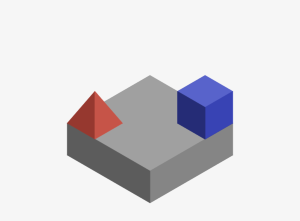
```javascript
var Shape = Isomer.Shape;
var Point = Isomer.Point;
var Color = Isomer.Color;
var red = new Color(160, 60, 50);
var blue = new Color(50, 60, 160);
iso.add(Shape.Prism(Point.ORIGIN, 3, 3, 1));
iso.add(Shape.Pyramid(Point(0, 2, 1)), red);
iso.add(Shape.Prism(Point(2, 0, 1)), blue);
```
## Getting Started
First, grab a copy of Isomer [here](https://github.com/jdan/isomer/releases/latest). You can also [pay for it](https://gumroad.com/l/Xzlg). Then, include the script wherever you see fit:
```html
<script src="/path/to/isomer.min.js"></script>
```
After which you'll need to place a canvas in your document that we can later refer to. Be sure to give it a width and height.
```html
<canvas width="800" height="600" id="art"></canvas>
```
**Note (Optional):** To improve the look of your canvas on retina displays, declare the width and height of your canvas element as double how you want it to appear. Then style your canvas with CSS to include the original dimensions.
```css
#art {
width: 400px;
height: 300px;
}
```
At this point we can finally instantiate an Isomer object. Pass it a reference to your canvas like so:
```javascript
var iso = new Isomer(document.getElementById("art"));
```
Now you're ready to start drawing!
## Build
Isomer uses [Gulp](http://gulpjs.com/) as a build tool. To build the project,
first install the dependencies.
```
$ npm install
```
Then run `npm run dist`:
```
$ npm run dist # or, alternatively, `gulp dist`
> isomer@0.2.5 dist /Users/jordan/Projects/isomer
> gulp
[gulp] Using gulpfile ~/Projects/isomer/gulpfile.js
[gulp] Starting 'dist'...
[gulp] Version: webpack 1.7.3
Asset Size Chunks Chunk Names
./dist/isomer.js 23.1 kB 0 [emitted] isomer
[gulp] Version: webpack 1.7.3
Asset Size Chunks Chunk Names
./dist/isomer.min.js 9.33 kB 0 [emitted] isomer
[gulp] Finished 'dist' after 911 ms
[gulp] Starting 'default'...
[gulp] Finished 'default' after 6.2 μs
```
To generate `isomer.js` and `isomer.min.js` in the `dist/` directory.
## Develop
Isomer is developed using [Webpack](http://webpack.github.io/). Install
dependencies and build the project like so:
```
$ npm install
$ npm run dist
```
[test/index.html](https://github.com/jdan/isomer/blob/master/test/index.html) contains a basic testing page that draws various shapes. This page will load a unminified bundle with source maps.
The `test` script (accessible via `npm test`) uses [webpack-dev-server](http://webpack.github.io/docs/webpack-dev-server.html) to automatically rebuild Isomer on any file changes. This script also opens the testing page (located at `http://localhost:2992/webpack-dev-server/`) in your default browser. The testing page includes a live reload script to refresh when Isomer is rebuilt and notify if the code is not conform the styling conventions for Isomer.
```
$ npm test
> isomer@0.2.5 test /Users/jordan/Projects/isomer
> gulp test
[Isomer] listening on http://localhost:2992/
webpack: wait until bundle finished: /webpack-dev-server/
Hash: ************
Version: webpack 1.8.2
Time: 432ms
Asset Size Chunks Chunk Names
isomer.js 59.5 kB 0 [emitted] isomer
chunk {0} isomer.js (isomer) 20.1 kB [rendered]
[0] ./index.js 83 bytes {0} [built]
[1] ./js/isomer.js 3.86 kB {0} [built]
[2] ./js/canvas.js 729 bytes {0} [built]
[3] ./js/color.js 2.68 kB {0} [built]
[4] ./js/path.js 3.77 kB {0} [built]
[5] ./js/point.js 2.44 kB {0} [built]
[6] ./js/shape.js 5.47 kB {0} [built]
[7] ./js/vector.js 1.05 kB {0} [built]
webpack: bundle is now VALID.
```
## With node-canvas
Isomer also accepts the canvas provided by [node-canvas](https://github.com/learnboost/node-canvas),
meaning you can generate isometric graphics on the command line.
```javascript
var Canvas = require('canvas');
var canvas = new Canvas(400, 400);
var Isomer = require('isomer'); // npm install isomer
var fs = require('fs');
var out = fs.createWriteStream('output.png');
var iso = new Isomer(canvas);
iso.add(Isomer.Shape.Prism(Isomer.Point.ORIGIN));
canvas.pngStream().pipe(out);
```
## More Info
For more info, check out the [official project page](http://jdan.github.io/isomer).
[MIT Licensed](https://github.com/jdan/isomer/blob/master/LICENSE)