iran-bank-detector
Version:
Detect Iranian bank information from a card number.
82 lines (55 loc) • 2.56 kB
Markdown
# 🏦 Iran Bank Detector
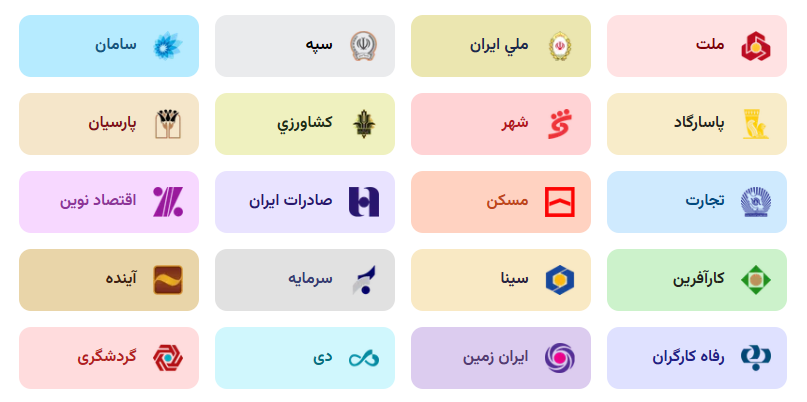
This package is designed to find **Iranian bank information** based on **IBan Numbers** and **Card Prefixes**. Users can input either an IBan number or a card prefix to retrieve the related bank information (such as bank name, logo, and related colors).
## ✨ Features
- 📑 Identify banks by **IBan Number**
- 💳 Identify banks by **Card Prefix**
- ✂️ **Automatically remove the `IR` or `ir` prefix** from the IBan number
- 🎨 **Display bank logos** and related color information
## 📦 Installation
To install the package, use the following command:
```bash
npm i iran-bank-detector
```
## 🧪 Usage
**1. Using IBan number**
To retrieve bank information by IBan, simply pass the IBan number to the **getBankByIBanCode** function. This function will automatically remove the IR or ir prefix from the IBan and return the corresponding bank.
```ts
import { getBankByIBanCode } from "iran-bank-detector";
const bank = getBankByIBanCode("IR36012");
console.log(bank?.bankName); // "ملت"
console.log(bank?.logo); // ".png file URL"
console.log(bank?.bgColor); // "#FFE2E3"
console.log(bank?.textColor); // "#800005"
```
**2. Using Card Prefix**
To retrieve bank information by card prefix, simply pass the card number to the **getBankByCardNumber** function.
```ts
import { getBankByCardNumber } from "iran-bank-detector";
const bank = getBankByCardNumber("6104331234567890");
console.log(bank?.bankName); // "ملت"
console.log(bank?.logo); // ".png file URL"
console.log(bank?.bgColor); // "#FFE2E3"
console.log(bank?.textColor); // "#800005"
```
## 🌐 CDN Support
Bank logos are served via a **CDN** to avoid the need for users to download or upload the files themselves. You can fetch the logos from the CDN links provided in return **logo** field.
## 📐 Recommended Logo Size
To ensure optimal display quality, we recommend using logos with a **maximum size of 72x72 pixels**.
## ⚙️ Configuration for Next.js
If you're using this package in a Next.js project, you will need to update your next.config.js file to allow loading images from the CDN. Add the following configuration:
```ts
// next.config.js
const nextConfig = {
images: {
remotePatterns: [
{
protocol: "https",
hostname: "cdn.jsdelivr.net",
},
],
},
};
```
## 📝 Issues and Suggestions
If you encounter any issues or have suggestions, please create a new Issue on the GitHub repository.