internet_checker
Version:
Check internet connection and emmit sound when there's no internet. This is very useful when your connection is not stable and you don't want to waste time checking often if your internet connection is really down.
44 lines (27 loc) • 1.6 kB
Markdown
# Internet Checker
Script to run it on background to check and announce when your Internet connection is down and up by emitting a sound.
> **This is very useful when your connection is not stable and you don't want to waste time checking often if your internet connection is really down.**
## How to install it
### Pre-requisites
1. You must have [`npm`](https://www.npmjs.com/) and [`node`](https://nodejs.org/en/) in your computer
2. You must have [`speak`](http://espeak.sourceforge.net/) installed
### Steps
#### From GitHub
1. Clone this repo `git clone https://github.com/bikecoders/internet_checker`
2. Step into the folder you just cloned `internet_checker`
3. Install node dependencies with `npm install`
4. Run the script with `npm start`
5. Done, now the computer will notify you when your internet is down
#### From NPM
1. Run `npm i internet_checker`
2. Step into `node_modules/internet_checker`
3. Run the script with `npm start`
## How it works ?
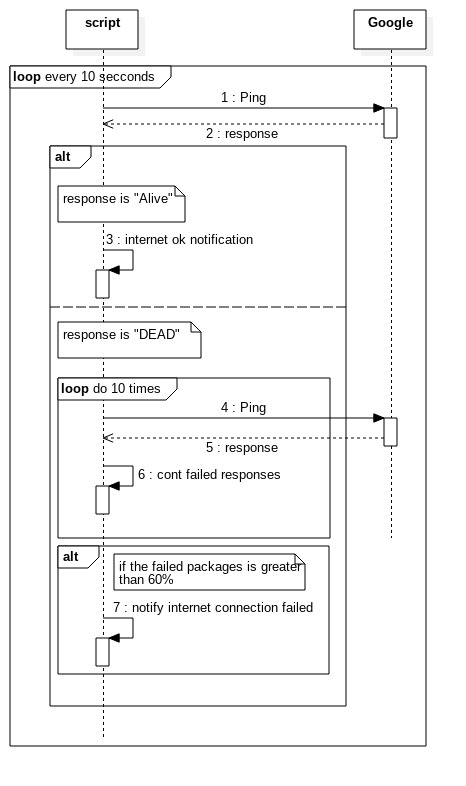
Once running the script make a `ping` to google (plubic dns on `8.8.8.8`) every 10 seconds, if **one of those package is lost** the script will send 10 packages in less than 10 seconds to make sure if your internet connection is down.
### Sequence Diagram
## Libraries used
- [ReactiveX](http://reactivex.io/) - 
- [Ping](https://www.npmjs.com/search?q=ping) npm package
----------------------
> Written with [StackEdit](https://stackedit.io/).