instascan-last
Version:
Webcam-driven QR code scanner.
207 lines (149 loc) • 9.13 kB
Markdown
#  Instascan
Real-time webcam-driven HTML5 QR code scanner. [Try the live demo](https://schmich.github.io/instascan/).
## Installing
*Note:* Chrome requires HTTPS when using the WebRTC API. Any pages using this library should be served over HTTPS.
*Note:* Some browsers (like Edge) require [WebRTC Adapter shim](https://github.com/webrtc/adapter).
### NPM
`npm install --save instascan`
```javascript
const Instascan = require('instascan');
```
### Bower
Pending. [Drop a note](https://github.com/schmich/instascan/issues/31) if you need Bower support.
### Minified
Copy `instascan.min.js` from the [releases](https://github.com/schmich/instascan/releases) page and load with:
```html
<script type="text/javascript" src="instascan.min.js"></script>
```
## Example
```html
<!DOCTYPE html>
<html>
<head>
<title>Instascan</title>
<script type="text/javascript" src="instascan.min.js"></script>
</head>
<body>
<video id="preview"></video>
<script type="text/javascript">
let scanner = new Instascan.Scanner({ video: document.getElementById('preview') });
scanner.addListener('scan', function (content) {
console.log(content);
});
Instascan.Camera.getCameras().then(function (cameras) {
if (cameras.length > 0) {
scanner.start(cameras[0]);
} else {
console.error('No cameras found.');
}
}).catch(function (e) {
console.error(e);
});
</script>
</body>
</html>
```
## API
### let scanner = new Instascan.Scanner(opts)
Create a new scanner with options:
```javascript
let opts = {
// Whether to scan continuously for QR codes. If false, use scanner.scan() to manually scan.
// If true, the scanner emits the "scan" event when a QR code is scanned. Default true.
continuous: true,
// The HTML element to use for the camera's video preview. Must be a <video> element.
// When the camera is active, this element will have the "active" CSS class, otherwise,
// it will have the "inactive" class. By default, an invisible element will be created to
// host the video.
video: document.getElementById('preview'),
// Whether to horizontally mirror the video preview. This is helpful when trying to
// scan a QR code with a user-facing camera. Default true.
mirror: true,
// Whether to include the scanned image data as part of the scan result. See the "scan" event
// for image format details. Default false.
captureImage: false,
// Only applies to continuous mode. Whether to actively scan when the tab is not active.
// When false, this reduces CPU usage when the tab is not active. Default true.
backgroundScan: true,
// Only applies to continuous mode. The period, in milliseconds, before the same QR code
// will be recognized in succession. Default 5000 (5 seconds).
refractoryPeriod: 5000,
// Only applies to continuous mode. The period, in rendered frames, between scans. A lower scan period
// increases CPU usage but makes scan response faster. Default 1 (i.e. analyze every frame).
scanPeriod: 1
};
```
### scanner.start(camera)
- Activate `camera` and start scanning using it as the source. Returns promise.
- This must be called in order to use [`scanner.scan`](#let-result--scannerscan) or receive [`scan`](#scanneraddlistenerscan-callback) events.
- `camera`: Instance of `Instascan.Camera` from [`Instascan.Camera.getCameras`](#instascancameragetcameras).
- `.then(function () { ... })`: called when camera is active and scanning has started.
- `.catch(function (err) { ... })`
- Called when an error occurs trying to initialize the camera for scanning.
- `err`: An `Instascan.MediaError` in the case of a known `getUserMedia` failure ([see error types](https://developer.mozilla.org/en-US/docs/Web/API/MediaDevices/getUserMedia#Errors)).
### scanner.stop()
- Stop scanning and deactivate the camera. Returns promise.
- `.then(function () { ... })`: called when camera and scanning have stopped.
### let result = scanner.scan()
- Scan video immediately for a QR code.
- QR codes recognized with this method are not emitted via the `scan` event.
- If no QR code is detected, `result` is `null`.
- `result.content`: Scanned content decoded from the QR code.
- `result.image`: Undefined if [`scanner.captureImage`](#let-scanner--new-instascanscanneropts) is `false`, otherwise, see the [`scan`](#scanneraddlistenerscan-callback) event for format.
### scanner.addListener('scan', callback)
- Emitted when a QR code is scanned using the camera in continuous mode (see [`scanner.continuous`](#let-scanner--new-instascanscanneropts)).
- `callback`: `function (content, image)`
- `content`: Scanned content decoded from the QR code.
- `image`: `null` if [`scanner.captureImage`](#let-scanner--new-instascanscanneropts) is `false`, otherwise, a base64-encoded [WebP](https://en.wikipedia.org/wiki/WebP)-compressed data URI of the camera frame used to decode the QR code.
### scanner.addListener('active', callback)
- Emitted when the scanner becomes active as the result of [`scanner.start`](#scannerstartcamera) or the tab gaining focus.
- If `opts.video` element was specified, it will have the `active` CSS class.
- `callback`: `function ()`
### scanner.addListener('inactive', callback)
- Emitted when the scanner becomes inactive as the result of [`scanner.stop`](#scannerstop) or the tab losing focus.
- If `opts.video` element was specified, it will have the `inactive` CSS class.
- `callback`: `function ()`
### Instascan.Camera.getCameras()
- Enumerate available video devices. Returns promise.
- `.then(function (cameras) { ... })`
- Called when cameras are available.
- `cameras`: Array of `Instascan.Camera` instances available for use.
- `.catch(function (err) { ... })`
- Called when an error occurs while getting cameras.
- `err`: An `Instascan.MediaError` in the case of a known `getUserMedia` failure ([see error types](https://developer.mozilla.org/en-US/docs/Web/API/MediaDevices/getUserMedia#Errors)).
### camera.id
- Unique camera ID provided by the browser.
- These IDs are stable and can be persisted across instances of your application (e.g. in localStorage).
### camera.name
- Camera name, including manufacturer and model
- e.g. "Microsoft LifeCam HD-3000".
## Compatibility
Instascan works on non-iOS platforms in [any browser that supports the WebRTC/getUserMedia API](http://caniuse.com/#feat=stream), which currently includes Chome, Firefox, Opera, and Edge. IE and Safari are not supported.
Instascan does not work on iOS since Apple does not yet support WebRTC in WebKit *and* forces other browser vendors (Chrome, Firefox, Opera) to use their implementation of WebKit. [Apple is actively working on WebRTC support in WebKit](https://bugs.webkit.org/show_bug.cgi?id=124288).
## Performance
Many factors affect how quickly and reliably Instascan can detect QR codes.
If you control creation of the QR code, consider the following:
- A larger physical code is better. A 2" square code is better than a 1" square code.
- Flat, smooth, matte surfaces are better than curved, rough, glossy surfaces.
- Include a sufficient quiet zone, the white border surrounding QR code. The quiet zone should be at least four times the width of an individual element in your QR code.
- A simpler code is better. You can use [this QR code generator](https://www.the-qrcode-generator.com/) to see how your input affects complexity.
- For the same length, numeric content is simpler than ASCII content, which is simpler than Unicode content.
- Shorter content is simpler. If you're encoding a URL, consider using a shortener such as [goo.gl](https://goo.gl/) or [bit.ly](https://bitly.com/).
When scanning, consider the following:
- QR code orientation doesn't matter.
- Higher resolution video is better, but is more CPU intensive.
- Direct, orthogonal scanning is better than scanning at an angle.
- Blurry video greatly reduces scanner performance.
- Auto-focus can cause lags in detection as the camera adjusts focus. Consider disabling it or using a fixed-focus camera with the subject positioned at the focal point.
- Exposure adjustment on cameras can cause lags in detection. Consider disabling it or having a fixed white backdrop.
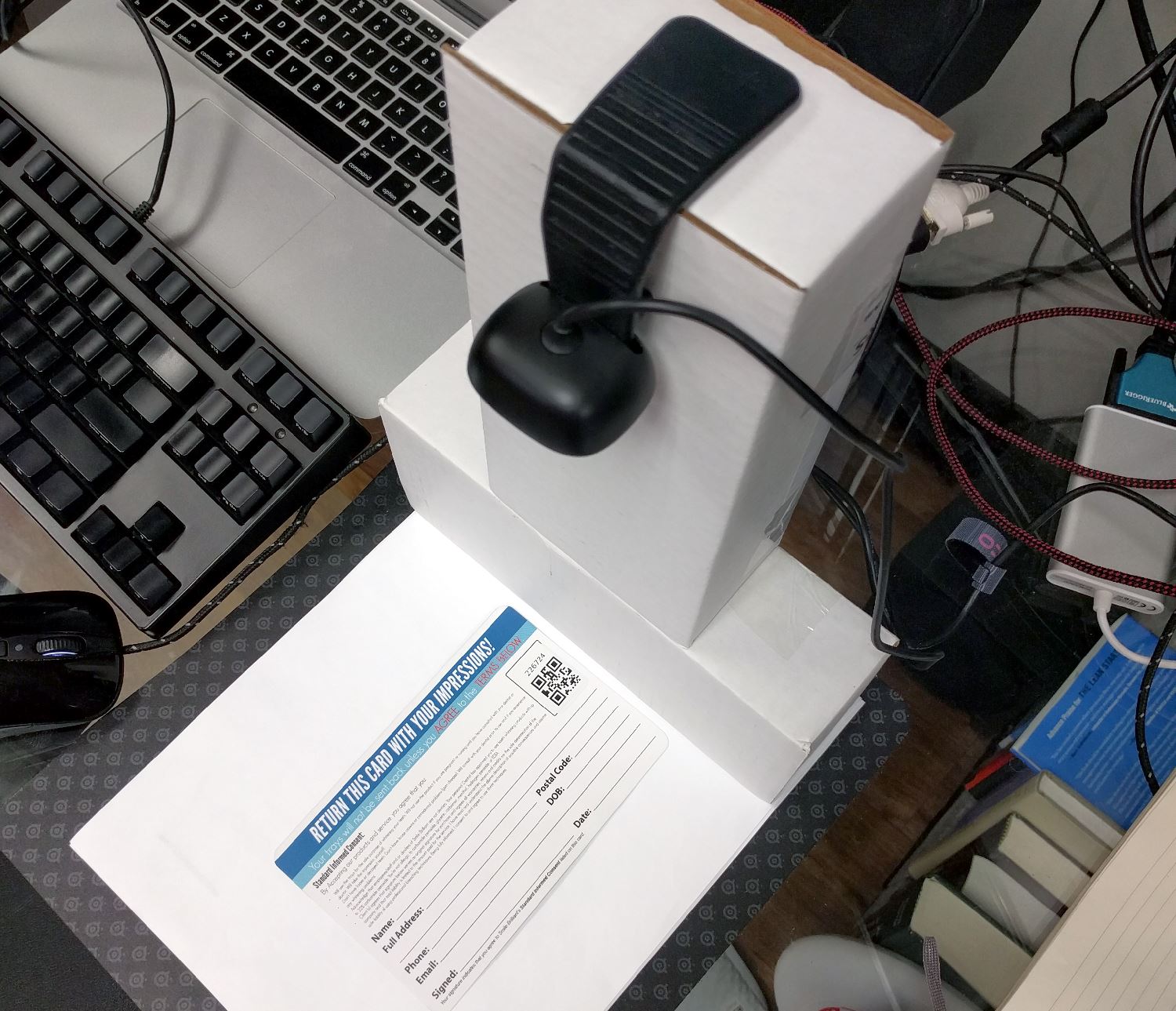
## Example Setup
- Purpose: To scan QR code stickers on paper cards and plastic bags.
- Camera: [Microsoft LifeCam HD-3000](http://www.newegg.com/Product/Product.aspx?Item=9SIA4RE40S4991), 720p, fixed focus, around $30 USD.
- Small support to ensure camera is focused on subject.
- White paper backdrop to mitigate exposure adjustment.
## Credits
Powered by the [Emscripten JavaScript build](https://github.com/kig/zxing-cpp-emscripten) of the [C++ port](https://github.com/glassechidna/zxing-cpp) of the [ZXing Java library](https://github.com/zxing/zxing).
## License
Copyright © 2016 Chris Schmich
MIT License. See [LICENSE](LICENSE) for details.