igniculus
Version:
SQL Syntax Highlighter and Logger. Unadorned and customizable.
355 lines (284 loc) • 13.8 kB
Markdown
# Igniculus
SQL Syntax Highlighter and Logger. Unadorned and customizable.
[](https://www.npmjs.com/package/igniculus)
[](https://github.com/Undre4m/igniculus/blob/master/LICENSE)
[](https://www.npmjs.com/package/igniculus)
[](https://travis-ci.org/Undre4m/igniculus)
[](https://codeclimate.com/github/Undre4m/igniculus/maintainability)
[](https://codeclimate.com/github/Undre4m/igniculus/test_coverage)
## Install
```console
$ npm install igniculus
```
## Usage
```js
const igniculus = require('igniculus')();
igniculus('SELECT [port] AS Printer, \'on fire\' AS Status ' +
'FROM [Printers] P ' +
'WHERE P."online" = 1 AND P."check" = 1');
```

## Table of Contents
- [Logger](#logger)
- [Options](#options)
- [Rules](#rules)
- [Styles](#styles)
- [Custom Rules](#custom-rules)
- [Examples](#examples)
- [Integration](#integration)
- [Sequelize](#sequelize)
## Logger
A reference to the log function is returned on initialization but can be accessed anywhere through `.log`
```js
// config.js
const igniculus = require('igniculus');
const options = { ... };
igniculus(options);
```
```js
// any.js
const igniculus = require('igniculus');
let query = 'SELECT ...';
igniculus.log(query);
```
## Options
A default color scheme is provided. However, you can define the highlight style for each rule when instantiating:
```js
const igniculus = require('igniculus');
/* White constants over red background using inverse mode.
* Gray keywords.
* Prefixed by white '(query)' message.
*/
const options = {
constants: { mode: 'inverse', fg: 'red', bg: 'white' },
standardKeywords: { mode: 'bold', fg: 'black' },
lesserKeywords: { mode: 'bold', fg: 'black' },
prefix: { mode: 'bold', fg: 'white', text: '(query) '}
};
const illumine = igniculus(options);
illumine('SELECT * FROM Student s ' +
'WHERE s.programme = \'IT\' AND EXISTS (' +
'SELECT * FROM Enrolled e ' +
'JOIN Class c ON c.code = e.code ' +
'JOIN Tutor t ON t.tid = c.tid ' +
'WHERE e.sid = s.sid AND t.name LIKE \'%Hoffman\')');
```

The _options_ argument is optional and each property should be one of the following.
### Rules
- options.**comments** - Single and multi-line comments. _E.g:_ `-- comments` or `/* Author: undre4m */`
- options.**constants** - Values surrounded by single quotes. _E.g:_ `'static'`
- options.**numbers** - Numeric values. _E.g:_ `2.5`
- options.**operators** - Arithmetic, Bitwise and Comparison operators. _E.g:_ `+` or `>=`
- options.**variables** - Local variables and parameters. _E.g:_ `@name` or `@@IDENTITY`
- options.**delimitedIdentifiers** - Text between brackets or double quotes. _E.g:_ `[Employee]` or `"salary"`
- options.**dataTypes** - One of the included data types. _E.g:_ `INTEGER` or `VARCHAR`
- dataTypes.**types** - Array of custom data types. Replaces the ones by default. _E.g:_ `['SERIAL', 'TIMESTAMP']`
- dataTypes.**casing** - Either `'lowercase'` or `'uppercase'`. If not defined data types won't be capitalized.
- options.**standardKeywords** - One the included keywords. _E.g:_ `SELECT` or `CONSTRAINT`
- standardKeywords.**keywords** - Array of custom standard keywords. Replaces the ones by default. _E.g:_ `['CLUSTER', 'NATURAL']`
- standardKeywords.**casing** - Either `'lowercase'` or `'uppercase'`. If not defined standard keywords won't be capitalized.
- options.**lesserKeywords** - One of the included lesser keywords. _E.g:_ `ANY`, `AVG` or `DESC`
- lesserKeywords.**keywords** - Array of custom lesser keywords. Replaces the ones by default. _E.g:_ `['VOLATILE', 'ASYMMETRIC']`
- lesserKeywords.**casing** - Either `'lowercase'` or `'uppercase'`. If not defined lesser keywords won't be capitalized.
- options.**prefix**
- prefix.**text** - A prefix can be appended to every log through this option. This prefix can be styled like any previous options.
- prefix.**replace** - Also, a _string_ or _regular expression_ can be provided and it will replace (if a prefix.**text** was given) or remove a prefix that matches such parameter. _E.g:_ [Sequelize](https://www.npmjs.com/package/sequelize) prefixes every _SQL statement_ with `Executing (default|transaction_id):` This is removed by **default** by the option `prefix: { replace: /.*?: / }`
- options.**postfix**
- postfix.**text** - A postfix can be appended to every log through this option. This postfix can be styled like any previous options.
- options.**output** - Output function for the highlighted statements, `console.log` by default. _E.g:_ `process.stdout`, `st => st`
- options.**own** - Your own custom-built rules can be defined here. See _[(Custom Rules)](#custom-rules)_ below for details.
If defined, the _options_ argument takes precedence over _default_ options. If a rule or it's style is missing it won't be applied. This allows to _"enable"_ or _"disable"_ certain syntax highlighting as you see fit. _[(Examples below)](#examples)_
>#### A word on types and keywords
>Most often, highlighting every reserved keyword can make syntax difficult to read, defeating the purpose altogether. Therefore, three distinct rules are provided: _dataTypes_, _standardKeywords_ and _lesserKeywords_.
Each of these rules can be customized individually and come with a [predefined list](https://github.com/Undre4m/igniculus/blob/master/index.js#L3) of most widely used T-SQL and SQL-92 keywords and data types. Furthermore each of this lists can be customized as described above.
>
>Starting from [v1.1.0](https://github.com/Undre4m/igniculus/blob/master/CHANGELOG.md#110--26-feb-2018) _types_ and _keywords_ are no longer uppercased by default. Custom styles should use the `casing: 'uppercase'` option for this behaviour. Predefined style already provides this option so no changes should be required.
### Styles
All of the previous rule styles can be defined like this:
```js
/* options = {"rule": style, ... } where
* style = { mode: "modifier", fg: "color", bg: "color"}
*/
const options = {
constants: {
mode: 'inverse',
fg: 'red',
bg: 'white'
},
...
};
```
Each style having an optional:
- style.**mode** - Modifier. _E.g:_ `'bold'`
- style.**fg** - Foreground text color. _E.g:_ `'red'`
- style.**bg** - Background color. _E.g:_ `'black'`
These can be one of the following.
#### Modifiers
- `reset`
- `bold`
- `dim`
- `italic`
- `underline`
- `blink`
- `inverse`
- `hidden`
- `strikethrough`
#### Colors (Foreground and Background)
- `black`
- `red`
- `green`
- `yellow`
- `blue`
- `magenta`
- `cyan`
- `white`
### Custom Rules
>#### ⚠ Be advised
>This feature is experimental and should be used with discretion. Custom pattern-matching has the potential to disrupt other rules and induce defects in highlighting.
You can define as many rules as needed. Like built-in rules, an optional style can be set for each one. Every **rule** can be named as desired, simple names are encouraged to avoid problems though. Option **transform** is not required, **regexp** is.
- options.**own**
- own.**rule**
- rule.**regexp** - A _regular expression_ must be provided for the rule to be applied. _E.g:_ `/(https?|ftp):\/\/[^\s/$.?#].[^\s]*/g`
- rule.**transform** - Each matched expression can be either replaced by a _string_ or transformed by a _function_. The function takes one argument, the matched expression, and it's return value will be used for replacement. _E.g:_ `'hidden'` or `match => match.trim()`
## Examples
```js
/* Predifined style */
const defaults = {
comments: { mode: 'dim', fg: 'white' },
constants: { mode: 'dim', fg: 'red' },
delimitedIdentifiers: { mode: 'dim', fg: 'yellow' },
variables: { mode: 'dim', fg: 'magenta' },
dataTypes: { mode: 'dim', fg: 'green', casing: 'uppercase' },
standardKeywords: { mode: 'dim', fg: 'cyan', casing: 'uppercase' },
lesserKeywords: { mode: 'bold', fg: 'black', casing: 'uppercase' },
prefix: { replace: /.*?: / }
};
```

```js
const igniculus = require('igniculus')(
{
constants: { mode: 'bold', fg: 'yellow' },
numbers: { mode: 'bold', fg: 'magenta' },
delimitedIdentifiers: { mode: 'bold', fg: 'red' },
standardKeywords: { mode: 'bold', fg: 'blue' }
}
);
igniculus("INSERT INTO [Printers] ([port], [name], [ready], [online], [check]) " +
"VALUES ('lp0', 'Bob Marley', 0, 1, 1)");
```

```js
const igniculus = require('igniculus');
const options = {
delimitedIdentifiers: {
fg: 'yellow'
},
dataTypes: {
fg: 'magenta',
types: ['VARBINARY']
},
standardKeywords: {
fg: 'red',
keywords: ['CREATE', 'PRIMARY', 'KEY']
},
lesserKeywords: {
mode: 'bold',
fg: 'black',
keywords: ['TABLE', 'NOT', 'NULL']
},
prefix: {
text: '\n'
}
};
igniculus(options);
igniculus.log('CREATE TABLE User (' +
'[username] VARCHAR(20) NOT NULL, ' +
'[password] BINARY(64) NOT NULL, ' +
'[avatar] VARBINARY(MAX), PRIMARY KEY ([username]))');
```

```js
const igniculus = require('igniculus');
const log = igniculus({
constants: { fg: 'red' },
delimitedIdentifiers: { mode: 'bold', fg: 'cyan' },
standardKeywords: { fg: 'blue', casing: 'uppercase' },
own: {
_: {
mode: 'bold',
fg: 'white',
regexp: /^/,
transform: '█ '
},
comments: {
regexp: /(-{2}.*)|(\/\*(.|[\r\n])*?\*\/)[\r\n]*/g,
transform: ''
},
UUIDv4s: {
mode: 'bold',
fg: 'black',
regexp: /'[A-F\d]{8}-[A-F\d]{4}-4[A-F\d]{3}-[89AB][A-F\d]{3}-[A-F\d]{12}'/gi,
transform: (uuid) => uuid.replace(/\w{1}/g, 'x')
}
}
});
log("/* May 13th, 2018 | 06:09:28.262 | http://server.local:8000 */" +
"select [username], [password] from Users where [_uuid] = '4072FA1B-D9E7-4F0E-9553-5F2CFFE6CC7A'");
```

## Integration
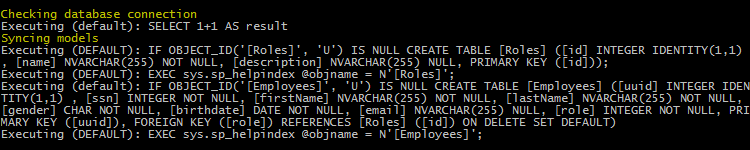
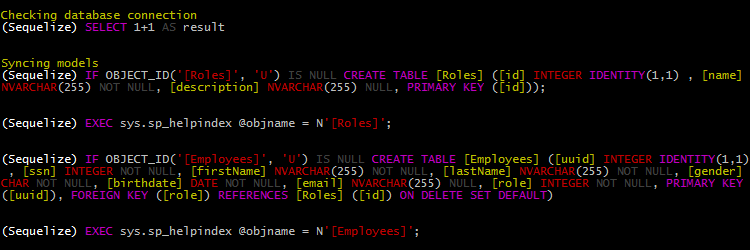
Igniculus' logger is a _drop in_ replacement on any tool that passes the log function either a `string` or `Object` paramater. In the latest case the `toString()` method will be called to obtain a `string` primitive.
### Sequelize
Using igniculus with sequelize is straightforward.
```js
const Sequelize = require('sequelize');
const igniculus = require('igniculus')();
const sequelize = new Sequelize('database', 'username', 'password', {
logging: igniculus
});
```
```js
/* Or add some customizations */
const Sequelize = require('sequelize');
const igniculus = require('igniculus')(
{
constants: { fg: 'red' },
delimitedIdentifiers: { fg: 'yellow' },
dataTypes: { fg: 'red' },
standardKeywords: { fg: 'magenta' },
lesserKeywords: { mode: 'bold', fg: 'black' },
prefix: {
mode: 'bold',
fg: 'white',
replace: /.*?:/,
text: '(Sequelize)'
},
postfix: { text: '\r\n' }
}
);
const sequelize = new Sequelize('database', 'username', 'password', {
logging: igniculus
});
...
sequelize.sync({ logging: igniculus});
```
#### Before
#### After
## Notes
### Changes
For a full list of changes please refer to the [changelog](https://github.com/Undre4m/igniculus/blob/master/CHANGELOG.md).
### Future Upgrades
#### [v2.0.0 milestone](https://github.com/Undre4m/igniculus/milestone/1)
- Separation of style-related and option-specific configurations **BC**
- Adding and omitting data types and keywords from the predefined sets
- Basic built-in themes
- Easier to read documentation
- Option validation and friendly error detection
## Maintainers
[Lucas Astrada](https://github.com/undre4m)
## License
[MIT](https://github.com/Undre4m/igniculus/blob/master/LICENSE)