iframe-channel
Version:
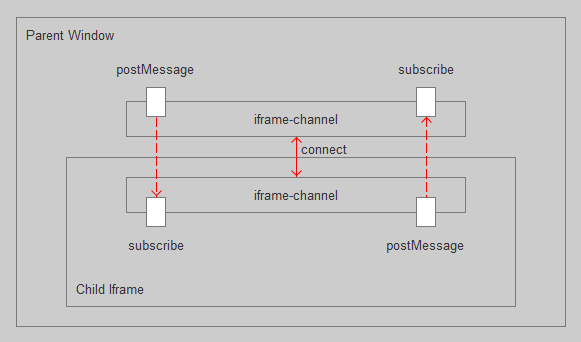
A channel used to communicate between iframe and parent. Support post function.
336 lines (273 loc) • 9.73 kB
Markdown
# iframe-channel
A channel used to communicate between iframe and parent. Support post function.
## Install
npm install iframe-channel --save
## Demo
[Local Demo](./demo)
[Online Demo](https://www.hcl1687.com/iframe-channel/parent)
## Code Examples
Say we have a page, which url is 'http://localhost:9876'. There is an iframe embedded within this page, which url is 'http://localhost:3000'.
As follows:
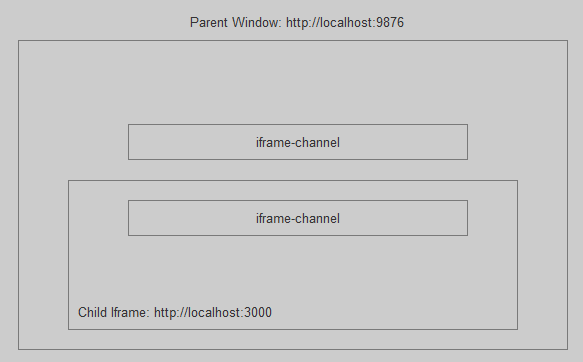
We'll discuss how to conmmunicate between these two page over iframe-channel.
### Child request connect
Parent Page
```javascript
const testIframe = document.createElement('iframe')
testIframe.id = 'test-iframe'
const channel = new Channel({
targetOrigin: 'http://localhost:3000'
})
channel.subscribe('connect', () => {
// have connected
// now send a message, whose type is 'xx' and data is 'hello'
channel.postMessage('xx', 'hello').then((data) => {
// will receive 'hello_hi' from child
expect(data).to.be.equal('hello_hi')
// destroy channel
// Each Channel instance will add 'message' and 'beforeunload' event listener to window
// object. So make sure destroy the instance once it's unused.
channel.destroy()
// destroy iframe
testIframe.parentNode.removeChild(testIframe)
done()
})
})
testIframe.src = 'http://localhost:3000?type=demo_child_request_connect'
document.body.appendChild(testIframe)
```
Child Iframe
```javascript
const channel = new Channel({
targetOrigin: 'http://localhost:9876', // only accept targetOrigin's message
target: window.parent // parent window
})
channel.subscribe('xx', (data, message, event) => {
// data === 'hello'
// message == { type: 'xx', data: 'hello' }
return `${data}_hi`
})
channel.connect()
```
### Parent request connect
Parent Page
```javascript
import Channel from 'iframe-channel'
const testIframe = document.createElement('iframe')
testIframe.id = 'test-iframe'
testIframe.onload = () => {
const channel = new Channel({
targetOrigin: 'http://localhost:3000', // only accept targetOrigin's message.
target: testIframe && testIframe.contentWindow
})
channel.connect().then(() => {
// have connected
// now send a message, whose type is 'xx' and data is 'hello'
channel.postMessage('xx', 'hello').then((data) => {
// will receive 'hello_hi' from child
expect(data).to.be.equal('hello_hi')
// destroy channel
// Each Channel instance will add 'message' and 'beforeunload' event listener to window
// object. So make sure destroy the instance once it's unused.
channel.destroy()
// destroy iframe
testIframe.parentNode.removeChild(testIframe)
done()
})
})
}
testIframe.src = 'http://localhost:3000?type=demo_parent_request_connect'
document.body.appendChild(testIframe)
```
Child Iframe
```javascript
import Channel from 'iframe-channel'
const channel = new Channel({
targetOrigin: 'http://localhost:9876' // only accept targetOrigin's message
})
channel.subscribe('xx', (data, message, event) => {
// data === 'hello'
// message == { type: 'xx', data: 'hello' }
return `${data}_hi`
})
```
### Post message before connect
iframe-channel support post message before connect. It will cache all postMessage requests. Then send these requests once the connection is established.
Parent Page
```javascript
import Channel from 'iframe-channel'
const testIframe = document.createElement('iframe')
testIframe.id = 'test-iframe'
testIframe.onload = () => {
const channel = new Channel({
targetOrigin: 'http://localhost:3000', // only accept targetOrigin's message.
target: testIframe && testIframe.contentWindow
})
// not connect yet
// now send a message, whose type is 'xx' and data is 'hello'
channel.postMessage('xx', 'hello').then((data) => {
// will receive 'hello_hi' from child
expect(data).to.be.equal('hello_hi')
// destroy channel
// Each Channel instance will add 'message' and 'beforeunload' event listener to window
// object. So make sure destroy the instance once it's unused.
channel.destroy()
// destroy iframe
testIframe.parentNode.removeChild(testIframe)
done()
})
channel.connect()
}
testIframe.src = 'http://localhost:3000?type=demo_post_message_before_connect'
document.body.appendChild(testIframe)
```
Child Iframe
```javascript
import Channel from 'iframe-channel'
const channel = new Channel({
targetOrigin: 'http://localhost:9876' // only accept targetOrigin's message
})
channel.subscribe('xx', (data, message, event) => {
// data === 'hello'
// message == { type: 'xx', data: 'hello' }
return `${data}_hi`
})
```
### Post function
iframe-channel support post function, including async function.
Parent Page
```javascript
const testIframe = document.createElement('iframe')
testIframe.id = 'test-iframe'
testIframe.onload = () => {
const channel = new Channel({
targetOrigin: 'http://localhost:3000', // only accept targetOrigin's message.
target: testIframe && testIframe.contentWindow
})
channel.connect().then(() => {
// data can be a function, or an object or an array which contains function.
const data = {
add: function (a, b) {
return new Promise(resolve => {
setTimeout(() => {
resolve(a + b)
}, 1000)
})
},
a: [2, function (a, b) {
return a * b
}],
parentData: 1
}
channel.postMessage('xx', data, {
hasFunction: true,
functionKeys: ['add', 'a[1]']
}).then((data) => {
// will receive 4 from child
expect(data).to.be.equal(4)
channel.destroy()
testIframe.parentNode.removeChild(testIframe)
done()
})
})
}
testIframe.src = 'http://localhost:3000?type=demo_post_function'
document.body.appendChild(testIframe)
```
Child Iframe
```javascript
const channel = new Channel({
targetOrigin: 'http://localhost:9876' // only accept targetOrigin's message
})
channel.subscribe('xx', (data, message, event) => {
const childData = 1
const { add, a = [], parentData } = data
const multiply = a[1]
return add(parentData, childData).then(res => {
return multiply(res, a[0])
})
})
```
## API Documentation
### Channel Class
#### Channel(options) => <code>Channel</code>
| Param | Type | Description |
| ---------------------| ------------------- | ------------------------------------------- |
| targetOrigin | <code>string</code> | The channel will only accept targetOrigin's message.
| target | <code>window</code> | The target window's object that the channel will connect to.
| subscribers | <code>object</code> | The subscribers object. Such as: { 'conncect': [fun1, fun2], 'xx': [fun1, fun2]}. You can also use 'subscribe' function to register a subscriber after create a Channel instance.
| attemptInterval | <code>number</code> | The interval between reconnect attempts. Default 1000ms.
| maxAttempts | <code>number</code> | The max number of times we'll try to reconnect for. Default 10 times.
#### subscribe(type, fun?) => <code>undefined</code>
Register a function to subscribe a specific type of message.
```javascript
channel.subscribe('xx', (data, message, event) => {
// data === 'hello'
// message == { type: 'xx', data: 'hello' }
return `${data}_hi`
})
// fun can be a function array
channel.subscribe('xx', [fun1, fun2])
// type can be an object.
channel.subscribe({
'xx': [fun1, fun2],
'ff': fun3
})
```
#### unsubscribe(type?, fun?) => <code>undefined</code>
Remove subscribers.
```javascript
// remove all
channel.unsubscribe()
// remove 'xx' type's subscribers
channel.unsubscribe('xx')
// remove 'xx' type's fun1 subscriber
channel.unsubscribe('xx', fun1)
// remove 'xx' type's fun1 and fun2 subscriber
channel.unsubscribe('xx', [fun1, fun2])
// remove 'xx' type's fun1 and 'xx1' type's fun3 and fun4 subscriber
channel.unsubscribe({
'xx': fun1,
'xx1': [fun3, fun4]
})
```
#### postMessage(type, data, opts?) => <code>Promise</code>
Post a specific type of message with data.
| opts | Type | Description |
| ---------------------| ------------------- | ------------------------------------------- |
| hasFunction | <code>bool</code> | Does the data contain a function or it is a function?
| functionKeys | <code>string[]</code> | A path string array. iframe-channel will use lodash/get to fetch the function in the specific path. If hasFunction is true but functionKeys is undefined, iframe-channel will traverse the data's each field to collect functions. This may have performance issues.
```javascript
channel.postMessage('xx', 'hello').then(data => {
console.log(data)
}).catch(err => {
console.log(err)
})
```
#### connect() => <code>Promise</code>
Connect to the target.
```javascript
channel.connect().then(() => {
// postMessage
}).catch(err => {
console.log(err)
})
```
#### clearQueue() => <code>undefined</code>
Clear postMesasge queue. Channel will queue postMessage requests that was sent before connect.
```javascript
channel.clearQueue()
```
#### destroy() => <code>undefined</code>
destroy a Channel instance. Including:
1. clear subscribers.
2. clear postMessage queue.
3. remove window's message event listener.
4. reset inner state.
```javascript
channel.destroy()
```
## License
[MIT](http://opensource.org/licenses/MIT)
Copyright (c) 2019-present Chunlin He