idanalyzer
Version:
ID Analyzer API client library, scan and verify global passport, driver license and identification card.
347 lines (269 loc) • 18.7 kB
Markdown
# ID Analyzer NodeJS
This is a Javascript library for [ID Analyzer Identity Verification APIs](https://www.idanalyzer.com), though all the APIs can be called with without the library using simple HTTP requests as outlined in the [documentation](https://developer.idanalyzer.com), you can use this library to accelerate server-side development.
We strongly discourage users to connect to ID Analyzer API endpoint directly from client-side applications that will be distributed to end user, such as mobile app, or in-browser JavaScript. Your API key could be easily compromised, and if you are storing your customer's information inside Vault they could use your API key to fetch all your user details. Therefore, the best practice is always to implement a client side connection to your server, and call our APIs from the server-side.
## Installation
Install through npm
```bash
npm install idanalyzer
```
## Core API
[ID Analyzer Core API](https://www.idanalyzer.com/products/id-analyzer-core-api.html) allows you to perform OCR data extraction, facial biometric verification, identity verification, age verification, document cropping, document authentication (fake ID check), and paperwork automation using an ID image (JPG, PNG, PDF accepted) and user selfie photo or video. Core API has great global coverage, supporting over 98% of the passports, driver licenses and identification cards currently being circulated around the world.
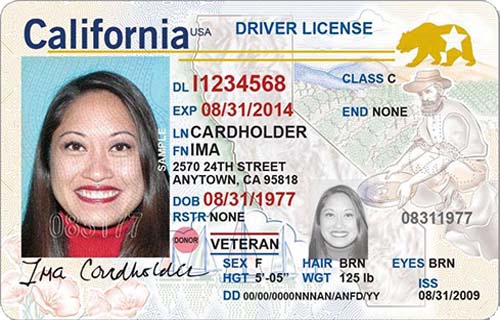
The sample code below will extract data from this sample Driver License issued in California, compare it with a [photo of Lena](https://upload.wikimedia.org/wikipedia/en/7/7d/Lenna_%28test_image%29.png), and check whether the ID is real or fake.
```javascript
const IDAnalyzer = require("idanalyzer");
let CoreAPI = new IDAnalyzer.CoreAPI("Your API Key","US");
// Enable authentication module v2 to check if ID is authentic
CoreAPI.enableAuthentication(true, 2);
// Analyze ID image by passing URL of the ID image (you may also use a local file)
CoreAPI.scan({ document_primary: "https://www.idanalyzer.com/img/sampleid1.jpg", biometric_photo: "https://upload.wikimedia.org/wikipedia/en/7/7d/Lenna_%28test_image%29.png" }).then(function (response) {
if(!response.error){
console.log(response);
// All the information about this ID will be returned in an associative array
let data_result = response['result'];
let authentication_result = response['authentication'];
let face_result = response['face'];
// Print result
console.log(`Hello your name is ${data_result['firstName']} ${data_result['lastName']}`);
// Parse document authentication results
if(authentication_result){
if(authentication_result['score'] > 0.5) {
console.log("The document uploaded is authentic");
}else if(authentication_result['score'] > 0.3){
console.log("The document uploaded looks little bit suspicious");
}else{
console.log("The document uploaded is fake");
}
}
// Parse biometric verification results
if(face_result){
if(face_result['isIdentical']) {
console.log("Biometric verification PASSED!");
}else{
console.log("Biometric verification FAILED!");
}
console.log("Confidence Score: "+face_result['confidence']);
}
}else{
// API returned an error
console.log(response.error);
}
}).catch(function (err) {
console.log(err.message);
});
```
You could also set additional parameters before performing ID scan:
```javascript
CoreAPI.enableVault(true,false,false,false); // enable vault cloud storage to store document information and image
CoreAPI.setBiometricThreshold(0.6); // make face verification more strict
CoreAPI.enableAuthentication(true, 'quick'); // check if document is real using 'quick' module
CoreAPI.enableBarcodeMode(false); // disable OCR and scan for AAMVA barcodes only
CoreAPI.enableImageOutput(true,true,"url"); // output cropped document and face region in URL format
CoreAPI.enableDualsideCheck(true); // check if data on front and back of ID matches
CoreAPI.setVaultData("user@example.com",12345,"AABBCC"); // store custom data into vault
CoreAPI.restrictCountry("US,CA,AU"); // accept documents from United States, Canada and Australia
CoreAPI.restrictState("CA,TX,WA"); // accept documents from california, texas and washington
CoreAPI.restrictType("DI"); // accept only driver license and identification card
CoreAPI.setOCRImageResize(0); // disable OCR resizing
CoreAPI.verifyExpiry(true); // check document expiry
CoreAPI.verifyAge("18-120"); // check if person is above 18
CoreAPI.verifyDOB("1990/01/01"); // check if person's birthday is 1990/01/01
CoreAPI.verifyDocumentNumber("X1234567"); // check if the person's ID number is X1234567
CoreAPI.verifyName("Elon Musk"); // check if the person is named Elon Musk
CoreAPI.verifyAddress("123 Sunny Rd, California"); // Check if address on ID matches with provided address
CoreAPI.verifyPostcode("90001"); // check if postcode on ID matches with provided postcode
CoreAPI.enableAMLCheck(true); // enable AML/PEP compliance check
CoreAPI.setAMLDatabase("global_politicians,eu_meps,eu_cors"); // limit AML check to only PEPs
CoreAPI.enableAMLStrictMatch(true); // make AML matching more strict to prevent false positives
CoreAPI.generateContract("Template ID", "PDF", {"email":"user@example.com"}); // generate a PDF document autofilled with data from user ID
```
To **scan both front and back of ID**:
```javascript
CoreAPI.scan({ document_primary: "path/to/front.jpg" , document_secondary: "path/to/back.jpg"})
```
To perform **biometric photo verification**:
```javascript
CoreAPI.scan({ document_primary: "path/to/front.jpg" , biometric_photo: "path/to/user/photo.jpg"})
```
To perform **biometric video verification**:
```javascript
CoreAPI.scan({ document_primary: "path/to/front.jpg" , biometric_video: "path/to/user/video.mp4", biometric_video_passcode: "1234"})
```
Check out sample response array fields visit [Core API reference](https://developer.idanalyzer.com/coreapi.html##readingresponse).
## DocuPass API
[DocuPass](https://www.idanalyzer.com/products/docupass.html) allows you to verify your users without designing your own web page or mobile UI. A unique DocuPass URL can be generated for each of your users and your users can verify their own identity by simply opening the URL in their browser. DocuPass URLs can be directly opened using any browser, you can also embed the URL inside an iframe on your website, or within a WebView inside your iOS/Android/Cordova mobile app.
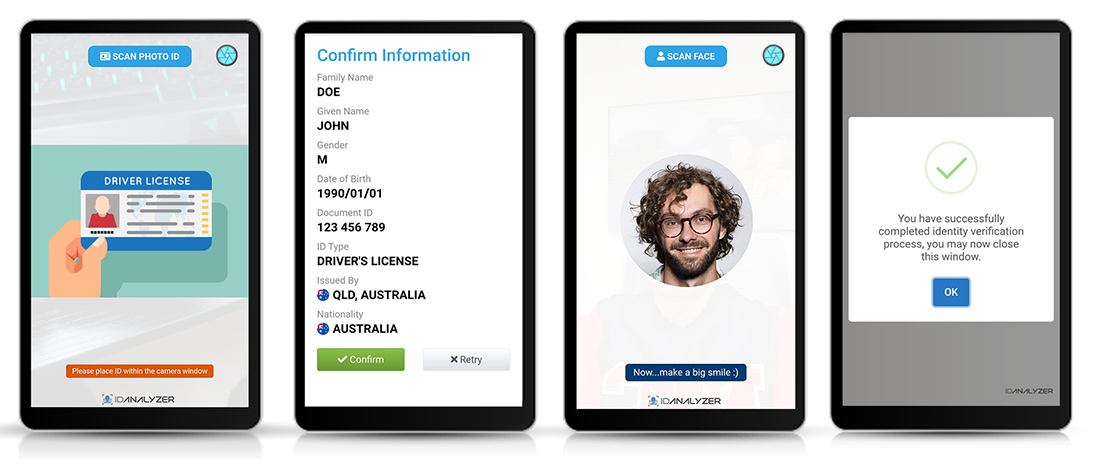
DocuPass comes with 4 modules and you need to [choose an appropriate DocuPass module](https://www.idanalyzer.com/products/docupass.html) for integration.
To start, we will assume you are trying to **verify one of your user that has an ID of "5678"** in your own database, we need to **generate a DocuPass verification request for this user**. A unique **DocuPass reference code** and **URL** will be generated.
```javascript
const IDAnalyzer = require("idanalyzer");
let DocuPass = new IDAnalyzer.DocuPass("Your API Key","Your Company Name Inc.","US");
// We need to set an identifier so that we know internally who we are verifying, this string will be returned in the callback. You can use your own user/customer id.
DocuPass.setCustomID("5678");
// Enable vault cloud storage to store verification results
DocuPass.enableVault(true);
// Set a callback URL where verification results will be sent, you can use docupass_callback.php under this folder as a template
DocuPass.setCallbackURL("https://www.your-website.com/docupass_callback.php");
// We want DocuPass to return document image and user face image in URL format.
DocuPass.setCallbackImage(true, true, 1);
// We will do a quick check on whether user have uploaded a fake ID
DocuPass.enableAuthentication(true, "quick", 0.3);
// Enable photo facial biometric verification with threshold of 0.5
DocuPass.enableFaceVerification(true,1,0.5);
// Users will have only 1 attempt for verification
DocuPass.setMaxAttempt(1);
// We want to redirect user back to your website when they are done with verification
DocuPass.setRedirectionURL("https://www.your-website.com/verification_succeeded.html","https://www.your-website.com/verification_failed.html");
// Create a verification session for this user
DocuPass.createMobile().then(function (response) {
if(!response.error){
console.log(response);
console.log("Scan the QR Code below to verify your identity: ");
console.log(response['qrcode']);
console.log("Or open your mobile browser and type in: ");
console.log(response['url']);
}else{
// Error occurred
console.log(response.error);
}
}).catch(function (err) {
console.log(err.message);
});
```
If you are looking to embed DocuPass into your mobile application, simply embed `$result['url']` inside a WebView. To tell if verification has been completed monitor the WebView URL and check if it matches the URLs set in setRedirectionURL. (DocuPass Live Mobile currently cannot be embedded into native iOS App due to OS restrictions, you will need to open it with Safari)
Check out additional DocuPass settings:
```javascript
DocuPass.setReusable(true); // allow DocuPass URL/QR Code to be used by multiple users
DocuPass.setLanguage("en"); // override auto language detection
DocuPass.setQRCodeFormat("000000","FFFFFF",5,1); // generate a QR code using custom colors and size
DocuPass.setWelcomeMessage("We need to verify your driver license before you make a rental booking with our company."); // Display your own greeting message
DocuPass.setLogo("https://www.your-website.com/logo.png"); // change default logo to your own
DocuPass.hideBrandingLogo(true); // hide footer logo
DocuPass.restrictCountry("US,CA,AU"); // accept documents from United States, Canada and Australia
DocuPass.restrictState("CA,TX,WA"); // accept documents from california, texas and washington
DocuPass.restrictType("DI"); // accept only driver license and identification card
DocuPass.verifyExpiry(true); // check document expiry
DocuPass.verifyAge("18-120"); // check if person is above 18
DocuPass.verifyDOB("1990/01/01"); // check if person's birthday is 1990/01/01
DocuPass.verifyDocumentNumber("X1234567"); // check if the person's ID number is X1234567
DocuPass.verifyName("Elon Musk"); // check if the person is named Elon Musk
DocuPass.verifyAddress("123 Sunny Rd, California"); // Check if address on ID matches with provided address
DocuPass.verifyPostcode("90001"); // check if postcode on ID matches with provided postcode
DocuPass.setCustomHTML("https://www.yourwebsite.com/docupass_template.html"); // use your own HTML/CSS for DocuPass page
DocuPass.smsVerificationLink("+1333444555"); // Send verification link to user's mobile phone
DocuPass.enablePhoneVerification(true); // get user to input their own phone number for verification
DocuPass.verifyPhone("+1333444555"); // verify user's phone number you already have in your database
DocuPass.enableAMLCheck(true); // enable AML/PEP compliance check
DocuPass.setAMLDatabase("global_politicians,eu_meps,eu_cors"); // limit AML check to only PEPs
DocuPass.enableAMLStrictMatch(true); // make AML matching more strict to prevent false positives
DocuPass.generateContract("Template ID", "PDF", {"somevariable": "somevalue"}); // automate paperwork by generating a document autofilled with ID data
DocuPass.signContract("Template ID", "PDF", {"somevariable": "somevalue"}); // get user to review and sign legal document prefilled with ID data
```
Now you should write a **callback script** or a **webhook**, to receive the verification results. Visit [DocuPass Callback reference](https://developer.idanalyzer.com/docupass_callback.html) to check out the full payload returned by DocuPass. Callback script is generally programmed in a server environment and is beyond the scope of this guide, you can check out our [PHP SDK](https://github.com/idanalyzer/id-analyzer-php-sdk) for creating a callback script in PHP.
For the final step, you could create two web pages (URLS set via setRedirectionURL) that display the results to your user. DocuPass reference will be passed as a GET parameter when users are redirected, for example: https://www.your-website.com/verification_succeeded.php?reference=XXXXXXXXX, you could use the reference code to fetch the results from your database. P.S. We will always send callbacks to your server before redirecting your user to the set URL.
## DocuPass Signature API
You can get user to review and remotely sign legal document in DocuPass without identity verification, to do so you need to create a DocuPass Signature session.
```javascript
const IDAnalyzer = require("idanalyzer");
let DocuPass = new IDAnalyzer.DocuPass("Your API Key","Your Company Name Inc.","US");
// We need to set an identifier so that we know internally who is signing the document, this string will be returned in the callback. You can use your own user/customer id.
DocuPass.setCustomID("CUSTOMER1234");
// Enable vault cloud storage to store signed document
DocuPass.enableVault(true);
// Set a callback URL where signed document will be sent, you can use docupass_callback.php under this folder as a template to receive the result
DocuPass.setCallbackURL("https://www.your-website.com/docupass_callback.php");
// We want to redirect user back to your website when they are done with document signing, there will be no fail URL unlike identity verification
DocuPass.setRedirectionURL("https://www.your-website.com/document_signed.html","");
/*
* more settings
DocuPass.setReusable(true); // allow DocuPass URL/QR Code to be used by multiple users
DocuPass.setLanguage("en"); // override auto language detection
DocuPass.setQRCodeFormat("000000","FFFFFF",5,1); // generate a QR code using custom colors and size
DocuPass.hideBrandingLogo(true); // hide branding footer
DocuPass.setCustomHTML("https://www.yourwebsite.com/docupass_template.html"); // use your own HTML/CSS for DocuPass page
DocuPass.smsContractLink("+1333444555"); // Send signing link to user's mobile phone
*/
// Assuming in your contract template you have a dynamic field %{email} and you want to fill it with user email
let prefill = {
"email": "user@example.com"
};
// Create a signature session
DocuPass.createSignature("Template ID", "PDF", prefill).then(function (response) {
if(!response.error){
console.log(response);
console.log("Scan the QR Code below to sign document: ");
console.log(response['qrcode']);
console.log("Or open your mobile browser and navigate to: ");
console.log(response['url']);
}else{
// Error occurred
console.log(response.error);
}
}).catch(function (err) {
console.log(err.message);
});
```
Once user has reviewed and signed the document, the signed document will be sent back to your server using callback under the `contract.document_url` field, the contract will also be saved to vault if you have enabled vault.
## Vault API
ID Analyzer provides free cloud database storage (Vault) for you to store data obtained through Core API and DocuPass. You can set whether you want to store your user data into Vault through `enableVault` while making an API request with PHP SDK. Data stored in Vault can be looked up through [Web Portal](https://portal.idanalyzer.com) or via Vault API.
If you have enabled Vault, Core API and DocuPass will both return a vault entry identifier string called `vaultid`, you can use the identifier to look up your user data:
```javascript
Vault.get("vaultid").then(function (response) {
if(!response.error){
console.log(response);
}else{
// Error occurred
console.log(response.error);
}
}).catch(function (err) {
console.log(err.message);
});
```
You can also list all the items in your vault:
```javascript
const IDAnalyzer = require("idanalyzer");
let Vault = new IDAnalyzer.Vault("Your API Key","US");
// List 5 items created on or after 2021/02/25, sort result by first name in ascending order, starting from first item.
Vault.list({filter: ["createtime>=2021/02/25"], orderby: "firstName", sort: "ASC", limit: 5, offset: 0}).then(function (response) {
if(!response.error){
console.log(response);
}else{
// Error occurred
console.log(response.error);
}
}).catch(function (err) {
console.log(err.message);
});
```
Alternatively, you may have a DocuPass reference code which you want to search through vault to check whether user has completed identity verification:
```javascript
Vault.list({filter: ["docupass_reference=XXXXXXXXXXXXX"]})
```
Learn more about [Vault API](https://developer.idanalyzer.com/vaultapi.html).
## AML API
ID Analyzer provides Anti-Money Laundering AML database consolidated from worldwide authorities, AML API allows our subscribers to lookup the database using either a name or document number. It allows you to instantly check if a person or company is listed under **any kind of sanction, criminal record or is a politically exposed person(PEP)**, as part of your **AML compliance KYC**. You may also use automated check built within Core API and DocuPass.
```javascript
const IDAnalyzer = require("idanalyzer");
let aml = new IDAnalyzer.AMLAPI("Your API Key","US");
// Set AML database to only search the PEP category
aml.setAMLDatabase("global_politicians,eu_cors,eu_meps");
// Search for a politician
aml.searchByName("Joe Biden").then(function (response) {
console.log(response);
}).catch(function (err) {
console.log(err.message);
});
// Set AML database to all databases
aml.setAMLDatabase("");
// Search for a sanctioned ID number
aml.searchByIDNumber("AALH750218HBCLPC02").then(function (response) {
console.log(response);
}).catch(function (err) {
console.log(err.message);
});
```
Learn more about [AML API](https://developer.idanalyzer.com/amlapi.html).
## Demo
Check out **/demo** folder for more JS demos.
## SDK Reference
Check out [ID Analyzer NodeJS Reference](https://idanalyzer.github.io/id-analyzer-nodejs/)