hostabee-profile-picture
Version:
A profile picture generator in a Web Component.
80 lines (55 loc) • 2.81 kB
Markdown
# \<hostabee-profile-picture\>
[](http://commitizen.github.io/cz-cli/)
[](https://travis-ci.org/Hostabee/hostabee-profile-picture)
[](https://www.webcomponents.org/element/hostabee/hostabee-profile-picture)
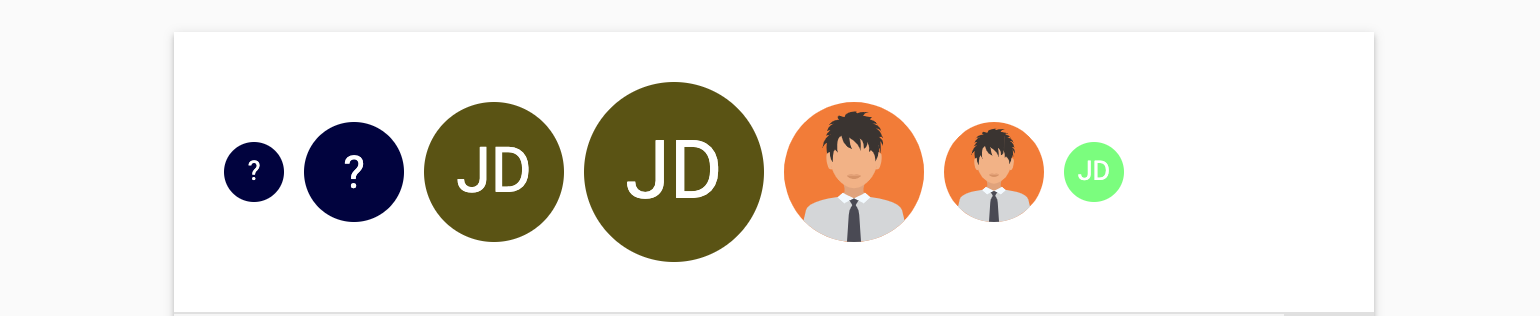
A profile picture generator in a Web Component. Displays the image target by the given URL or generate one using a string (like username, email address, etc..).
<!--
```
<custom-element-demo height="400">
<template>
<link rel="import" href="hostabee-profile-picture.html">
<next-code-block></next-code-block>
</template>
</custom-element-demo>
```
-->
```html
<hostabee-profile-picture></hostabee-profile-picture>
<hostabee-profile-picture src="John Doe"></hostabee-profile-picture>
<hostabee-profile-picture src="john.doe@example.org"></hostabee-profile-picture>
<hostabee-profile-picture id="hpp"></hostabee-profile-picture>
<script>
document.querySelector('#hpp').src = {
fullname: 'John Doe',
profilePictureURL: 'https://image.flaticon.com/icons/svg/219/219988.svg',
};
</script>
```
## Installation
Install `<hostabee-profile-picture>`:
```shell
bower install Hostabee/hostabee-profile-picture --save
```
Once installed, import it in your application:
```html
<link rel="import" href="bower_components/hostabee-profile-picture/hostabee-profile-picture.html">
```
## Running demos and tests in a browser
1. Fork the `hostabee-profile-picture` repository and clone it locally.
2. Make sure you have [npm](https://www.npmjs.com/) and [Bower](https://bower.io) installed.
3. When in the `hostabee-profile-picture` directory, run `npm install` and then `bower install` to install dependencies.
4. Run `npm start`, browser will automatically open the component API documentation.
5. You can also open demo or in-browser tests by adding **demo** or **test** to the URL, for example:
- http://127.0.0.1:3000/components/hostabee-profile-picture/demo/basic.html
- http://127.0.0.1:3000/components/hostabee-profile-picture/test
## Running Tests
- When in the `hostabee-profile-picture` directory, run `polymer test`
## Contributing
1. Fork it!
2. Create your feature branch: `git checkout -b my-new-feature`
3. Commit your changes: `git cz` **OR** [follow this commit guide](https://conventionalcommits.org/) to write the commit messages.
4. Push to the branch: `git push origin my-new-feature`
5. Submit a pull request.
## License
Apache License 2.0