homebridge-bondbridge
Version:
Catered shell script to integrate BondBridge units by Bond
138 lines (100 loc) • 9.19 kB
Markdown
# homebridge-bondbridge
For ceiling fans fitted with **Hunter Pacific LOGIC remote control** or **equivalent** via **Bond Bridge RF Controller**
## Introduction
This `homebridge-bondbridge` plugin is specially designed to control ceiling fans fitted with **[Hunter Pacific LOGIC remote control A2003](https://www.hunterpacificinternational.com/remotes)** (left image below) or **equivalent** via **[Bond Bridge RF Controller](https://bondhome.io/product/bond-bridge/)** (right image below).
You can make use of this plugin only if your ceiling fan is fitted with a RF remote which is not in the Bond Bridge database and it has a Light with Dimmer function, otherwise you should use the **[homebridge-bond](https://github.com/aarons22/homebridge-bond)** plugin instead.

## How to programme my RF remote control functions onto Bond Bridge RF Controller
To work as intended, the RF remote control functions need to be programmed onto the Bond Bridge RF Controller as two separate "Celing Fan" devices, one for the Fan and one for the Light:
1. Add a **"Ceiling Fan"** device onto Bond Bridge RF Controller and programme the `Fan Off` function and the `Fan Speed` functions under "Fan". Name the device ending with " Fan" (e.g. "Bed 4 Fan"). Do not programme the `Light On/Off` functions here.
Note that the Fan Speed has intrinsic "On" function, as such the "Fan On" function is not required, only the "Fan Off" function need to be programmed. No harm done also if you do programme both "On/Off" functions.
2. Add another **"Ceiling Fan"** device onto Bond Bridge RF Controller and programme the `Light On/Off` functions under "Light" and programme the `Light Dimmer` functions under "Fan" as "Fan Speed". For example, the LOGIC RF remote control has 7-levels dimmer, you should programme them as "Speed 1", "Speed 2", etc. Name this device ending with " Light" (e.g. "Bed 4 Light").
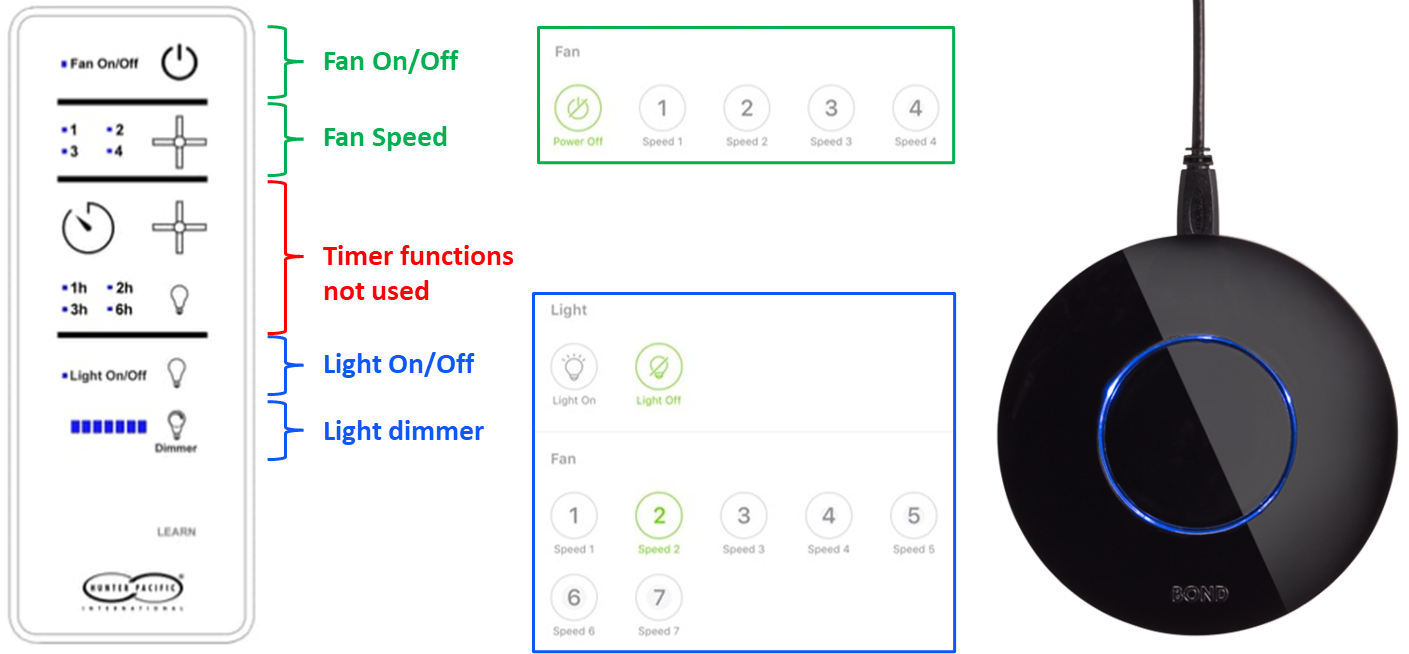
This plugin does not use the built-in timers but use custom-built timers within a bash script. These custom-built timers have greater flexibility and capability to turn on or off the fan and the light.
## Installation
### Raspbian/HOOBS/macOS/NAS:
1. If you have not already, install Homebridge via these instructions for [Raspbian](https://github.com/homebridge/homebridge/wiki/Install-Homebridge-on-Raspbian), [HOOBS](https://support.hoobs.org/docs) or [macOS](https://github.com/homebridge/homebridge/wiki/Install-Homebridge-on-macOS).
2. Install the `homebridge-myplace` plug-in via the Homebridge UI `Plugins` tab search function. Once installed, click on the "three dots" at the bottom right and click on "JSON Config", and a pop-up box with a small config in it will appear. Do not edit anything but make sure you click `SAVE`. More pop-up dialogue box may appear, click "SAVE" again to all until you are prompted to "RESTART HOMEBRIDGE". You don't have to restart hombridge but can click "CLOSE" now to move on to the next step.
Note: `homebridge-myplace` plug-in is essential because the `homebridge-bondbridge` plug-in is dependent on it.
3. Install `homebridge-bondbridge` plug-in via the Homebridge UI `Plugins` tab search function. Once installed, do the same thing as describe in step 2.
4. If you have not already, install <B>jq</B> and <B>curl</B> via your terminal or Homebridge UI terminal or through ssh:
#### Raspbian/Hoobs:
```shell
sudo apt-get install jq
sudo apt-get install curl
```
#### macOS:
```shell
brew install jq
brew install curl
```
#### Synology NAS:
```shell
apt-get install jq
apt-get install curl
```
#### QNAP NAS:
```shell
apk add jq
apk add curl
```
#### Important note:
At the time of updating this README, the `apt-get insatall` only allow jq-1.6 to be installed. To install the lastest and **MUCH faster** version of jq-1.7.1, please follow the step-by-step guide below:
1. Download the Source Code:
You can download the source code "jq-1.7.1.tar.gz" for jq 1.7.1 from the official GitHub releases page (https://github.com/jqlang/jq/releases) or use the link below:
```shell
wget https://github.com/jqlang/jq/releases/download/jq-1.7.1/jq-1.7.1.tar.gz
```
2. Install Dependencies:
Ensure you have the necessary build tools and dependencies installed. You can do this by running:
```shell
sudo apt-get update
sudo apt-get install -y autoconf automake libtool make gcc
```
3. Extract and Build:
Extract the downloaded tarball and navigate to the directory:
```shell
tar -xvzf jq-1.7.1.tar.gz
cd jq-1.7.1
chmod +x configure
```
4. Run the following commands to build and install jq:
```shell
./configure
make
sudo make install
```
5. Verify Installation:
After installation, you can verify that jq is installed correctly by running:
```shell
jq --version
```
## Configuring the Plugin
A configuration file is required to run this plugin and it can be generated automatically by running the script **ConfigCreator.sh**.
(A) Homebridge users with access to the Homebridge web UI can follow the steps below to run the script:
Go to the 'Plugins' tab in Homebridge UI, locate your newly installed `Homebridge Bondbridge` plugin and click the three dots on the bottom right, select `Plugin Config` and it should launch the <B>Bond Bridge Configuration Creator and Checker</B> and <B>Bond Bridge Device Settings</B> page.
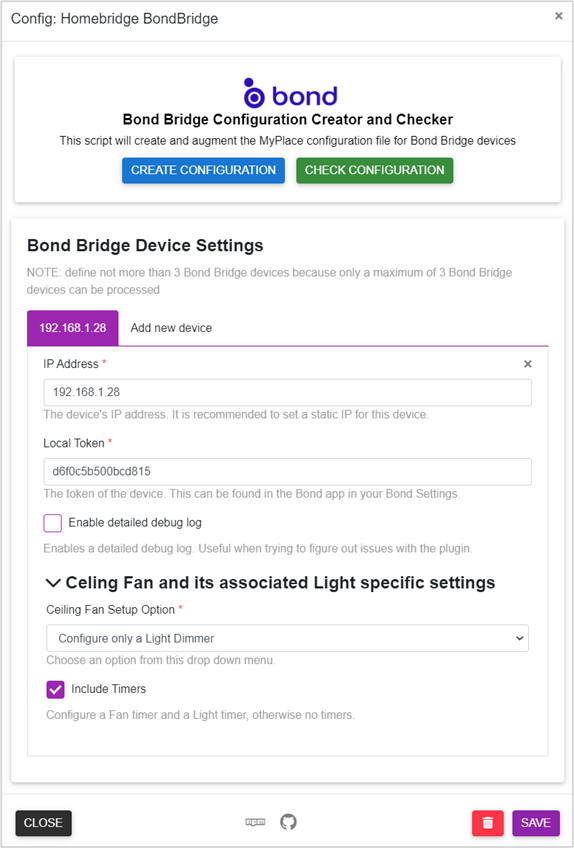
In <B>Bond Bridge Device Settings</B> area, fill out the `IP Address` and `Local Token` of your Bond Bridge device, check/uncheck `Enable detailed debug log` checkbox, then expand the `Ceiling Fan and its associated Light specific settings` and select an `Ceiling Fan Setup Option` from a drop down menu, check/uncheck the `Include timers` checkbox, then click `SAVE`. This is to save your system parameters. Click `CLOSE` if a pop up urging you to `RESTART HOMEBRIDGE`.
Go back to `Plugin Config` again and press the `CREATE CONFIGURATION` button to create the required configuration file. On a sucess, click `CHECK CONFIGURATION`to check the configuration file just created is in order. On a success it will say `Passed`; if something is incorrect, an error message will pop up telling you what needs to be fixed. Finally, click `SAVE` and `RESTART HOMEBRIDGE`.
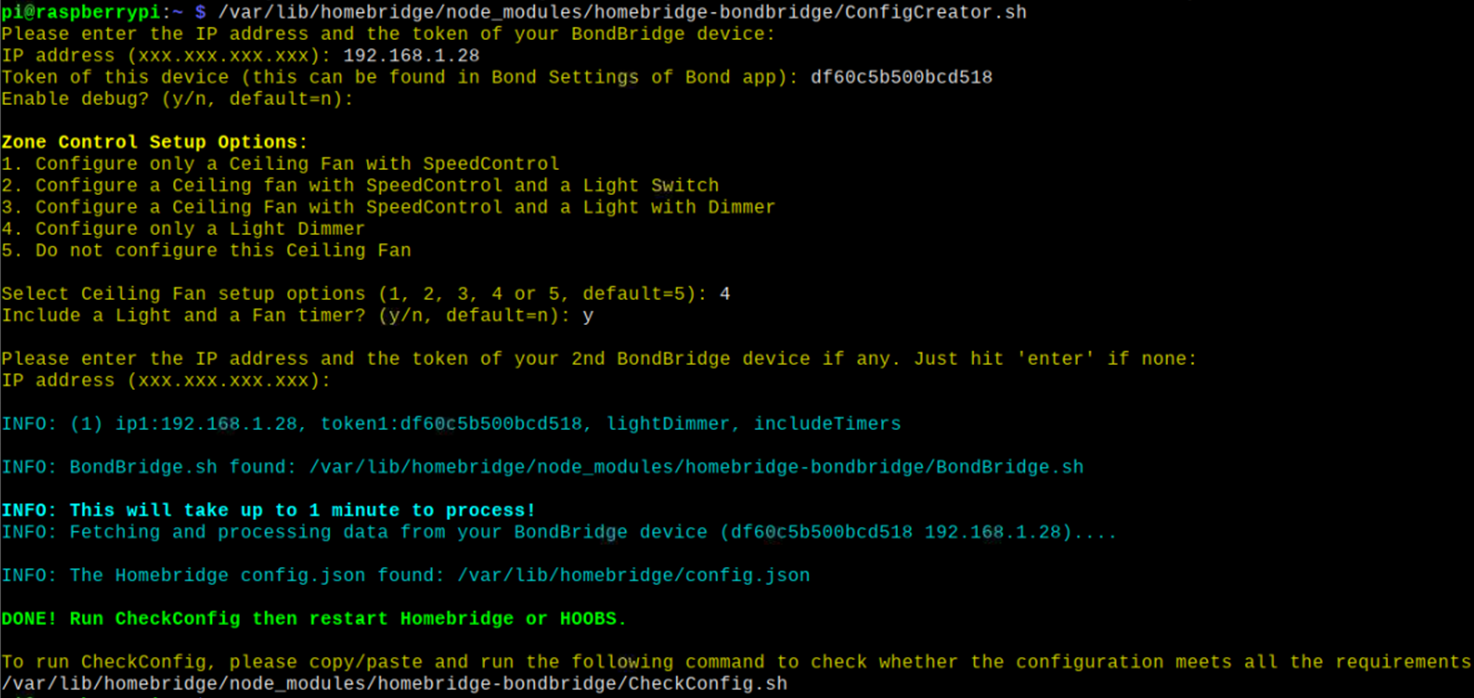
(B) HOOBS users who do not have access to Homebridge UI (for now!) will have to run the Config Creator on a terminal:
```shell
cd
<Plugin Path>/node_modules/homebridge-bondbridge/ConfigCreator.sh
```
then follow the on-screen instructions.
*typical `<Plugin Path>` is `/var/lib/hoobs/<bridge>`

## What You Expect to See in Homekit
For 'Full Setup' with 'Timers', you should expect to see 4 Homekit tiles per ceiling fan/light; one for the Fan with speed control, one for the Light with brightness control, one for the Fan Timer and another for the Light Timer (not shown, it is similar to the Fan Timer).

The Timers are custom-built timers and used 'Lightbulb' accessory as a proxy and 'Brightness' in % have a scale of 6 minutes per 1%, or 10% = 1.0 hour and a maximum of 10 hours timer can be set. You can set either **`time-to-on`** or **`time-to-off`** timer. Setting the Fan or Light Timer when the Fan or Light is in "Off" state will be a **`time-to-on`** timer and vice versa.
## How You Can Help
* Report Bugs/Errors by opening Issues/Tickets.
* Suggest Improvements and Features you would like to see!
## Special Thanks
1. Many thanks to [Mitch Williams](https://github.com/mitch7391) who has created the wonderful [homebridge-cmd4:-AdvantageAir](https://github.com/mitch7391/homebridge-cmd4-AdvantageAir) plugin and has allowed me to participate in its development and in the process I have leant a lot on **bash** and **javascript** coding in homebridge environment.
2. Many thanks also to [John Talbot](https://github.com/ztalbot2000) for his fantastic [homebridge-cmd4](https://github.com/mitch7391/homebridge-cmd4) plugin with which I can do wonderful things in Homekit.
3. And never forget to thank my beautiful wife who has put up with my obsession on this.....
## LICENSE
This plugin is distributed under the MIT license. See [LICENSE](https://github.com/uswong/homebridge-myplace/blob/main/LICENSE) for details.