hiding-header
Version:
Toggles header visibility on scroll.
84 lines (58 loc) • 2.54 kB
Markdown
# Hiding Header [](https://www.npmjs.com/package/hiding-header) 
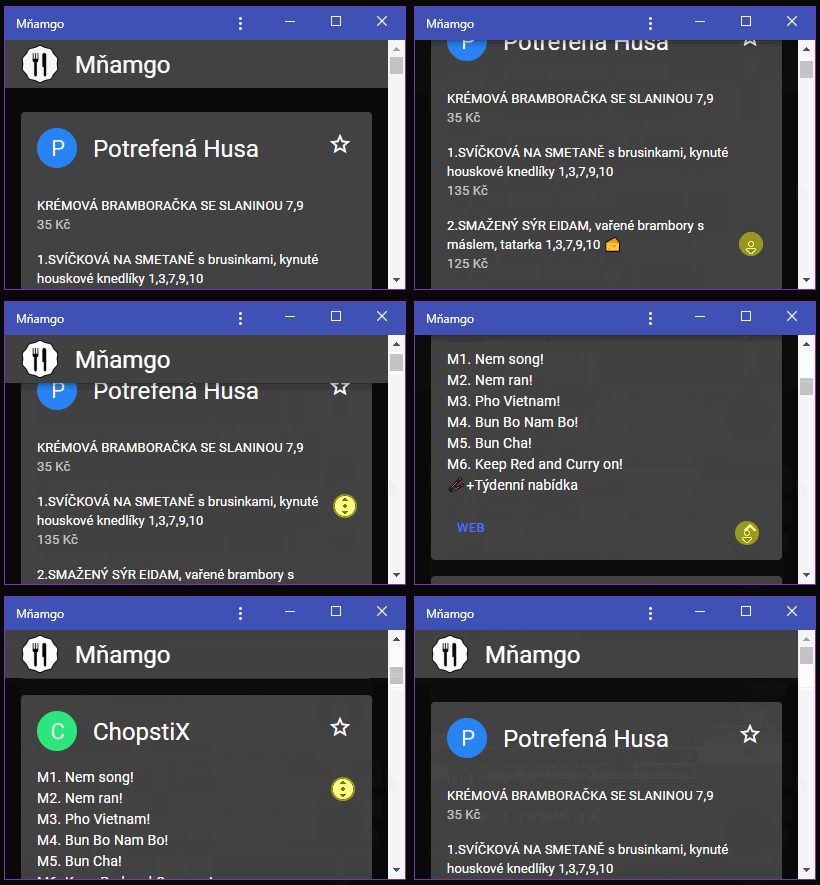
Toggles header visibility on scroll. [Demo](https://filipchalupa.cz/hiding-header/demo).
## Installation
```bash
npm install hiding-header
```
## How to use
### HTML:
```html
<!-- … -->
<body>
<div class="hidingHeader" id="hidingHeader">
<div class="hidingHeader-in">
<!-- Your header -->
</div>
</div>
<!-- … -->
</body>
<!-- … -->
```
### CSS:
Import [dist/style.css](src/style.css) to your CSS. It's few lines of code. You can alternatively copy paste it and adjust things like `z-index` to your needs.
### JavaScript:
```javascript
import { hidingHeader } from 'hiding-header'
const container = document.querySelector('#hidingHeader')
hidingHeader(container)
```
### More
```javascript
import { hidingHeader } from 'hiding-header'
const container = document.querySelector('#hidingHeader')
const instance = hidingHeader(container, {
heightPropertyName: '--hidingHeader-height',
boundsHeightPropertyName: '--hidingHeader-bounds-height',
animationOffsetPropertyName: '--hidingHeader-animation-offset',
snap: true, // Reveal or hide header if user stops scrolling in middle
onHeightChange: (height: number) => {}, // When content height changes
onVisibleHeightChange: (height: number) => {}, // When part of header is revealed
onHomeChange: (isHome: boolean) => {}, // When returns to home
})
instance.pause() // Pauses recalculations of sticky boundaries on scroll
instance.isPaused() // Check if paused
instance.run() // Reactivates
instance.destroy() // Removes all internal event listeners
instance.reveal() // Reveals header if hidden
instance.hide() // Hides header if visible
instance.getHeight() // Returns content height in pixels
instance.getVisibleHeight() // Returns height of visible content area in pixels
instance.isHome() // Returns true if element is at initial position, e.g. user has not yet scrolled
```
### React component
For more information see [hiding-header-react](https://www.npmjs.com/package/hiding-header-react).
### SolidJS component
For more information see [@sect/solid-hiding-header](https://www.npmjs.com/package/@sect/solid-hiding-header).
### Web component
For more information see [hiding-header-webcomponent](https://www.npmjs.com/package/hiding-header-webcomponent).