hfxbus
Version:
Redis backed high frequency exchange bus
171 lines (108 loc) • 6.08 kB
Markdown
# HFXBus
**HFXBus** is a bus implementation for NodeJS backed by Redis Streams and PubSub.
* Focused on performance for asynchronous communication between endpoints
* Replaces Kafka, RabbitMQ and other brokers
* Support Redis Standalone or Cluster
* Support for **correct** message acknowledgement, resolution and rejection states
* Message's payload can be raw Buffer or JSON
* Claiming logic to retry and collect stalled out messages
* Architecture and payload agnostic
* Limit the number of parallel processing done by your microservices
* Supports client side partitioning to achieve Redis HA
* Supports distributed routing to distribute streams across nodes
* Unit and E2E tested
It's simple and effective to achieve high performance event-sourcing environment and microservice communication.
```bash
npm install --save hfxbus
```
----------------------
## Upgrading
This project was rewritten in Typescript on v2, if you're running v1 and need reference please visit the branch v1. **The v2+ still defined as RC and will only achieve GA when we finish the tests for HFXBus v2.**
----------------------
## How it works
HFXBus uses [Redis Streams](https://redis.io/topics/streams-intro) to enqueue messages and groups to consume messages, but these streams only controls the flow of messages to make the processing lighweight in networking and memory/CPU aspects. All payload is stored as regular Redis keys and it's up to your endpoints decide which keys need to be loaded/created.
[Redis PubSub](https://redis.io/topics/pubsub) is used to emit events happening to messages like when a message is **consumed**, so your endpoints have feedback about messages events.
And finally, with [XTRIM](https://redis.io/commands/xtrim) you can keep your Redis server memory utilization low and with [XCLAIM](https://redis.io/commands/xclaim) improve your (micro)services redundancy/resilience. We implemented the command XRETRY using Lua Scripting to achieve a reliable way to retry stalled out messages.
----------------------
## Client side partitioning
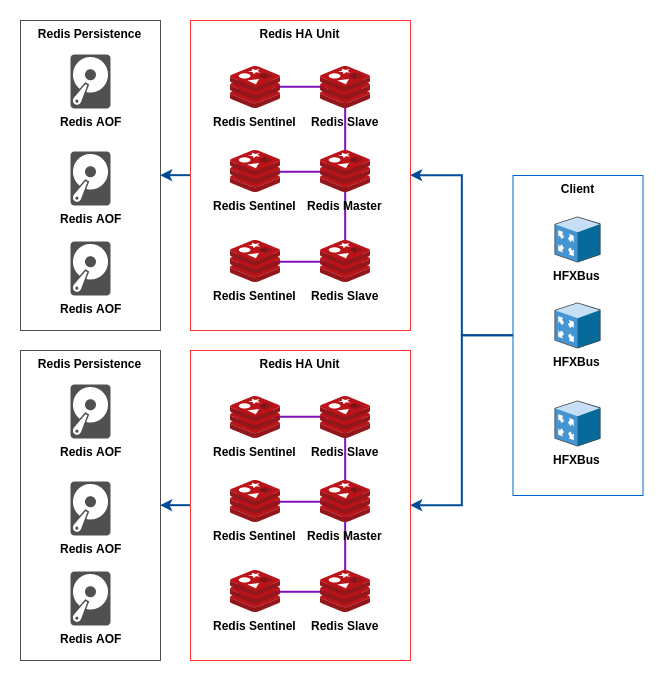
HFXBus provides client side partitioning through the method **ConnectionManager.nodes()**, but you need to be aware of the following points:
* This partitioning is efficient for partitioning job's payload.
* Consumers group can't read from streams spread through multiple nodes, so you'll need to make them as static routing using the **route** parameter of consumers and the **staticRoutes** of connection parameters.
* Always use the **sequence** parameter to specify the sequence of nodes when partitioning the data.
* Producer's listen to Pub/Sub from a single connection only if the stream name is not a pattern, otherwise it'll listen to all nodes.
This feature was designed to work with the following architecture:
## Distributed routing
To really scale Redis horizontally using the architecture above HFXBus provides a routing method named "distributed routing":
* Consumers will try to acquire messages from all connections using a round-robin algorithm to distribute the workload.
* Producers will not more send messages using the specified **route**, instead they will use the job's ID as route.
* You don't need to specify static routes.
But there are tradeoffs with this method:
* Stream messages IDs can be repeated across nodes.
* The number of connections done by each consumer increases.
* Currently HFXBus doesn't auto eject failing connections (maybe you want to open a PR for this feature?).
----------------------
## Quick Start
First, setup a Redis running at `127.0.0.1:6379` (you can use [docker](https://hub.docker.com/_/redis)). And then create a **consumer.ts** file with the following content:
```typescript
import { ConnectionManager, Consumer } from 'hfxbus';
const connection = ConnectionManager.standalone({
port: 6379,
host: '127.0.0.1'
});
const consumer = new Consumer(connection, { group: 'worldConcat' });
consumer.process({
stream: 'concat',
processor: async (job) => {
console.log(`Received job: ${job.id}`);
const {
inbound
} = await job.get('inbound', false).del('inbound').pull();
console.log(`Received inbound: ${inbound}`);
await job.set('outbound', `${inbound} world!`).push();
console.log('Job consumed');
}
});
consumer.play().then(() => {
console.log(`Consumer is waiting for jobs (consumer id is ${consumer.id})`);
}).catch((error) => console.error(error));
```
And another file as **producer.ts**:
```javascript
import { ConnectionManager, Producer } from 'hfxbus';
const connection = ConnectionManager.standalone({
port: 6379,
host: '127.0.0.1'
});
const producer = new Producer(connection);
const execute = async () => {
await producer.listen();
console.log(`Producer is listening for messages (producer id is ${producer.id})`);
const job = producer.job();
console.log(`Created job: ${job.id}`);
await job.set('inbound', 'Hello').push();
await producer.send({
stream: 'concat',
waitFor: [
'worldConcat'
],
job
});
console.log(`Sent job: ${job.id}`);
await job.finished();
console.log(`Finished job: ${job.id}`);
const {
outbound
} = await job.get('outbound', false).del('outbound').pull();
console.log(`Outbound is: ${outbound}`);
}
execute().catch((error) => console.error(error));
```
Remember to start **consumer.ts** before **producer.ts** as by default consumer will receive only new jobs, you can change this behavior, take a look at the API Documentation.
----------------------
## API Documentation
Your can learn more about HFXBus API [clicking here](https://github.com/gamaops/hfx-bus/blob/master/API.md).
----------------------
## Related Projects
* [HFXWorker](https://github.com/gamaops/hfx-worker) - A worker pool using NodeJS worker threads.
* [HFXEventStash](https://github.com/gamaops/hfx-eventstash) - A high performance event store to persist commands (CQRS).