hexo-theme-reimu
Version:
A Hakurei Reimu style Hexo theme
1,670 lines (1,256 loc) • 52.8 kB
Markdown
<div align = center>
<img src="https://fastly.jsdelivr.net/gh/D-Sketon/blog-img/icon.png"/>
<h1>hexo-theme-reimu</h1>
<img alt="NPM License" src="https://img.shields.io/npm/l/hexo-theme-reimu">
<img alt="NPM Version" src="https://img.shields.io/npm/v/hexo-theme-reimu">
<img alt="NPM Downloads" src="https://img.shields.io/npm/dm/hexo-theme-reimu">
<img alt="GitHub Repo stars" src="https://img.shields.io/github/stars/D-Sketon/hexo-theme-reimu">
💘 博麗 霊夢 💘
[演示网站](https://d-sketon.github.io) | [开发日志](https://d-sketon.github.io/20240601/hexo-theme-reimu-log/)
简体中文 | [English](https://github.com/D-Sketon/hexo-theme-reimu/blob/main/README.en.md)
<img src="https://cdn.jsdelivr.net/gh/D-Sketon/hexo-theme-reimu@main/_screenshot/Reimu_dark.png"/>
</div>
> [!WARNING]
> v1.0.0 以下版本已经废弃,请尽快升级到 v1.0.0 以上版本
本人是车车人,所以制作了这样一款博丽灵梦风格的 Hexo 主题,融合了 [landscape](https://github.com/hexojs/hexo-theme-landscape)、[Tangyuxian](https://github.com/tangyuxian/hexo-theme-tangyuxian) 和 [Shoka](https://github.com/amehime/hexo-theme-shoka) 三个主题
| framework | repository | version | stars |
| ---------------------------- | ------------------------------------------------------------------ | ------------------------------------------------------------------------------------------------------------------------------------------------------------------------------------------- | -------------------------------------------------------------------------------------------------- |
| [Hexo](https://hexo.io/) | [hexo-theme-reimu](https://github.com/D-Sketon/hexo-theme-reimu) | <img alt="version" src="https://img.shields.io/badge/dynamic/json?url=https%3A%2F%2Fgithub.com%2FD-Sketon%2Fhexo-theme-reimu%2Fraw%2Fmain%2Fpackage.json&query=%24.version&label=version"> | <img alt="GitHub Repo stars" src="https://img.shields.io/github/stars/D-Sketon/hexo-theme-reimu"> |
| [Hugo](https://gohugo.io) | [hugo-theme-reimu](https://github.com/D-Sketon/hugo-theme-reimu) | <img alt="version" src="https://img.shields.io/badge/dynamic/json?url=https%3A%2F%2Fgithub.com%2FD-Sketon%2Fhugo-theme-reimu%2Fraw%2Fmain%2Fpackage.json&query=%24.version&label=version"> | <img alt="GitHub Repo stars" src="https://img.shields.io/github/stars/D-Sketon/hugo-theme-reimu"> |
| [Astro](https://astro.build) | [astro-theme-reimu](https://github.com/D-Sketon/astro-theme-reimu) | <img alt="version" src="https://img.shields.io/badge/dynamic/json?url=https%3A%2F%2Fgithub.com%2FD-Sketon%2Fastro-theme-reimu%2Fraw%2Fmain%2Fpackage.json&query=%24.version&label=version"> | <img alt="GitHub Repo stars" src="https://img.shields.io/github/stars/D-Sketon/astro-theme-reimu"> |
**欢迎提交 ISSUE 和 PR!**
## 特性
### 基础功能
- ✨ 完整的博客功能
- 🔄 兼容 Hexo6 及以上版本
- 📱 响应式布局
- 🌙 暗黑模式支持
- 🅰️ i18n 支持
### 代码与数学
- 🖥️ 代码高亮与复制
- ➗ KaTeX / MathJax3 数学公式支持
- 📊 Mermaid 流程图支持
### 搜索与评论
- 🔍 Algolia 搜索集成
- 🔍 本地搜索集成
- 💬 多评论系统支持:
- Valine
- Waline
- Twikoo
- Gitalk
- Giscus
- Disqus
### 统计与分析
- 📊 文章阅读统计(Valine / Waline)
- 👥 访客统计(不蒜子)
### 媒体与交互功能
- 🎵 音乐播放器支持:
- Aplayer
- Meting
- 🖼️ 图片懒加载
- ⚡ 加载动画
- 🖱️ 鼠标特效:
- 动画效果
- 灵梦鼠标指针
- 👾 Live2D / Live2D-widgets 集成
### 导航与结构
- 📑 目录导航
- 🔄 PJAX 支持
- 🔧 ServiceWorker 实现
- 📰 RSS 订阅
### 设计与自定义
- 🎨 图标支持:
- Iconfont
- FontAwesome7
- 🔗 内置标签插件:
- 内部链接
- 外部链接
- 友情链接
- 热力图
- 标签轮盘
- 标签页
- 照片墙
- 🎨 动态适配主题色
- 🎨 自定义容器
- ©️ 文章版权声明
- 🌐 自定义 CDN 源配置
- 📜 自定义字体
- 🎨 分享卡片功能
## 安装
> 纯小白可以直接使用 [reimu-template](https://github.com/D-Sketon/reimu-template)。其中预先安装了 hexo, hexo-theme-reimu 和其他功能包,只需 克隆仓库-安装依赖-修改配置 即可获得一个基本的博客!
使用 npm
```bash
npm install hexo-theme-reimu --save
```
或直接克隆本仓库至 `/themes` 文件夹下并重命名为 `reimu`
```bash
git clone https://github.com/D-Sketon/hexo-theme-reimu.git
```
并修改 `_config.yml` 中的 theme
```yaml
theme: reimu
```
## 使用
<details>
<summary>基本结构</summary>
### 基本结构
为了保证显示正确,请参考 `_example` 在 `source` 中分别建立 `_data`、`about` 和 `friend` 文件夹 (注意:是博客根目录下的 `source` 文件夹,而不是主题中的 `source` !)
**目录结构示例:**
```
source/
├── images/
│ └── favicon.ico # 网站图标
├── _data/
│ ├── avatar/
│ │ └── avatar.webp # 头像文件
│ ├── covers.yml # 文章封面 URL 列表
│ └── covers/ # 文章封面文件夹
├── about/ # 关于页面
│ └── index.md
├── friend/ # 友链页面
│ ├── index.md
│ └── _data.yml # 友链数据
└── _posts/ # 文章文件夹
└── xxxx.md
```
#### \_data
- `avatar` 文件夹中存储作者头像,默认命名 `avatar.webp`,可在内层 `_config.yml` 中做如下配置
```yaml
avatar: "avatar.webp" # 默认就是在avatar文件夹内寻找,请不要包含路径,否则会404
```
- `covers` 文件夹中存储文章封面
- `covers.yml` 中存储文章封面 url
#### about
`index.md` 作为**关于**页面
#### friend
`index.md` 作为**友链**页面,在 `_data.yml` 中填入友链信息即可在页面上显示对应好友卡片
</details>
<details>
<summary>封面、头图和favicon</summary>
### 封面、头图和 favicon
#### 封面
封面显示逻辑如下
- 如果文章的 Front matter 中包含 cover 的 url,则该文章头图和首页缩略图均显示该 url
```yaml
title: Hello World
cover: https://example.com
```
- 如果文章的 Front matter 中包含 cover 为 `false`,则该文章不显示头图(首页缩略图仍然是随机图片)
```yaml
title: Hello World
cover: false
```
- 如果文章的 Front matter 中包含 cover 为 `rgb(xxx,xxx,xxx)`,则该文章头图为对应的渐变纯色(首页缩略图仍然是随机图片)
```yaml
title: Hello World
cover: rgb(255,117,117)
```
- 否则首页缩略图查找 `covers` 文件夹和 `covers.yml`,并从中随机挑选图片,文章内头图查找内层 `_config.yml` 中的 `cover` 配置
- 若上述文件/配置均不存在,则显示 `banner` 头图作为兜底
#### 头图
头图保存于 `themes/reimu/source/images/banner.webp`,可在内层 `_config.yml` 中修改
```yaml
banner: "/images/banner.webp"
```
#### favicon
favicon 保存于 `themes/reimu/source/images/favicon.ico`,可在内层 `_config.yml` 中修改
```yaml
favicon: "/images/favicon.ico"
```
#### 置顶
在文章的 Front-matter 中添加 `sticky: true`
```yaml
title: Hello World
sticky: true
```
#### 文章总结
默认关闭,可选择在副标题或者文章开头显示文章摘要
```yaml
summary:
enable: false
style: 'subtitle' # 'subtitle' | 'blockquote'
```
</details>
<details>
<summary>侧边栏</summary>
### 侧边栏
#### 侧边栏位置
默认在右边,可在内层 `_config.yml` 中修改
```yaml
sidebar:
position: right # left | right | false
menu: true # 是否显示侧边栏菜单按钮,移动端忽略
article:
show_common: true # 文章页是否显示通用侧边栏,移动端忽略
```
此外,也可以通过文章的 front-matter 控制,其优先级高于全局配置
```yaml
sidebar: left # left | right | false
```
> 当 sidebar 设置为 false 时,侧边栏将被隐藏,此时 aplayer 播放器和 widgets 小部件将同时无法显示
#### TOC
默认开启,可在内层 `_config.yml` 中修改
```yaml
toc: true # true | false
```
此外,也可以通过文章的 front-matter 控制,其优先级高于全局配置
```yaml
toc: true # true | false
```
你还可以通过如下配置对目录进行行为配置
```yaml
toc_options:
list_number: true # 是否显示编号
min_depth: 1 # 最小深度
max_depth: 6 # 最大深度
```
#### 社交链接
可在内层 `_config.yml` 中配置侧边栏中的社交链接
```yaml
social:
# github: https://github.com/yourname
# bilibili: https://space.bilibili.com/yourname
# ...
```
#### 侧边栏小部件
可在内层 `_config.yml` 中配置侧边栏小部件
```yaml
widgets:
# - category # 分类
# - tag # 标签
# - tagcloud # 标签云
# - archive # 归档
# - recent_posts # 最近文章
```
此外,可使用如下配置对小部件进行行为配置
```yaml
archive_type: "monthly" # monthly | yearly,归档类型
show_count: false # 归档是否显示数量
tag_limits: # 标签数量限制
recent_posts_limits: 5 # 最近文章数量限制
tagcloud_limits: # 标签云数量限制
```
</details>
<details>
<summary>页脚</summary>
### 页脚
#### 基础信息
页脚部分允许您配置基本显示信息和统计数据
```yaml
footer:
since: 2020 # 在版权信息中显示的起始年份(例如:2020-当前年份)
powered: true # 是否显示版权信息
count: true # 是否显示字数统计和阅读时间信息
busuanzi: true # 是否启用不蒜子访客统计功能
```
#### ICP 备案
对于托管在中国大陆的网站,可以根据法规要求显示 ICP 备案信息
```yml
icp:
icpnumber: # ICP备案号
beian: # 网安备案号
recordcode: # 网安备案链接中的recordcode参数
```
#### 萌国 ICP 备案 (v1.9.1+)
[萌国 ICP 备案](https://icp.gov.moe/)
```yml
moe_icp:
icpnumber: # 萌国ICP备案号
```
</details>
<details>
<summary>代码块</summary>
### 代码块
为保证代码块的正确显示,请保证外层 `_config.yml` 中为如下配置
(Hexo <7.0.0)
```yaml
highlight:
enable: true
wrap: true
hljs: false
prismjs:
enable: false
```
(Hexo >=7.0.0)
```yaml
syntax_highlighter: highlight.js
highlight:
wrap: true
hljs: false
```
代码块同时提供了代码粘贴功能,点击代码块右上角的复制按钮即可复制代码。在内层 `_config.yml` 中可以对复制功能进行配置。
`success` 为复制成功时的提示,`fail` 为复制失败时的提示。此外,可以配置版权声明,当复制的字符数大于 `count` 时会在复制的内容后面添加版权声明。
```yaml
clipboard:
success:
en: Copy successfully (*^▽^*)
zh-CN: 复制成功 (*^▽^*)
zh-TW: 複製成功 (*^▽^*)
ja: コピー成功 (*^▽^*)
fail:
en: Copy failed (゚⊿゚)ツ
zh-CN: 复制失败 (゚⊿゚)ツ
zh-TW: 複製失敗 (゚⊿゚)ツ
ja: コピー失敗 (゚⊿゚)ツ
copyright:
enable: false
count: 50 # 大于多少字符添加版权声明
license_type: by-nc-sa # https://creativecommons.org/licenses
```
v1.1.0 添加了配置用于控制代码块的默认展开状态,`expand` 可以设置为 `true`、`false` 或数字,数字表示当代码块的行数大于该数字时默认收缩。
```yaml
code_block:
expand: true # true | false | number
```
</details>
<details>
<summary>站内评论</summary>
### 站内评论
> 站内评论可以使用 Front matter 中的 `comments` 独立控制每篇文章是否显示评论。
> 当 `comments` 为 `false` 时不显示评论,`true` 或不填时根据 `_config.yml` 的配置决定是否显示。
> 1.7.0+ 后支持多评论系统同时使用
全局评论系统配置:
```yaml
comment:
title: # 评论框标题
en: Leave a comment
zh-CN: 说些什么吧!
zh-TW: 說些什麼吧!
ja: コメントを残す
default: waline # 多评论下,默认使用的评论系统
```
若基于 [Valine](https://valine.js.org/)
请参考其官方文档完成 `LeanCloud` 的配置,并在内层 `_config.yml` 中将 `valine.enable` 改为 `true`,并填入自己的 `appId` 和 `appKey`
```yaml
valine:
enable: true
appId: "your appId"
appKey: "your appKey"
pageSize: 10 # comment list page size
avatar: mp # gravatar style https://valine.js.org/#/avatar
# lang: zh-cn # deprecated, use html.lang instead
placeholder: Just go go # valine comment input placeholder(like: Please leave your footprints )
guest_info: nick,mail,link #valine comment header info
recordIP: true # whether to record the IP address of the commenters
highlight: true # whether to highlight the code blocks
visitor: false # whether to display the number of visitors
serverURLs: # leancloud server url
```
若基于 [Waline](https://waline.js.org/)
请参考其[官方文档](https://waline.js.org/guide/get-started/)完成 `LeanCloud` 的配置,并在内层 `_config.yml` 中将 `waline.enable` 改为 `true`,并填入自己的 `serverURL`
```yaml
waline:
enable: true
serverURL: "your server url"
locale: {} # https://waline.js.org/guide/features/i18n.html#%E8%87%AA%E5%AE%9A%E4%B9%89%E8%AF%AD%E8%A8%80
emoji:
- https://unpkg.com/@waline/emojis@1.2.0/weibo
- https://unpkg.com/@waline/emojis@1.2.0/alus
- https://unpkg.com/@waline/emojis@1.2.0/bilibili
- https://unpkg.com/@waline/emojis@1.2.0/qq
- https://unpkg.com/@waline/emojis@1.2.0/tieba
- https://unpkg.com/@waline/emojis@1.2.0/tw-emoji
meta:
- nick
- mail
- link
requiredMeta:
- nick
- mail
wordLimit: 0
pageSize: 10
pageview: true
```
若基于 [twikoo](https://twikoo.js.org)
请参考其[官方文档](https://twikoo.js.org/quick-start.html)完成 腾讯云 或 Vercel 部署,并在内层 `_config.yml` 中将 `twikoo.enable` 改为 `true`,并填入自己的 `envId`
```yml
twikoo:
enable: true
envId: # 腾讯云环境填 envId;Vercel 环境填地址(https://xxx.vercel.app)
region:
```
若基于 [giscus](https://giscus.app/zh-CN)
请参考文档完成仓库的配置,并在内层 `_config.yml` 中将 `giscus.enable` 改为 `true`,并填入对应的数据
```yml
giscus:
enable: true
repo: "your repo"
repoId: "your repoId"
category: "your category"
categoryId: "your categoryId"
mapping: mapping
strict: 0
reactionsEnabled: 1
emitMetadata: 0
inputPosition: bottom
```
若基于 [gitalk](https://gitalk.github.io/)
请参考其[官方文档](https://github.com/gitalk/gitalk?tab=readme-ov-file#usage)完成仓库的配置,并在内层 `_config.yml` 中将 `gitalk.enable` 改为 `true`,并填入对应的数据
```yml
gitalk:
enable: true
clientID: "your application client ID"
clientSecret: "your application client secret"
repo: "your repo"
owner: "repo owner"
admin: "repo owner and collaborators"
md5: false # 是否使用 md5 加密路径
```
若基于 [Disqus](https://disqus.com/)
请在内层 `_config.yml` 中将 `disqus.enable` 改为 `true`,并填入自己的 `shortname`
```yml
disqus:
enable: true
shortname: "your shortname"
count: true # 是否启用评论数量统计
```
</details>
<details>
<summary>站内搜索</summary>
### 站内搜索
> 注意不要同时开启 Algolia 和 本机搜索
若选择 [Algolia](https://www.algolia.com/),请安装 [@reimujs/hexo-algoliasearch](https://github.com/D-Sketon/hexo-algoliasearch)
```bash
npm install @reimujs/hexo-algoliasearch --save
```
并参考其 [README](https://github.com/D-Sketon/hexo-algoliasearch#readme) 完成对 `Algolia` 账号的配置,并在外层 `_config.yml` 中添加如下配置
> 注意:搜索跳转链接为永久链接,所以请保证外层 `_config.yml` 中的 `url` 填写正确
```yml
algolia:
appId: "your applicationID"
apiKey: "your apiKey"
adminApiKey: "your adminApiKey"
indexName: "your indexName"
chunkSize: 5000
fields:
- content:strip:truncate,0,500
- excerpt:strip
- gallery
- permalink
- photos
- slug
- tags
- title
```
在内层 `_config.yml` 中将 `algolia_search.enable` 改为 `true`
```yaml
algolia_search:
enable: true
```
并运行以下命令生成索引
```bash
hexo algolia
```
> 1.5.0+ 后主题内置了 `hexo-generator-search`,所以无需再安装 `hexo-generator-search`
本主题内置了 hexo-generator-search,若选择本机搜索,请在内层 `_config.yml` 中将 `generator_search.enable` 改为 `true`,其余配置参考 [hexo-generator-search](https://github.com/wzpan/hexo-generator-search)
```yaml
generator_search:
enable: true
field: post
content: true
```
</details>
<details>
<summary>数学公式</summary>
### 数学公式
请安装 [@reimujs/hexo-renderer-markdown-it-plus](https://github.com/D-Sketon/hexo-renderer-markdown-it-plus)
```bash
npm uninstall hexo-renderer-marked --save
npm install @reimujs/hexo-renderer-markdown-it-plus --save
```
默认关闭,在内层 `_config.yml` 中将 `math.enable` 改为 `true` 可以开启数学公式支持
> 注意不要同时开启 KaTeX 和 MathJax3
#### KaTeX
如果想要基于服务端渲染,在内层 `_config.yml` 中将 `math.katex.enable` 改为 `true`
```yaml
math:
enable: true
katex:
enable: true
autoRender: false
```
如果想要基于客户端渲染,在内层 `_config.yml` 中将 `math.katex.enable` 改为 `true`,并将 `autoRender` 也改为 `true`
```yaml
math:
enable: true
katex:
enable: true
autoRender: true
```
在外层 `_config.yml` 中添加如下配置
```yaml
markdown_it_plus:
rawLaTeX: true
```
#### MathJax3
如果想要使用 MathJax3,请在内层 `_config.yml` 中将 `math.mathjax.enable` 改为 `true`
```yaml
math:
enable: true
mathjax:
enable: true
options: # MathJax 配置
```
在外层 `_config.yml` 中添加如下配置
```yaml
markdown_it_plus:
rawLaTeX: true
```
</details>
<details>
<summary>Mermaid 流程图</summary>
### Mermaid 流程图
请安装 [hexo-filter-mermaid-diagrams](https://github.com/webappdevelp/hexo-filter-mermaid-diagrams)
```bash
npm install hexo-filter-mermaid-diagrams --save
```
在内层 `_config.yml` 中将 `mermaid.enable` 改为 `true`
```yaml
mermaid:
enable: true
zoom: false # 是否启用缩放功能
```
并在需要使用 mermaid 的文章的 front-matter 中添加 `mermaid: true`
```yaml
title: Hello World
mermaid: true
```
</details>
<details>
<summary>RSS</summary>
### RSS
请安装 [hexo-generator-feed](https://github.com/hexojs/hexo-generator-feed)
```bash
npm install hexo-generator-feed --save
```
并参考其 [README](https://github.com/hexojs/hexo-generator-feed#readme) 在外层 `_config.yml` 完成对 `feed` 的配置
在内层 `_config.yml` 中填入生成的 `xml`
```yaml
rss: atom.xml
```
</details>
<details>
<summary>i18n</summary>
### i18n
本主题默认提供 `en`、`zh-CN`、`zh-TW`、`ja` 和 `pt-BR` 五种语言,可以在外层 `_config.yml` 中修改 `language` 来切换语言
```yaml
language: zh-CN
```
> 以下为实验性功能,可能会有 BUG
v1.4.0+ 实验性地引入了 `hexo-generator-i18n` 并提供了多语言切换功能,可以在内层 `_config.yml` 中配置 `i18n` 来添加自定义语言,其配置方式可参考 [hexo-generator-i18n](https://github.com/Jamling/hexo-generator-i18n):
```yaml
i18n:
enable: false # false | true
type: [page, post]
generator: [archive, category, tag, index]
languages: [zh-CN, en] # 语言列表,第一个为默认语言
```
对于 post 的多语言支持,可以在 Front-matter 中添加 `lang` 来指定**除默认语言外的**其他语言(默认语言不需要添加)
```yaml
lang: en
```
以上会生成 `/en/:permalink` 的页面
对于 page 的多语言支持,可直接在 `source` 文件夹下新建对应语言的文件夹,并将 `index.md` 放入其中,如 `source/en/about/index.md`。这会生成 `/en/about` 的页面
详情请见 [如何为 Hexo 添加多语言支持](https://d-sketon.github.io/20250223/hexo-theme-reimu-i18n/)
</details>
<details>
<summary>Icon</summary>
### Icon
Icon 默认使用本主题提供的 iconfont(v0.1.3+)
```yml
icon_font: 4552607_0khxww3tj3q9
```
如果想要继续使用 fontawesome 图标,请将 `icon_font` 设置为 `false`,此时会使用 `vendor` 中对应的 fontawesome
```yml
fontawesome:
high_priority:
- src: webcache|@fortawesome/fontawesome-free@7.1.0/css/regular.min.css
integrity: sha384-4qYppzjH8EiA+cGdaubu2vL7Rk8WGiqCSj7oRuP1uwtFWkfKNHD20lPfcrbQc8dU
- src: webcache|@fortawesome/fontawesome-free@7.1.0/css/solid.min.css
integrity: sha384-wbMWab3UDSPm2kvIgVOn/d9KPTecgPU1+Nb3zoQrm/oVu0EkPL6IaKinjbwW0rum
low_priority:
- src: webcache|@fortawesome/fontawesome-free@7.1.0/css/brands.min.css
integrity: sha384-KTGeC2hIMzpeQakhsmzB9bZfhCD5xZZCgI1iZH6f/O457SxzlkzTQg/WXFNoi3ih
- src: webcache|@fortawesome/fontawesome-free@7.1.0/css/v5-font-face.min.css
integrity: sha384-nJ1ThfldViXoLpJ6jlKcP2beas8BMbYq26SG9Hi8cH89bZi4RZ644v7helMCqJxd
- src: webcache|@fortawesome/fontawesome-free@7.1.0/css/v4-font-face.min.css
integrity: sha384-UlkrhOIvZxJFd4MElSUp7ow6/RUeYKi/orfCZIRRiOENFuQPIAA3T3HjYfmBRhNq
```
</details>
<details>
<summary>扩展功能</summary>
### 扩展功能
#### 回到顶部
默认开启
```yaml
top:
enable: true
position: right # left | right
```
#### 暗黑模式
默认为 `auto`,根据用户系统设置自动切换。可以设置为 `true` 或 `false` 改变默认状态
```yaml
dark_mode:
# true 代表暗黑模式默认开启
# false 代表暗黑模式默认关闭
# auto 代表根据用户系统设置自动切换
enable: auto # true | false | auto
```
#### 站点统计
默认关闭,支持百度统计、谷歌统计和微软 Clarity
```yaml
baidu_analytics: false
google_analytics: false
clarity: false
```
#### Pace 进度条
默认开启
```yaml
pace:
enable: true
```
#### Firework 鼠标特效
默认开启
```yaml
firework:
enable: true
disable_on_mobile: false # 是否在移动端禁用,可以提高性能
options: # mouse-firework 配置项
```
具体配置请查看 [mouse-firework](https://github.com/D-Sketon/mouse-firework)
#### PJAX
默认关闭
```yaml
pjax:
enable: false
```
> PJAX 无法与 `relative_link: true` 配合使用!
#### ServiceWorker
默认关闭
```yaml
service_worker:
enable: false
```
#### Live2D
默认关闭
```yaml
live2d:
enable: false
position: left # left | right
```
#### Live2D Widgets
默认关闭
```yaml
live2d_widgets:
enable: false
position: left # left | right
```
#### Reimu 鼠标指针
默认开启
```yml
reimu_cursor:
enable: true
cursor:
default: ../images/cursor/reimu-cursor-default.png
pointer: ../images/cursor/reimu-cursor-pointer.png
text: ../images/cursor/reimu-cursor-text.png
```
#### 响应式头图(v0.2.0+)
默认关闭,打开后并提供对应尺寸的图片和媒体查询可以在一定程度上提高移动端的 LCP
```yml
banner_srcset:
enable: false
srcset:
- src: "/images/banner-600w.webp"
media: "(max-width: 479px)"
- src: "/images/banner-800w.webp"
media: "(max-width: 799px)"
- src:
- "/images/banner.avif"
- "/images/banner.webp" # 支持数组形式的 fallback
media: "(min-width: 800px)"
```
#### 文章版权声明(v0.2.0+)
默认关闭
```yml
article_copyright:
enable: false # 是否展示版权卡片?
content:
author: # true | false 版权卡片展示作者?
link: # true | false 版权卡片展示链接?
title: # true | false 版权卡片展示标题?
date: # true | false 版权卡片展示创建日期?
updated: # true | false 版权卡片展示更新日期?
license: # true | false 版权卡片展示协议?
license_type: by-nc-sa # https://creativecommons.org/licenses
```
此外,也可以通过文章的 front-matter 控制,其优先级高于全局配置
```yaml
copyright: true # 是否展示版权卡片?
```
#### Quicklink(v0.2.3+)
默认关闭,打开后可以在用户停留在页面时预加载链接,提高用户体验
```yml
quicklink:
enable: false
timeout: 3000 # 预加载超时时间
priority: true # 是否优先加载
ignores: [] # 忽略的链接,仅支持字符串数组
```
#### 文章过期提醒(v0.2.4+)
默认关闭
```yml
outdate:
enable: false
daysAgo: 180 # 多少天前的文章算过期
message:
en: This article was last updated on {time}. Please note that the content may no longer be applicable.
zh-CN: 本文最后更新于 {time},请注意文中内容可能已不适用。
zh-TW: 本文最後更新於 {time},請注意文中內容可能已不適用。
ja: この記事は最終更新日:{time}。記載内容が現在有効でない可能性がありますのでご注意ください。
```
#### 赞助(v0.3.2+)
默认关闭
```yml
sponsor:
enable: false # 是否展示赞助二维码?
tip: # 赞助提示
zh-CN: 请作者喝杯咖啡吧
zh-TW: 請作者喝杯咖啡吧
en: Buy me a coffee
ja: コーヒーを買ってください
icon:
url: "../images/taichi.png" # 赞助图标,相对于 css/style.css 的路径,所以需要向上一级才能找到 images 文件夹
rotate: true # 是否旋转图标
mask: true # 是否将图片作为遮罩(即只显示 png 图片的轮廓)
qr:
- name: 支付宝 # 二维码名称
src: "/sponsor/alipay.jpg" # 二维码路径,请自行填写
```
此外,也可以通过文章的 front-matter 控制,其优先级高于全局配置
```yaml
sponsor: true # 是否展示赞助二维码?
```
#### 首页目录卡片(v1.0.0+)
默认关闭,打开后可以在首页展示目录卡片,用于代替 widget 中的目录
```yaml
home_categories:
enable: false # 是否展示首页目录卡片?
content:
- categories: # 目录名称,格式和 front-matter 中的 categories 一致,可以为字符串(单级分类)或数组(多级分类)
cover: # 卡片封面,不填则使用随机封面
- categories:
cover:
```
#### 音乐播放器(v1.2.0+)
> 使用前建议先打开 Pjax,否则会出现播放器自动暂停的问题
使用 Aplayer + Meting(可选)默认关闭
##### 音乐播放器位置(v1.9.1+)
默认在 sidebar 之后
```yml
player:
position: before_sidebar # before_sidebar / after_sidebar / after_widget
```
##### 纯 Aplayer
将 `player.aplayer.enable` 设置为 `true`,并在 `player.aplayer.options` 中参考 [Aplayer Docs](https://aplayer.js.org/#/home?id=options) 进行配置
```yml
player:
aplayer:
enable: true
options:
audio: [] # audio list
fixed:
autoplay:
loop:
order:
preload:
volume:
mutex:
listFolded:
lrcType:
```
##### Aplayer + Meting
同时将 `player.aplayer.enable` 和 `player.meting.enable` 设置为 `true`,并在 `player.meting.options` 中参考 [Meting Docs](https://github.com/metowolf/MetingJS?tab=readme-ov-file#option) 进行配置,`player.aplayer.options` 为 Aplayer 配置
```yml
player:
aplayer:
enable: true
options:
audio: [] # this option will be overwritten by meting
fixed:
autoplay:
loop:
order:
preload:
volume:
mutex:
listFolded:
lrcType:
meting:
enable: true
meting_api: # custom api
options:
id:
server:
type:
auto:
```
#### 分享链接/卡片(v1.3.0+)
默认关闭,目前支持 `facebook`、`twitter`、`linkedin`、`reddit`、`weibo`、`qq`、`weixin`。
```yml
share:
# - facebook
# - twitter
# - linkedin
# - reddit
# - weibo
# - qq
# - weixin
```
`weixin` 状态下会生成带有二维码的分享卡片,可保存到本地后分享到微信朋友圈(注意,当文章封面存在跨域问题时无法使用 snapdom 正确生成含图片的卡片!)
#### 注入器(v1.5.1+)
用于注入自定义代码,其效果和 [Hexo#Injector](https://hexo.io/api/injector) 类似,支持 `head`、 `body` 和 `sidebar` 注入
```yaml
injector:
head_begin: # 在 <head> 标签后注入代码
head_end: # 在 </head> 标签前注入代码
body_begin: # 在 <body> 标签后注入代码
body_end: # 在 </body> 标签前注入代码
sidebar_begin: # 在 <aside> 标签后注入代码
sidebar_end: # 在 </aside> 标签前注入代码
```
#### Pangu 自动分割(v1.6.0+)
默认关闭,自动替你在文章中所有的中文字和半形的英文、数字、符号之间插入空白。
```yml
pangu:
enable: false
```
#### 三角徽标(v1.10.2+)
默认关闭,打开后会在右上角展示三角徽标,支持自定义链接和图标
```yml
triangle_badge:
enable: false
icon: github # 与 social 配置里的 icon 相同
link: https://github.com/D-Sketon/hexo-theme-reimu
```
</details>
<details>
<summary>内置标签插件</summary>
### 内置标签插件
#### friendLink 友链卡片
```markdown
{% friendsLink path %}
```
第一个参数 `path` 表示友链 yaml 的路径
#### postLinkCard 内链卡片 (不推荐,建议使用 link)
```markdown
{% postLinkCard slug [cover]|"auto" [escape] %}
```
不推荐使用该标签,建议使用 `link` 标签代替。
其中第一个参数为文章的 `slug`;第二个参数(可选)为卡片展示的封面,如果设置为 `auto` 则自动使用博客的 `banner`;第三个参数(可选)表示文章标题是否被转义
> slug 的生成算法:https://github.com/hexojs/hexo-util/blob/master/lib/slugize.ts
> 简单来说就是去除文章标题的不可见字符,把文章的标题中的特殊字符 `\s~!@#$%^&*()\-_+=[]{}|\;:"'<>,.?/` 全换成分隔符 `-`,合并连续分隔符并去除首尾分隔符
#### externalLinkCard 外链卡片 (不推荐,建议使用 link)
```markdown
{% externalLinkCard title link [cover]|"auto" %}
```
不推荐使用该标签,建议使用 `link` 标签代替。
其中第一个参数为文章的标题;第二个参数为文章的外部链接,第三个参数(可选)为卡片展示的封面,如果设置为 `auto` 则自动使用缺省封面
#### heatMapCard 文章热力图 (v1.7.0+)
```markdown
{% heatMapCard levelStandard %}
```
其中第一个参数为热力图的等级标准(按照文章字数分级),默认为 `"1000,5000,10000"`
#### tagRoulette 标签轮盘 (v1.9.0+)
```markdown
{% heatMapCard tags icon %}
```
tagRoulette 是一个互动元素,提供随机标签展示功能,点击按钮后会从预定义的标签池中随机抽取并展示一个标签。
- tags:可选参数,指定标签池,多个标签用英文逗号(,)分隔;未提供时默认使用几个示例标签,例如:tags="记忆衰退,表达欲丧失,更加怠惰,无感,好想睡觉"
- icon:可选参数,自定义触发按钮的图标,默认使用: 🕹️(游戏手柄 emoji),可替换为任何 emoji 或文字,如 🎲、🎯、🔄 等
#### link 链接卡片 (v1.11.0+)
```markdown
{% link slug|title [title] [cover]|"auto" [escape] %}
```
externalLinkCard 和 postLinkCard 的升级版,推荐使用该标签。
其中第一个参数为文章的 `slug` 或外链的 `title`;第二个参数(可选)为卡片展示的标题;第三个参数(可选)为卡片展示的封面,如果设置为 `auto` 则自动使用博客的 `banner` 或缺省封面;第四个参数(可选)表示文章标题是否被转义
#### tabs 标签页 (v1.11.0+)
```markdown
{% tabs [activeTab] ["center"] %}
<!-- tabName -->
Tab content
<!-- tabName -->
Tab content
{% endtabs %}
```
从 next, volantis, stellar 主题借鉴而来,支持在文章中创建标签页切换效果。
- activeTab:可选参数,指定默认激活的标签页下标,从 1 开始计数,默认为 1
- "center":可选参数,指定标签页标题居中显示,默认左对齐
- tabName:每个标签页的标题,必须用 `<!-- tabName -->` 包裹,支持使用 `@` + 图标十六进制代码 展示图标,例:
- 标题 `<!-- 标题 -->`
- 图标 `<!-- @e60c -->`
- 图标+标题 `<!-- 标题@e60c -->`
#### gallery 照片墙 (v1.11.0+)
```markdown
{% gallery %}


...
{% endgallery %}
```
将多张图片以照片墙的形式展示出来,支持自动排列和响应式布局。
#### grid 网格布局 (v1.11.1+)
```markdown
{% grid [width] [col] %}
<!-- cell -->
内容1
<!-- cell -->
内容2
<!-- cell -->
内容3
{% endgrid %}
```
将内容以网格的形式展示出来,支持响应式布局。
- width:可选参数,设置最小列宽,如 `300` 表示最小列宽为 300px,默认值为 `240`
- col:可选参数,设置固定列数,如 `col:3` 表示固定 3 列布局,默认值为自适应列数
- 使用 `<!-- cell -->` 分隔每个网格单元,每个单元的内容会被独立渲染
#### alertBlockquote 警告引用块 (v1.11.1+)
```markdown
{% alertBlockquote [type] [title] %}
引用内容
{% endalertBlockquote %}
```
下文自定义容器的 fallback 版本,适用于不支持自定义容器的渲染器。
- type:可选参数,指定警告类型,可选值有 `info`、`tip`、`important`、`warning`、`danger`,默认值为 `info`
- title:可选参数,指定警告标题,若不提供则使用默认标题
#### details 折叠详情块 (v1.11.1+)
```markdown
{% details [summary] %}
折叠内容
{% enddetails %}
```
下文自定义容器的 fallback 版本,适用于不支持自定义容器的渲染器。
- summary:可选参数,指定折叠块的标题,若不提供则使用默认标题
</details>
<details>
<summary>自定义容器</summary>
### 自定义容器
本主题提供了类似 vitepress 的自定义容器功能,使用前需要安装 [@reimujs/hexo-renderer-markdown-it-plus](https://github.com/D-Sketon/hexo-renderer-markdown-it-plus)
使用方法如下:
```markdown
::: info
This is an info box.
:::
::: tip
This is a tip.
:::
::: important
This is an important box.
:::
::: warning
This is a warning.
:::
::: danger
This is a dangerous warning.
:::
::: danger STOP
Danger zone, do not proceed
:::
::: details INFO
This is a details block.
:::
```
</details>
<details>
<summary>自定义主题</summary>
### 自定义主题
hexo-theme-reimu 主题支持高度的自定义,你可以通过修改 `_config.yml` 来定制你的主题。
#### 动态适配主题色 (v1.7.0+ 实验性功能)
默认关闭,打开后会基于 Google's Material You 的设计规范根据文章头图的主色调动态生成主题色
```yml
material_theme:
enable: false # true | false
```
> 注意:当开启该功能时,会在 banner 的 img 元素上添加 `crossorigin="anonymous"` 属性,以获取图片的主色调,所以请确保你的图片服务器支持跨域访问,或使用第三方图片代理。
#### 手动定制主题颜色
hexo-theme-reimu 主题支持通过 CSS 变量定制主题颜色,你可以通过修改 `:root` 伪类下的 CSS 变量来定制你的主题颜色。
v1.8.0 对外暴露了 `internal_theme` 配置用于定制主题颜色 token
```yaml
internal_theme:
light:
--red-0: "#ff0000"
--red-1: "#ff5252"
--red-2: "#ff7c7c"
--red-3: "#ffafaf"
--red-4: "#ffd0d0"
--red-5: "#ffecec"
--red-5-5: "#fff3f3"
--red-6: "#fff7f7"
--color-red-6-shadow: "rgba(255, 78, 78, 0.6)"
--color-red-3-shadow: "rgba(255, 78, 78, 0.3)"
--highlight-nav: "#f5f5f5"
--highlight-scrollbar: "#d6d6d6"
--highlight-background: "#fdfdfd"
--highlight-selection: "#e9e9e988"
--highlight-foreground: "#24292e"
--highlight-comment: "#7d7d7d"
--highlight-red: "#d73a49"
--highlight-orange: "#e36209"
--highlight-yellow: "#cb911d"
--highlight-green: "#22863a"
--highlight-aqua: "#005cc5"
--highlight-blue: "#032f62"
--highlight-purple: "#6f42c1"
--highlight-deletion: "#b31d28"
--highlight-deletion-bg: "#ffeef0"
--highlight-addition: "#22863a"
--highlight-addition-bg: "#f0fff4"
dark:
--red-4: "rgba(255, 208, 208, 0.5)"
--red-5: "rgba(255,228,228,0.15)"
--red-5-5: "rgba(255,236,236,0.05)"
--red-6: "rgba(255, 243, 243, 0.2)"
--highlight-nav: "#222830"
--highlight-scrollbar: "#454d59"
--highlight-background: "#1e2027"
--highlight-selection: "#51515155"
--highlight-foreground: "#c9d1d9"
--highlight-comment: "#8b949e"
--highlight-red: "#ff7b72"
--highlight-orange: "#ffa657"
--highlight-yellow: "#ffcc66"
--highlight-green: "#7ee787"
--highlight-aqua: "#a5d6ff"
--highlight-blue: "#79c0ff"
--highlight-purple: "#d2a8ff"
--highlight-deletion: "#ffa198"
--highlight-deletion-bg: "#490202"
--highlight-addition: "#7ee787"
--highlight-addition-bg: "#04260f"
```
#### 自定义字体
可通过以下配置定义谷歌字体:
```yaml
# https://fonts.google.com/
font:
enable: true # 是否启用谷歌字体
article:
- Mulish
- Noto Serif SC
code:
# - Ubuntu Mono
# - Source Code Pro
# - JetBrains Mono
```
v1.1.0 添加了 `local_font` 配置用于定义本机字体,其优先级比谷歌字体低:
```yaml
local_font:
article:
- "-apple-system"
- PingFang SC
- Microsoft YaHei
- sans-serif
code:
- Menlo
- Monaco
- Consolas
- monospace
```
v1.8.0 添加了 `custom_font` 配置用于定义自定义字体,其优先级最高:
```yaml
custom_font:
enable: true
article:
- css: https://fontsapi.zeoseven.com/292/main/result.css # 字体 css 文件
name: LXGW WenKai # 字体名称
code:
```
#### 定制图标
v1.0.0 经过大量重构,向用户暴露了许多配置用于改变原有的图标
##### 头部 / 侧边栏图标
v1.0.0 的 `menu` 配置的结构发生了变化,允许用户自定义 icon。icon 为空时默认使用太极图标,你可以填写一个十六进制的数字来自定义 icon,同时支持 fontawesome, icon font 和 `false`。
v1.8.4 icon 支持图片路径,如 `/avatar/avatar.webp`。
```yaml
menu:
- name: home
url: /
icon: # 不填默认使用太极图标
- name: archives
url: /archives
icon: f0c1 # 你可以填写一个十六进制的数字来自定义 icon,支持 fontawesome 和 icon font,如果填写 false 则不显示图标
- name: about
url: /about
icon:
- name: friend
url: /friend
icon:
```
##### 底部 / 回到顶部 / 赞助图标
v1.0.0 的 `footer`、`top`、`sponsor` 配置均增加了 `icon` 配置用于自定义图标。
- `url` 为图标的路径,相对于 `css/style.css` 的路径,所以需要向上一级才能找到 images 文件夹。
- `rotate` 为是否旋转图标,默认为 `true`。
- `mask` 是否将图片作为遮罩(即只显示 png 图片的轮廓),默认为 `true`。
```yaml
footer:
icon:
url: "../images/taichi.png" # 相对于 css/style.css 的路径,所以需要向上一级才能找到 images 文件夹,支持 false 以隐藏图标
rotate: true
mask: true
top:
icon:
url: "../images/taichi.png"
rotate: true
mask: true
sponsor:
icon:
url: "../images/taichi.png" # 支持 false 以隐藏图标
rotate: true
mask: true
```
##### 加载图标
v1.0.0 的 `preloader` 配置增加了 `icon` 配置用于自定义图标。icon 为空时默认使用内链的 svg(保证首屏加载速度),你可以填入一个链接来自定义加载图标。
不建议使用过大的图标,以免影响加载速度。
```yaml
preloader:
enable: true
text:
zh-CN: 少女祈祷中...
zh-TW: 少女祈禱中...
en: Loading...
ja: 少女祈祷中...
icon: # 不填默认使用内链的svg(保证首屏加载速度),你可以填入一个链接来自定义加载图标,如 '/images/taichi.png'
rotate: true
```
##### 锚点图标
v1.0.0 增加了 `anchor_icon` 配置用于自定义锚点图标,默认使用 `#` 图标,你可以填写一个十六进制的数字来自定义 icon,同时支持 fontawesome 和 icon font。
```yaml
anchor_icon: # 不填默认使用 # 图标
```
v1.8.5 `anchor_icon` 支持传递 `false` 以隐藏锚点图标。
##### 鼠标图标(v1.3.0+)
v1.3.0 增加了 `reimu_cursor.cursor` 配置用于自定义鼠标图标,你可以填写一个相对于 `css/style.css` 的路径来自定义鼠标图标。
```yaml
reimu_cursor:
enable: true
cursor:
default: ../images/cursor/reimu-cursor-default.png
pointer: ../images/cursor/reimu-cursor-pointer.png
text: ../images/cursor/reimu-cursor-text.png
```
#### 自定义滚动动画
基于 [AOS.js](https://github.com/D-Sketon/aos.js) 实现的滚动动画效果,默认为 `true`,可以通过以下配置开启或关闭,并为不同页面设置不同的动画效果。
```yaml
animation:
enable: true
options:
header:
home:
article:
archive:
```
**可用动画效果:**
- **Fade**: fade, fade-up, fade-down, fade-left, fade-right, fade-up-right, fade-up-left, fade-down-right, fade-down-left
- **Flip**: flip-up, flip-down, flip-left, flip-right
- **Slide**: slide-up, slide-down, slide-left, slide-right
- **Zoom**: zoom-in, zoom-in-up, zoom-in-down, zoom-in-left, zoom-in-right, zoom-out, zoom-out-up, zoom-out-down, zoom-out-left, zoom-out-right
#### 自定义样式
可以通过修改 `layout.max_width` 来定制主要内容区域的最大宽度,默认为 `1350px`。
```yaml
layout:
max_width: 1350px # 主要内容区域的最大宽度
```
</details>
<details>
<summary>Vendor</summary>
### Vendor
`vendor` 用于存放一些第三方资源,如 fontawesome、iconfont、katex、mathjax 等。
hexo-theme-reimu 的 `vendor` 结构非常灵活,其支持以下几种形式:
- `:cdn|:package@:version/:file`:使用 CDN 加速,如 `cdn_jsdelivr_gh|katex@0.13.11/dist/katex.min.css`,`:cdn`可在 `vendor` 中自行配置。目前自带以下 CDN 源:
```yaml
cdn_jsdelivr_gh: https://cdn.jsdelivr.net/gh/ # 仅针对github加速
cdn_jsdelivr_npm: https://cdn.jsdelivr.net/npm/ # 仅针对npm加速
fastly_jsdelivr_gh: https://fastly.jsdelivr.net/gh/ # 仅针对github加速
fastly_jsdelivr_npm: https://fastly.jsdelivr.net/npm/ # 仅针对npm加速
unpkg: https://unpkg.com/ # 仅针对npm加速
webcache: https://npm.webcache.cn/ # 仅针对npm加速
```
用户可根据网络状况自行切换 CDN 源。
- `https://` 开头:直接使用绝对链接,如 `https://cdn.jsdelivr.net/npm/katex@0.13.11/dist/katex.min.css`
- `/` 开头:本地资源,你可以把资源放在 `source` 文件夹下和 `_posts` 同级,然后使用诸如 `/katex.min.css` 的路径引用
此外,`vendor` 还支持 SRI 校验,你可以在 `vendor` 中使用 `SHA-384` 用于校验资源的完整性,如:
```yaml
js:
clipboard: # 使用 SRI 校验
src: webcache|clipboard@2.0.11/dist/clipboard.min.js
integrity: sha384-J08i8An/QeARD9ExYpvphB8BsyOj3Gh2TSh1aLINKO3L0cMSH2dN3E22zFoXEi0Q
lazysizes: webcache|lazysizes@5.3.2/lazysizes.min.js # 不使用 SRI 校验
```
以上两种形式均支持,建议对外部 CDN 资源使用 SRI 校验,以确保资源的完整性。
</details>
<details>
<summary>Front-matter 字段</summary>
### Front-matter 字段
| meta | 描述 | 类型 | 取值逻辑 | 版本 |
| ----------- | ----------------------------------------------- | -------------------------------------------------- | ------------------ | --------- |
| title | 标题 | `string` | 文章的文件名 | Hexo 内置 |
| date | 创建日期 | `date` | 文件的创建日期 | Hexo 内置 |
| updated | 更新日期 | `date` | 文件的更新日期 | Hexo 内置 |
| tags | 标签 | `string[] \| string[][]` | - | Hexo 内置 |
| categories | 分类 | `string[] \| string[][]` | - | Hexo 内置 |
| permalink | 覆盖文章的永久链接 | `string` | - | Hexo 内置 |
| excerpt | 文章摘要 | `string` | - | Hexo 内置 |
| description | 文章描述 | `string` | - | 0.0.1 |
| link | 用于文章直接指向外部链接 | `string` | - | 0.0.1 |
| sticky | 是否置顶文章 | `boolean` | `false` | 0.0.1 |
| photos | 文章照片墙 | `string[]` | - | 0.0.1 |
| mermaid | 是否开启 mermaid,需配合 `mermaid` 配置一起使用 | `boolean` | `false` | 0.2.0 |
| copyright | 是否开启文章版权声明 | `boolean` | 不传默认走全局配置 | 0.3.1 |
| sponsor | 是否开启文章赞助 | `boolean` | 不传默认走全局配置 | 0.3.2 |
| comments | 是否开启文章评论 | `boolean` | 不传默认走全局配置 | 0.3.2 |
| cover | 文章封面 | `https://example.com \| false \| rgb(255,117,117)` | 不传默认走全局配置 | 0.0.7 |
| sidebar | 文章侧边栏位置 | `false \| 'left' \| 'right'` | 不传默认走全局配置 | 1.3.0 |
| lang | 文章语言,需配合 `i18n` 配置一起使用 | `string` | - | 1.4.0 |
| toc | 是否开启文章目录 | `boolean` | 不传默认走全局配置 | 1.6.0 |
| outdated | 文章是否过期 | `boolean` | 不传默认走全局配置 | 1.10.1 |
| author | 文章作者,用于文章版权和分享卡片 | `string` | 不传默认走全局配置 | 1.10.2 |
| keywords | 文章关键词 | `string[] \| string` | 不传默认走全局配置 | 1.10.4 |
</details>
## 贡献者
[](https://github.com/D-Sketon/hexo-theme-reimu/graphs/contributors)
## 赞助 💘
[爱发电-afdian](https://afdian.tv/a/dsketon)
## 相关项目
| 包名 | 版本 | npm | jsdelivr |
| ----------------------------------------------------------------------------------------------------- | ------------------------------------------------------------------------------------ | --------------------------------------------------------------------------------------- | ------------------------------------------------------------------------------------------------ |
| [hexo-theme-reimu](https://github.com/D-Sketon/hexo-theme-reimu) |  |  |  |
| [theme-shokax-pjax](https://github.com/theme-shoka-x/theme-shokax-pjax) |  |  |  |
| [theme-shokax-anime](https://github.com/theme-shoka-x/theme-shokax-anime) |  |  |  |
| [mouse-firework](https://github.com/D-Sketon/mouse-firework) |  |  |  |
| [@reimujs/aos](https://github.com/D-Sketon/aos.js) |  |  |  |
| [@reimujs/hexo-algoliasearch](https://github.com/D-Sketon/hexo-algoliasearch) |  |  |  |
| [@reimujs/hexo-renderer-markdown-it-plus](https://github.com/D-Sketon/hexo-renderer-markdown-it-plus) |  |  |  |
| [@reimujs/instantsearch.js](https://github.com/D-Sketon/instantsearch) |  |  |  |
| [plugin-live2d](https://github.com/D-Sketon/plugin-live2d) | - | - |  |
## Star History
[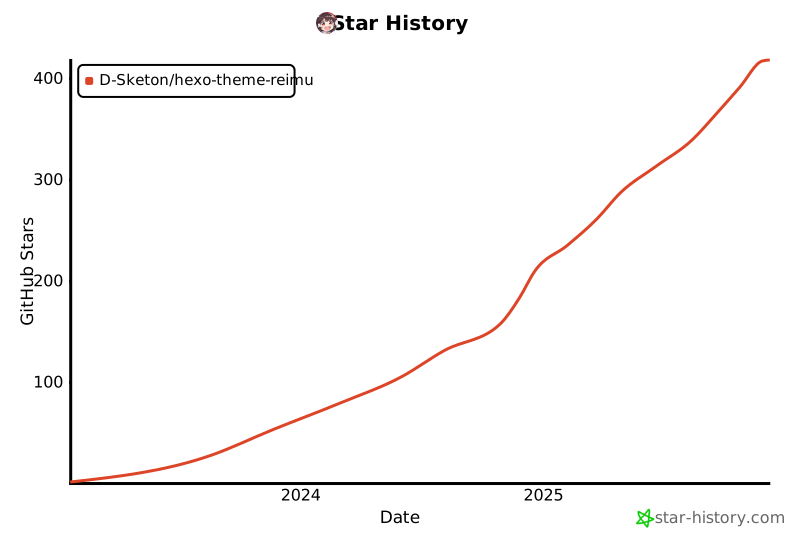](https://www.star-history.com/#D-Sketon/hexo-theme-reimu&type=date&legend=top-left)
## 许可
MIT