hexo-theme-kratos-rebirth
Version:
A transplanted theme for Hexo, with many new features built with love.
72 lines (48 loc) • 5.67 kB
Markdown

## 🍭 关于主题
一只移植的主题,兼具亮暗双主题,身负多种小挂件,短能卡片列首页,长能文章读更多,退可罗列全归档,进可搜索全文章,相关介绍可以参见[主题说明](https://candinya.com/posts/Kratos-Rebirth/)页面哦~
[](https://github.com/Candinya/Kratos-Rebirth/releases/latest)
[](https://www.npmjs.com/package/hexo-theme-kratos-rebirth)
[](https://kr-demo.candinya.com/)
[](https://app.fossa.com/projects/git%2Bgithub.com%2FCandinya%2FKratos-Rebirth?ref=badge_shield)
[样例站点](https://kr-demo.candinya.com)自动部署已经上线,具体可以参照这篇日志:[使用Github Actions部署主题样例站](https://candinya.com/posts/theme-demo-deployment-with-github-actions/)
全新的配置文档增加了!戳[这里](https://github.com/Candinya/Kratos-Rebirth/blob/master/Kratos-Rebirth-Manual.md)就能查看~
或者也可以去[我的博客](https://candinya.com/posts/Kratos-Rebirth/)踩踩哦~
核心结构&样式来源:[@MoeDog](https://github.com/xb2016) 狗狗大佬的[Kratos](https://github.com/xb2016/kratos)的某个上古版本
## 💞 安装使用
1. `hexo init your-awesome-blog` 初始化您的 Hexo 站点目录(已经完成则可以忽略)
2. 进入您的站点目录,使用 `npm install --save hexo-theme-kratos-rebirth` 或 `yarn add hexo-theme-kratos-rebirth` 安装主题。如果您有调整代码的需求,您也可以进入站点的主题目录,使用 git clone 本仓库来使用。
3. 修改站点目录下的 `_config.yml` 站点配置文件,将默认的 `theme: landscape` 修改成 `theme: kratos-rebirth`
4. 如有自定义配置的需要,为更有效地管理您的主题配置文件,您可以从该主题代码仓库中,手动复制一份 `_config.yml` ,并改名为 `_config.kratos-rebirth.yml` ,移动至您的站点目录下;或者您也可以参考 `.demo` 目录下的 `_config.kratos-rebirth.yml` 这个用于构建样例站点的配置文件扩展,将其移动至站点目录下。
**每一项配置项的具体解释可以参照[配置文档](https://kr-demo.candinya.com/posts/Kratos-Rebirth-Manual/)**。
## 🎁 使用环境小贴士
1. hexo的官方渲染器现在也已经支持文章置顶啦,配置`Front-Matter`段中的`sticky`参数即可实现置顶降序排序,可以参见生成器的[官方文档](https://github.com/hexojs/hexo-generator-index#usage)哦
2. 由于使用了 `?.` 运算符,在旧版本的 NodeJS 上可能出现工作不正常的情况,因而我们推荐您使用 Node v14 或更新的版本。详情请参见 [可选链操作符](https://developer.mozilla.org/zh-CN/docs/Web/JavaScript/Reference/Operators/Optional_chaining) 。
3. (如果您使用的是主题目录内的配置的方案,现在已经不推荐这种方案了)为了防止主题配置文件被上传导致版本管理冲突,主题的 `_config.yml` 文件是默认被忽略的( .gitignore ),如果您使用远程构建部署的方式(例如 Pages 或是 Vercel 等),您需要手动添加对主题配置文件的追踪,可以使用 `git add -f ./themes/kratos-rebirth/_config.yml` 来恢复追踪。
4. 如果发现代码块渲染样式出错(例如块代码被渲染成了行代码样式),可以试着检查一下是不是同时开启了 highlight 和 prismjs 的选项哦,主题对 highlight 的支持更佳呢
## 💬 支持的评论系统
- [Disqus](https://disqus.com)
- [DisqusJS](https://disqusjs.skk.moe/)
- [Valine](https://valine.js.org)
- [Twikoo](https://twikoo.js.org)
- [Waline](https://waline.js.org)
- [Gitalk](https://gitalk.github.io/)
- [LiveRe](https://livere.com/)
## 🍩 二次开发相关
为了保证最终上线产品的有效空间利用,我们引入了gulp对静态资源文件(js、css)进行压缩;因而您在src文件夹下直接修改的静态文件会无法实时生效,请安装gulp及相应的插件(在主题文件夹下 `npm install` 或是 `yarn` )。
您可以使用 `npm run build` 或是 `yarn build` 来构建一次静态文件。
同时,为方便变化内容实时更新和多浏览器测试开发,您可以使用 `npm run dev` 或是 `yarn dev` 来运行。我们也有引入 Browser Sync 功能方便地在多个浏览器上查看变化,**推荐**您在 Hexo 启动后运行该指令。
## 💮 非常感谢
- [Kratos-pjax](https://github.com/xb2016/kratos-pjax)
- [hexo-theme-sagiri](https://github.com/DIYgod/diygod.me/tree/master/themes/sagiri)
- [hexo-theme-suka](https://github.com/SukkaW/hexo-theme-suka)
- [hexo-theme-landscape](https://github.com/hexojs/hexo-theme-landscape)
- [APlayer](https://github.com/MoePlayer/APlayer)
- [NProgress](https://github.com/rstacruz/nprogress)
- [CloudFlare](https://www.cloudflare.com/)
- [jsDelivr](https://www.jsdelivr.com/)
- [unpkg](https://www.unpkg.com/)
- [npm](https://www.npmjs.com/)
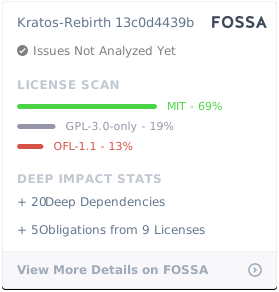
## 🎵 证书
- GNU General Public License v3
[](https://app.fossa.com/projects/git%2Bgithub.com%2FCandinya%2FKratos-Rebirth?ref=badge_large)