helmer
Version:
Node Implementation of Foreman
264 lines (180 loc) • 9.1 kB
Markdown
# Helmer
Helmer is a bleeding edge fork of [Node Foreman](https://github.com/NodeFly/node-foreman) a Node.js version of the popular
[Foreman](http://ddollar.github.com/foreman/) tool,
with a few Node specific changes.
> Foreman is a manager for Procfile-based applications.
> Its aim is to abstract away the details of the Procfile
> format, and allow you to either run your application
> directly or export it to some other process management format.
## Install
Install the command line tool
$ npm install -g helmer
All of Foremans version dependencies have been set to use `latest`.
If however you find a dependency should break it is possible to find out which dependency versions were last working with Foreman.
The `npm-shrinkwrap.json` file is updated each time Foreman is published to npm.
### How to Contribute
I encourage anyone and everyone to help.
If you have a specific change in mind, open an issue; we can talk about it there.
If you would like to make a code change, go ahead.
Fork the repository, open a pull request.
Do this early, and talk about the change you want to make.
Maybe we can work together on it.
Refactor Refactor Refactor!
You are free to add features, or just help clean things up.
## Usage
Node Foreman can be run with as little as `helmer start`, as long as `npm start` has been defined.
For more complicated applications you will want to define a `Procfile` for your various server
processes and and a `.env` file to preload environmental variables.
Your module directory should end up looking like the following:
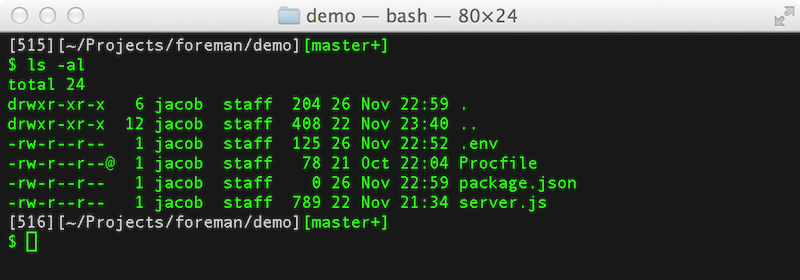
Once your Procfile is defined, run your application with `helmer start`:
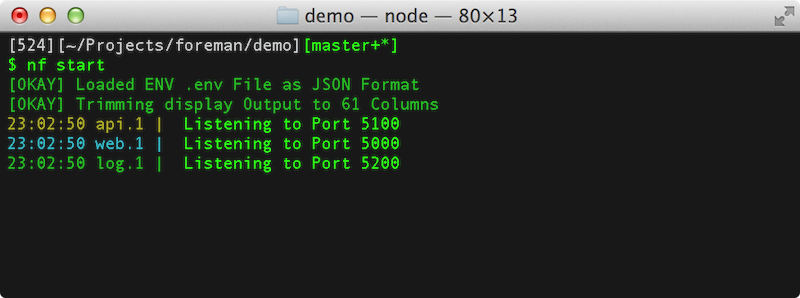
Node Foreman _always_ starts in the foreground and expects your applications
to do the same. If your processes exit, Node Foreman will assume an error
has ocurred and shut your application down.
Instead of daemonizing, you should use `helmer export` to ready your application
for production.
For more information try any of the following:
$ helmer --help
$ helmer start --help
$ helmer export --help
### Procfile
The `Procfile` format is a simple `key : command` format:
web: node web_server.js
api: node api_server.js
log: node log_server.js
Each line should contain a separate process.
### Environmental Variables
Create a `.env` file to pre-load environmental variables with the format:
MYSQL_NAME=superman
MYSQL_PASS=cryptonite
The equivalent `.env` file may alternatively be a valid JSON document:
{
"mysql":{
"name": "superman",
"pass": "cryptonite"
}
}
The above JSON document will be flattened into env variables by
concatenating the nested values with an underscore.
Environmental variables are passed in fully capitalized.
{
"mysql":{
"name": "superman", # => MYSQL_NAME=superman
"pass": "cryptonite" # => MYSQL_PASS=cryptonite
}
}
There is no need to specify which type of file you wish to use.
#### The PATH environment variable
The `PATH` variable is given special treament and is always read
from the environment that the `nf` command has been executed from,
rather than a `.env` file. To set a different `PATH` execute
`nf` with the `PATH` variable set appropriately.
```bash
PATH=/opt/foo:/opt/bar:$PATH helmer export
```
#### Best Practices
Generally you should not check your `.env` file into version control.
The `.env` file contain _only_ parameters that depend on where the application
gets deployed. It should not contain anything related to _how_ the application
is deployed.
For example, good candiates for the `.env` file are MySQL connection information,
port bindings, and other passwords.
### Advanced Usage
Node Foreman lets you start multiple jobs of the same type:
$ helmer start web=5
18:51:12: web.1 | Web Server started listening on 0.0.0.0:5000
18:51:12: web.2 | Web Server started listening on 0.0.0.0:5001
18:51:12: web.3 | Web Server started listening on 0.0.0.0:5002
18:51:12: web.4 | Web Server started listening on 0.0.0.0:5003
18:51:12: web.5 | Web Server started listening on 0.0.0.0:5004
Each job will be started as its own process, receiving a different `PORT`
environmental variable.
The port number for processes of the same type will be offset by 1.
The port number for processes of different types will be offset by 100.
$ helmer start web=2,api=2
18:51:12: web.1 | Web Server started listening on 0.0.0.0:5000
18:51:12: web.2 | Web Server started listening on 0.0.0.0:5001
18:51:12: api.1 | Api Server started listening on 0.0.0.0:5100
18:51:12: api.2 | Api Server started listening on 0.0.0.0:5101
## Export to Production
Node Foreman is designed to be in a development environment,
however it can export an Upstart job for use in production.
The Upstart file has _no_ dependency on Node Foreman.
$ helmer export
Loaded ENV .env File as JSON Format
Wrote : ./foreman-web-1.conf
Wrote : ./foreman-web.conf
Wrote : ./foreman-api-1.conf
Wrote : ./foreman-api.conf
Wrote : ./foreman-log-1.conf
Wrote : ./foreman-log.conf
Wrote : ./foreman.conf
You can inspect your upstart files before placing them in the right
directory, or have foreman do it for you:
$ sudo helmer export -o /etc/init
Loaded ENV .env File as JSON Format
Wrote : /etc/init/foreman-api-1.conf
Wrote : /etc/init/foreman-web.conf
Wrote : /etc/init/foreman-api.conf
Wrote : /etc/init/foreman-log.conf
Wrote : /etc/init/foreman-log-1.conf
Wrote : /etc/init/foreman-web-1.conf
Wrote : /etc/init/foreman.conf
Start and stop your jobs with
$ sudo start foreman
$ sudo stop foreman
The export will occur with whatever environmental variables are
listed in the .env file.
### Systemd Support
_This section is beta_
Optionally specify a type `-t systemd` during export for [systemd](http://www.freedesktop.org/wiki/Software/systemd) support.
### Advanced Exports
You can specify the type and number of processes exported using
the `type=num` syntax:
$ helmer export web=2,api=2
Use `-u <USER>` to have the exported job run as `USER`.
Note that if you need to bind to privileged ports, you _must_
start as `root`. In such a case, we advise you to drop user
permissions after binding.
If you want to call your upstart job something other than foreman,
use `-a <JOBNAME>` and manage your jobs with `sudo start <JOBNAME>`.
## Reverse Proxy
Node.js processes are supposed to be stateless.
Application scale by starting multiple processes that either share a socket,
or sit behind a load balancer.
Node Foreman can help you test the parallel capabilities of your application
by spawning multiple processes behind a round-robin proxy automatically.
$ helmer start -x 8888 web=5
[OKAY] Starting Proxy Server 8888 -> 5000-5004
Access your application from port `8888` and the connections will be balanced
across the servers started from ports `5000` - `5004`.
If your application gets its port number from `process.env.PORT` the proxy
setup will ocurr automatically.
### Multiple Reverse Proxies
If you have multiple processes in your `Procfile` you can start multiple proxies.
$ helmer start -x 8888,8080,9090
This will start 3 separate proxies and bind each to a separate process group.
Proxies are bound based on their order specified, their order in the Procfile,
or by their order on the command line.
$ helmer start -x 8888,9999 web,api
### Privileged Ports
Node Foreman disallows applications from starting on privileged ports.
It does however allow proxies to be bound to lower ports, such as port 80.
If you require access to a privileged port, start Node Foreman with `sudo`:
$ sudo helmer start -x 80 web=5
[OKAY] Starting Proxy Server 80 -> 5000-5004
Your application will then be accessible via port 80.
Your applications will _still_ be started in user space, and the proxy will
drop its privileges after binding to the privileged port.
## Forward Proxy
Local development and testing has huge advantages,
but sometimes one needs to test web applications agains their real-world domain name.
Editing `/etc/hosts` is a pain however, and error prone.
Node Foreman can start up an HTTP forward proxy which your browser can route requests through.
The forward proxy will intercept requests based on domain name, and route them to the local application.
$ helmer start -f 9999 -h nodefly.com
[OKAY] Forward Proxy Started in Port 9999
[OKAY] Intercepting requests to nodefly.com through forward proxy
A forward proxy is useful when testing OAuth, or other external services with application callbacks.
For users with Google Chrome, this can be paired with [Proxy Switch Sharp](http://switchy.samabox.com/) for great results.