halo-theme-dream
Version:
梦之城,童话梦境,动漫类型博客主题。
101 lines (61 loc) • 5.27 kB
Markdown
<p align="center">
<img src="https://cdn.jsdelivr.net/gh/nineya/halo-theme-dream/screenshot.png" alt="halo-theme-dream" width="180">
</p>
<h1 align="center">halo-theme-dream</h1>
<p align="center">
<a href="https://github.com/nineya/halo-theme-dream/releases"><img alt="releases" src="https://img.shields.io/github/release/nineya/halo-theme-dream.svg?style=flat-square"/></a>
<a href="https://github.com/nineya/halo-theme-dream/blob/master/LICENSE"><img alt="license" src="https://img.shields.io/github/license/nineya/halo-theme-dream?style=flat-square"/></a>
<a href="https://github.com/nineya/halo-theme-dream/releases"><img alt="downloads" src="https://img.shields.io/github/downloads/nineya/halo-theme-dream/total.svg?style=flat-square"/></a>
<a href="https://github.com/nineya/halo-theme-dream/releases"><img alt="size" src="https://img.shields.io/github/languages/code-size/nineya/halo-theme-dream?style=flat-square"/></a>
<a href="https://github.com/nineya/halo-theme-dream/commits"><img alt="commits" src="https://img.shields.io/github/last-commit/nineya/halo-theme-dream.svg?style=flat-square"/></a>
<a href="https://github.com/nineya/halo-theme-dream#donate"><img alt="donate" src="https://img.shields.io/badge/$-donate-ff69b4.svg?style=flat-square"/></a>
</p>
主题已完成 `Halo 2.0` 适配,2.x 的主题不在当前仓库维护,详见:https://github.com/nineya/halo-theme-dream2.0
## 一、预览
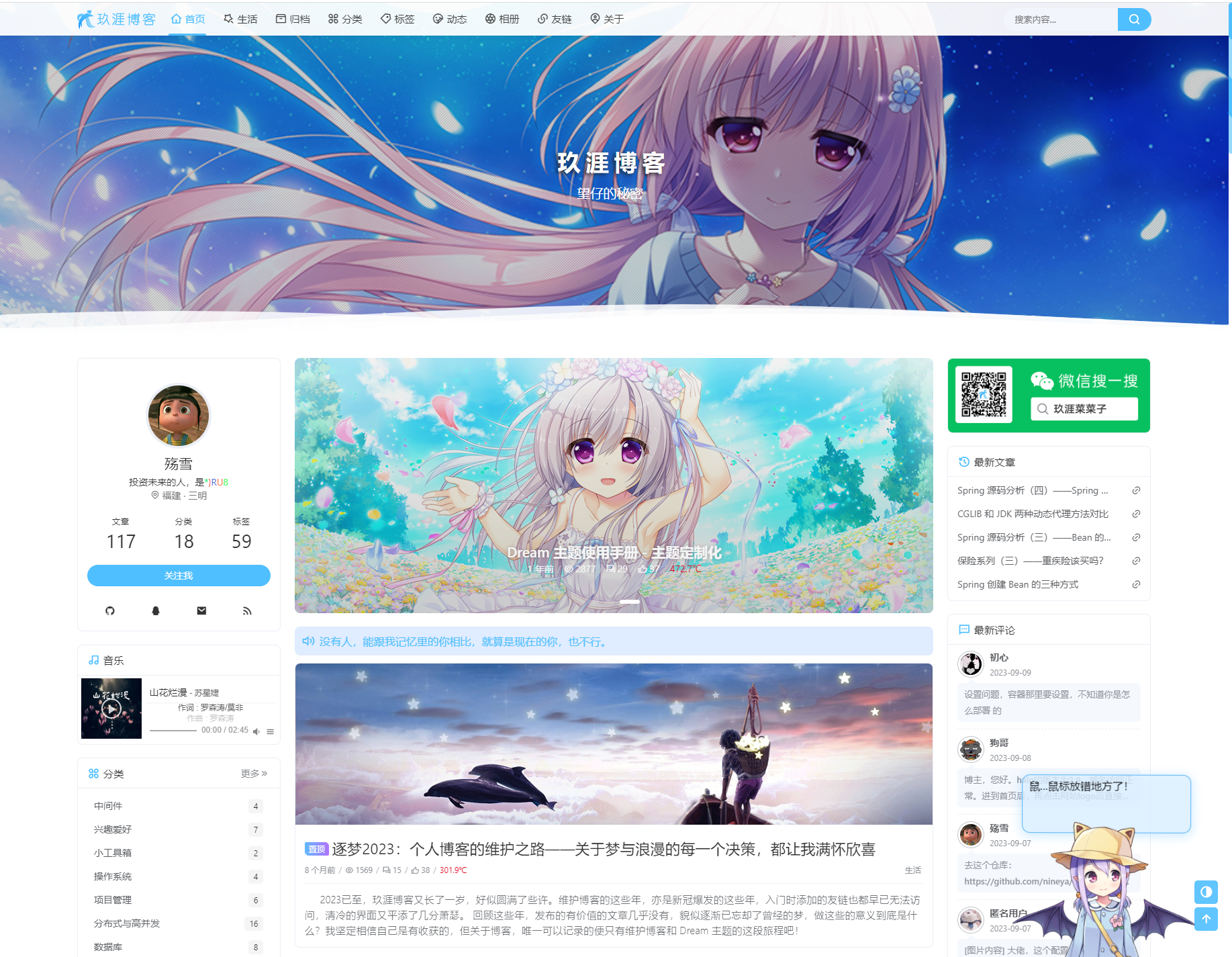
预览:[主题预览](https://github.com/nineya/halo-theme-dream/discussions/72)
> 如果你有计划长期使用 `Dream` 主题,也来[这里](https://github.com/nineya/halo-theme-dream/discussions/72)留下你的博客链接吧。
## 二、说明
梦之城,童话梦境,动漫类型博客主题。
关于主题使用上的一些问题可以参见 [主题使用手册-基础篇](https://blog.nineya.com/archives/94.html)
如有疑问,欢迎加入 <a target="_blank" href="https://qm.qq.com/cgi-bin/qm/qr?k=X7p7Bs21cgtkQ0dRfzmBsuWqNNQc10hn&jump_from=webapi">Dream 主题交流群:638168592</a>
欢迎参与主题开发的一些<a href="https://github.com/nineya/halo-theme-dream/discussions">问题探讨</a>
欢迎关注微信公众号《玖涯菜菜子》,主题版本更新消息与要点说明将在公众号发布。

## 三、版本适配关系
| 主题版本 | 适配Halo-Plus版本 | 测试用Halo-Plus版本 |
|----------|---------------|----------------|
| xx-2.3.1 | 1.0.0 | 1.0.0 |
| 3.0.0 | 1.0.1 | 1.0.1 |
| 3.0.1 | 1.0.2 | 1.0.2 |
当前仓库为适配 `Halo-Plus` 的仓库,与 `Halo` 官方的博客系统不兼容。
- 兼容 `Halo 1.x` 的分支(存档,不再维护):https://github.com/nineya/halo-theme-dream/tree/halo
- 兼容 `Haki 2.x` 的分支(维护中):https://github.com/nineya/halo-theme-dream2.0
## 四、安装 & 更新
### 4.1 安装包安装 & 更新
1. 进入主题 `Release` 界面:https://github.com/nineya/halo-theme-dream/releases 下载主题压缩包 `halo-theme-dream.zip` 压缩包文件;
2. 进入博客后台管理 `外观->主题->安装->本地上传`,选择下载的 `halo-theme-dream.zip` 安装包进行上传;
3. 等待安装完成;
4. 更新主题时同样前往主题 `Release` 界面下载主题安装包,然后通过 `外观->主题->Dream->更多->从主题包更新` 方法上传安装包进行更新。
### 4.2 在线安装 & 更新
1. 复制主题仓库地址 `https://github.com/nineya/halo-theme-dream.git`
2. 进入博客后台管理 `外观->主题->安装->远程下载`,黏贴仓库地址进行安装;
3. 等待安装完成;
4. 在线更新主题时,通过 `外观->主题->Dream->更多->在线更新` 方法进行更新。
> 在线安装 & 更新的方式不推荐:
>
> 1. 因为由于 `GitHub` 的网络问题,很大几率会安装& 更新失败;
> 2. 主题是经过源码编译的,直接从仓库下载包含了主题的源码以及开发所需的相关文件,这些文件并不是安装主题所需要的。
## 五、参与主题开发
> 推荐使用 IDEA 进行主题开发,能够比较好的支持 FreeMarker。
1. 开发环境准备
- 安装 `nodejs` 版本需要在 `15+`;
- 主题目录下执行 `npm i` 安装依赖;
2. npm 命令
- `npm run build` 执行主题打包操作,主题将被打包为压缩包文件存放在 `dist/` 目录下,同时 `source` 目录下的文件也将被更新。
- `npm run build --devel` 开发模式进行主题打包,`js` 和 `css` 不会被做压缩和混淆处理,方便排查问题。
- `npm run cdn --tag=$version` 创建 `FreeCDN` 清单文件,必须指定 `tag` 参数,值为本地代码将发布到 `GitHub` 仓库的版本标签。
- `npm run release --tag=$version` 发布模式执行主题打包操作,将自动更新主题中的版本号,并使用这个版本标签重新创建 `FreeCDN` 清单文件。
## 六、打赏项目
感谢您对本项目的喜爱,您的打赏是对本项目最好的支持!