hai-server
Version:
Serves JSON files through REST routes with authentication.
566 lines (410 loc) • 14.2 kB
Markdown
# HAI Server
[](https://github.com/sumn2u/hai-server/issues) [](https://github.com/sumn2u/hai-server/network) [](https://github.com/sumn2u/hai-server/stargazers) [](https://github.com/sumn2u/hai-server/blob/master/LICENSE) [](https://twitter.com/intent/tweet?text=Wow:&url=https%3A%2F%2Fgithub.com%2Fsumn2u%2Fhai-server)
[](https://GitHub.com/sumn2u/hai-server/tags/)
[](https://GitHub.com/sumn2u/hai-server/releases/)
[](https://GitHub.com/sumn2u/hai-server/graphs/commit-activity)
<a href="https://npmjs.com/package/hai-server"><img src="https://img.shields.io/npm/dt/hai-server.svg" alt="npm Downloads"></a>
<!-- tocstop -->
Inspired and Forked from [JSON Server](https://github.com/typicode/json-server)
Get a full fake REST API with authorization.
## Authentication using HAI Server
[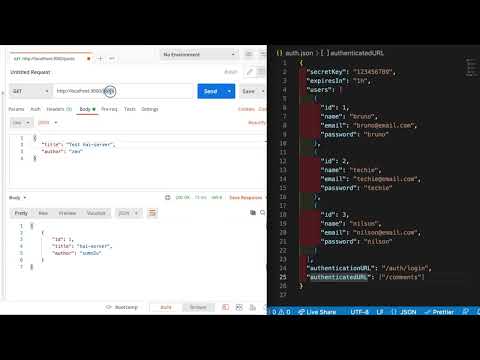](https://www.youtube.com/watch?v=R8DccIqyER4)
## Getting started
Install HAI Server
```
npm install -g hai-server
```
Create a `db.json` file with some data
```json
{
"posts": [
{ "id": 1, "title": "hai-server", "author": "sumn2u" }
],
"comments": [
{ "id": 1, "body": "some comment", "postId": 1 }
],
"profile": { "name": "sumn2u" }
}
```
Start HAI Server
```bash
hai-server --watch db.json
```
Now if you go to [http://localhost:3000/posts/1](http://localhost:3000/posts/1), you'll get
```json
{ "id": 1, "title": "hai-server", "author": "sumn2u" }
```
Also when doing requests, it's good to know that:
- If you make POST, PUT, PATCH or DELETE requests, changes will be automatically and safely saved to `db.json` using [lowdb](https://github.com/sumn2u/lowdb).
- Your request body JSON should be object enclosed, just like the GET output. (for example `{"name": "Foobar"}`)
- Id values are not mutable. Any `id` value in the body of your PUT or PATCH request will be ignored. Only a value set in a POST request will be respected, but only if not already taken.
- A POST, PUT or PATCH request should include a `Content-Type: application/json` header to use the JSON in the request body. Otherwise it will result in a 200 OK but without changes being made to the data.
## Routes
Based on the previous `db.json` file, here are all the default routes. You can also add [other routes](#add-custom-routes) using `--routes`.
### Plural routes
```
GET /posts
GET /posts/1
POST /posts
PUT /posts/1
PATCH /posts/1
DELETE /posts/1
```
### Singular routes
```
GET /profile
POST /profile
PUT /profile
PATCH /profile
```
### Filter
Use `.` to access deep properties
```
GET /posts?title=hai-server&author=sumn2u
GET /posts?id=1&id=2
GET /comments?author.name=sumn2u
```
### Paginate
Use `_page` and optionally `_limit` to paginate returned data.
In the `Link` header you'll get `first`, `prev`, `next` and `last` links.
```
GET /posts?_page=7
GET /posts?_page=7&_limit=20
```
_10 items are returned by default_
### Sort
Add `_sort` and `_order` (ascending order by default)
```
GET /posts?_sort=views&_order=asc
GET /posts/1/comments?_sort=votes&_order=asc
```
For multiple fields, use the following format:
```
GET /posts?_sort=user,views&_order=desc,asc
```
### Slice
Add `_start` and `_end` or `_limit` (an `X-Total-Count` header is included in the response)
```
GET /posts?_start=20&_end=30
GET /posts/1/comments?_start=20&_end=30
GET /posts/1/comments?_start=20&_limit=10
```
_Works exactly as [Array.slice](https://developer.mozilla.org/en/docs/Web/JavaScript/Reference/Global_Objects/Array/slice) (i.e. `_start` is inclusive and `_end` exclusive)_
### Operators
Add `_gte` or `_lte` for getting a range
```
GET /posts?views_gte=10&views_lte=20
```
Add `_ne` to exclude a value
```
GET /posts?id_ne=1
```
Add `_like` to filter (RegExp supported)
```
GET /posts?title_like=server
```
### Full-text search
Add `q`
```
GET /posts?q=internet
```
### Relationships
To include children resources, add `_embed`
```
GET /posts?_embed=comments
GET /posts/1?_embed=comments
```
To include parent resource, add `_expand`
```
GET /comments?_expand=post
GET /comments/1?_expand=post
```
To get or create nested resources (by default one level, [add custom routes](#add-custom-routes) for more)
```
GET /posts/1/comments
POST /posts/1/comments
```
### Database
```
GET /db
```
### Homepage
Returns default index file or serves `./public` directory
```
GET /
```
## Extras
### Static file server
You can use HAI Server to serve your HTML, JS and CSS, simply create a `./public` directory
or use `--static` to set a different static files directory.
```bash
mkdir public
echo 'hello world' > public/index.html
hai-server db.json
```
```bash
hai-server db.json --static ./some-other-dir
```
### Alternative port
You can start HAI Server on other ports with the `--port` flag:
```bash
$ hai-server --watch db.json --port 3004
```
### Access from anywhere
You can access your fake API from anywhere using CORS and JSONP.
### Remote schema
You can load remote schemas.
```bash
$ hai-server http://example.com/file.json
$ hai-server http://jsonplaceholder.sumn2u.com/db
```
### Generate random data
Using JS instead of a JSON file, you can create data programmatically.
```javascript
// index.js
module.exports = () => {
const data = { users: [] }
// Create 1000 users
for (let i = 0; i < 1000; i++) {
data.users.push({ id: i, name: `user${i}` })
}
return data
}
```
```bash
$ hai-server index.js
```
__Tip__ use modules like [Faker](https://github.com/Marak/faker.js), [Casual](https://github.com/boo1ean/casual), [Chance](https://github.com/victorquinn/chancejs) or [JSON Schema Faker](https://github.com/json-schema-faker/json-schema-faker).
### HTTPS
There are many ways to set up SSL in development. One simple way is to use [hotel](https://github.com/sumn2u/hotel).
### Add custom routes
Create a `routes.json` file. Pay attention to start every route with `/`.
```json
{
"/api/*": "/$1",
"/:resource/:id/show": "/:resource/:id",
"/posts/:category": "/posts?category=:category",
"/articles\\?id=:id": "/posts/:id"
}
```
Start HAI Server with `--routes` option.
```bash
hai-server db.json --routes routes.json
```
Now you can access resources using additional routes.
```sh
/api/posts # → /posts
/api/posts/1 # → /posts/1
/posts/1/show # → /posts/1
/posts/javascript # → /posts?category=javascript
/articles?id=1 # → /posts/1
```
### Add middlewares
You can add your middlewares from the CLI using `--middlewares` option:
```js
// hello.js
module.exports = (req, res, next) => {
res.header('X-Hello', 'World')
next()
}
```
```bash
hai-server db.json --middlewares ./hello.js
hai-server db.json --middlewares ./first.js ./second.js
```
### CLI usage
```
hai-server [options] <source>
Options:
--config, -c Path to config file [default: "hai-server.json"]
--port, -p Set port [default: 3000]
--host, -H Set host [default: "localhost"]
--watch, -w Watch file(s) [boolean]
--routes, -r Path to routes file
--middlewares, -m Paths to middleware files [array]
-- auth, -a Authentication file
--static, -s Set static files directory
--read-only, --ro Allow only GET requests [boolean]
--no-cors, --nc Disable Cross-Origin Resource Sharing [boolean]
--no-gzip, --ng Disable GZIP Content-Encoding [boolean]
--snapshots, -S Set snapshots directory [default: "."]
--delay, -d Add delay to responses (ms)
--id, -i Set database id property (e.g. _id) [default: "id"]
--foreignKeySuffix, --fks Set foreign key suffix, (e.g. _id as in post_id)
[default: "Id"]
--quiet, -q Suppress log messages from output [boolean]
--help, -h Show help [boolean]
--version, -v Show version number [boolean]
Examples:
hai-server db.json
hai-server file.js
hai-server http://example.com/db.json
https://github.com/sumn2u/hai-server
```
You can also set options in a `hai-server.json` configuration file.
```json
{
"port": 3000
}
```
### Module
If you need to add authentication, validation, or __any behavior__, you can use the project as a module in combination with other Express middlewares.
#### Simple example
```sh
$ npm install hai-server --save-dev
```
```js
// server.js
const jsonServer = require('hai-server').haijsServer
const server = jsonServer.create()
const router = jsonServer.router('db.json')
const middlewares = jsonServer.defaults()
server.use(middlewares)
server.use(router)
server.listen(3000, () => {
console.log('HAI Server is running')
})
```
```sh
$ node server.js
```
The path you provide to the `jsonServer.router` function is relative to the directory from where you launch your node process. If you run the above code from another directory, it’s better to use an absolute path:
```js
const path = require('path')
const router = jsonServer.router(path.join(__dirname, 'db.json'))
```
For an in-memory database, simply pass an object to `jsonServer.router()`.
Please note also that `jsonServer.router()` can be used in existing Express projects.
#### Custom routes example
Let's say you want a route that echoes query parameters and another one that set a timestamp on every resource created.
```js
const jsonServer = require('hai-server').haijsServer
const server = jsonServer.create()
const router = jsonServer.router('db.json')
const middlewares = jsonServer.defaults()
// Set default middlewares (logger, static, cors and no-cache)
server.use(middlewares)
// Add custom routes before HAI Server router
server.get('/echo', (req, res) => {
res.jsonp(req.query)
})
// To handle POST, PUT and PATCH you need to use a body-parser
// You can use the one used by HAI Server
server.use(jsonServer.bodyParser)
server.use((req, res, next) => {
if (req.method === 'POST') {
req.body.createdAt = Date.now()
}
// Continue to HAI Server router
next()
})
// Use default router
server.use(router)
server.listen(3000, () => {
console.log('HAI Server is running')
})
```
#### Access control example
Create a file name `auth.json` similar like the one shown below. Provide your own `secretKey`, `expiresIn`, and collection of authenticated users. Here the `authenticatedURL` indicates the collection of URL's that needs authorization and `authenticationURL` is the URL to get accesstoken.
```json
{
"secretKey":"123456789",
"expiresIn": "1h",
"users": [
{
"id": 1,
"name": "bruno",
"email": "bruno@email.com",
"password": "bruno"
},
{
"id": 2,
"name": "techie",
"email": "techie@email.com",
"password": "techie"
},
{
"id": 3,
"name": "nilson",
"email": "nilson@email.com",
"password": "nilson"
}
],
"authenticationURL":"/auth/login",
"authenticatedURL":["/users"]
}
```
```
hai-server --watch db.json --auth auth.json --port 3000
```
## How to login?
You can login by sending a POST request to
```json
POST http://localhost:3000/auth/login
```
with the following data
```json
{
"email": "nilson@email.com",
"password":"nilson"
}
```
You should receive an access token with the following format
```json
{
"access_token": "<ACCESS_TOKEN>"
}
```
You should send this authorization with any request to the protected endpoints
```json
Authorization: Bearer <ACCESS_TOKEN>
```
#### Custom output example
To modify responses, overwrite `router.render` method:
```javascript
// In this example, returned resources will be wrapped in a body property
router.render = (req, res) => {
res.jsonp({
body: res.locals.data
})
}
```
You can set your own status code for the response:
```javascript
// In this example we simulate a server side error response
router.render = (req, res) => {
res.status(500).jsonp({
error: "error message here"
})
}
```
#### Rewriter example
To add rewrite rules, use `jsonServer.rewriter()`:
```javascript
// Add this before server.use(router)
server.use(jsonServer.rewriter({
'/api/*': '/$1',
'/blog/:resource/:id/show': '/:resource/:id'
}))
```
#### Mounting HAI Server on another endpoint example
Alternatively, you can also mount the router on `/api`.
```javascript
server.use('/api', router)
```
#### API
__`jsonServer.create()`__
Returns an Express server.
__`jsonServer.defaults([options])`__
Returns middlewares used by HAI Server.
| Option | Description | Default |
|-------------|------------------------------------------------|-----------|
| `static` | Path to static files | - |
| `logger` | Enable logger middleware | `true` |
| `bodyParser`| Enable body-parser middleware | `true` |
| `noCors` | Disable CORS | `false` |
| `readOnly` | Accept only GET requests | `false` |
__`jsonServer.router([path|object])`__
Returns HAI Server router.
## License
[MIT](./LICENSE)