gwitter
Version:
Turn GitHub Issues into your personal microblog platform
380 lines (291 loc) • 13.4 kB
Markdown
# Gwitter
[中文版本](README.zh_CN.md)
## 🎮 Playground
- **🌐 Live Demo**: [https://simonaking.com/Gwitter](https://simonaking.com/Gwitter) - Experience Gwitter in action
- **💭 Share Your Thoughts**: [Create an Issue](https://github.com/SimonAKing/Gwitter/issues) to join the conversation
- **📚 Browse Discussions**: Explore existing thoughts and insights on the demo site
## ✨ Project Introduction
✨ **The Story Behind "Gwitter"**
Ever wondered what happens when you combine the world's most powerful issue tracker with the globe's favorite microblogging platform? 🤔
**GitHub Issues** 📝 = The unsung hero of note-taking (seriously, it's brilliant!)
**Twitter** 🐦 = Where thoughts become conversations worldwide
**Gwitter** 🚀 = Turn GitHub Issues into your personal microblog platform!
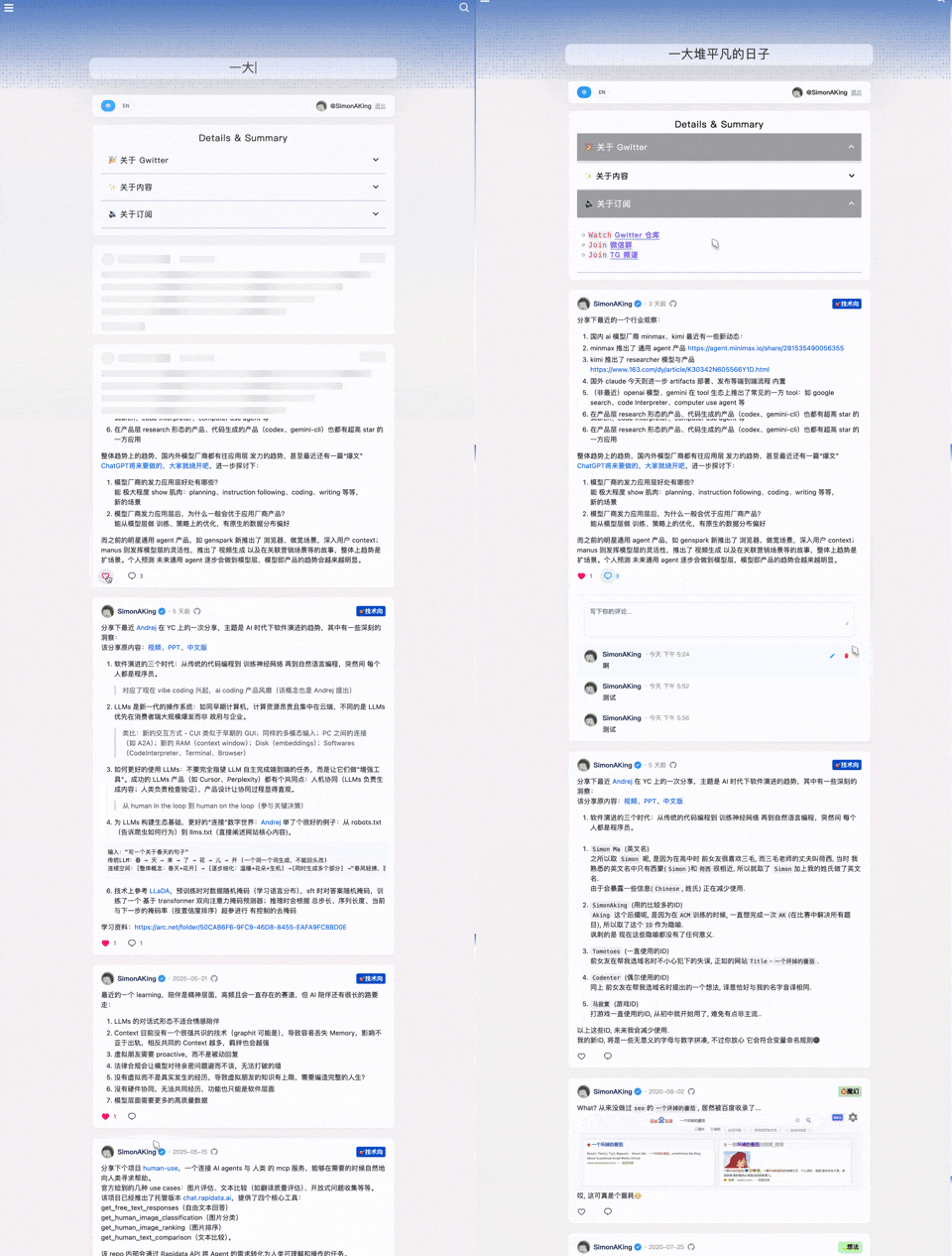
> **📱 Author's Gwitter**: [https://simonaking.com/blog/weibo/](https://simonaking.com/blog/weibo/) - See how Gwitter is used in practice
Gwitter is a lightweight microblogging application built on GitHub Issues. It records my thoughts on technology, life insights, and interesting discoveries. Welcome to join the discussion!
## 🚀 Key Features
1. 📝 GitHub Issues Based
- Utilizes GitHub Issues as content storage, supporting GitHub's label system for content categorization
2. 👍 Social Interaction
- Like Feature: Supports GitHub Reactions (👍 ❤️ 😄 😮 😢 😡 🚀 👀)
- Comment System: Complete commenting functionality with nested replies support
3. ✨ Visual Experience
- Beautiful Animations: Smooth page animations using Framer Motion
- Responsive Design: Perfect adaptation for desktop, tablet, and mobile devices
- Skeleton Screen: Elegant loading state display
4. 🌐 User Experience
- Internationalization Support: Built-in Chinese and English bilingual support
- Infinite Scroll: Smart pagination loading for smooth browsing experience
5. 🤖 Automated Synchronization
- Multi-platform Sync: Automatically sync newly published Issues to other platforms via GitHub Actions
## 📝 Usage Instructions
### Publishing Content
1. Create a new Issue in the configured GitHub repository
2. Write content using Markdown format
3. Add appropriate labels for categorization
4. Content will automatically sync to the gwitter application after publishing
<img src="./docs/issue.png" alt="Create issue example" width="500">
### Content Management
- **Edit**: Edit directly in GitHub Issues
- **Delete**: Close the corresponding Issue
- **Categorize**: Use GitHub Labels for content categorization
- **Pin**: Control display order through Issue creation sequence
### 🤖 Automated Synchronization Configuration
Gwitter supports automatically syncing newly published Issues to Telegram and GitHub Gist via GitHub Actions.
1. **Create Sync Script**
- Refer to [sync.js](https://github.com/SimonAKing/weibo/blob/master/sync.js) implementation
- Create `.github/workflows/sync.yml` in the repository
2. **Configure Environment Variables**
In GitHub repository Settings > Secrets and variables
3. **Telegram Configuration**
- Create Telegram Bot (via @BotFather)
- Get Bot Token and target channel/group Chat ID
- Add Bot to target channel and grant admin permissions
## 🛠️ Tech Stack
- **Frontend Framework**: React 18 + TypeScript
- **Build Tool**: Rsbuild (Fast build tool based on Rspack)
- **Styling Solution**: Emotion (CSS-in-JS)
- **Animation Library**: Framer Motion + React Flip Move
- **State Management**: React Hooks
- **Network Requests**: Axios + GitHub GraphQL API
- **Internationalization**: i18next
- **Code Standards**: ESLint + Prettier
```
Gwitter/
├── src/ # Main source code
│ ├── components/ # React components
│ │ ├── common/ # Shared UI components
│ │ ├── About.tsx # About page component
│ │ ├── CommentInput.tsx # Comment input component
│ │ └── ...
│ ├── hooks/ # Custom React hooks
│ │ └── useAuth.tsx # Authentication hook
│ ├── utils/ # Utility functions
│ │ ├── cache.ts # Caching utilities
│ │ ├── request.ts # API request utilities
│ │ └── index.ts # Common utilities
│ ├── config/ # Configuration files
│ │ └── index.ts # Main configuration
│ ├── i18n/ # Internationalization
│ │ ├── index.ts # i18n setup
│ │ └── locales/ # Language files
│ ├── types/ # TypeScript type definitions
│ │ └── global.d.ts # Global types
│ └── lib/ # External libraries
│ └── collapse.js # UI collapse functionality
├── demo/ # Demo examples
│ ├── npm-demo/ # NPM/React demo
│ │ ├── src/ # React source files
│ │ │ ├── App.tsx # Main demo component
│ │ │ ├── config/ # Demo configuration
│ │ │ └── ...
│ │ ├── package.json # Dependencies
│ │ └── vite.config.ts # Build config
│ ├── umd-demo/ # UMD/Browser demo
│ │ └── index.html # Complete HTML demo
│ └── README.md # Demo documentation
├── docs/ # Documentation assets
│ └── *.png # Setup screenshots
└── dist/ # Built files for distribution
├── gwitter.min.js # UMD bundle
└── gwitter.min.css # Styles
```
## 📦 Installation & Usage
> 🎯 **Quick Start**: Check out our [live demos](./demo/) to see Gwitter in action!
### 📖 Demo Examples
Two demo examples to get you started:
#### 🔧 [NPM Demo](./demo/npm-demo/) - React Development
For modern React applications with build tools.
```bash
cd demo/npm-demo
npm install
npm run dev
```
#### 🌐 [UMD Demo](./demo/umd-demo/) - Browser Integration
For existing websites without build tools.
```html
<!-- Just open index.html in your browser -->
<script src="https://unpkg.com/gwitter/dist/gwitter.min.js"></script>
<link rel="stylesheet" href="https://unpkg.com/gwitter/dist/gwitter.min.css">
```
#### 📋 Setup Requirements
Both demos need GitHub configuration:
1. Create a GitHub repository for your content
2. Generate a Personal Access Token with `repo` and `read:user` permissions
3. Create a GitHub OAuth Application
4. Update demo config files with your details
See [Configuration Setup](#3-configuration-setup) for detailed instructions.
### Method 1: NPM Installation (Recommended)
For modern JavaScript projects using module bundlers:
#### Requirements
- **React**: ^18.0.0 or higher
- **React DOM**: ^18.0.0 or higher
#### Installation
```bash
npm install gwitter react react-dom
# or
yarn add gwitter react react-dom
```
#### Usage
```javascript
import gwitter from 'gwitter';
import 'gwitter/dist/gwitter.min.css';
gwitter({
container: document.getElementById('comments'),
config: {
request: {
// GitHub Personal Access Token
token: ['your_token_part1', 'your_token_part2'],
// OAuth configuration
clientID: 'your_github_oauth_client_id',
clientSecret: 'your_github_oauth_client_secret',
// GitHub repository configuration
owner: 'your_github_username',
repo: 'your_repo_name',
// Pagination configuration
pageSize: 6,
// CORS proxy (optional)
autoProxy: 'https://cors-anywhere.azm.workers.dev/https://github.com/login/oauth/access_token',
},
app: {
// Application feature toggles
onlyShowOwner: false,
enableRepoSwitcher: false,
enableAbout: false,
enableEgg: false,
},
}
});
```
### Method 2: UMD (Browser)
For direct browser usage without build tools:
```html
<!-- Include React and ReactDOM -->
<script crossorigin src="https://unpkg.com/react@18/umd/react.production.min.js"></script>
<script crossorigin src="https://unpkg.com/react-dom@18/umd/react-dom.production.min.js"></script>
<!-- Include Gwitter -->
<script src="https://unpkg.com/gwitter/dist/gwitter.min.js"></script>
<link rel="stylesheet" href="https://unpkg.com/gwitter/dist/gwitter.min.css">
<script>
gwitter({
container: document.getElementById('comments'),
config: {
request: {
// GitHub Personal Access Token
token: ['your_token_part1', 'your_token_part2'],
// OAuth configuration
clientID: 'your_github_oauth_client_id',
clientSecret: 'your_github_oauth_client_secret',
// GitHub repository configuration
owner: 'your_github_username',
repo: 'your_repo_name',
// Pagination configuration
pageSize: 6,
// CORS proxy (optional)
autoProxy: 'https://cors-anywhere.azm.workers.dev/https://github.com/login/oauth/access_token',
},
app: {
// Application feature toggles
onlyShowOwner: false,
enableRepoSwitcher: false,
enableAbout: false,
enableEgg: false,
},
}
});
</script>
```
### 3. Configuration Setup
Before using Gwitter, you need to set up GitHub configuration:
#### 3.1 Create GitHub Repository
1. Create a new repository on GitHub to store your microblog content
2. Record the repository's `owner` (username) and `repo` (repository name)
> Similar to https://github.com/SimonAKing/weibo/issues
<img src="./docs/repo.png" alt="GitHub repository example" width="500">
#### 3.2 Apply for GitHub Personal Access Token
1. Visit [GitHub Settings > Developer settings > Personal access tokens](https://github.com/settings/tokens)
2. Click "Generate new token (classic)"
<img src="./docs/token.png" alt="Generate new token" width="500">
3. Select the following permissions:
- `repo` (Full repository access)
- `read:user` (Read user information)
4. Generate and save the token
<img src="./docs/token_premission.png" alt="Token permissions" width="500">
#### 3.3 Create GitHub OAuth Application
1. Visit [GitHub Settings > Developer settings > OAuth Apps](https://github.com/settings/developers)
2. Click "New OAuth App"
<img src="./docs/oauth.png" alt="OAuth Apps" width="500">
3. Fill in application information:
- **Application name**: Gwitter
- **Homepage URL**: Your deployment domain
- **Authorization callback URL**: Your deployment domain
4. After creation, obtain `Client ID` and `Client Secret`
### 4. API Reference
#### `gwitter(options)`
Main function to initialize and render Gwitter.
**Parameters:**
- `options` (Object): Configuration options for Gwitter
**options.container** (HTMLElement | string) - **Required**
- The DOM element or CSS selector where Gwitter will be rendered
- Example: `document.getElementById('comments')` or `'#comments'`
**options.config** (Object) - **Required**
- Configuration object containing request and app settings
**options.config.request** (Object) - **Required**
- GitHub API and authentication configuration
| Property | Type | Required | Description | Example |
|----------|------|----------|-------------|---------|
| `token` | `string[]` | ✅ | GitHub Personal Access Token split into two parts for security | `['ghp_xxxx', 'xxxx']` |
| `clientID` | `string` | ✅ | GitHub OAuth Application Client ID | `'your_client_id'` |
| `clientSecret` | `string` | ✅ | GitHub OAuth Application Client Secret | `'your_client_secret'` |
| `owner` | `string` | ✅ | GitHub repository owner (username) | `'your_username'` |
| `repo` | `string` | ✅ | GitHub repository name | `'your_repo_name'` |
| `pageSize` | `number` | ❌ | Number of issues to load per page (default: 6) | `6` |
| `autoProxy` | `string` | ❌ | CORS proxy URL for OAuth requests | `'https://cors-anywhere.azm.workers.dev/https://github.com/login/oauth/access_token'` |
**options.config.app** (Object) - **Optional**
- Application behavior configuration
| Property | Type | Default | Description | Example |
|----------|------|---------|-------------|---------|
| `onlyShowOwner` | `boolean` | `false` | Show only repository owner's issues | `false` |
| `enableRepoSwitcher` | `boolean` | `false` | Enable repository switching functionality | `false` |
| `enableAbout` | `boolean` | `false` | Show About page/section | `false` |
| `enableEgg` | `boolean` | `false` | Enable easter egg features | `false` |
**Returns:**
- `Promise<void>` - Resolves when Gwitter is successfully initialized
**Example:**
```javascript
gwitter({
container: '#comments',
config: {
request: {
token: ['ghp_xxxx', 'xxxx'],
clientID: 'your_client_id',
clientSecret: 'your_client_secret',
owner: 'your_username',
repo: 'your_repo_name',
pageSize: 10,
},
app: {
onlyShowOwner: true,
enableAbout: true,
}
}
});
```
## 🤝 Contributing
Issues and Pull Requests are welcome!
---
<div align="center">
**Thank you for your attention and support!**
If you like this project, don't forget to give it a ⭐!
Made with ❤️ by [SimonAKing](https://github.com/SimonAKing)
</div>