gulp-print-spacesavings
Version:
This Gulp plugin prints space savings for any Gulp compression plugin, such as gulp-uglify, gulp-clean-css, etc. Space savings is the reduction in size relative to the uncompressed size.
59 lines (44 loc) • 2.21 kB
Markdown
# gulp-print-spacesavings
[](https://badge.fury.io/js/gulp-print-spacesavings) [](https://travis-ci.org/ova2/gulp-print-spacesavings)
This Gulp plugin prints space savings for any Gulp compression plugins, like gulp-uglify, gulp-clean-css, etc. Space savings is the reduction in size relative to the uncompressed size.
__Space Savings in % = 1 - Compressed Size / Uncompressed Size__
See [Wikipedia][Wikipedia] for more information.
## Install
```sh
$ npm install gulp-print-spacesavings --save-dev
```
## Usage
The plugin has zero configuration. There are two methods `init` and `print` which should be called __before__ and __after__ any Gulp compression plugin respectively. An example for `gulp-clean-css` and `gulp-uglify` is shown below.
```js
var gulp = require('gulp');
var cleanCSS = require('gulp-clean-css');
var uglify = require('gulp-uglify');
var printSpaceSavings = require('gulp-print-spacesavings');
...
gulp.task('styles', function() {
return gulp.src('app/css/*.css')
.pipe(plumber())
.pipe(concat('all.css'))
.pipe(autoprefix('last 2 versions'))
.pipe(printSpaceSavings.init())
.pipe(cleanCSS())
.pipe(printSpaceSavings.print())
.pipe(gulp.dest('dist/'));
});
gulp.task('scripts', function() {
return gulp.src('app/js/*.js')
.pipe(plumber())
.pipe(jshint())
.pipe(jshint.reporter('jshint-stylish'))
.pipe(sourcemaps.init())
.pipe(printSpaceSavings.init())
.pipe(uglify())
.pipe(printSpaceSavings.print())
.pipe(sourcemaps.write('.'))
.pipe(gulp.dest('dist/'));
});
```
The output is displayed in the form of a table.
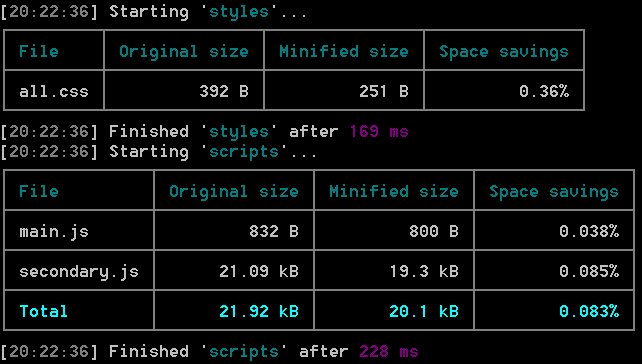
As you can see, the plugin also displays a footer with total uncompressed, compressed sizes and space savings if there are more than one file.
[Wikipedia]: https://en.wikipedia.org/wiki/Data_compression_ratio