grunt-mock2easy
Version:
通过nodejs的服务实现ajax的跨域访问,利用mockjs动态生成json接口,模拟各种恶略环境测试系统是否健全,测试接口生成接口文档
78 lines (77 loc) • 11.2 kB
JSON
{
"name": "grunt-mock2easy",
"description": "通过nodejs的服务实现ajax的跨域访问,利用mockjs动态生成json接口,模拟各种恶略环境测试系统是否健全,测试接口生成接口文档",
"version": "0.4.3",
"homepage": "https://github.com/appLhui/grunt-mock2easy",
"author": {
"name": "mofei",
"email": "mofei.lh@alibaba-inc.com"
},
"repository": {
"type": "git",
"url": "git@github.com:appLhui/grunt-mock2easy.git"
},
"licenses": [
{
"type": "MIT",
"url": "/blob/master/LICENSE-MIT"
}
],
"engines": {
"node": ">= 0.8.0"
},
"scripts": {
"test": "grunt test",
"build": "browserify -t brfs ./tasks/web/app/app.js -o ./tasks/web/public/bundle.js"
},
"peerDependencies": {
"grunt": "~0.4.0"
},
"keywords": [
"mock",
"gruntplugin",
"mockjs",
"jsonp",
"postman"
],
"dependencies": {
"async": "~0.9.0",
"colors": "~0.6.2",
"mock2easy": ">=0.0.5",
"underscore": "~1.7.0"
},
"_id": "grunt-mock2easy@0.3.18",
"_from": "grunt-mock2easy@",
"bugs": {
"url": "https://github.com/appLhui/grunt-mock2easy/issues"
},
"dist": {
"shasum": "44d815e87623dd408612b39239de2e36f107009d",
"size": 1417090,
"noattachment": false,
"key": "grunt-mock2easy/-/grunt-mock2easy-0.2.31.tgz",
"tarball": "http://registry.npm.alibaba-inc.com/grunt-mock2easy/download/grunt-mock2easy-0.2.31.tgz"
},
"_npmVersion": "1.4.3",
"_npmUser": {
"name": "applelihui",
"email": "lhui3it@gmail.com"
},
"maintainers": [
{
"name": "applelihui",
"email": "lhui3it@gmail.com"
},
{
"name": "liuyangbeta",
"email": "liuyang@mrcoder.org"
}
],
"directories": {},
"publish_time": 1419672078526,
"_cnpm_publish_time": 1419672078526,
"_shasum": "44d815e87623dd408612b39239de2e36f107009d",
"_resolved": "https://registry.npmjs.org/grunt-mock2easy/-/grunt-mock2easy-0.3.18.tgz",
"readmeFilename": "README.md",
"readme": "# grunt-mock2easy\n\n> Implement ajax cross-domain access through the service in nodejs. Use Curl to access to the interface. Ulitize mockjs to generate json interface dynamically. Support jsonp format, simulate various server environment, test the interfaces and generate the interface documents. \n\n> 通过nodejs的服务实现ajax的跨域访问,使用Curl获取接口,利用mockjs动态生成json接口,支持jsonp格式,模拟多种服务器环境,测试接口并且生成接口文档\n\n## Demo\n\nclick [grunt-mock2easy-demo](https://github.com/appLhui/grunt-mock2easy-demo) \n\n\n## 1. Getting Started\nThis plugin requires Grunt `~0.4.5`\n\nIf you haven't used [Grunt](http://gruntjs.com/) before, be sure to check out the [Getting Started](http://gruntjs.com/getting-started) guide, as it explains how to create a [Gruntfile](http://gruntjs.com/sample-gruntfile) as well as install and use Grunt plugins. Once you're familiar with that process, you may install this plugin with this command:\n\n```shell\nnpm install grunt-mock2easy --save-dev\n```\n\nOnce the plugin has been installed, it may be enabled inside your Gruntfile with this line of JavaScript:\n\n```js\ngrunt.loadNpmTasks('grunt-mock2easy');\n```\n\n## 2. The \"mock2easy\" task\n\n### Overview\nIn your project's Gruntfile, add a section named `mock2easy` to the data object passed into `grunt.initConfig()`.\n\n\n```js\n\n//DEMO 1\n\n// access the local static mock data \n// 访问本地静态mock数据\ngrunt.initConfig({\n mock2easy: {\n test:{\n options: {\n port:3000,\n lazyLoadTime:3000, \n database:'database',\n doc:'doc', \n keepAlive:true, \n ignoreField:['__preventCache'], \n interfaceSuffix:'.json'\n preferredLanguage:'en' \n }\n }\n },\n});\n\n\n//DEMO 2\n\n// access the interface data of the server using Curl \n// (Solve the alignment difficulties. All interfaces will \n// automatically proceed cross-domain access. If it is a \n// Windows system, please install the curl command) for system)\n\n// 通过Curl访问服务端的接口数据(解决联调困难,所有接口自动进\n// 行跨域访问,如果是 windows系统,请先为系统安装 curl 命令)\n\n mock2easy: {\n test: {\n options: {\n port: 3000,\n lazyLoadTime:3000, \n database: 'database',\n keepAlive: false,\n ignoreField: ['__preventCache', 'secToken'],\n interfaceSuffix:'.json' \n curl: { \n domain: 'http://hello.console.demo.com', \n parameter: { \n secToken: 'jimZPPU1MZtLmjFXnxCl22'\n },\n Cookie: 'kRm9JWrHB9%2B%2Bq84dcf4tLAUfECcVq5NknX2Rs9ic'\n }\n }\n }\n }\n\n```\n\n### Options\n\n#### options.port\n\nType: `Number`\n\nDefault value: 3000\n\nservice port of the starting service\n\n启动的服务的端口号\n \n\n#### options.lazyLoadTime\n\nType: `Number`\n\nDefault value: 3000\n\nenable lazy-loading interface, the delayed time of executing the interface \n\n启动接口延时加载,调用接口的延迟时间 \n\n#### options.database\n\nType: `String`\n\nDefault value: `mock2easy`\n\nlocation of the generated interface data \n\n接口数据的生成位置\n\n#### options.doc\n\nType: `String`\n\nDefault value: `doc`\n\nlocation of the generated interface documents\n\n接口文档的生成位置\n\n#### options.keepAlive\n\nType: `Boolean`\n\nDefault value: true\n\nDefault value is true. If the value is true, a separate service interface will be executed to support. If the value is false, the service will be task list\n\n默认为`true`,`true`时可以独立起一个服务提供接口,`false`时可以和别的grunt服务组合成为一个任务串\n\n\n#### options.curl\n\nType: `Object`\n\nDefault value: false\n\nBy default leave it blank. If not empty then instead of accessing the local mock data, use will access the service interface through Curl\n\n默认为不写,如果写了的话优先于Curl请求,所有的接口将不再访问本地的mock数据,改为通过Curl访问服务端的接口\n\n#### options.interfaceSuffix\n\nType: `Sting`\n\nDefault value: `.json`\n\nDefault value is `.json`, all generated interface end with `.json`. All the interface end with ‘.action’, you can change the attribute to `.action`\n\n默认为`.json` ,产生的接口都是以`.json`为后缀的,若你的接口全部都是`.action`结尾的话,可以将该属性更改为`.action`。\n\n#### options.ignoreField\n\nType: `Array`\n\nDefault value: []\n\nDefault value is []. It is ok to add ignorable request parameters. Each time when sending request, these key words will not be verified.\n\n默认为[],可以添加忽略的请求参数,在每次发起请求的时候不去校验这些字段,例如:`__preventCache`等字段,可能不是我们想要的校验的参数。\n\n#### options.preferredLanguage\n\nType: `String`\n\nDefault value: 'en'\n\nDefault value is en, en/cn EN/中文\n\n\n## 3. Change grunt-contrib-connect configuration\n## 修改 grunt-contrib-connect 配置\n\nThrough the middleware parameters of the connect forward the interface to mock2easy to handle\n\n通过 connect 的 middleware 参数将接口转发至 mock2easy 进行处理\n\nChange the connect configuration in the `Gruntfiles.js`\n\n修改 `Gruntfile.js` 中 connect的配置\n```js\n \n // import do.js script file which is generated in the data \n // interface Change the connect configuration in the `Gruntfiles.js`\n connect: {\n server: {\n options: {\n middleware: function(connect) {\n return [\n require('./database/do') // 引入数据接口生成文件中的do.js脚本\n \n \n ];\n },\n },\n },\n },\n\n```\n\n\n\n## Support of mockjs mockjs的支持\n\nThe default folder for the generated documents is `./doc/`. Push it to git for direct review.\n\n文档生成默认在 `./doc/` 目录下,push 到 git 上可以直接查看\n\nSupport all the mockjs grammar, [Mockjs grammar examples](http://mockjs.com/demo/mock.html)\n\n支持所有的mockjs语法,[Mockjs语法样例](http://mockjs.com/demo/mock.html) \n\nIf you have any idea or suggestion, please connect me:lhui3it@gmail.com \n\n如果有好的建议和意见请联系我:lhui3it@gmail.com\n\n[Click here to view the use case>>](https://github.com/appLhui/grunt-mock2easy-demo) \n\n[使用案例请戳我>>](https://github.com/appLhui/grunt-mock2easy-demo) \n\n## Basic UI 基本界面\n\n#### Main UI 主界面\n\n1. Simulate the lazy-loading status. Easy to check if the loading status is properly handled\n \n 方面模拟访问延时状态,轻松检查 loading 状态是否合理处理。\n\n2. Record interface (similar to postman operation), easily access remote interface through curl, (make sure the system supports curl command). Also record the interface to the local interface base.\n \n 录制接口(类似 postman 操作),轻松通过 curl ( 保证系统支持curl命令 )访问远程接口,并将接口录制入本地接口库。\n\n3. Access local interface base, automatically check if the interface has any issue. Easy to keep the consistency of the code in local interface base and the code in js execute interface. Besides, make sure the interface document and script the same at real time\n \n 访问本地接口库,自动检查接口是否存在异常,轻松保持本地接口库代码和 js 调用接口代码保持一致,并且确保接口文档实时和脚本保持一致。\n\n\n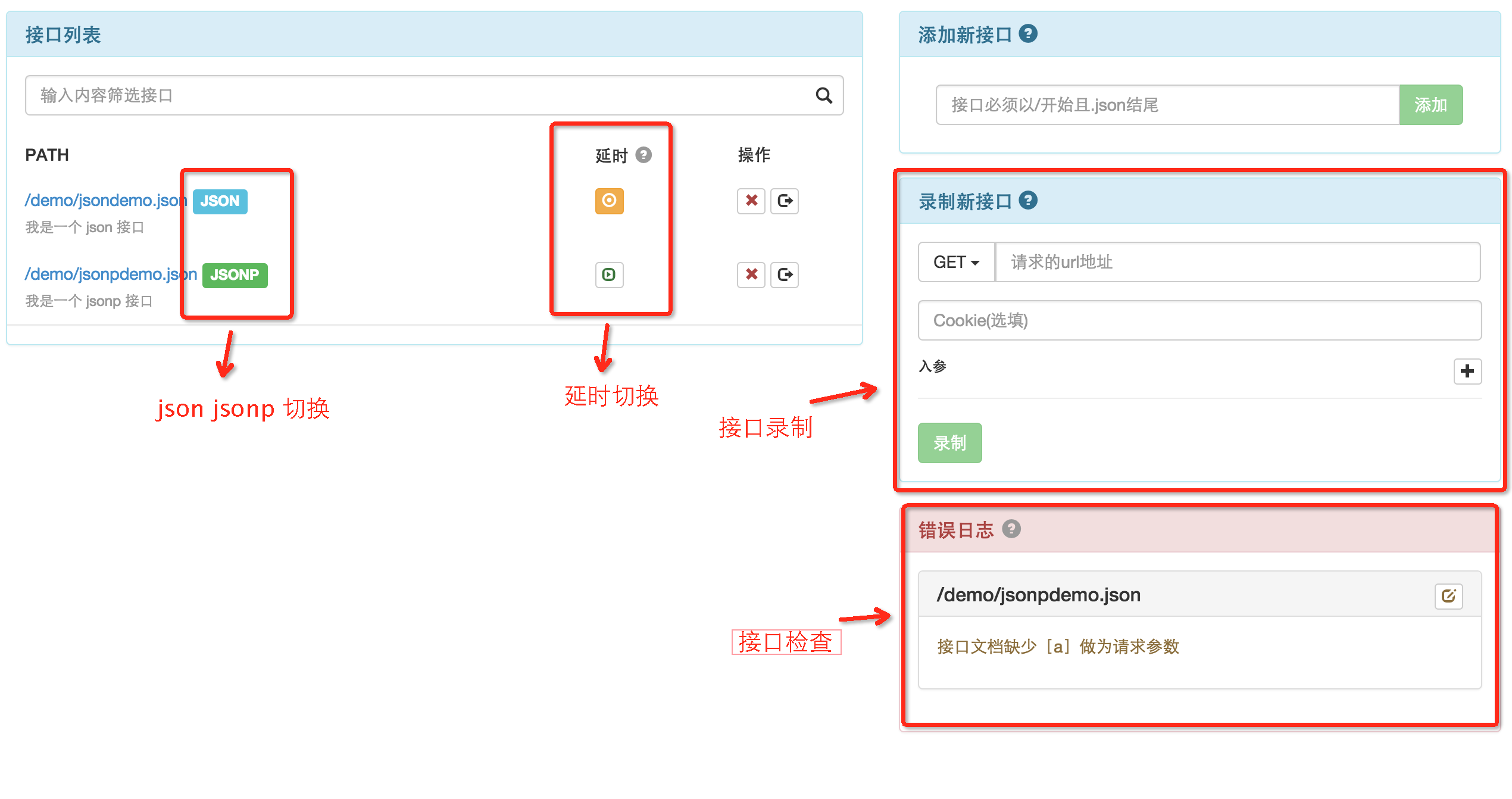 \n\n#### 接口操作页面\n\n1. Dynamic interface, use [Mockjs](http://mockjs.com/demo/mock.html)as support, can dynamically and randomly generate the interface\n \n 动态接口,使用 [Mockjs](http://mockjs.com/demo/mock.html) 作为支持,可以动态随机生成接口。\n\n2. Dynamic interface can access any node and add comments.\n \n 动态接口,可以轻松在任何一个节点上加上注释。\n\n3. Static interface. If the interface data is too complex for mock2easy to meet your requirement. Please use static interface.\n \n 静态接口,如果接口数据过于复杂,mock2easy 无法满足您的需求,请选用静态接口。\n\n4. Switch between json and jsonp\n \n json 和 jsonp 互相切换\n\n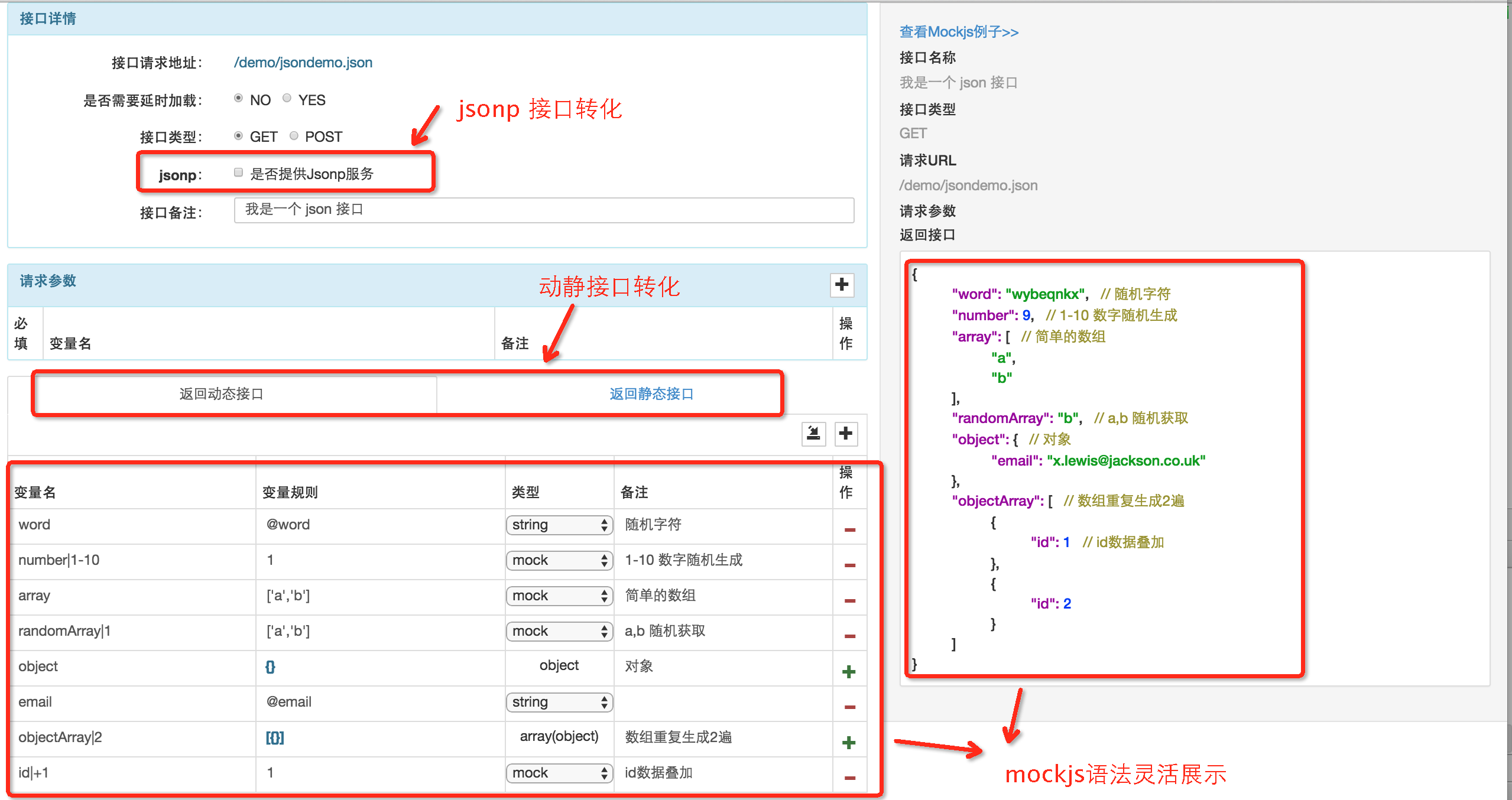 \n\n#### Interface documentation 接口文档\n\n \n [Interface menu>>](https://github.com/appLhui/grunt-mock2easy-demo/blob/master/doc/menu.md)\n\n \n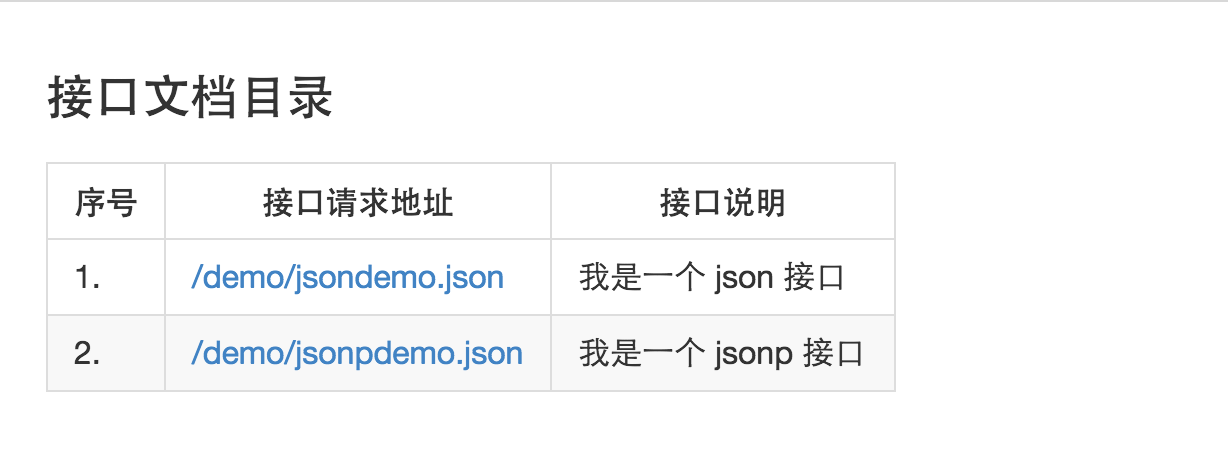 \n\n [Interface details>>](https://github.com/appLhui/grunt-mock2easy-demo/blob/master/doc/demo/jsondemo.md)\n\n\n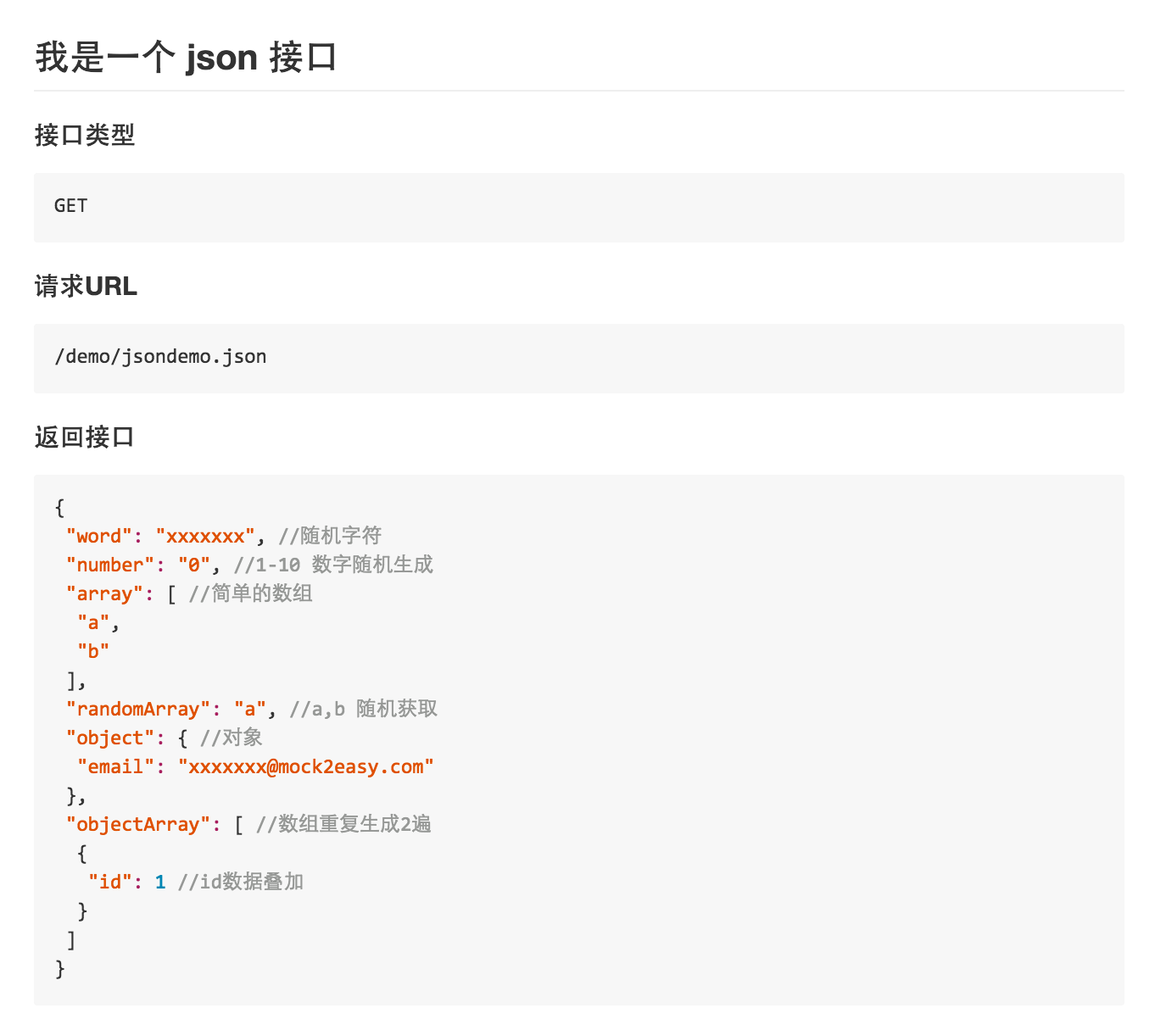 \n\n\n\n\n\n\n\n\n"
}