grunt-file-info
Version:
Automate template-driven updates of project file stats to project documentation.
374 lines (285 loc) • 14.5 kB
Markdown
# grunt-file-info
Automate template-driven updates of project file stats to project documentation.
## Getting Started
This plugin requires Grunt `>=0.4.0`
If you haven't used [Grunt](http://gruntjs.com/) before, be sure to check out the [Getting Started](http://gruntjs.com/getting-started) guide, as it explains how to create a [Gruntfile](http://gruntjs.com/sample-gruntfile) as well as install and use Grunt plugins. Once you're familiar with that process, you may install this plugin with this command:
```shell
npm install grunt-file-info --save-dev
```
Once the plugin has been installed, it may be enabled inside your Gruntfile with this line of JavaScript:
```js
grunt.loadNpmTasks('grunt-file-info');
```
## The `file_info` task
_Run this task with the `grunt file_info` command._
Task targets, files and options may be specified according to the grunt [Configuring tasks](http://gruntjs.com/configuring-tasks) guide.
### [Overview](#overview)
In your project's Gruntfile, add a section named `file_info` to the data object passed into `grunt.initConfig()`.
The following example injects file size information for a source file and its minified version into a README.md file that already has a section whose layout conforms to the `options.inject.text` template:
```js
grunt.initConfig({
file_info: {
source_files: {
src: ['source_file.js', 'minified_source_file.js'],
options: {
inject: {
dest: 'README.md',
text: '###Size' +
grunt.util.linefeed + grunt.util.linefeed +
'Original: {{= sizeText(size(src[0])) }}' +
grunt.util.linefeed + grunt.util.linefeed +
'Minified: {{= sizeText(size(src[1])) }}' +
grunt.util.linefeed + grunt.util.linefeed +
'Gzipped: {{= sizeText(gzipSize(src[1])) }}'
}
}
}
}
});
```
### [Options](#options)
#### options.stdout
Type: `boolean` or `string`
Default: `true`
If falsy, output to the command line is suppressed.
If `true`, results for each file specified by `src` are output to the command line using the default layout.
If a string is passed, it is applied as a template (using mustache-style delimiters) specifying how results are output to the command line.
#### options.inject
Type: `object` or `array of object`
Default: `undefined`
An inject config object or array of inject config objects having the following properties:
| | Required | Description |
| :---: | :---: | :--- |
| `dest` | **Yes** | An injection target filepath string or array of injection target filepath strings. |
| `text` | **Yes** | A template string (using mustache-style delimiters) to define where and how results are injected into the file(s) specified by `dest`. |
| `report` | No | If truthy, inject status is output to the command line. Otherwise, no status is reported. Default: `true` |
The template defined by `text` is used to:
1) identify the portion of text to replace in an injection target file
2) extract current field values from an injection target file for comparison against calculated values
3) determine the text to inject into an injection target file (if changes are detected)
#### options.injectReport
Type: `boolean`
Default: `true`
Provides a default value for the `report` property of `options.inject` config objects.
### [Command-Line Output and File Injection Templates](#command-line-output-and-file-injection-templates)
`options.stdout` and `options.inject.text` values are processed through [Lo-Dash templating](http://lodash.com/docs#template) via Grunt. As such, these templates conform to the semantics set forth by Lo-Dash template specs.
In order to control the timing of template processing within the file_info task, custom delimiters of the form `{{ }}` are used for these templates.
[Lo-Dash functions](http://lodash.com/docs) are accessible within fields of such templates via standard Lo-Dash syntax (eg, `_.first([1,2,3])`). Additionally, [underscore.string](https://github.com/epeli/underscore.string) methods are similiarly accessible (eg, `_.titleize("hello cruel world")`).
The file_info task also furnishes certain [Template Functions](#template-functions) and [Template Variables](#template-variables) within template fields, as outlined below.
### [Template Functions](#template-functions)
The following functions are available within fields of templates defined by `options.stdout` and `options.inject.text`:
#### size (`string` _filepath_)
Returns the size in bytes of the file specified by _filepath_.
#### gzipSize (`string` _filepath_)
Returns the gzipped size in bytes of the file specified by _filepath_.
#### sizeText (`number` _bytes_ [, `number` _lpadding_])
Returns unit-adjusted and optionally-padded text (eg, "2 kB", "632 bytes") corresponding to a number of bytes.
#### spaceSavings (`string` _filepath_)
Returns the percentage space savings gained by gzipping the file specified by _filepath_.
#### modified (`string` _filepath_)
Returns the date that the contents of the file specified by _filepath_ were last modified.
#### modifiedAgo (`string` _filepath_)
Returns a string (eg, "10 days ago") describing how long ago the contents of the file specified by _filepath_ were last modified. This function is generally more useful to stdout templates than file injection templates.
#### filename (`string` _filepath_)
Returns the file name portion (including file type) of a file path.
#### filetype (`string` _filepath_)
Returns the file type portion (without the leading '.') of a file path.
#### config ([`string` _configName_])
Returns the value of the item stored in grunt.config(configName).
---
Additionally, the following function is available within fields of templates defined by `options.inject.text`:
#### pass ([`number` _index_])
Returns the matched value of a template field when that template is matched against existing text of an injection target file. _index_ is the 1-based order of the matched field within the template and defaults to the order of the field in which `pass()` is called.
### [Template Variables](#template-variables)
The following variables are available within fields of templates defined by `options.stdout` and `options.inject.text`:
#### filesSrc
An array of expanded filepath strings of all src files to get file info for. Note that this is not the same as `src`, which refers to the raw (ie, non-expanded) value of the `src` property of the file_info config target object.
### [Usage Examples](#usage-examples)
#### Default Options
The following example simply outputs file size information for a source file and its minified version to the command line:
```js
grunt.initConfig({
file_info: {
source_files: {
src: ['source_file.js', 'minified_source_file.js']
}
}
});
```
Output:
```
source_files stats:
source_file.js 22.5 kB (4.2 kB gzipped)
minified_source_file.js 17.9 kB (3.9 kB gzipped)
```
#### Customized Command-Line Output
The following example outputs file size information for a source file and its minified version to the command line according to a custom template:
```js
grunt.initConfig({
file_info: {
source_files: {
src: ['source_file.js', 'minified_source_file.js'],
options: {
stdout:
'Original: {{= sizeText(size(src[0]), 7) }}' + grunt.util.linefeed +
'Minified: {{= sizeText(size(src[1]), 7) }}' + grunt.util.linefeed +
'Gzipped: {{= sizeText(gzipSize(src[1]), 7) }} ({{= spaceSavings(src[1]) }}% savings)'
}
}
}
});
```
Output:
```
Original: 22.5 kB
Minified: 17.9 kB
Gzipped: 3.9 kB (78.06% savings)
```
The following example outputs a file's name, modification date, and size to the command line according to a custom template:
```js
grunt.initConfig({
file_info: {
source_files: {
src: 'src/source_file.js',
options: {
stdout:
'Name: {{= filename(src) }}' + grunt.util.linefeed +
'Date: {{= modified(src).toDateString() }}' + grunt.util.linefeed +
'Size: {{= sizeText(size(src)) }}'
}
}
}
});
```
Output:
```
Name: source_file.js
Date: Sat Dec 07 2013
Size: 22.5 kB
```
#### File Injection
The following example injects file size information for a source file and its minified version into a README.md file according to a template specified by `options.inject.text`. The template is used to match the portion of the file to replace as well as to generate the replacement text.
```js
grunt.initConfig({
file_info: {
source_files: {
src: ['source_file.js', 'minified_source_file.js'],
options: {
inject: {
dest: 'README.md',
text:
'###Size' +
grunt.util.linefeed + grunt.util.linefeed +
'| | Dependent Version | Standalone Version |' + grunt.util.linefeed +
'| :------- | ----------------: | -----------------: |' + grunt.util.linefeed +
'| Original | {{= _.lpad(pass(), 17) }} | {{= sizeText(size(src[0]), 18) }} |' +
grunt.util.linefeed +
'| Minified | {{= _.lpad(pass(), 17) }} | {{= sizeText(size(src[1]), 18) }} |' +
grunt.util.linefeed +
'| Gzipped | {{= _.lpad(pass(), 17) }} | {{= sizeText(gzipSize(src[1]), 18) }} |'
}
}
}
}
});
```
Injected text:
```
###Size
| | Dependent Version | Standalone Version |
| :------- | ----------------: | -----------------: |
| Original | 22.5 kB | 57.5 kB |
| Minified | 7 kB | 17.2 kB |
| Gzipped | 1.5 kB | 3.8 kB |
```
File injection occurs only if a portion of the destination file matches `options.inject.text` and one or more corresponding field values _change_, in which case a diff report is normally output to the command line for the matching portion of text. For example:
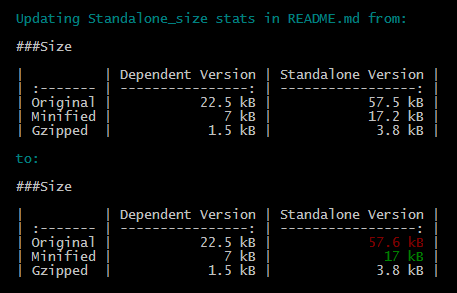
If the destination file does not exist, it is created and populated with the generated text. In this case the template function `pass()` yields an empty string since there are no field values to propagate.
Note that in the example above, text is written to the destination file only if any of the size values for "Standalone Version" have changed. "Dependent Version" values in this case are simply propagated from existing text.
#### Kitchen Sink
The following extensive example shows the use of two `file_info` targets that each write source file stats for a particular version of an application to a corresponding column of the same markdown table of a README.md file.
```js
grunt.initConfig({
file_info: {
source_verion_1: {
src: ['dist/v1/source_file.js', 'dist/v1/minified_source_file.js'],
options: {
inject: {
dest: 'README.md',
text:
'###Size' + grunt.util.linefeed + grunt.util.linefeed +
'| | Dependent Version | Standalone Version |' + grunt.util.linefeed +
'| :------- | ----------------: | -----------------: |' + grunt.util.linefeed +
'| Original | {{= sizeText(size(src[0]), 17) }} | {{= _.lpad(pass(), 18) }} |' +
grunt.util.linefeed +
'| Minified | {{= sizeText(size(src[1]), 17) }} | {{= _.lpad(pass(), 18) }} |' +
grunt.util.linefeed +
'| Gzipped | {{= sizeText(gzipSize(src[1]), 17) }} | {{= _.lpad(pass(), 18) }} |'
},
stdout:
'Original: {{= sizeText(size(src[0]), 7) }}' + grunt.util.linefeed +
'Minified: {{= sizeText(size(src[1]), 7) }}' + grunt.util.linefeed +
'Gzipped: {{= sizeText(gzipSize(src[1]), 7) }} ({{= spaceSavings(src[1]) }}% savings)'
}
},
source_verion_2: {
src: ['dist/v2/source_file.js', 'dist/v2/minified_source_file.js'],
options: {
inject: {
dest: 'README.md',
text:
'###Size' + grunt.util.linefeed + grunt.util.linefeed +
'| | Dependent Version | Standalone Version |' + grunt.util.linefeed +
'| :------- | ----------------: | -----------------: |' + grunt.util.linefeed +
'| Original | {{= _.lpad(pass(), 17) }} | {{= sizeText(size(src[0]), 18) }} |' +
grunt.util.linefeed +
'| Minified | {{= _.lpad(pass(), 17) }} | {{= sizeText(size(src[1]), 18) }} |' +
grunt.util.linefeed +
'| Gzipped | {{= _.lpad(pass(), 17) }} | {{= sizeText(gzipSize(src[1]), 18) }} |'
},
stdout:
'Original: {{= sizeText(size(src[0]), 7) }}' + grunt.util.linefeed +
'Minified: {{= sizeText(size(src[1]), 7) }}' + grunt.util.linefeed +
'Gzipped: {{= sizeText(gzipSize(src[1]), 7) }} ({{= spaceSavings(src[1]) }}% savings)'
}
}
}
});
```
<!---
### Usage Examples
#### Default Options
In this example, the default options are used to do something with whatever. So if the `testing` file has the content `Testing` and the `123` file had the content `1 2 3`, the generated result would be `Testing, 1 2 3.`
```js
grunt.initConfig({
file_info: {
options: {},
files: {
'dest/default_options': ['src/testing', 'src/123'],
},
},
});
```
#### Custom Options
In this example, custom options are used to do something else with whatever else. So if the `testing` file has the content `Testing` and the `123` file had the content `1 2 3`, the generated result in this case would be `Testing: 1 2 3 !!!`
```js
grunt.initConfig({
file_info: {
options: {
separator: ': ',
punctuation: ' !!!',
},
files: {
'dest/default_options': ['src/testing', 'src/123'],
},
},
});
```
-->
## Contributing
In lieu of a formal styleguide, take care to maintain the existing coding style. Add unit tests for any new or changed functionality. Lint and test your code using [Grunt](http://gruntjs.com/).
<!---
## Release History
_(Nothing yet)_
-->