gitpick
Version:
Clone exactly what you need aka straightforward project scaffolding!
368 lines (277 loc) • 15.3 kB
Markdown
# GitPick
<!-- -->
**Clone exactly what you need aka straightforward project scaffolding!**
[](https://twitter.com/nrjdalal_dev)
[](https://www.npmjs.com/package/gitpick)
[](https://www.npmjs.com/package/gitpick)
[](https://github.com/nrjdalal/gitpick)
📦 `Zero dependencies` / `Un/packed (~72/26kb)` / `Faster and more features` yet drop-in replacement for `degit`
> #### Just `copy-and-paste` any GitHub, GitLab, Bitbucket or Codeberg URL - no editing required (shorthands work too) - to clone individual files, folders, branches, commits, raw content or even entire repositories without the `.git` directory.
Unlike other tools that force you to tweak URLs or follow strict formats to clone files, folders, branches or commits, GitPick works seamlessly with any URL.
**You can also try [Interactive Mode](#-interactive-mode)**. Browse any repo right in your terminal. See every file, pick what you want, skip what you don't. Just `gitpick owner/repo -i` and you're in. No more guessing paths.
<img width="400" alt="GitPick Meme" src="https://github.com/user-attachments/assets/180c3e5b-320c-48d7-aaf9-a7402e74c882" />
---
### Table of Contents
- [Some Examples](#-some-examples)
- [Features](#-features)
- [Quick Usage](#-quick-usage)
- [Options](#-options)
- [Interactive Mode](#-interactive-mode)
- [Private Repos](#-private-repos)
- [Config File](#-config-file)
- [.gitpickignore](#-gitpickignore)
- [Install Globally](#-install-globally-optional)
- [Used By](#-used-by)
- [Related Projects](#-related-projects)
- [Contributing](#-contributing)
---
## 📖 Some Examples
See [Quick Usage](#-quick-usage) to learn more.
```sh
# interactive mode - browse and pick files/folders
npx gitpick owner/repo -i
npx gitpick https://github.com/owner/repo -i
# clone a repo without .git
npx gitpick owner/repo
npx gitpick https://github.com/owner/repo
# clone a folder aka tree
npx gitpick owner/repo/tree/main/path/to/folder
npx gitpick https://github.com/owner/repo/tree/main/path/to/folder
# clone a file aka blob
npx gitpick owner/repo/blob/main/path/to/file
npx gitpick https://github.com/owner/repo/blob/main/path/to/file
# clone a branch
npx gitpick owner/repo -b canary
npx gitpick https://github.com/owner/repo -b canary
npx gitpick owner/repo/tree/canary
npx gitpick https://github.com/owner/repo/tree/canary
# clone a commit SHA
npx gitpick owner/repo -b cc8e93
npx gitpick https://github.com/owner/repo/commit/cc8e93
# clone submodules
npx gitpick owner/repo -r
npx gitpick https://github.com/owner/repo -r
# clone a private repo
npx gitpick https://<token>@github.com/owner/repo
# clone from GitLab
npx gitpick https://gitlab.com/owner/repo
npx gitpick https://gitlab.com/owner/repo/-/tree/main/path/to/folder
# clone from Bitbucket
npx gitpick https://bitbucket.org/owner/repo
npx gitpick https://bitbucket.org/owner/repo/src/main/path/to/folder
# clone from Codeberg
npx gitpick https://codeberg.org/owner/repo
npx gitpick https://codeberg.org/owner/repo/src/branch/main/path/to/folder
# dry run (preview without cloning)
npx gitpick owner/repo --dry-run
npx gitpick owner/repo -i --dry-run
```
---
## ✨ Features
- 🔍 Clone individual files or folders from GitHub, GitLab, Bitbucket and Codeberg
- 🧠 Use shorthands `TanStack/router` or full URL's `https://github.com/TanStack/router`
- **🔥 Interactive mode** - browse and cherry-pick files/folders with `-i` | `--interactive`
- ⚙️ Auto-detects branches and target directory (if not specified) like `git clone`
- 🔐 Seamlessly works with both public and private repositories using a PAT
- 📦 Can easily clone all submodules with `-r` | `--recursive`
- 🚫 `.gitpickignore` at the root of the picked path excludes matching paths from the copy (gitignore-style patterns)
- 🧱 Initialize the cloned output as a fresh git repo with `--init`
- 💾 Commit with `--commit "<msg>"` (or `--auto-commit`, which uses `chore: gitpick'ed`) - implies `--init`
- 🔁 Sync changes remotely with `--watch` using intervals (e.g., `15s`, `1m`, `1h`)
- 🔎 Preview what would be cloned with `--dry-run` before cloning
- 🌳 View cloned file structure as a colored tree with `--tree`
- 🗑️ Overwrite or replace existing files without a prompt using `-o` | `--overwrite`
- 📋 Config file support (`.gitpick.json` / `.gitpick.jsonc`) for multi-path picks
- 🔇 Silent mode with `--quiet` for CI pipelines, debug mode with `--verbose`
---
## 🚀 Quick Usage
```sh
npx gitpick <url/shorthand> [target] [options]
```
- [target] and [options] are optional, if not specified, GitPick fallbacks to the default behavior of `git clone`
Examples:
```sh
npx gitpick https://github.com/owner/repo # repo without .git
npx gitpick owner/repo/tree/main/path/to/folder # a folder aka tree
npx gitpick owner/repo/blob/main/path/to/file # a file aka blob
npx gitpick <url/shorthand> # default git behavior
npx gitpick <url/shorthand> [target] # with optional target
npx gitpick <url/shorthand> -b [branch/SHA] # branch or commit SHA
npx gitpick <url/shorthand> -o # overwrite if exists
npx gitpick <url/shorthand> -r # clone submodules
npx gitpick <url/shorthand> --dry-run # preview without cloning
npx gitpick <url/shorthand> -w 30s # sync every 30 seconds
npx gitpick <url/shorthand> --init # initialize as a new git repository
npx gitpick <url/shorthand> --auto-commit # Commit with message "chore: gitpick'ed"
npx gitpick <url/shorthand> --commit "gitpick'ed" # Commit with a message
npx gitpick https://<token>@github.com/owner/repo # private repository
npx gitpick https://gitlab.com/owner/repo # GitLab
npx gitpick https://bitbucket.org/owner/repo # Bitbucket
npx gitpick https://codeberg.org/owner/repo # Codeberg
```
<img width="720" alt="Image" src="https://github.com/user-attachments/assets/ddbc41b4-bfc6-4287-bb85-eb949d723591" />
---
## 🔧 Options
```
-i, --interactive Browse and pick files/folders interactively
-b, --branch Branch/SHA to clone
-o, --overwrite Skip overwrite prompt
-r, --recursive Clone submodules
--fast Fetch via archive/raw HTTP instead of git clone (faster)
-q, --quiet Suppress all output except errors
-n, --dry-run Show what would be cloned without cloning
-w, --watch [time] Watch the repository and sync every [time]
(e.g. 1h, 30m, 15s)
--init Initialize the cloned output as a new git repository
--auto-commit Commit with message "chore: gitpick'ed" (implies --init)
--commit <msg> Commit with <msg> (implies --init)
--tree List copied files as a tree
--verbose Show detailed clone information
-h, --help display help for command
-v, --version display the version number
```
---
## ⚡ Fast Mode (`--fast`)
By default GitPick uses `git clone`, so a pick is byte-for-byte what a checkout gives you. Pass `--fast` (or set `GITPICK_FAST=1` for a whole CI fleet) to fetch through the host's **archive / raw HTTP endpoints** instead: no `git` process, typically **2-4x faster**, and (in a 100-repo differential test) byte-identical to a clone.
```sh
npx gitpick owner/repo --fast # download + extract the tarball
GITPICK_FAST=1 npx gitpick owner/repo # opt in fleet-wide
```
Three cases where a `--fast` pick can differ from a clone (all are how every archive-based tool, e.g. `degit`, behaves, which is why it's opt-in):
- **`.gitattributes` `export-ignore` / `export-subst`**: host archives honor these (they omit paths / expand keywords); a clone does not. Common in PHP/Composer repos.
- **`core.autocrlf` on Windows**: archives store blobs verbatim (LF); a clone would CRLF-normalize.
- **Symlink-hostile Windows**: `--fast` warns and skips a symlink it can't create; a clone may fail or write git's text stub instead.
`--recursive` (submodules) always uses a clone.
---
## 🔥 Interactive Mode
> **New in v5.0.** Browse any repository's file tree in your terminal and cherry-pick exactly the files and folders you want.
```sh
npx gitpick owner/repo -i
npx gitpick owner/repo -i -b canary
npx gitpick https://github.com/owner/repo -i
npx gitpick https://gitlab.com/owner/repo -i
npx gitpick https://codeberg.org/owner/repo -i
```
<img width="900" alt="gitpick interactive mode: browse and pick files/folders" src="https://raw.githubusercontent.com/nrjdalal/demo-kit/main/gitpick/demo-interactive.gif" />
Navigate with arrow keys, `space` to select, `enter` to expand a folder or preview a file, `.` to select all, `c` to confirm, `q` to quit. File previews come with syntax highlighting for 38 languages. Works with GitHub, GitLab, Bitbucket, Codeberg, public and private repos.
### Pick from a local folder
Interactive mode also works on any folder already on your machine, so you can use GitPick as a local file cherry-picker:
```sh
npx gitpick -i # browse the current directory
npx gitpick -i my-app # browse cwd, copy the selection into ./my-app
npx gitpick ./src -i my-app # browse ./src, copy the selection into ./my-app
```
Inside a git repo it respects your `.gitignore` (via `git ls-files`) and preserves symlinks when copying.
---
## 🔐 Private Repos
Use a personal access token with read-only contents permission. Works with GitHub, GitLab, Bitbucket and Codeberg:
```sh
npx gitpick https://<token>@github.com/owner/repo
npx gitpick https://<token>@gitlab.com/owner/repo
npx gitpick https://<token>@bitbucket.org/owner/repo
npx gitpick https://<token>@codeberg.org/owner/repo
```
Or use environment variables (recommended for CI):
```sh
export GITHUB_TOKEN=ghp_xxxx # or GH_TOKEN
export GITLAB_TOKEN=glpat-xxxx
export BITBUCKET_TOKEN=xxxx
export CODEBERG_TOKEN=xxxx
npx gitpick owner/private-repo # token is picked up automatically
```
Create a GitHub token 👉 [here](https://github.com/settings/personal-access-tokens/new) with `repo -> contents: read-only` permission.
---
## 📋 Config File
Create a `.gitpick.json` or `.gitpick.jsonc` in your project to pick multiple files/folders in one command:
```jsonc
// .gitpick.jsonc
[
// clone a repo without .git
"owner/repo",
"https://github.com/owner/repo",
// clone a folder aka tree
"owner/repo/tree/main/path/to/folder",
"https://github.com/owner/repo/tree/main/path/to/folder",
// clone a file aka blob
"owner/repo/blob/main/path/to/file",
"https://github.com/owner/repo/blob/main/path/to/file",
// clone a branch
"owner/repo -b canary",
"https://github.com/owner/repo -b canary",
"owner/repo/tree/canary",
"https://github.com/owner/repo/tree/canary",
// clone a commit SHA
"owner/repo -b cc8e93",
"https://github.com/owner/repo/commit/cc8e93",
// clone submodules
"owner/repo -r",
"https://github.com/owner/repo -r",
// clone a private repo
"https://<token>@github.com/owner/repo",
// GitLab
"https://gitlab.com/owner/repo",
"https://gitlab.com/owner/repo/-/tree/main/path/to/folder",
// Bitbucket
"https://bitbucket.org/owner/repo",
"https://bitbucket.org/owner/repo/src/main/path/to/folder",
// Codeberg
"https://codeberg.org/owner/repo",
"https://codeberg.org/owner/repo/src/branch/main/path/to/folder",
]
```
Then just run:
```sh
npx gitpick
```
Each entry follows the same `<url> [target]` syntax as the CLI. All entries are cloned with `-o` (overwrite) by default.
---
## 🚫 .gitpickignore
Add a `.gitpickignore` file at the root of the path you are picking to keep matching files out of the copy. It uses gitignore-style patterns, so the syntax is already familiar:
```gitignore
# .gitpickignore lives at the root of the picked folder or repo
# any .log file, at any depth
*.log
# a directory named node_modules, anywhere (trailing slash means directory only)
node_modules/
# only the dist at the picked root (a leading slash anchors the pattern)
/dist
# every png under docs, at any depth
docs/**/*.png
# re-include a file an earlier rule excluded (! negates, last match wins)
!docs/logo.png
```
- The file must sit at the **root of what you pick** - the folder for a `tree` URL, or the repo root for a full clone.
- `*` matches within a path segment, `**` spans directories, `?` matches a single character, and a trailing `/` limits a rule to directories.
- A leading or embedded `/` anchors a pattern to the picked root; otherwise it matches by basename at any depth.
- Full-line `#` comments and blank lines are ignored, and the `.gitpickignore` file itself is never copied.
---
## 📦 Install Globally (Optional)
```sh
npm install -g gitpick
gitpick <url/shorthand> [target] [options]
```
This installs two commands, `gitpick` and `degit`, so existing `degit owner/repo` workflows keep working unchanged.
---
## 🌍 Used By
- **Major:** [Storybook](https://github.com/storybookjs/storybook), [TanStack Router](https://github.com/TanStack/router), [ElectricSQL](https://github.com/electric-sql/electric), [Alchemy](https://github.com/alchemy-run/alchemy), [Porto](https://github.com/ithacaxyz/porto), [oidc-spa](https://github.com/keycloakify/oidc-spa), [Fidely UI](https://github.com/fidely-ui/fidely-ui)
- **Other:** [hono-better-auth](https://github.com/LovelessCodes/hono-better-auth), [vite-hono-ssr](https://github.com/Mirza-Glitch/vite-hono-ssr), [tanstack-start-cf](https://github.com/depsimon/tanstack-start-cf), [constructa-starter-min](https://github.com/instructa/constructa-starter-min), [tanstack-starter](https://github.com/enesdir/tanstack-starter), [react-shadcn-starter](https://github.com/aliadelelroby/react-shadcn-starter), [open-store](https://github.com/bang0711/open-store)
---
## 🛠 More Tools
Check out more projects at [github.com/nrjdalal](https://github.com/nrjdalal)
## 🔗 Related Projects
- [tiged](https://github.com/tiged/tiged) - community driven fork of degit
- [giget](https://github.com/unjs/giget) - alternative approach
[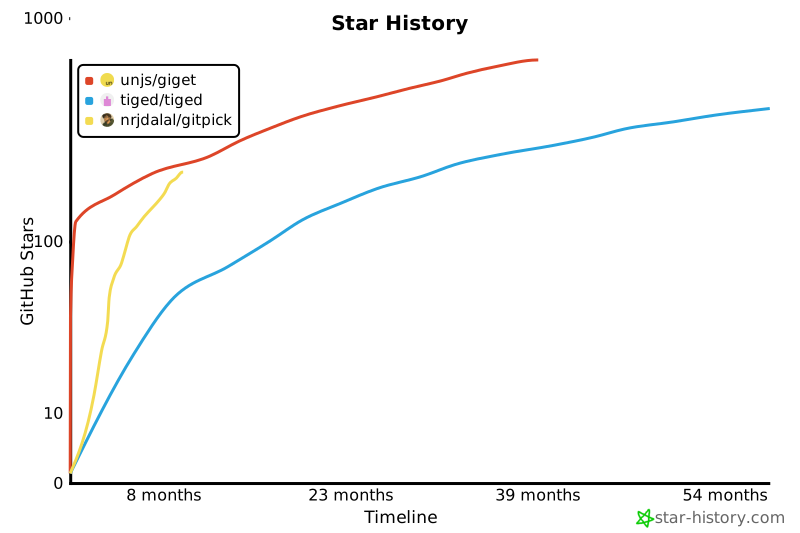](https://www.star-history.com/#nrjdalal/gitpick&tiged/tiged&unjs/giget&type=timeline&logscale&legend=top-left)
## 🤝 Contributing
Contributions welcome - any help is appreciated!
- Fork the repo and create a branch (use descriptive names, e.g. feat/<name> or fix/<name>).
- Make your changes, add tests if applicable, and run the checks:
- bun install
- bun test
- Follow the existing code style and commit message conventions (use conventional commits: feat, fix, docs, chore).
- Open a PR describing the change, motivation, and any migration notes; link related issues.
- For breaking changes or large features, open an issue first to discuss the approach.
- By contributing you agree to the MIT license and the project's Code of Conduct.
Thank you for helping improve GitPick!
## 📄 License
MIT - [LICENSE](LICENSE)