git-webhook-handler2
Version:
Web handler / middleware for processing GitCode, GitHub, Gitee, Gitlab Webhooks
107 lines (77 loc) • 4.81 kB
Markdown
# git-webhook-handler
[](https://travis-ci.com/github/Rem486/git-webhook-handler)
[](https://nodei.co/npm/git-webhook-handler/)
Fork form github-webhook-handler, add support for gitee , gitlab, gitea, gogs. [English Document](./doc-en.md)
>网页开发中的网络钩子(Webhook)是一种通过自定义回调函数来增加或更改网页表现的方法。这些回调可被可能与原始网站或应用相关的第三方用户及开发者保存、修改与管理。术语“网络钩子”由杰夫·林德塞(Jeff Lindsay)于2007年通过给计算机编程术语“钩子”(Hook)加上前缀得来。[网络钩子](https://zh.wikipedia.org/wiki/%E7%BD%91%E7%BB%9C%E9%92%A9%E5%AD%90)
基于 nodejs 实现对 webhook 处理的,支持:
- [github](https://developer.github.com/webhooks/)
- [gitee](https://gitee.com/)
- [gitlab](https://gitlab.com/)
- [gitea](https://gitea.io/)
- [gogs](https://gogs.io/)
- [codeup](https://www.aliyun.com/product/yunxiao/codeup)
- [gitcode](https://docs.gitcode.com/docs/help/home/org_project/webhook/web-hook)
Git 服务器的仓库都提供了 Webhooks 功能。每当代码仓库中有事件发生时,比如 `push` 代码,提 `issue`,提交 `pull request`,都可以往你配置的 Webhook 地址发送一个带有操作和仓库详细信息的请求。根据请求的信息,我们可以运行特定操作,自动更新代码等。**[Github Webhooks 文档](https://developer.github.com/webhooks/)**
该库是Node.js Web服务器的小型处理程序,包含处理 Git 服务器发送的 Webhook 请求的所有逻辑。
## 注意
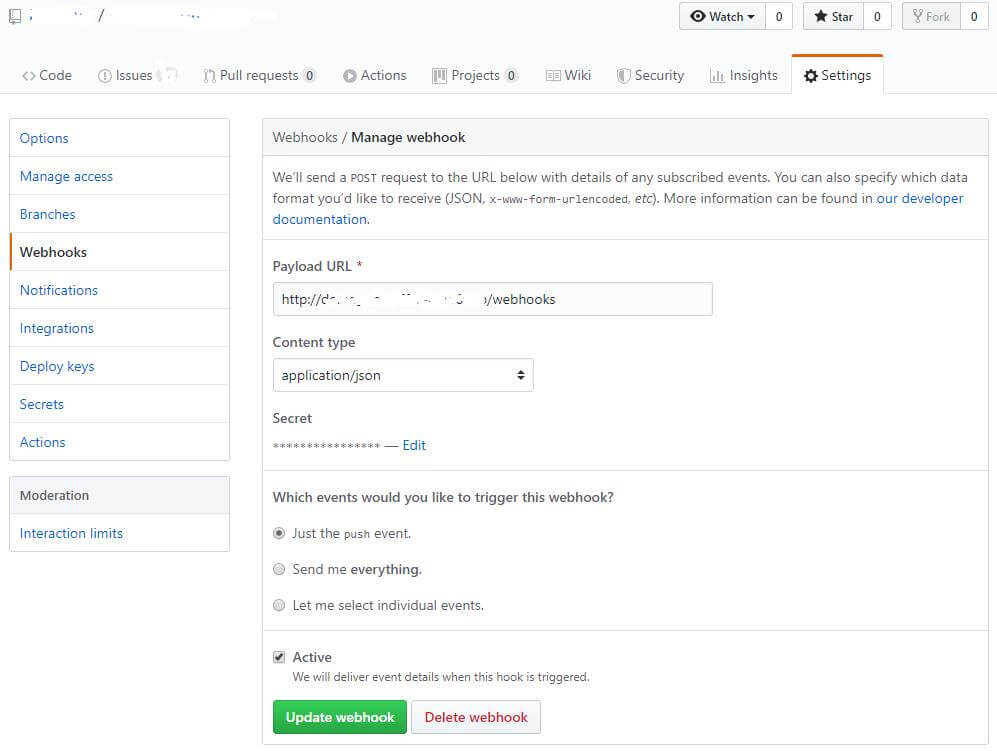
在 Git 仓库的 Webhooks 设置里面, 需要设置 `Content-Type` 为 `application/json`。
## 例子🌰
以 Github 为栗。
```js
const http = require('http')
const createHandler = require('git-webhook-handler')
const handler = createHandler({ path: '/webhook', secret: 'myhashsecret' })
http.createServer(function (req, res) {
handler(req, res, function (err) {
res.statusCode = 404
res.end('no such location')
})
}).listen(7777)
handler.on('error', function (err) {
console.error('Error:', err.message)
})
handler.on('push', function (event) {
console.log('Received a push event for %s to %s',
event.payload.repository.name,
event.payload.ref)
})
handler.on('issues', function (event) {
console.log('Received an issue event for %s action=%s: #%d %s',
event.payload.repository.name,
event.payload.action,
event.payload.issue.number,
event.payload.issue.title)
})
```
部署和启动服务后,在 git 仓库进行设置:
## API 介绍
`git-webhook-handler` 会导出一个方法,通过这个方法来创建 webhook 的处理函数 **handler**。你需要提供一个 `options` 来确定一些参数:
* `"path"`: `${服务器地址/域名}:${端口号}${options.path}` 就是最后的请求地址,填写在 git 仓库里面的。
* `"secret"`: 可以是一串随机字符串、hash。用来验证请求的,有的 Git 服务器会加密后返回,有的直接返回。比如 Github 是 `HMAC SHA-1`加密后放在请求头的 `x-hub-signature` 里面 [Payloads](https://developer.github.com/webhooks/#payloads),我们拿到这个 `signature` ,对比验证后,如果通过就可以执行定义好的对应事件的后续操作了。没有通过的话,会抛出 `error` 事件。
* `"events"`: 一个事件数组/字符串(事件参考: *events.json*),可选。会验证请求携带的事件参数是否在数组里面。比如 Github 是在请求的 `x-github-event` 。如果不存在也会抛出 `error`。
`options` 也可以是一个数组:
```js
const handler = createHandler([
{ path: '/webhook1', secret: 'myhashsecret1' },
{ path: '/webhook2', secret: 'myhashsecret2' }
])
```
返回的 **handler** 函数接受三个参数:`request`, `response`, `callback`。如果验证失败则执行 `callback` 回调。
**handler** 函数继承自 `EventEmitter`。所以可以在上面注册对应事件来处理 Git 服务器发来的具体事件类型。
可以通过下面的代码,查看 *events.json* 里面预先定义了一些事件。
```js
var events = require('git-webhook-handler/events')
Object.keys(events).forEach(function (event) {
console.log(event, '=', events[event])
})
```
也可以使用通配符 `*` 来监听所有事件,在调试的时候非常有用。
```js
handler.on('*', function (event) {
console.log(event.event);
});
```
## License
[MIT](https://en.wikipedia.org/wiki/MIT_License)
**git-webhook-handler** is Copyright (c) 2020 Rem486.具体查看 [LICENSE.md](./LICENSE.md)