git-jira-hook
Version:
Git hook for Jira workflow
208 lines (128 loc) • 6.51 kB
Markdown
# git-jira-hook [](https://www.npmjs.com/package/git-jira-hook)
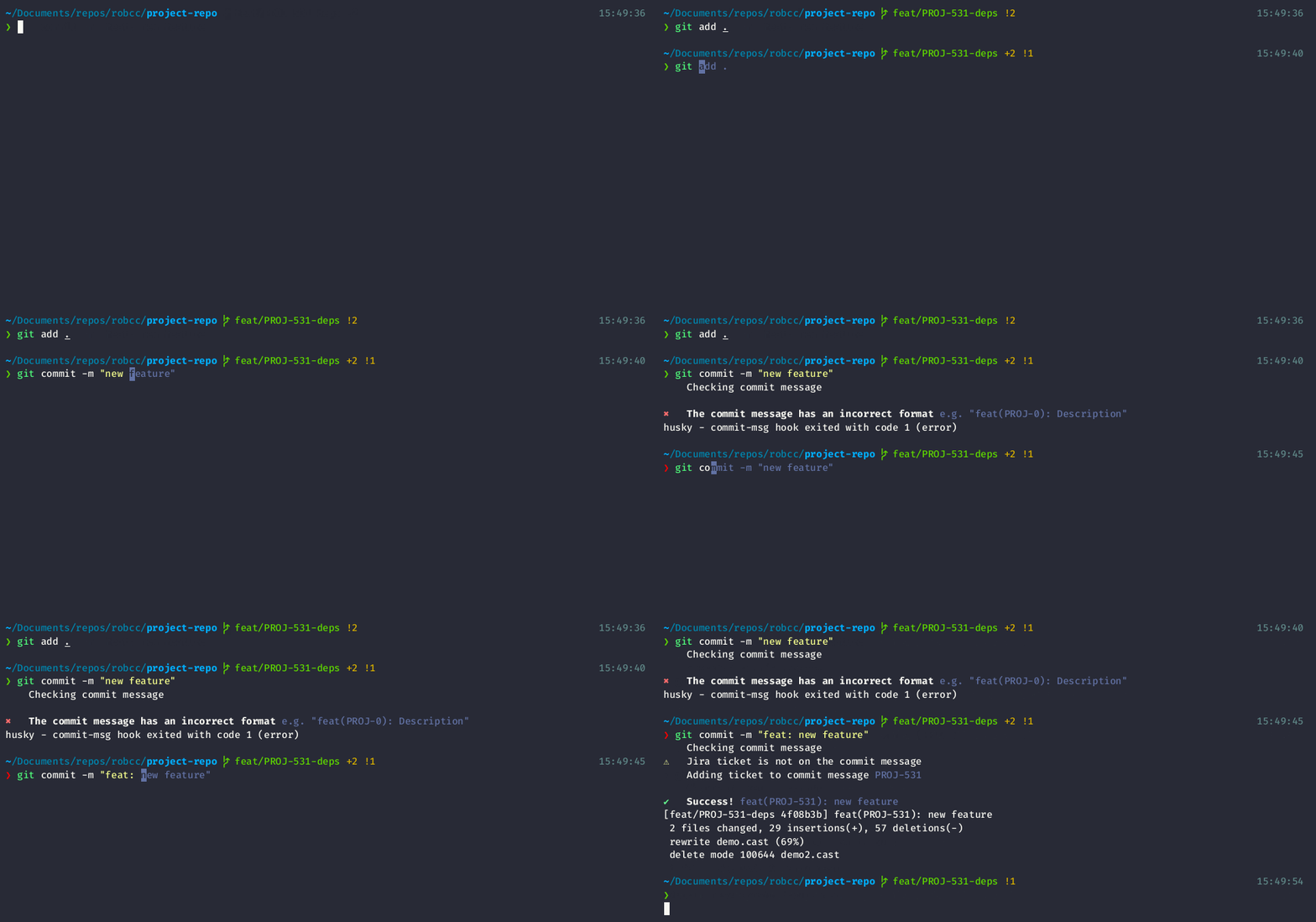
Enforces commit messages and branches to be written in a specific format (using **JIRA**), following a similar structure to the conventional commits. This is done through [husky](https://github.com/typicode/husky) and the [`commit-msg`](https://git-scm.com/docs/githooks#_commit_msg) hook.
# Install
```
npm i -D git-jira-hook
```
# Use
```
"husky": {
"hooks": {
"commit-msg": "git-jira-hook ${HUSKY_GIT_PARAMS} --projectId MYPROJ"
}
},
```
on Husky 5 (`commit-msg`):
```
#!/bin/sh
. "$(dirname "$0")/_/husky.sh"
npx git-jira-hook $1
```
# How it works
The hook will validate two things:
- That the current branch is valid to commit directly, and has the correct format.
- That the commit message has the correct format.
Without a configuration file, all validations will work with its default value.
**All** these validations can be skipped by adding the `--no-verify` (or `-n`) flag when commiting.
## Branches
The branch should contain its type, a Jira ticket (when required) and an optional description. The pattern is as follows:
`[branch-type]/[JIRA-ticket](-[description])`
In order to support additional branch types, they must be added through a configuration file.
### Main branches
By default, there are 2 "main" branches, where direct commits are not allowed: `master` and `develop`.
### Non-ticket branches
By default, there are 3 "non-ticket" branch prefixes: `other`, `release`, and `support`.
Examples of valid non-ticket branches:
- `other/update-configuration`
- `release/v1.2.0`
### Ticket branches
By default, there are 3 "ticket" branch prefixes: `feature`, `bugfix`, and `hotfix`. These branches require a Jira ticket in its name, otherwise the commit will be rejected. A description can be included after the Jira ticket, followed by a hyphen (`-`).
Examples of valid ticket branches:
- `feature/MYPROJ-13`
- `bugfix/MYPROJ-05-Scroll-issues`
Examples of invalid ticket branch types:
- `feature/TEST-123_Optional-Description`
## Commit Messages
The commit message must have a valid prefix, a Jira ticket associated and a message. If the Jira ticket is omitted, the hook will try and add it based on the ticket in the branch name (when applicable). The pattern is as follows:
`[commit-type]([JIRA-ticket]): [message]`
In order to support additional commit types, they must be added through a configuration file.
### Non-ticket commit messages
By default, there is only one "non-ticket" commit type: `other`. This means that a JIRA ticket is not required.
Examples of valid non-ticket commit messages:
- `other: Updated configuration`
### Ticket commit messages
By default, there are 3 commit types allowed: `feat`, `fix` and `chore`. These commits must include a JIRA ticket. If ommited, the hook will try and add it based on the branch name (when applicable).
Examples of valid ticket commit messages (with a Jira ticket):
- `feat(PROJ-13): Add Settings page`
- `fix(PROJ-05): Fix issue with scrolling`
Example of valid ticket commit messages (without a Jira ticket):
- `feat: Add Home page`
### Special Commits
The hook will identify special commit messages. These commit messages will always be allowed regarding on format or branch, except for the **main branches**.
The hook will allow special commits such as:
1. Commits generated during a merge (e.g. `Merge dev-branch...`).
2. Messages with just the app's version (e.g. `1.2.0`, `v1.2.0`, `v1.2.1-beta.1`, etc.).
3. `BREAKING CHANGES` commits.
# Configure
## Minimal
For minimal configuration, you just need to pass `projectId` on the `commit-msg` hook file. This will be used to ensure that all tickets are based on this id.
```
#!/usr/bin/env sh
. "$(dirname -- "$0")/_/husky.sh"
npx git-jira-hook $1 --projectId MYPROJ
```
Based on the configuration above, the following are correct:
- `feat(MYPROJ-10): Commit message`
- `bugfix/MYPROJ-10-Description`
## Configuration file
You can create a config file to override default constants, it can be a JSON file. or a JS file either exporting an object or a function that return an object.
When adding a configuration file, only `projectId` is required.
The following is an example of a full configuration file, with the default values:
```json
{
"projectId": "MYPROJ",
"commitTypes": {
"ticket": ["feat", "feature", "fix"],
"nonTicket": ["chore", "refactor"]
},
"branchTypes": {
"main": ["master"],
"ticket": ["feat", "feature", "bugfix"],
"nonTicket": ["release", "support"]
}
}
```
By default it will look for `hooks.config.js` or `hooks.config.json` on the root folder. You can also specify a custom path and name:
```
"husky": {
"hooks": {
"commit-msg": "git-jira-hook ${HUSKY_GIT_PARAMS} --config 'path/to/my-jira-config.js'"
}
},
```
on Husky 5 (`commit-msg`):
```
#!/bin/sh
. "$(dirname "$0")/_/husky.sh"
npx git-jira-hook $1 --config 'path/to/my-jira-config.js'
```
# Specifics
The [commit-msg](https://git-scm.com/docs/githooks#_commit_msg) hook does job. First, it will check that the message has the correct format. If so, it will check if the ticket is on the message (if required). If the ticket is not there and is required (i.e. the ticket is not present on a `feat` commit type), it will check if the ticket is available on the branch name. If so, it will append it:
`feat: Do stuff` -> `feat(PROJ-66): Do stuff`
Not complying with these conditions will abort the commit. It will display a message on what did fail:

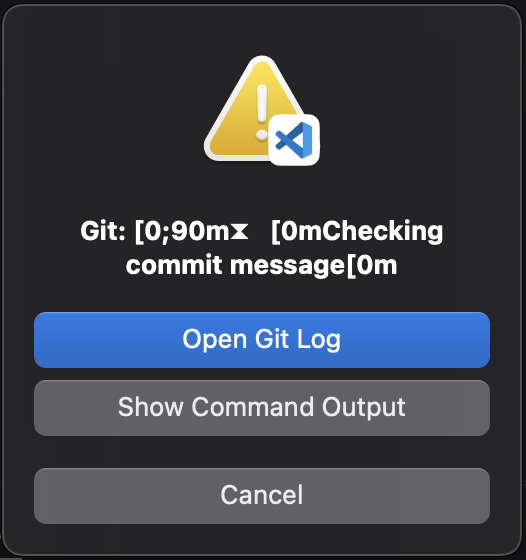
**Important:** These messages show up when commiting from the terminal. If using, for example, VS Code's Source Control, it will show up an alert with a `Open git log` option when an error occurs, where the same messages can be seen (in an uglier format).
# Testing
```shell
# create a file named `commit-msg`
npx git-jira-hook commit-msg --debug
```
Additionally:
1. Build with `npm run build`
2. Run test on `build.test.ts`
# Contributing
Pull requests are welcome. For major changes, please open an issue first to discuss what you would like to change.
# License
[MIT](https://choosealicense.com/licenses/mit/)