ghost-cursor-patchright-core
Version:
Move your mouse like a human in puppeteer and playwright or generate realistic movements on any 2D plane
199 lines (142 loc) • 8.22 kB
Markdown
# Ghost Cursor
<img src="https://media2.giphy.com/media/26ufp2LYURTvL5PRS/giphy.gif" width="100" align="right">
Generate realistic, human-like mouse movement data between coordinates or navigate between elements with puppeteer
like the definitely-not-robot you are.
> Oh yeah? Could a robot do _**this?**_
## Installation
```sh
yarn add ghost-cursor
```
or with npm
```sh
npm install ghost-cursor
```
## Usage
Generating movement data between 2 coordinates.
```js
import { path } from "ghost-cursor"
const from = { x: 100, y: 100 }
const to = { x: 600, y: 700 }
const route = path(from, to)
/**
* [
* { x: 100, y: 100 },
* { x: 108.75573501957051, y: 102.83608396351725 },
* { x: 117.54686481838543, y: 106.20019239793275 },
* { x: 126.3749821408895, y: 110.08364505509256 },
* { x: 135.24167973152743, y: 114.47776168684264 }
* ... and so on
* ]
*/
```
Generating movement data between 2 coordinates with timestamps.
```js
import { path } from "ghost-cursor"
const from = { x: 100, y: 100 }
const to = { x: 600, y: 700 }
const route = path(from, to, { useTimestamps: true })
/**
* [
* { x: 100, y: 100, timestamp: 1711850430643 },
* { x: 114.78071695023473, y: 97.52340709495319, timestamp: 1711850430697 },
* { x: 129.1362373468682, y: 96.60141853603243, timestamp: 1711850430749 },
* { x: 143.09468422606352, y: 97.18676354029148, timestamp: 1711850430799 },
* { x: 156.68418062398405, y: 99.23217132478408, timestamp: 1711850430848 },
* ... and so on
* ]
*/
```
Usage with puppeteer:
```js
import { createCursor } from "ghost-cursor"
import puppeteer from "puppeteer"
const run = async (url) => {
const selector = "#sign-up button"
const browser = await puppeteer.launch({ headless: false });
const page = await browser.newPage()
const cursor = createCursor(page)
await page.goto(url)
await page.waitForSelector(selector)
await cursor.click(selector)
// shorthand for
// await cursor.move(selector)
// await cursor.click()
}
```
### Puppeteer-specific behavior
* `cursor.move()` will automatically overshoot or slightly miss and re-adjust for elements that are too far away
from the cursor's starting point.
* When moving over objects, a random coordinate that's within the element will be selected instead of
hovering over the exact center of the element.
* The speed of the mouse will take the distance and the size of the element you're clicking on into account.
<br>

> Ghost cursor in action on a form
## Methods
#### `createCursor(page: puppeteer.Page, start?: Vector, performRandomMoves?: boolean, defaultOptions?: DefaultOptions): GhostCursor`
Creates the ghost cursor. Returns cursor action functions.
- **page:** Puppeteer `page`.
- **start (optional):** Cursor start position. Default is `{ x: 0, y: 0 }`.
- **performRandomMoves (optional):** Initially perform random movements. Default is `false`.
- **defaultOptions (optional):** Set custom default options for `click`, `move`, `moveTo`, and `randomMove` functions. Default values are described below.
#### `toggleRandomMove(random: boolean): void`
Toggles random mouse movements on or off.
#### `click(selector?: string | ElementHandle, options?: ClickOptions): Promise<void>`
Simulates a mouse click at the specified selector or element.
- **selector (optional):** CSS selector or ElementHandle to identify the target element.
- **options (optional):** Additional options for clicking.
- `hesitate (number):` Delay before initiating the click action in milliseconds. Default is `0`.
- `waitForClick (number):` Delay between mousedown and mouseup in milliseconds. Default is `0`.
- `moveDelay (number):` Delay after moving the mouse in milliseconds. Default is `2000`. If `randomizeMoveDelay=true`, delay is randomized from 0 to `moveDelay`.
- `randomizeMoveDelay (boolean):` Randomize delay between actions from `0` to `moveDelay`. Default is `true`.
#### `move(selector: string | ElementHandle, options?: MoveOptions): Promise<void>`
Moves the mouse to the specified selector or element.
- **selector:** CSS selector or ElementHandle to identify the target element.
- **options (optional):** Additional options for moving.
- `paddingPercentage (number):` Percentage of padding to be added inside the element. Default is `0` (may move to anywhere within the element). `100` will always move to center of element.
- `waitForSelector (number):` Time to wait for the selector to appear in milliseconds. Default is to not wait for selector.
- `moveDelay (number):` Delay after moving the mouse in milliseconds. Default is `0`. If `randomizeMoveDelay=true`, delay is randomized from 0 to `moveDelay`.
- `randomizeMoveDelay (boolean):` Randomize delay between actions from `0` to `moveDelay`. Default is `true`.
- `maxTries (number):` Maximum number of attempts to mouse-over the element. Default is `10`.
- `moveSpeed (number):` Speed of mouse movement. Default is random.
- `overshootThreshold (number):` Distance from current location to destination that triggers overshoot to occur. (Below this distance, no overshoot will occur). Default is `500`.
#### `moveTo(destination: Vector, options?: MoveToOptions): Promise<void>`
Moves the mouse to the specified destination point.
- **destination:** An object with `x` and `y` coordinates representing the target position. For example, `{ x: 500, y: 300 }`.
- **options (optional):** Additional options for moving.
- `moveSpeed (number):` Speed of mouse movement. Default is random.
- `moveDelay (number):` Delay after moving the mouse in milliseconds. Default is `0`. If `randomizeMoveDelay=true`, delay is randomized from 0 to `moveDelay`.
- `randomizeMoveDelay (boolean):` Randomize delay between actions from `0` to `moveDelay`. Default is `true`.
#### `getLocation(): Vector`
Get current location of the cursor.
### Other Utility Methods
#### `installMouseHelper(page: Page): Promise<void>`
Installs a mouse helper on the page. Makes pointer visible. Use for debugging only.
#### `getRandomPagePoint(page: Page): Promise<Vector>`
Gets a random point on the browser window.
#### `path(point: Vector, target: Vector, options?: number | PathOptions): Vector[] | TimedVector[]`
Generates a set of points for mouse movement between two coordinates.
- **point:** Starting point of the movement.
- **target:** Ending point of the movement.
- **options (optional):** Additional options for generating the path. Can also be a number which will set `spreadOverride`.
- `spreadOverride (number):` Override the spread of the generated path.
- `moveSpeed (number):` Speed of mouse movement. Default is random.
- `useTimestamps (boolean):` Generate timestamps for each point based on the trapezoidal rule.
## How does it work
Bezier curves do almost all the work here. They let us create an infinite amount of curves between any 2 points we want
and they look quite human-like. (At least moreso than alternatives like perlin or simplex noise)
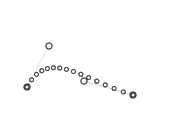
The magic comes from being able to set multiple points for the curve to go through. This is done by picking
2 coordinates randomly in a limited area above and under the curve.
<img src="https://mamamoo.xetera.dev/🧣👎😠🧟✍.png" width="400">
However, we don't want wonky looking cubic curves when using this method because nobody really moves their mouse
that way, so only one side of the line is picked when generating random points.
<img src="http://simonwallner.at/ext/fitts/shannon.png" width="250" align="right">
When calculating how fast the mouse should be moving we use <a href="https://en.wikipedia.org/wiki/Fitts%27s_law">Fitts's Law</a>
to determine the amount of points we should be returning relative to the width of the element being clicked on and the distance
between the mouse and the object.
## To turn on logging, please set your DEBUG env variable like so:
- OSX: `DEBUG="ghost-cursor:*"`
- Linux: `DEBUG="ghost-cursor:*"`
- Windows CMD: `set DEBUG=ghost-cursor:*`
- Windows PowerShell: `$env:DEBUG = "ghost-cursor:*"`