generate-readme
Version:
Generate a README.md using answers to prompts and data from the environment, like `package.json`, `.git` config, etc. This generator can be run by command line if Generate is installed globally, or you can use this as a plugin or sub-generator in your own
340 lines (220 loc) • 12 kB
Markdown
# generate-readme [](https://www.npmjs.com/package/generate-readme) [](https://npmjs.org/package/generate-readme) [](https://travis-ci.org/generate/generate-readme)
> Generate a README.md using answers to prompts and data from the environment, like `package.json`, `.git` config, etc. This generator can be run by command line if Generate is installed globally, or you can use this as a plugin or sub-generator in your own generator.
Need to generate documentation? You might also be interested in [verb](https://github.com/verbose/verb).
<br>
## Table of Contents
- [What is "Generate"?](#what-is-generate)
- [Command line usage](#command-line-usage)
* [Install](#install)
* [Run](#run)
* [Help](#help)
* [Options](#options)
* [Running tasks](#running-tasks)
- [Available tasks](#available-tasks)
- [Running multiple generators](#running-multiple-generators)
* [generate-package](#generate-package)
* [generate-dest](#generate-dest)
- [API usage](#api-usage)
* [Install locally](#install-locally)
* [Use as a plugin](#use-as-a-plugin)
* [Register as a generator](#register-as-a-generator)
- [Customization](#customization)
* [Destination directory](#destination-directory)
* [Overriding templates](#overriding-templates)
- [About](#about)
* [Related projects](#related-projects)
* [Contributing](#contributing)
* [Running tests](#running-tests)
* [Author](#author)
* [License](#license)
_(TOC generated by [verb](https://github.com/verbose/verb) using [markdown-toc](https://github.com/jonschlinkert/markdown-toc))_
## What is "Generate"?
Generate is a command line tool and developer framework for scaffolding out new GitHub projects using [generators](https://github.com/generate/generate/blob/master/docs/generators.md) and [tasks](https://github.com/generate/generate/blob/master/docs/tasks.md).
Answers to prompts and the user's environment can be used to determine the templates, directories, files and contents to build. Support for [gulp](http://gulpjs.com), [base](https://github.com/node-base/base) and [assemble](https://github.com/assemble/assemble) plugins, and much more.
**For more information**:
* Visit the [generate project](https://github.com/generate/generate/)
* Visit the [generate documentation](https://github.com/generate/generate/blob/master/docs/)
* Find [generators on npm](https://www.npmjs.com/browse/keyword/generate-generator) (help us [author generators](https://github.com/generate/generate/blob/master/docs/micro-generators.md))
## Command line usage
### Install
**Installing the CLI**
To run the `readme` generator from the command line, you'll need to install [Generate](https://github.com/generate/generate) globally first. You can do that now with the following command:
```sh
$ npm install --global generate
```
This adds the `gen` command to your system path, allowing it to be run from any directory.
**Install generate-readme**
Install this module with the following command:
```sh
$ npm install --global generate-readme
```
### Run
You should now be able to run `generate-readme` with the following command:
```sh
$ gen readme
```
**What will happen?**
Running `$ gen readme` will run the generator's [default task](#default), which will:
1. prompt you to choose a license to generate
2. prompt you for any information that's missing, if applicable (like author name, etc.)
3. render the necessary template(s) using your answers
4. write the resulting file(s) to the current working directory
**Conflict detection**
This generator will [prompt you for feedback](https://github.com/node-base/base-fs-conflicts) _before overwrite existing files_. You can [set the destination](#customization) to a new directory if you want to avoid the prompts, or avoid accidentally overwriting files with unintentional answers => _'Oops! I meant "no! Don't overwrite!!!"'_.
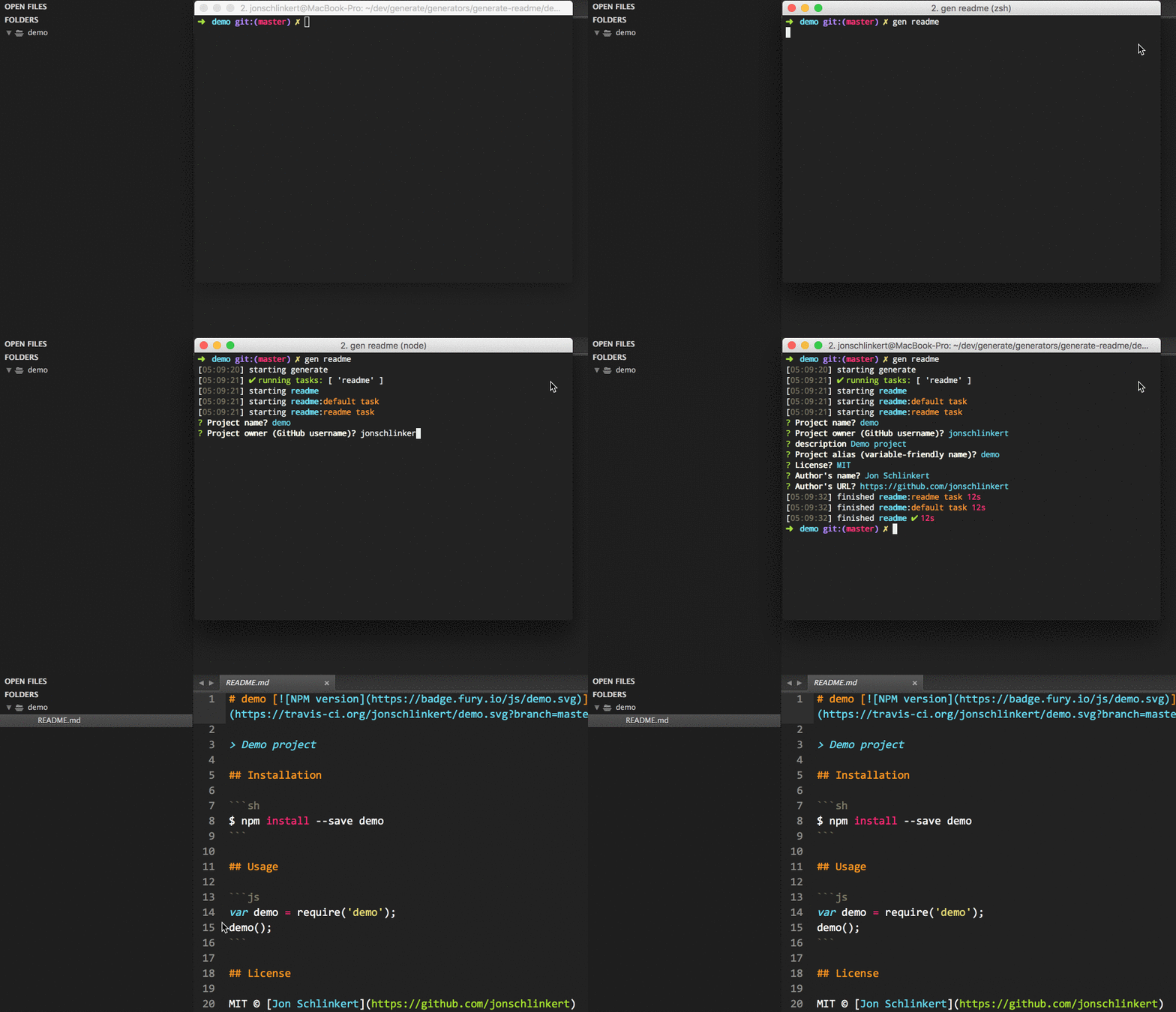
**What you should see in the terminal**
If completed successfully, you should see both `starting` and `finished` events in the terminal, like the following:
```sh
[00:44:21] starting ...
...
[00:44:22] finished ✔
```
If you do not see one or both of those events, please [let us know about it](../../issues).
### Help
To see a general help menu and available commands for Generate's CLI, run:
```sh
$ gen help
```
### Options
* `--dest`, `-d`: set the destination directory to use for generated files
* `--no-hints`: Don't use hints in prompts (except for global data, like `author.name`)
### Running tasks
Generators use [tasks](https://github.com/generate/generate/blob/master/docs/tasks.md) for flow control. Tasks are run by passing the name of the task to run after the generator name, delimited by a comma.
**Example**
For instance, the following will run generator `foo`, task `bar`:
```sh
$ gen foo:bar
^ ^
generator task
```
**Default task**
When a task name is not explicitly passed on the command line, Generate's CLI will run the [default](#default) task.
## Available tasks
### [default](generator.js#L26)
Alias for the [readme:node](#node) task, to allow this generator to be run with the following command:
**Example**
```sh
$ gen readme
$ gen readme --dest ./docs
```
### [node](generator.js#L41)
Generate a basic `README.md` for a node.js project to the current working directory or specified `--dest`.
**Example**
```sh
$ gen readme:node
$ gen readme:node --dest ./docs
```
### [min](generator.js#L57)
Generate a minimal `README.md` to the current working directory or specified `--dest`. Also aliased as `readme-minimal` to provide a semantic task name for plugin usage.
**Example**
```sh
$ gen readme:min
```
Visit Generate's [documentation for tasks](https://github.com/generate/generate/blob/master/docs/tasks.md).
## Running multiple generators
Generate supports running multiple generators at once. The following generator(s) work well with `generate-readme`:
### generate-package
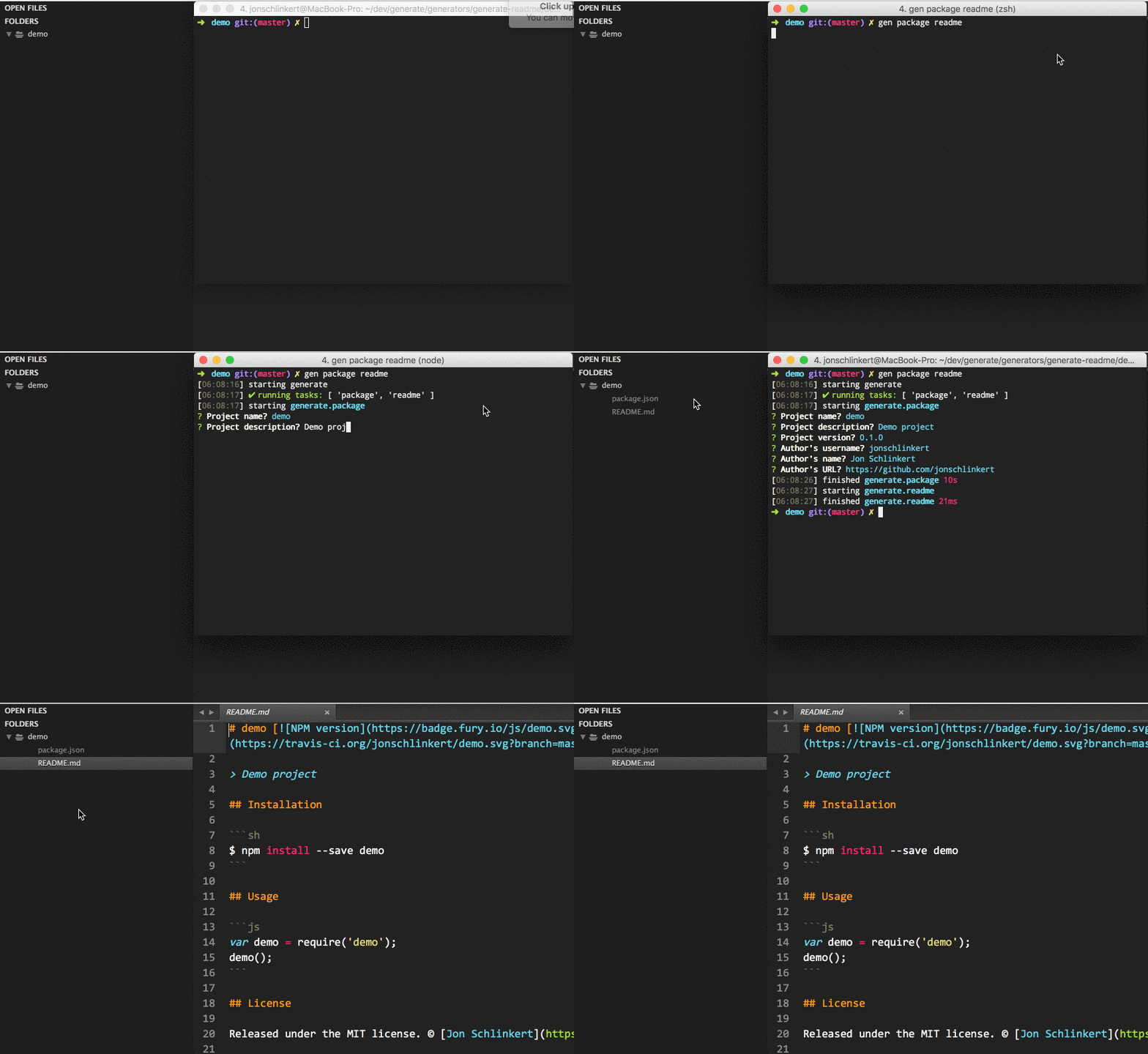
Run [generate-package](https://github.com/generate/generate-package) **before** `generate-readme` to create a `package.json` for your project. Answers to your prompts will be used in `generate-readme`, so you will only be prompted for anything that hasn't already been answered.
```sh
$ gen package readme
```
**Example**
### generate-dest
Run [generate-dest](https://github.com/generate/generate-dest) **before** `generate-readme` to prompt for the destination directory to use for generated files.
```sh
$ gen dest readme
```
**Example**

## API usage
Use `generate-readme` as a [plugin](https://github.com/generate/generate/blob/master/docs/plugins.md) in your own [generator](https://github.com/generate/generate/blob/master/docs/generators.md).
### Install locally
Install with [npm](https://www.npmjs.com/):
```sh
$ npm install --save generate-readme
```
### Use as a plugin
When used as a plugin, tasks from `generate-readme` are added to your generator's instance.
```js
module.exports = function(app) {
app.use(require('generate-readme'));
// do generator stuff
};
```
**Running tasks**
You can now run any tasks from `generate-readme` as if they were part of your own generator.
```js
module.exports = function(app) {
app.use(require('generate-readme'));
app.task('foo', function(cb) {
// do task stuff
cb();
});
// run the `mit` task from `generate-readme`
app.task('default', ['foo', 'mit']);
};
```
### Register as a generator
When registered as a generator, tasks from `generate-readme` are added to the "namespace" you give to the generator.
```js
module.exports = function(app) {
app.register('foo', require('generate-readme'));
// generate
};
```
**Running tasks**
Pass the names of one or more tasks to run to the `.generate` method, prefixed with the namespace of the sub-generator (`foo`, in our example):
**Examples**
Run the `bar` task from generator `foo`:
```js
module.exports = function(app) {
app.register('foo', require('generate-readme'));
app.generate('foo:bar', function(err) {
if (err) console.log(err);
});
};
```
Wrap the call to `.generate` in a task, so it can be run on demand:
```js
module.exports = function(app) {
app.register('foo', require('generate-readme'));
app.task('bar', function(cb) {
app.generate('foo:bar', cb);
});
};
```
**More information**
Visit the [generator docs](https://github.com/generate/generate/blob/master/docs/generators.md) to learn more about creating, installing, using and publishing generators.
## Customization
The following instructions can be used to override settings in `generate-readme`. Visit the [Generate documentation](https://github.com/generate/generate/blob/master/docs/overriding-defaults.md) to learn about other ways to override defaults.
### Destination directory
To customize the destination directory, install [generate-dest](https://github.com/generate/generate-dest) globally, then in the command line prefix `dest` before any other generator names.
For example, the following will prompt you for the destination path to use, then pass the result to `generate-readme`:
```sh
$ gen dest readme
```
### Overriding templates
You can override a template by adding a template of the same name to the `templates` directory in user home.
For example, to override the `foo.tmpl` template, add a template at the following path `~/generate/templates/foo.tmpl`, where `~/` is the user-home directory that `os.homedir()` resolves to on your system.
## About
### Related projects
* [generate-gitignore](https://www.npmjs.com/package/generate-gitignore): Generate any local or global .gitignore file from the github/gitignore repository. Use from the command… [more](https://github.com/generate/generate-gitignore) | [homepage](https://github.com/generate/generate-gitignore "Generate any local or global .gitignore file from the github/gitignore repository. Use from the command line when Generate's CLI is installed globally, or use as a plugin or sub-generator in your own generator.")
* [generate-license](https://www.npmjs.com/package/generate-license): Generate a license file for a GitHub project. | [homepage](https://github.com/generate/generate-license "Generate a license file for a GitHub project.")
* [generate-package](https://www.npmjs.com/package/generate-package): Generate a package.json from a pre-defined or user-defined template. This generator can be used from… [more](https://github.com/generate/generate-package) | [homepage](https://github.com/generate/generate-package "Generate a package.json from a pre-defined or user-defined template. This generator can be used from the command line when globally installed, or as a plugin or sub-generator in your own generator.")
### Contributing
Pull requests and stars are always welcome. For bugs and feature requests, [please create an issue](../../issues/new).
### Running tests
Install dev dependencies:
```sh
$ npm install -d && npm test
```
### Author
**Jon Schlinkert**
* [github/jonschlinkert](https://github.com/jonschlinkert)
* [twitter/jonschlinkert](http://twitter.com/jonschlinkert)
### License
Copyright © 2016, [Jon Schlinkert](https://github.com/jonschlinkert).
Released under the [MIT license](https://github.com/generate/generate-readme/blob/master/LICENSE).
***
_This file was generated by [verb-generate-readme](https://github.com/verbose/verb-generate-readme), v0.1.31, on October 01, 2016._