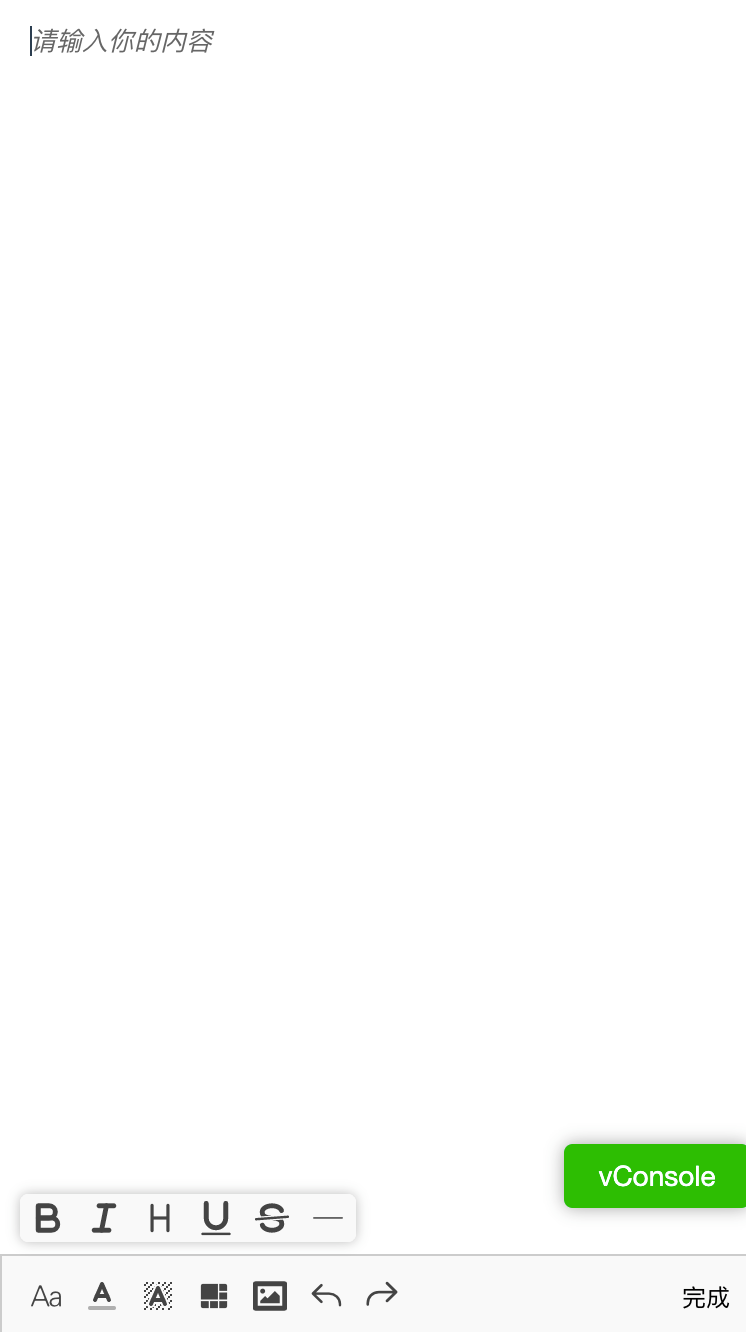
gdy-quill-editor
Version:
基于Quill的vue编辑器组件 npm@0.1.6
180 lines (163 loc) • 5.56 kB
Markdown
# gdy-quill-editor
基于Quill的vue编辑器组件 npm@0.1.6
## Base
``` javascript
"quill": "2.0.0-dev.4"
```
* 文档: [https://quilljs.com/](https://quilljs.com/)
* 中文文档: [http://doc.quilljs.cn/](http://doc.quilljs.cn/)
## Install
``` javascript
// npm
npm install gdy-quill-editor
// yarn
yarn add gdy-quill-editor
```
## Start
``` javascript
lerna bootstrap
// if you want run demo
yarn serve:demo
```
## Usage
#### Global
``` javascript
// gdyEditor = { Quill, gdyEditor, install, Dplayer }
// VUE Global registration
import Vue from 'vue'
import 'gdy-quill-editor/dist/main.css'
import gdyEditor from 'gdy-quill-editor'
Vue.use(gdyEditor)
```
#### Local
``` javascript
// VUE Local registration
import { gdyEditor } from 'gdy-quill-editor'
import 'gdy-quill-editor/dist/main.css'
components: {
gdyEditor,
},
```
## Options & Events
* props
| props | 类型 | 是否必填 | 默认值 | 描述
| :- | :- | :- | :- | :- |
|isShowTips|Boolean|false|false|是否显示title tips(鼠标悬浮弹出的提示框)
|isShowCode|Boolean|false|true|是否显示html代码区(出现在编辑区下方)
|options|Object|false|false|编辑器是否能编辑
|isShowTips|Boolean|false|{placeholder: '请输入你的内容', ...}|quill设置(参考quill文档[https://quilljs.com/docs/configuration/#options](https://quilljs.com/docs/configuration/#options)
|globalOptions|Object|false|{}|全局quill设置(优先级大于options,Obj二级直接覆盖,说明见globalOptions)
|toolbarOptions|Object|false|{}|菜单栏设置(优先级大于globalOptions)
* emit
| emit | 参数 | 描述
| :- | :- | :-
|blur|quill实例|编辑器失焦|
|focus|quill实例|编辑器聚焦|
|input|quill实例|编辑器输入|
|change|{ html, text, quill }|编辑器改变|
|ready|quill实例|编辑器初始化完成|
|imgHandle| {base64: String, imgFile: File , insert: Function} |图片上传(参数:「图片的base64对象,图片的File对象 , 上传成功调用插入方法」|
* inner methods
| methods | 参数 | 描述
| :- | :- | :-
|addVideoLink|{ url: String, id: String, poster: String, height: String,width: String} |添加一个自定义视频, 参数:「视频url,视频唯一id,视频封面 ,视频height 默认50 单位px,视频width 默认100 单位px 」|
|addTextLink|{ innerText: String, dataValue: String, href: String}|添加一个自定义超链接, 参数:「插入的文字,data-value,链接」|
* globalOptions
``` javascript
// 1. 使用已定义的toolbar
import { fontType, fontColor, other, alltype } from 'gdy-quill-editor/lib/config/toolbar'
import { handlers } from 'gdy-quill-editor/lib/config/handlers'
toolbarOptions = {
container: alltype,
handlers,
}
// 2. 你也可以自定义你的toolbar
// 比如:<div id="toolbar">
toolbarOptions = {
container: '#toolbar',
handlers,
}
```
* titleConfig
| titleConfig | 说明
| :- | :-
|ql-bold| 加粗|
|ql-color| 颜色|
|ql-font| 字体|
|ql-code| 插入代码|
|ql-italic| 斜体|
|ql-link| 添加链接|
|ql-background| 背景颜色|
|ql-size| 字体大小|
|ql-strike| 删除线|
|ql-script| 上标/下标|
|ql-underline| 下划线|
|ql-blockquote| 引用|
|ql-header| 标题|
|ql-indent| 缩进|
|ql-list| 列表|
|ql-align| 文本对齐|
|ql-direction| 文本方向|
|ql-code-block| 代码块|
|ql-formula| 公式|
|ql-image| 图片|
|ql-video| 视频|
|ql-clean| 清除字体样式|
|ql-grammarly-inline| 插入分割线|
|ql-shortcode| 自定义命令|
|ql-table| 表格|
|ql-table-insert-row| 增加行|
|ql-table-insert-column| 增加列|
|ql-table-delete-row| 删除行|
|ql-table-delete-column| 删除列|
|ql-lineHeight| 行高|
|ql-history-back| 返回|
|ql-history-redo| 撤销返回|
|ql-emoji| 表情|
|ql-dangerously-paste| 完全复制, 禁用quill所有的黏贴过滤规则, 存在position样式可能会出现不能复制的问题|
* video
```javascript
// video在编辑视频并不会播放,会以封面图的图片展示
// 你需要在预览中初始化视频的播放:
// 使用Dplayer初始化
import { Dplayer } from 'gdy-quill-editor'
// 参考 packages/editor-demo/src/components/EditorDemo/index 273-300
const op = HTMLDecode(options[1])
op.container = document.querySelectorAll('#' + op.container)[1]
const myvideo = new Dplayer(op)
myvideo.play()
```
* 上传图片
```javascript
// <gdy-editor @imgHandle="imgHandle"/>
// ...
imgHandle(param) {
// 这里使用axios举个🌰
axios.post(url: 'http://xxx.xxx.xxx',qs.stringify({img: param.base64,})).then(
() => {
/* 200 */ param.insert()
/* else */ param.insert(param.base64)
},
// failed
() => {
param.insert(base64)
}
)
},
```
* 其他
initEditor中自定义图标和方法
```javascript
// 1. 现在toolbarOptions中的handlers添加一个自己的方法
handlers['xxx'] = function() {}
// 2. 操作dom给它添加图标和title tip
document.getElementsByClassName(className)[0].innerHTML = `图标`
document.querySelector('.ql-toolbar').querySelector('.ql-xxx').dataset.title = 'xxx'
// 3. 给它定义触发事件
quill.getModule('toolbar').addHandler('xxx', () => {})
// or.你也可以在handlers添加方法 handlers.xxx = function(){},但要注意作用域
// 上传并添加后的图片地址
// 参考 packages/editor-demo/src/components/EditorDemo/index 194-250
```
## Screenshot