gatsby-plugin-purgecss
Version:
Gatsby plugin for purgecss. Removes unused css/sass/less/stylus from files and modules. Supports Tailwindcss, Bootstrap, Bulma etc.
411 lines (334 loc) • 17.2 kB
Markdown
# Gatsby Plugin Purgecss [](https://www.npmjs.com/package/gatsby-plugin-purgecss) [](https://www.npmjs.com/package/gatsby-plugin-purgecss)
For Gatsby 2 only
[](https://circleci.com/gh/anantoghosh/gatsby-plugin-purgecss/tree/master)
[](https://travis-ci.org/anantoghosh/gatsby-plugin-purgecss)
[](https://coveralls.io/github/anantoghosh/gatsby-plugin-purgecss?branch=master)
[](https://renovatebot.com/) [](https://snyk.io/test/github/anantoghosh/gatsby-plugin-purgecss?targetFile=package.json)
[](https://github.com/facebook/jest)
[](https://david-dm.org/anantoghosh/gatsby-plugin-purgecss/)
[](https://david-dm.org/anantoghosh/gatsby-plugin-purgecss?type=dev)
[](https://david-dm.org/anantoghosh/gatsby-plugin-purgecss?type=peer)
## What is this plugin about?
**Remove unused css from css/sass/less/stylus files and modules in your Gatsby project using [purgecss](https://github.com/FullHuman/purgecss). 🎉. Supports tailwind, bootstrap, bulma etc.**
<hr />
⚠️ NOTE: This is NOT an install and forget type plugin. By default, it may remove required styles too.
**Please read [Help! Purgecss breaks my site](#help-purgecss-breaks-my-site) 😯 to make sure gatsby-plugin-purgecss does not cause you issues and [TLDR](#TLDR) for the important bits**
<hr />
📘 [Read the latest docs here.](https://github.com/anantoghosh/gatsby-plugin-purgecss/blob/master/README.md) • [Changelog](https://github.com/anantoghosh/gatsby-plugin-purgecss/blob/master/CHANGELOG.md) •
### Demo
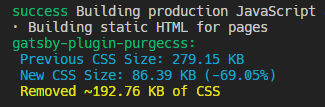
When used in [gatsby-starter-bootstrap](https://github.com/jaxx2104/gatsby-starter-bootstrap)
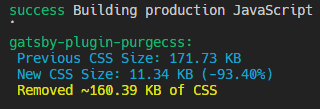
When used in [gatsby-starter-bootstrap-cv](https://github.com/mhjadav/gatsby-starter-bootstrap-cv) (installed by default)
## Supported files
- `.css` , `.module.css`
- `.scss`, `.sass`, `.module.scss`, `.module.sass` (via [gatsby-plugin-sass](https://next.gatsbyjs.org/packages/gatsby-plugin-sass/))
- `.less`, `.module.less` (via [gatsby-plugin-less](https://next.gatsbyjs.org/packages/gatsby-plugin-less/))
- `.styl`, `.module.styl` (via [gatsby-plugin-stylus](https://next.gatsbyjs.org/packages/gatsby-plugin-sass/))
## Installation
```sh
npm i gatsby-plugin-purgecss
```
### Usage
> **Add the plugin AFTER other css/postcss plugins**
```js
// gatsy-config.js
module.exports = {
plugins: [
`gatsby-plugin-stylus`,
`gatsby-plugin-sass`,
`gatsby-plugin-less`,
`gatsby-plugin-postcss`,
// Add after these plugins if used
{
resolve: `gatsby-plugin-purgecss`,
options: {
printRejected: true, // Print removed selectors and processed file names
// develop: true, // Enable while using `gatsby develop`
// tailwind: true, // Enable tailwindcss support
// whitelist: ['whitelist'], // Don't remove this selector
// ignore: ['/ignored.css', 'prismjs/', 'docsearch.js/'], // Ignore files/folders
// purgeOnly : ['components/', '/main.css', 'bootstrap/'], // Purge only these files/folders
}
}
]
};
```
[Read about all the available options.](#options)
## TLDR
* Define options in `gatsby-config.js`, not `purgecss.config.js`.
* If using tailwindcss, use the [`tailwind: true` option](#tailwind).
* Use [`printRejected: true`](#printrejected) option to print the removed selectors.
* Only files processed by Webpack will be purged.
* `my-selector` will not match `mySelector`.
* Whitelist required selectors or ignore files/folder using the [Whitelist Solutions](#whitelist-solutions) guide.
* Ignore complete packages with [`ignore: ['packagename/']`](#ignore).
* To only purge specific files/packages use [`purgeOnly: ['fileOrPackage/']`](#purgeOnly).
## Help! Purgecss breaks my site
### Diagnosing the issue
* Use [`printRejected: true` option](#printrejected) which will print the filenames and the selectors which were removed.
* Identify which of the required selectors were removed.
* Whitelist the required selectors or completely ignore files using [Whitelist Solutions](#whitelist-solutions) guide.
* Look at the [Issues](#issues) section to understand why/how the purge was performed.
### Issues
This section documents purgecss behavior in removing unused css. Most of the rules apply in any project and is not `gatsby-plugin-purgecss` specific.
#### Issue 1: CSS file not getting purged
For `gatsby-plugin-purgecss` to work on a css file it **must be imported by a script file inside your src folder**. This plugin depends on webpack to process css. **If webpack does not use the css file then `gatsby-plugin-purgecss` cannot process it.**
Also, make sure that you [included the plugin](#usage) after sass/less/stylus/postcss plugins.
#### Issue 2: Selectors with dashes in name gets removed when used with named imports
For eg:
**style.css**
```css
.my-selector { color: 'white' }
```
**index.js**
```jsx
// Named import
import style from './style.css';
...
<div className={style.mySelector} /> ❌
```
Here `.my-selector` **will get removed** since purgecss by default cannot match it with `mySelector`.
**Read how to solve this issue in the ["Whitelist Solutions"](#whitelist-solutions) section.**
*Note: Directly importing and using the selector name as is will work as intended*
```jsx
import './style.css';
<div className={`my-selector`} /> ✅
```
#### Issue 3: Styles getting purged even though the script file has selector names
Make sure that the script file is in the `src` folder.
If you want to look for selectors in another folder, use the [`content` option.](#content---from-purgecss)
#### Issue 4: Getting "Could not parse file, skipping. Your build will not break."
> If you use postcss syntax based plugins then read [this](#using-with-postcss-syntax-plugins).
Something is wrong. Good news is `gatsby-plugin-purgecss` should not cause any issue in such cases, files which could not be parsed will be skipped. If you want to diagnose the problem then use the [`debug` option](#debug). Also, feel free to create a GitHub issue.
#### Issue 5: Using npm packages with components which import css files
If you import a npm package which imports its own styles locally, then gatsby-plugin-purgecss will incorrectly remove all the css imported by the package. It's because by default the selectors are only matched with the files under 'src' folder.
To get around this, you could:
1. Ignore the file completely using the [`ignore` option](#ignore)
2. Whitelist the required selectors as described in the next section.
3. Use the [`content` option](#content---from-purgecss) and add the package's path.
Eg:
```js
content: [
path.join(process.cwd(), 'src/**/!(*.d).{ts,js,jsx,tsx}'),
path.join(process.cwd(), 'node_modules/my-npm-package/folder-to-match/!(*.d).{ts,js,jsx,tsx}')
];
```
#### Issue 6: Works in `develop`, breaks in `build`
`gatsby-plugin-purgecss` by default does not run when using `gatsby develop`.
### Whitelist Solutions
You can use any of these techniques to stop purgecss from removing required styles
#### 1. Whitelist the selector using the whitelist option in gatsby-config.js
```js
whitelist: ['my-selector']
```
[Read about whitelist option.](#whitelist---from-purgecss)
#### 2. Use a JavaScript comment
```jsx
// my-selector
<div className={style.mySelector} />
```
This comment can be in any script file inside `src`.
#### 3. Use Regex pattern to exclude many selectors
`whitelistPatterns` option is available from purgecss
```js
whitelistPatterns: [/^btn/]
```
For eg, this pattern will whitelist all selectors starting with btn: btn btn-primary btn-secondary etc.
[Read about whitelistPatterns option.](#whitelistpatterns---from-purgecss)
Look at the [`whitelistPatternsChildren` option](#whitelist---from-purgecss) in purgecss to also whitelist children of the selectors.
#### 4. Use purgecss ignore comment in css file
```css
/* purgecss ignore */
.my-selector { color: 'white' }
```
This comment will ignore the selector on the next line.
#### 5. Use purgecss ignore block comments in css file
```css
/* purgecss start ignore */
button { color: 'white' };
.yo { color: 'blue' };
/* purgecss end ignore */
```
This comment pair will ignore all css selectors between them.
#### 6. Ignore files and folder using the ignore options
```js
ignore: ['ignoredFile.css', 'ignoredFolder/', 'sub/folder/ignore/', 'inFolder/file.css']
```
**Note:** always use forward slash `/` for folders, even on Windows.
[Read about ignore option.](#ignore)
#### 7. Purge only specified files and skip everything else
```js
purgeOnly: ['/mainstyles.css', 'node_modules/bootstrap']
```
**Note:** always use forward slash `/` for folders, even on Windows.
Good if you only need to purge some large css library and not touch anything else.
[Read about purgeOnly option.](#purgeOnly)
#### 8. For selector with dashes in them and using named imports
You *could* write it like `className={style['my-selector']}` instead.
### Improving Purgecss selector detection
Purgecss relies on extractors to get the list of selector used in a file. The default extractor considers every word of a file as a selector.
You could use your own extractor (or get one made by other community members) to improve detection and further decrease your css file size.
[Read more at Purgecss docs.](https://www.purgecss.com/extractors)
If you do find/write a better extractor suited for Gatsby, please help me add it to the docs.
## Important Notes
### Running
By default, this plugin only runs when building the project (`gatsby build`).
It will print the amount of css removed.
To run it while using `gatsby develop`, use the `develop: true` option.
### Size reporting
The size reported by this plugin is the approximate size of the css content *before* any optimizations have been performed.
The actual file size should be smaller.
### Selector matching
This plugin loads css files (or transformed output from css plugins) and searches for matching selectors in js, jsx, ts, tsx files in `src/`. It does not know which css file belongs to which source file. Therefore, for eg., if there is a class `.module` in some css file, it will not be removed if it used in _any_ script file under `src/`.
### Whitelist ['html', 'body']
Since html and body tags do not appear in `src/` files, it is whitelisted by default to not be removed.
Since v2.3.0, manually including 'html', 'body' is no longer required.
### Webpack loader order
Sass/Less/Stylus(or any other loader) -> PostCSS -> **PurgeCSS** -> CSSLoader -> (CSSExtract/StyleLoader)
Note: Sass/Less/Stylus `@import`s are executed before this plugin, therefore, it won't see the `@import`ed files as separate files.
### Using with postcss syntax plugins
Since v3, `gatsby-plugin-purgecss` should work with other postcss plugins.
For older versions:
`gatsby-plugin-purgecss` is executed before postcss loader and can only purge css syntax. If you are using any syntax based postcss plugin, then it may not get purged. In such cases you will see "Could not parse file, skipping. Your build will not break." message. `gatsby-plugin-purgecss` will simply ignore the file and continue without issue.
It would be better if you use purgecss postcss plugin directly instead.
## Options
This plugins supports most purgecss options as is (except `css`).
> [Read about purgecss options in detail](https://www.purgecss.com/configuration)
Options can be specified in your `gatsby-config.js` file like so:
```js
module.exports = {
plugins: [
{
resolve: 'gatsby-plugin-purgecss',
options: {
printRejected: true,
}
}
]
};
```
### rejected
Print the amount of css removed
**`rejected: boolean`**
```js
rejected: true
```
default: `true`
### printRejected
Print the list of removed selectors
**`printRejected: boolean`**
```js
printRejected: true
```
Needs [`rejected`](#rejected) option to be true.
It will print maximum of 100 removed selector per file to keep the output readable.
To view all the removed selector enable the [`printAll` option](#printall).
default: `false`
### printAll
Enables `printRejected` to print all the rejected selectors.
(Output can get messy)
**`printAll: boolean`**
```js
printAll: true
```
Needs [`printRejected`](#printrejected) option to be true.
default: `false`
### whitelist - from purgecss
Stops from removing these selectors.
**`whitelist: Array<string>`**
```js
whitelist: ['my-selector', 'footer']
```
**Note:** do NOT add `.` or `#` for classes and ids.
`'html'`, `'body'` are always whitelisted.
Since v2.3.0 manually including 'html', 'body' is no longer required.
default: `[]`
### purgeOnly
Only purge these files/folders.
Added in v3.1.0.
**`ignore: Array<string>`**
```js
purgeOnly: ['/main.css', 'bootstrap/', 'node_modules/font-awesome/']
```
**Note:** always use forward slash `/` for folders, even on Windows.
Can be combined with the [`ignore` option](#ignore).
default: `[]`
### ignore
Stop these files or folders from getting purged.
**`ignore: Array<string>`**
```js
ignore: ['/ignoredFile.css', 'ignoredFolder/', 'sub/folder/ignore/', 'inFolder/file.css']
```
**Note:** always use forward slash `/` for folders, even on Windows.
default: `[]`
### tailwind
Enable Tailwind support.
Added in v3.
**`tailwind: boolean`**
```js
tailwind: true
```
Uses extractors needed for parsing tailwind class names.
Enable if you are using tailwindcss.
default: `false`
### develop
Enable plugin while using `gatsby develop`.
Added in v3.
**`develop: boolean`**
```js
develop: true
```
This does not print the total css removed.
To see what is being removed, use it with the [printRejected option](#printRejected).
default: `false`
### debug
Enable debugging
**`debug: boolean`**
```js
debug: true
```
It will write two files to disk.
`gatsby-plugin-purgecss-debug-config.js` with Gatsby's webpack config.
`gatsby-plugin-purgecss-debug.js` with the errors encountered.
default: `false`
### content - from purgecss
Files to search for selectors.
**`content: Array<string>`**
```js
content: [
path.join(process.cwd(), 'src/**/!(*.d).{ts,js,jsx,tsx}'),
path.join(process.cwd(), 'anotherFolder/!(*.d).{ts,js,jsx,tsx}')
];
```
default: `[path.join(process.cwd(), 'src/**/!(*.d).{ts,js,jsx,tsx}')]`
### whitelistPatterns - from purgecss
Whitelist Selectors with Regular Expression
**`whitelistPatterns: Array<RegExp>`**
```js
whitelistPatterns: [/button/, /^fa-/, /main$/]
```
This example will whitelist selectors containing "button", starting with "fa-" and ending with "main".
default: `[]`
### whitelistPatternsChildren - from purgecss
Contrary to `whitelistPatterns`, it will also whitelist children of the selectors.
**`whitelistPatternsChildren: Array<RegExp>`**
```js
whitelistPatternsChildren: [/red$/]
```
In the example, selectors such as `red p` or `.bg-red .child-of-bg` will be left in the final CSS.
default: `[]`
### Other options from purgecss
[Read About other purgecss options.](https://www.purgecss.com/configuration)
**`extractors?: Array<ExtractorsObj>`**
**`keyframes?: boolean`**
**`fontFace?: boolean`**
## Versioning
gatsby-plugin-purgecss uses [SemVer](http://semver.org/) for versioning.
## Acknowledgment
This project was made possible due to the incredible work done on the following projects:
- [purgecss](https://github.com/FullHuman/purgecss)
- [purgecss-loader](https://github.com/americanexpress/purgecss-loader)
- [gatsby](https://github.com/gatsbyjs/gatsby/)
## License
This project is licensed under the MIT License - see the [LICENSE](LICENSE) file for details.