gateio-api
Version:
Complete & robust Node.js SDK for Gate.io's REST APIs, WebSockets & WebSocket APIs, with TypeScript declarations.
405 lines (305 loc) • 15.2 kB
Markdown
# Node.js & JavaScript SDK for Gate.io REST APIs, WebSockets & WebSocket API
<p align="center">
<a href="https://www.npmjs.com/package/gateio-api">
<picture>
<source media="(prefers-color-scheme: dark)" srcset="https://github.com/tiagosiebler/gateio-api/blob/master/docs/images/logoDarkMode2.svg?raw=true#gh-dark-mode-only">
<img alt="SDK Logo" src="https://github.com/tiagosiebler/gateio-api/blob/master/docs/images/logoBrightMode2.svg?raw=true#gh-light-mode-only">
</picture>
</a>
</p>
[][1]
[][1]
[][1]
[](https://github.com/tiagosiebler/gateio-api/actions/workflows/e2etest.yml)
[][1]
[](https://t.me/nodetraders)
[1]: https://www.npmjs.com/package/gateio-api
Updated & performant JavaScript & Node.js SDK for the Gate.io REST APIs and WebSockets:
- Extensive integration with Gate.io REST APIs and WebSockets.
- TypeScript support (with type declarations for most API requests & responses).
- Gate.io REST APIs for Gate.io Spot, Margin, Perpetual Futures, Delivery Futures, Options & Announcements APIs.
- Strongly typed on most requests and responses.
- Extremely robust & performant JavaScript/Node.js Gate.io SDK.
- Actively maintained with a modern, promise-driven interface.
- Support for seamless API authentication for private Gate.io REST API and WebSocket calls.
- Gate.io Spot, Margin, Perpetual Futures, Delivery Futures & Options.
- Event driven messaging.
- Smart websocket persistence
- Automatically handle silent websocket disconnections through timed heartbeats, including the scheduled 24hr disconnect.
- Automatically handle listenKey persistence and expiration/refresh.
- Emit `reconnected` event when dropped connection is restored.
- Websocket API for Gate.io Spot, Margin, Perpetual Futures & Delivery Futures.
- Automatic connectivity via existing WebsocketClient, just call sendWSAPIRequest to trigger a request.
- Automatic authentication, just call sendWSAPIRequest with channel & parameters.
- Choose between two interfaces for WS API communication:
- Event-driven interface, fire & forget via sendWSAPIRequest and receive async replies via wsClient's event emitter.
- Promise-driven interface, simply call and await sendWSAPIRequest for a REST-API-like behaviour with the WS API.
- Proxy support via axios integration.
- Active community support & collaboration in telegram: [Node.js Algo Traders](https://t.me/nodetraders).
## Installation
`npm install --save gateio-api`
## Issues & Discussion
- Issues? Check the [issues tab](https://github.com/tiagosiebler/gateio-api/issues).
- Discuss & collaborate with other node devs? Join our [Node.js Algo Traders](https://t.me/nodetraders) engineering community on telegram.
- Follow our announcement channel for real-time updates on [X/Twitter](https://x.com/QuantSDKs)
<!-- template_related_projects -->
## Related projects
Check out my related JavaScript/TypeScript/Node.js projects:
- Try my REST API & WebSocket SDKs:
- [Bybit-api Node.js SDK](https://www.npmjs.com/package/bybit-api)
- [Okx-api Node.js SDK](https://www.npmjs.com/package/okx-api)
- [Binance Node.js SDK](https://www.npmjs.com/package/binance)
- [Gateio-api Node.js SDK](https://www.npmjs.com/package/gateio-api)
- [Bitget-api Node.js SDK](https://www.npmjs.com/package/bitget-api)
- [Kucoin-api Node.js SDK](https://www.npmjs.com/package/kucoin-api)
- [Coinbase-api Node.js SDK](https://www.npmjs.com/package/coinbase-api)
- [Bitmart-api Node.js SDK](https://www.npmjs.com/package/bitmart-api)
- Try my misc utilities:
- [OrderBooks Node.js](https://www.npmjs.com/package/orderbooks)
- [Crypto Exchange Account State Cache](https://www.npmjs.com/package/accountstate)
- Check out my examples:
- [awesome-crypto-examples Node.js](https://github.com/tiagosiebler/awesome-crypto-examples)
<!-- template_related_projects_end -->
## Documentation
Most methods accept JS objects. These can be populated using parameters specified by gateio's API documentation.
- [Gate.io API Documentation](https://www.gate.io/docs/developers/apiv4/en/)
- [REST Endpoint Function List](./docs/endpointFunctionList.md)
- [TSDoc Documentation (autogenerated using typedoc)](https://tsdocs.dev/docs/gateio-api)
## Structure
This project uses typescript. Resources are stored in 2 key structures:
- [src](./src) - the whole connector written in typescript
- [examples](./examples) - some implementation examples & demonstrations. Contributions are welcome!
---
# Usage
Create API credentials
- [Gate.io API Key Management](https://www.gate.io/myaccount/api_key_manage)
### REST API
To use any of Gate.io's REST APIs in JavaScript/TypeScript/Node.js, import (or require) the `RestClient`:
```javascript
const { RestClient } = require('gateio-api');
const API_KEY = 'xxx';
const PRIVATE_KEY = 'yyy';
const client = new RestClient({
apiKey: API_KEY,
apiSecret: PRIVATE_KEY,
});
client
.getSpotTicker()
.then((result) => {
console.log('all spot tickers result: ', result);
})
.catch((err) => {
console.error('spot ticker error: ', err);
});
client
.getSpotOrders({
currency_pair: 'BTC_USDT', // Specify the currency pair
status: 'open', // Specify the status of the orders to fetch
})
.then((result) => {
console.log('getSpotOrders result: ', result);
})
.catch((err) => {
console.error('getSpotOrders error: ', err);
});
```
See [RestClient](./src/RestClient.ts) for further information, or the [examples](./examples/) for lots of usage examples.
## WebSockets
All available WebSockets can be used via a shared `WebsocketClient`. The WebSocket client will automatically open/track/manage connections as needed. Each unique connection (one per server URL) is tracked using a WsKey (each WsKey is a string - see [WS_KEY_MAP](src/lib/websocket/websocket-util.ts) for a list of supported values).
Any subscribe/unsubscribe events will need to include a WsKey, so the WebSocket client understands which connection the event should be routed to. See examples below or in the [examples](./examples/) folder on GitHub.
Data events are emitted from the WebsocketClient via the `update` event, see example below:
```javascript
const { WebsocketClient } = require('gateio-api');
const API_KEY = 'xxx';
const PRIVATE_KEY = 'yyy';
const wsConfig = {
apiKey: API_KEY,
apiSecret: PRIVATE_KEY,
/*
The following parameters are optional:
*/
// Livenet is used by default, use this to enable testnet:
// useTestnet: true
// how long to wait (in ms) before deciding the connection should be terminated & reconnected
// pongTimeout: 1000,
// how often to check (in ms) that WS connection is still alive
// pingInterval: 10000,
// how long to wait before attempting to reconnect (in ms) after connection is closed
// reconnectTimeout: 500,
// config options sent to RestClient (used for time sync). See RestClient docs.
// restOptions: { },
// config for axios used for HTTP requests. E.g for proxy support
// requestOptions: { }
};
const ws = new WebsocketClient(wsConfig);
/**
* Subscribing to data:
**/
const userOrders = {
topic: 'spot.orders',
payload: ['BTC_USDT', 'ETH_USDT', 'MATIC_USDT'],
};
const userTrades = {
topic: 'spot.usertrades',
payload: ['BTC_USDT', 'ETH_USDT', 'MATIC_USDT'],
};
const userPriceOrders = {
topic: 'spot.priceorders',
payload: ['!all'],
};
// subscribe to multiple topics at once
ws.subscribe([userOrders, userTrades, userPriceOrders], 'spotV4');
// and/or subscribe to individual topics on demand
ws.subscribe(
{
topic: 'spot.priceorders',
payload: ['!all'],
},
'spotV4',
);
// Some topics don't need params, for those you can just subscribe with a string (or use a topic + payload object as above)
ws.subscribe('spot.balances', 'spotV4');
/**
* Handling events:
**/
// Listen to events coming from websockets. This is the primary data source
ws.on('update', (data) => {
console.log('data', data);
});
// Optional: Listen to websocket connection open event (automatic after subscribing to one or more topics)
ws.on('open', ({ wsKey, event }) => {
console.log('connection open for websocket with ID: ' + wsKey);
});
// Optional: Listen to responses to websocket queries (e.g. the reply after subscribing to a topic)
ws.on('response', (response) => {
console.log('response', response);
});
// Optional: Listen to connection close event. Unexpected connection closes are automatically reconnected.
ws.on('close', () => {
console.log('connection closed');
});
// Optional: listen to internal exceptions. Useful for debugging if something weird happens
ws.on('exception', (data) => {
console.error('exception: ', data);
});
// Optional: Listen to raw error events.
ws.on('error', (err) => {
console.error('ERR', err);
});
```
See [WebsocketClient](./src/WebsocketClient.ts) for further information and make sure to check the [examples](./examples/) folder for much more detail.
### Websocket API
The [WebsocketClient](./src/WebsocketClient.ts) supports this exchange's Websocket API. There are two ways to use the WS API, depending on individual preference:
- event-driven:
- send requests via `client.sendWSAPIRequest(wsKey, channel, params)`, fire and forget, don't use await
- handle async replies via event handlers on `client.on('exception', cb)` and `client.on('response', cb)`
- promise-driven:
- send requests via `const result = await client.sendWSAPIRequest(wsKey, channel, params)`, which returns a promise
- await each call
- use try/catch blocks to handle promise rejections
The below example demonstrates the promise-driven approach, which behaves similar to a REST API. For more detailed examples, refer to the [examples](./examples/) folder (e.g the [ws-private-spot-wsapi.ts](./examples/ws-private-spot-wsapi.ts) example).
```javascript
const { WebsocketClient } = require('gateio-api');
const API_KEY = 'xxx';
const PRIVATE_KEY = 'yyy';
async function start() {
const client = new WebsocketClient({
apiKey: API_KEY,
apiSecret: PRIVATE_KEY,
// Automatically re-auth WS API, if we were auth'd before and get reconnected
reauthWSAPIOnReconnect: true,
});
/**
* Setup basic event handlers for core connectivity events.
* Note for this approach, the `response` and `update` events are not needed (but you can use them too/instead if you prefer).
**/
// Successfully connected
client.on('open', (data) => {
console.log(new Date(), 'ws connected ', data?.wsKey);
});
// Something happened, attempting to reconnect
client.on('reconnect', (data) => {
console.log(new Date(), 'ws reconnect: ', data);
});
// Reconnect successful
client.on('reconnected', (data) => {
console.log(new Date(), 'ws reconnected: ', data);
});
// Connection closed. If unexpected, expect reconnect -> reconnected.
client.on('close', (data) => {
console.error(new Date(), 'ws close: ', data);
});
client.on('exception', (data) => {
console.error(new Date(), 'ws exception: ', data);
});
client.on('authenticated', (data) => {
console.error(new Date(), 'ws authenticated: ', data);
});
try {
/**
* All WebSocket API (WS API) messaging should be done via the sendWSAPIRequest method.
*/
// The WSKey identifies which connection this request is for.
// (e.g. "spotV4" | "perpFuturesUSDTV4" | "perpFuturesBTCV4" | "deliveryFuturesUSDTV4" | "deliveryFuturesBTCV4" | "optionsV4")
const wsKey = 'spotV4';
/**
* To authenticate, send an empty request to "spot.login". The SDK will handle all the parameters.
*
* By default (reauthWSAPIOnReconnect: true), if we get reconnected later on (e.g. connection temporarily lost), we will try to re-authenticate the WS API automatically when the connection is restored.
*/
console.log(new Date(), 'try authenticate');
const loginResult = await client.sendWSAPIRequest(wsKey, 'spot.login');
console.log(new Date(), 'authenticated!', loginResult);
/**
* For other channels, you should include any parameters for the request (the payload) in your call.
*
* Note that internal parameters such as "signature" etc are all handled automatically by the SDK. Only the core request parameters are needed.
*/
console.log(new Date(), 'try get order status');
const orderStatus = await client.sendWSAPIRequest(
wsKey,
'spot.order_status',
{
order_id: '600995435390',
currency_pair: 'BTC_USDT',
},
);
console.log(new Date(), 'orderStatus result!', orderStatus);
} catch (e) {
console.error(`WS API Error: `, e);
}
}
start();
```
---
## Customise Logging
Pass a custom logger which supports the log methods `silly`, `debug`, `notice`, `info`, `warning` and `error`, or override methods from the default logger as desired.
```javascript
const { WebsocketClient, DefaultLogger } = require('gateio-api');
// Disable all logging on the silly level
DefaultLogger.silly = () => {};
const ws = new WebsocketClient({ key: 'xxx', secret: 'yyy' }, DefaultLogger);
```
---
<!-- template_contributions -->
### Contributions & Thanks
Have my projects helped you? Share the love, there are many ways you can show your thanks:
- Star & share my projects.
- Are my projects useful? Sponsor me on Github and support my effort to maintain & improve them: https://github.com/sponsors/tiagosiebler
- Have an interesting project? Get in touch & invite me to it.
- Or buy me all the coffee:
- ETH(ERC20): `0xA3Bda8BecaB4DCdA539Dc16F9C54a592553Be06C` <!-- metamask -->
<!---
old ones:
- BTC: `1C6GWZL1XW3jrjpPTS863XtZiXL1aTK7Jk`
- BTC(SegWit): `bc1ql64wr9z3khp2gy7dqlmqw7cp6h0lcusz0zjtls`
- ETH(ERC20): `0xe0bbbc805e0e83341fadc210d6202f4022e50992`
- USDT(TRC20): `TA18VUywcNEM9ahh3TTWF3sFpt9rkLnnQa
-->
<!-- template_contributions_end -->
### Contributions & Pull Requests
Contributions are encouraged, I will review any incoming pull requests. See the issues tab for todo items.
<!-- template_star_history -->
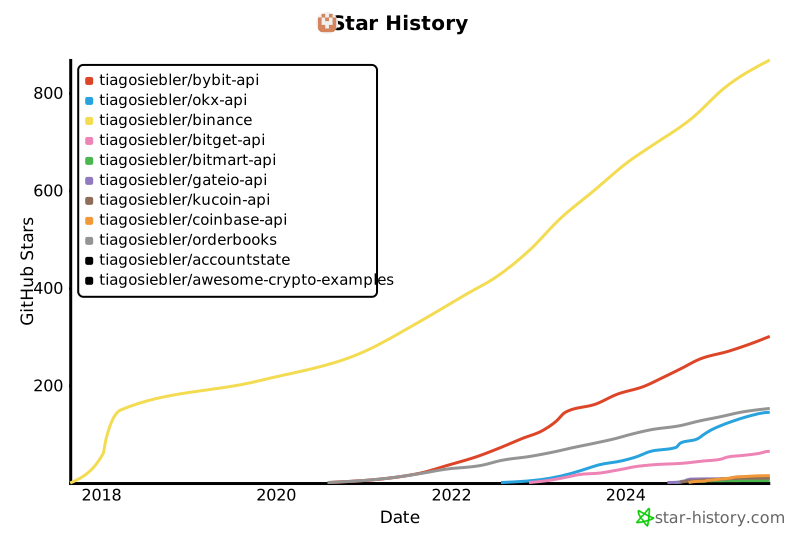
## Star History
[](https://star-history.com/#tiagosiebler/bybit-api&tiagosiebler/okx-api&tiagosiebler/binance&tiagosiebler/bitget-api&tiagosiebler/bitmart-api&tiagosiebler/gateio-api&tiagosiebler/kucoin-api&tiagosiebler/coinbase-api&tiagosiebler/orderbooks&tiagosiebler/accountstate&tiagosiebler/awesome-crypto-examples&Date)
<!-- template_star_history_end -->