fuse-angular-filemanager
Version:
A very smart filemanager to manage your files in the browser.
142 lines (109 loc) • 5.56 kB
Markdown
# fuse-angular-filemanager
Has some minor changes in original angular file-manager component to make it fuse theme compatible
## angular-filemanager
A very smart filemanager to manage your files in the browser developed in AngularJS following Material Design styles by [Jonas Sciangula Street](https://github.com/joni2back)
This project provides you a font-end interface in order to allow you to create your own backend connector following the [connector API](API.md).
By the way, we provide some backend connectors in many languages as example (ftp, local files, etc)
[](https://travis-ci.org/joni2back/angular-filemanager)
### Support
This project is under free license. If you want to support the angular-filemanager development or just thank it's main maintainer by paying a beer, you can make a donation by clicking the following button
Donate by Paypal [](https://www.paypal.com/cgi-bin/webscr?cmd=_s-xclick&hosted_button_id=XRB7EW72PS982)
Donate by Bitcoin wallet: ```147ca6be-a6a5-4012-8209-8ec94ff340b8```
#### [Try the DEMO](http://angular-filemanager.zendelsolutions.com/)
---------
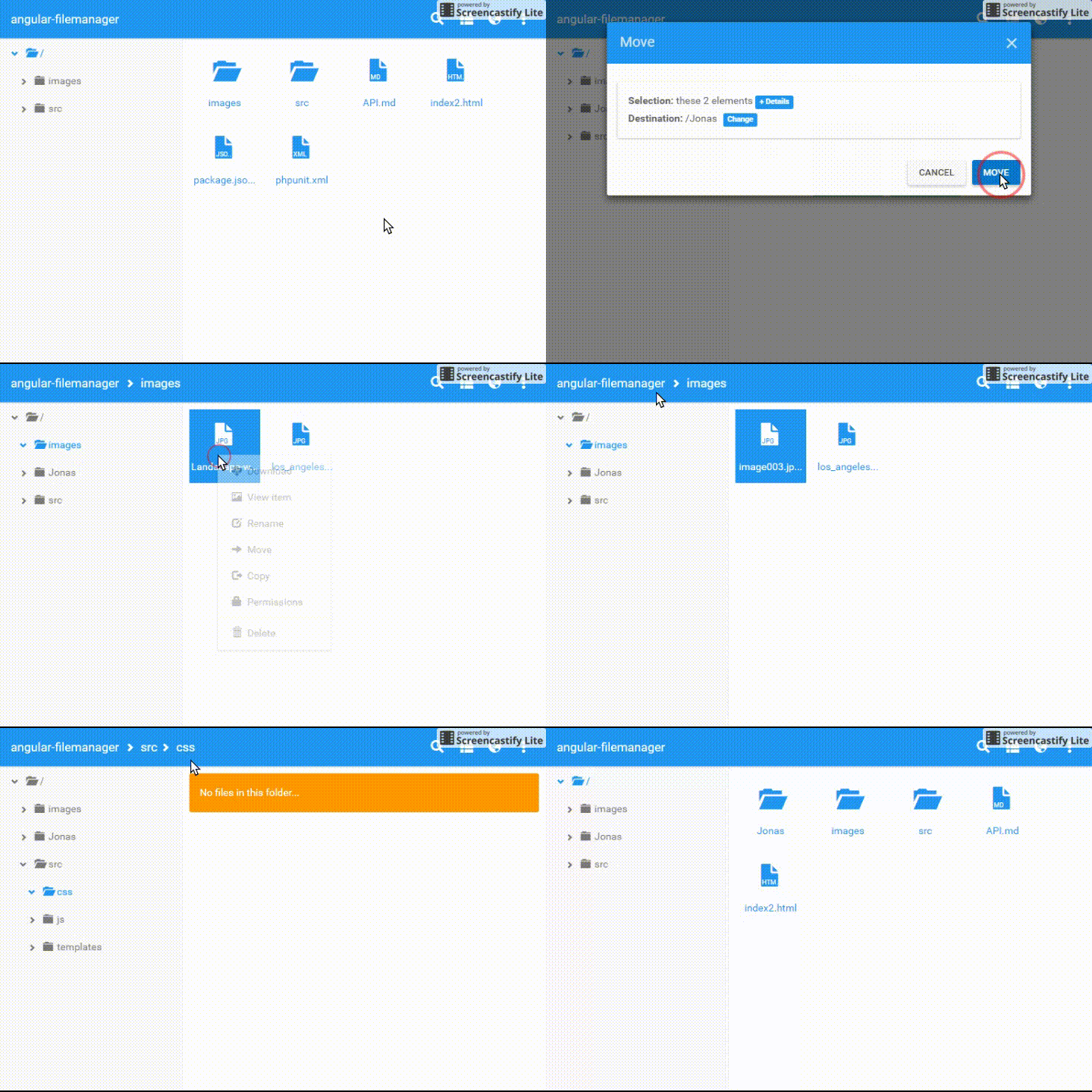
### Features
- Multilanguage (English, Chinese, Spanish, Russian, Portuguese, French, German, Italian, Slovak, Hebrew, Persian, Polish, Ukrainian, Turkish, etc...)
- Multiple templates (List / Icons)
- Multiple file upload
- Multiple file support
- Pick files callback for third parties apps
- Search files
- Directory tree navigation
- Copy, Move, Rename (Interactive UX)
- Delete, Edit, Preview, Download
- File permissions (Unix chmod style)
- Mobile support
### TODO
- Drag and drop
- Dropbox and Google Drive compatibility
- Extend backend bridges (PHP, Java, Python, Node, .Net)
- Migrate jQuery to native or angular.element
### Backend API
[Read the docs](API.md)
---------
### Use in your existing project
**1) Install and use**
```bower install --save angular-filemanager```
**2) Include the dependencies in your project**
```html
<!-- third party -->
<script src="bower_components/angular/angular.min.js"></script>
<script src="bower_components/angular-translate/angular-translate.min.js"></script>
<script src="bower_components/jquery/dist/jquery.min.js"></script>
<script src="bower_components/bootstrap/dist/js/bootstrap.min.js"></script>
<link rel="stylesheet" href="bower_components/bootswatch/paper/bootstrap.min.css" />
<!-- angular-filemanager -->
<link rel="stylesheet" href="dist/angular-filemanager.min.css">
<script src="dist/angular-filemanager.min.js"></script>
```
**3) Use the angular directive in your HTML**
```html
<angular-filemanager></angular-filemanager>
```
---------
### Using source files instead of minified js
```html
<!-- Uncomment if you need to use raw source code
<script src="src/js/app.js"></script>
<script src="src/js/directives/directives.js"></script>
<script src="src/js/filters/filters.js"></script>
<script src="src/js/providers/config.js"></script>
<script src="src/js/entities/chmod.js"></script>
<script src="src/js/entities/item.js"></script>
<script src="src/js/services/apihandler.js"></script>
<script src="src/js/services/apimiddleware.js"></script>
<script src="src/js/services/filenavigator.js"></script>
<script src="src/js/providers/translations.js"></script>
<script src="src/js/controllers/main.js"></script>
<script src="src/js/controllers/selector-controller.js"></script>
<link href="src/css/animations.css" rel="stylesheet">
<link href="src/css/dialogs.css" rel="stylesheet">
<link href="src/css/main.css" rel="stylesheet">
-->
<!-- Comment if you need to use raw source code -->
<link href="dist/angular-filemanager.min.css" rel="stylesheet">
<script src="dist/angular-filemanager.min.js"></script>
<!-- /Comment if you need to use raw source code -->
```
---------
### Extending the configuration file
```html
<script type="text/javascript">
angular.module('FileManagerApp').config(['fileManagerConfigProvider', function (config) {
var defaults = config.$get();
config.set({
appName: 'angular-filemanager',
pickCallback: function(item) {
var msg = 'Picked %s "%s" for external use'
.replace('%s', item.type)
.replace('%s', item.fullPath());
window.alert(msg);
},
allowedActions: angular.extend(defaults.allowedActions, {
pickFiles: true,
pickFolders: false,
}),
});
}]);
</script>
```
You can do many things by extending the configuration. Like hide the sidebar or the search button. See [the list of default configurations](/src/js/providers/config.js).
---------
### Contribute
To contribute to the project you can simply fork this repo. To build a minified version, you can simply run the Gulp
task `gulp build`. The minified/uglified files are created in the `dist` folder.
### Versioning
For transparency into our release cycle and in striving to maintain backward compatibility, angular-filemanager is maintained under [the Semantic Versioning guidelines](http://semver.org/).
### Copyright and license
Code and documentation released under [the MIT license](https://github.com/joni2back/angular-filemanager/blob/master/LICENSE).