flowy-engine
Version:
The minimal javascript library to create flowcharts ✨
270 lines (202 loc) • 9.81 kB
Markdown
# Flowy
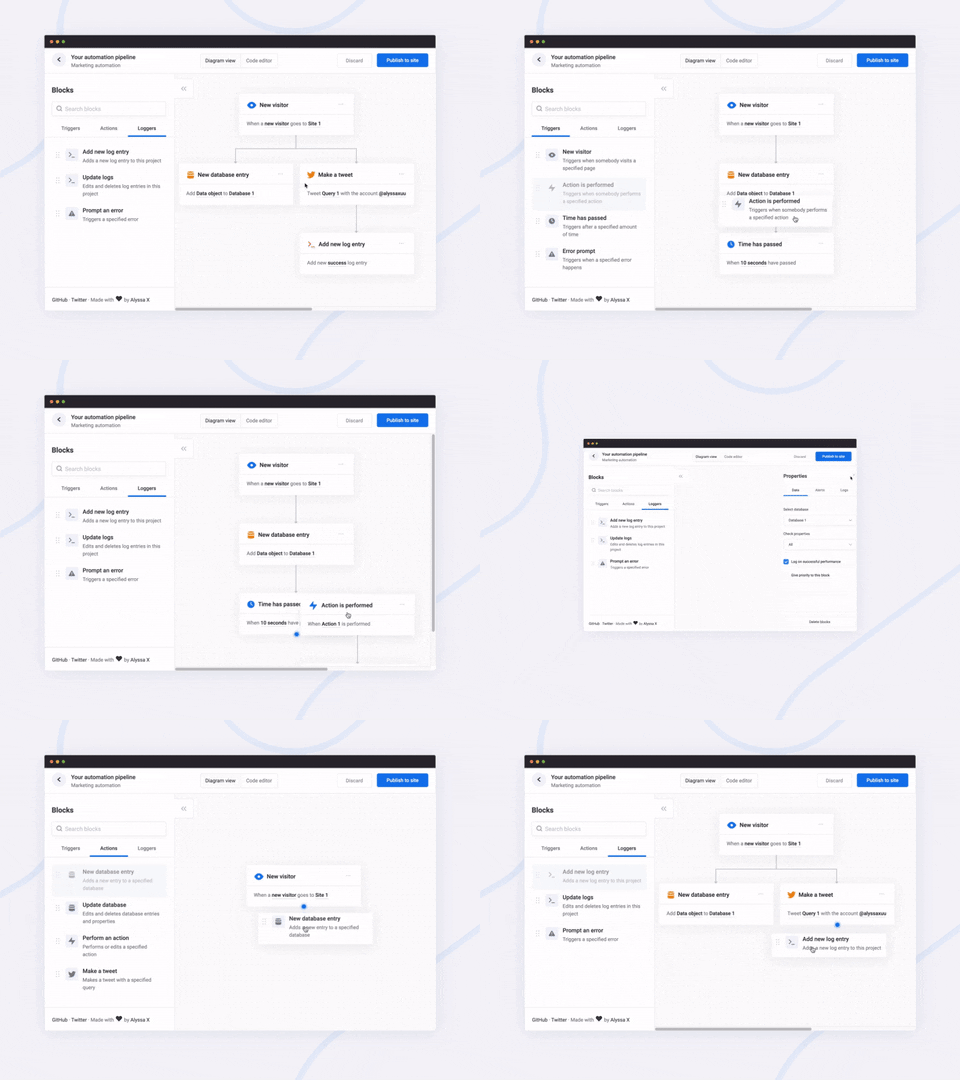
<br>A javascript library to create pretty flowcharts with ease ✨
[Dribbble](https://dribbble.com/shots/8576286-Flowy-Flowchart-Engine) | [Twitter](https://twitter.com/alyssaxuu/status/1199724989353730048) | [Live demo](https://alyssax.com/x/flowy)
Flowy makes creating WebApps with flowchart functionality an incredibly simple task. Build automation software, mind mapping tools, or simple programming platforms in minutes by implementing the library into your project.
Made by [Alyssa X](https://alyssax.com)
## Table of contents
- [Features](#features)
- [Installation](#installation)
- [Running Flowy](#running-flowy)
- [Initialization](#initialization)
- [Example](#example)
- [Callbacks](#callbacks)
- [On grab](#on-grab)
- [On release](#on-release)
- [On snap](#on-snap)
- [On rearrange](#on-rearrange)
- [Methods](#methods)
- [Get the flowchart data](#get-the-flowchart-data)
- [Import the flowchart data](#import-the-flowchart-data)
- [Delete all blocks](#delete-all-blocks)
## Features
Currently, Flowy supports the following:
- [x] Responsive drag and drop
- [x] Automatic snapping
- [x] Block rearrangement
- [x] Delete blocks
- [x] Automatic block centering
- [x] Conditional snapping
- [x] Conditional block removal
- [x] Import saved files
- [x] Mobile support
- [x] Vanilla javascript (no dependencies)
- [ ] [npm install](https://github.com/alyssaxuu/flowy/issues/10)
You can suggest new features [here](https://github.com/alyssaxuu/flowy/issues)
## Installation
You can install the Flowy package and use it as a module.
1. Install the package: `npm install flowy`
2. Import the module in your project: `import flowy from "flowy"` or `const flowy = require("flowy")`
3. Import styles into your project: `import styles from "flowy/engine/index.css"`
Adding Flowy to your WebApp is incredibly simple:
1. Run `npm run build:web`
2. Link `dist/flowy.js` and `dist/flowy.css` to your project -- or via CDN:
```html
<link rel="stylesheet" href="https://cdn.jsdelivr.net/gh/alyssaxuu/flowy/flowy.min.css" />
<script src="https://cdn.jsdelivr.net/gh/alyssaxuu/flowy/flowy.min.js"></script>
```
3. Create a canvas element that will contain the flowchart (for example, `<div id="canvas"></div>`)
4. Create the draggable blocks with the `.create-flowy` class (for example, `<div class="create-flowy">Grab me</div>`)
### Publish NPM Module
This package is published by first converting to ES5 modules in a `dist` folder. The `package.json` is copied to the `dist` folder and published from there to allow importing modules from `flowy/engine` instead of `flowy/dist/engine`.
```bash
npm run dist && npm publish dist
```
## Running Flowy
### Demo
There's a demo in [`src/demo`](./src/demo/). You can run the demo in your browser with `npm run demo`. This will open a browser window for you (or visit http://localhost:1234/).
If you want to build the demo without running it in your browser, run `npm run build:demo` and the source will be output to the [`demo`](./demo/) folder.
### Initialization
```javascript
flowy(canvas, ongrab, onrelease, onsnap, onrearrange, spacing_x, spacing_y)
```
| Parameter | Type | Description |
| ------------- | ------------------------ | ---------------------------------------------------------------- |
| `canvas` | _javascript DOM element_ | The element that will contain the blocks |
| `ongrab` | _function_ (optional) | Function that gets triggered when a block is dragged |
| `onrelease` | _function_ (optional) | Function that gets triggered when a block is released |
| `onsnap` | _function_ (optional) | Function that gets triggered when a block snaps with another one |
| `onrearrange` | _function_ (optional) | Function that gets triggered when blocks are rearranged |
| `spacing_x` | _integer_ (optional) | Horizontal spacing between blocks (default 20px) |
| `spacing_y` | _integer_ (optional) | Vertical spacing between blocks (default 80px) |
To define the blocks that can be dragged, you need to add the class `.create-flowy`
### Example
**HTML**
```html
<div class="create-flowy">The block to be dragged</div>
<div id="canvas"></div>
```
**Javascript**
```javascript
var spacing_x = 40
var spacing_y = 100
// Initialize Flowy
flowy(document.getElementById('canvas'), onGrab, onRelease, onSnap, onRearrange, spacing_x, spacing_y)
function onGrab(block) {
// When the user grabs a block
}
function onRelease() {
// When the user releases a block
}
function onSnap(block, first, parent) {
// When a block snaps with another one
}
function onRearrange(block, parent) {
// When a block is rearranged
}
```
## Callbacks
In order to use callbacks, you need to add the functions when initializing Flowy, as explained before.
### On grab
```javascript
function onGrab(block) {
// When the user grabs a block
}
```
Gets triggered when a user grabs a block with the class `create-flowy`
| Parameter | Type | Description |
| --------- | ------------------------ | ------------------------------- |
| `block` | _javascript DOM element_ | The block that has been grabbed |
### On release
```javascript
function onRelease() {
// When the user lets go of a block
}
```
Gets triggered when a user lets go of a block, regardless of whether it attaches or even gets released in the canvas.
### On snap
```javascript
function onSnap(block, first, parent) {
// When a block can attach to a parent
return true
}
```
Gets triggered when a block can attach to another parent block. You can either prevent the attachment, or allow it by using `return true;`
| Parameter | Type | Description |
| --------- | ------------------------ | ----------------------------------------------------------------------- |
| `block` | _javascript DOM element_ | The block that has been grabbed |
| `first` | _boolean_ | If true, the block that has been dragged is the first one in the canvas |
| `parent` | _javascript DOM element_ | The parent the block can attach to |
### On rearrange
```javascript
function onRearrange(block, parent) {
// When a block is rearranged
return true
}
```
Gets triggered when blocks are rearranged and are dropped anywhere in the canvas, without a parent to attach to. You can either allow the blocks to be deleted, or prevent it and thus have them re-attach to their previous parent using `return true`.
| Parameter | Type | Description |
| --------- | ------------------------ | ---------------------------------- |
| `block` | _javascript DOM element_ | The block that has been grabbed |
| `parent` | _javascript DOM element_ | The parent the block can attach to |
## Methods
### Get the flowchart data
```javascript
// As an object
flowy.output()
// As a JSON string
JSON.stringify(flowy.output())
```
The JSON object that gets outputted looks like this:
```json
{
"html": "",
"blockarr": [],
"blocks": [
{
"id": 1,
"parent": 0,
"data": [
{
"name": "blockid",
"value": "1"
}
],
"attr": [
{
"id": "block-id",
"class": "block-class"
}
]
}
]
}
```
Here's what each property means:
| Key | Value type | Description |
| ---------- | ------------------ | -------------------------------------------------------------------------------- |
| `html` | _string_ | Contains the canvas data |
| `blockarr` | _array_ | Contains the block array generated by the library (for import purposes) |
| `blocks` | _array_ | Contains the readable block array |
| `id` | _integer_ | Unique value that identifies a block |
| `parent` | _integer_ | The `id` of the parent a block is attached to (-1 means the block has no parent) |
| `data` | _array of objects_ | An array of all the inputs within a certain block |
| `name` | _string_ | The name attribute of the input |
| `value` | _string_ | The value attribute of the input |
| `attr` | _array of objects_ | Contains all the data attributes of a certain block |
### Import the flowchart data
```javascript
flowy.import(output)
```
Allows you to import entire flowcharts initially exported using the previous method, `flowy.output()`
| Parameter | Type | Description |
| --------- | ------------------------ | ------------------------------ |
| `output` | _javascript DOM element_ | The data from `flowy.output()` |
### Delete all blocks
To remove all blocks at once use:
```javascript
flowy.deleteBlocks()
```
Currently there is no method to individually remove blocks. The only way to go about it is by splitting branches manually.
#
Feel free to reach out to me through email at hi@alyssax.com or [on Twitter](https://twitter.com/alyssaxuu) if you have any questions or feedback! Hope you find this useful 💜