flowengine-n8n-workflow-builder
Version:
Build n8n workflows from text using AI. Connect to Claude, Cursor, or any LLM to generate and validate n8n workflows with expert knowledge and intelligent auto-fixing. Built by FlowEngine. Now with real node parameter schemas from n8n packages!
594 lines (433 loc) • 15.1 kB
Markdown
# n8n Workflow Builder MCP Server
**Build n8n workflows from text using AI** - Built by [FlowEngine](https://flowengine.cloud)
Turn natural language descriptions into production-ready n8n workflows. Connect your favorite AI assistant to expert n8n knowledge with 600+ nodes, intelligent validation, and auto-fixing.
[](LICENSE)
[](https://www.npmjs.com/package/flowengine-n8n-workflow-builder)
[](https://smithery.ai/server/@Ami3466/mcp-flowengine-n8n-workflow-builder)
> **📜 License:** Free for any use. Source code access restricted. Cannot build competing products.
---
## Video Demo
Watch how to build n8n workflows with AI in minutes:
[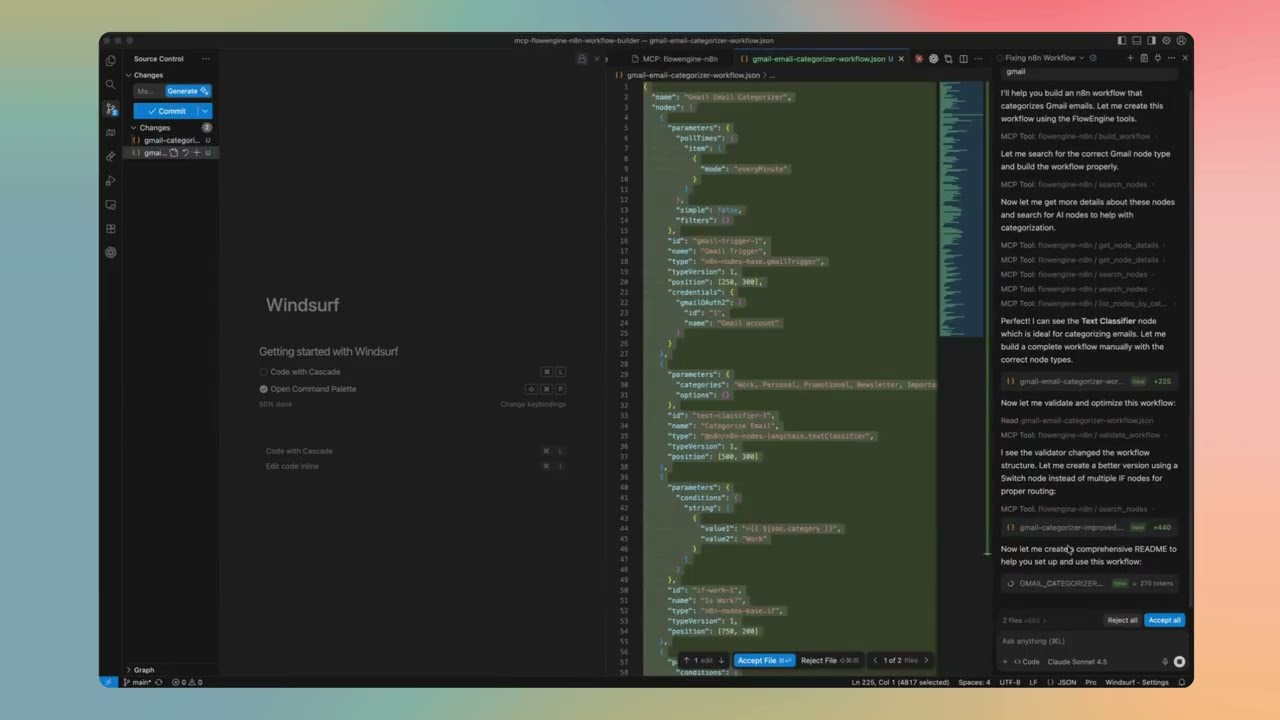](https://youtu.be/XrxHom6w6WM)
**[▶️ Watch on YouTube](https://youtu.be/XrxHom6w6WM)**
See how to:
- Install and setup the MCP server
- Generate workflows from natural language
- Validate and fix workflows automatically
- Deploy to FlowEngine.cloud
---
## Quick Start
### Installation Methods
Choose the method that works best for you:
#### 1. Smithery (One-Click Install)
Easy local installation for Claude Desktop. [View on Smithery](https://smithery.ai/server/@Ami3466/mcp-flowengine-n8n-workflow-builder)
```bash
npx @smithery/cli install @Ami3466/mcp-flowengine-n8n-workflow-builder --client claude
```
**Note:** Smithery has a 50 uses/day limit. For unlimited access, use the remote server below.
#### 2. Remote Server (More Stable - Unlimited) ⭐
**Connect to our hosted server - no installation required!**
Add this to your Claude Desktop config:
**Mac:** `~/Library/Application Support/Claude/claude_desktop_config.json`
**Windows:** `%APPDATA%/Claude/claude_desktop_config.json`
```json
{
"mcpServers": {
"flowengine-n8n": {
"url": "https://mcp-flowengine-n8n-workflow-builder.onrender.com/mcp",
"transport": "http"
}
}
}
```
**Benefits:**
- ✅ **More stable** - Dedicated hosting infrastructure
- ✅ **Unlimited usage** - No daily limits
- ✅ **Always up-to-date** - Automatically updated
- ✅ **Zero installation** - Just add config and restart Claude
- ✅ **Free** - Community hosted
#### 3. npm (Manual Install)
For all other MCP clients:
```bash
npm install -g flowengine-n8n-workflow-builder
```
---
## Setup by Platform
### Claude Desktop
#### Option A: Smithery (Local Install)
[View on Smithery](https://smithery.ai/server/@Ami3466/mcp-flowengine-n8n-workflow-builder)
```bash
npx @smithery/cli install @Ami3466/mcp-flowengine-n8n-workflow-builder --client claude
```
Restart Claude Desktop after installation.
**Note:** Limited to 50 uses/day. For unlimited access, use the remote server below.
#### Option B: Remote Server (More Stable - Unlimited) ⭐
**No installation required!** Just add config and restart.
1. **Edit Claude Desktop config:**
- **Mac:** `~/Library/Application Support/Claude/claude_desktop_config.json`
- **Windows:** `%APPDATA%/Claude/claude_desktop_config.json`
2. **Add this configuration:**
```json
{
"mcpServers": {
"flowengine-n8n": {
"url": "https://mcp-flowengine-n8n-workflow-builder.onrender.com/mcp",
"transport": "http"
}
}
}
```
3. **Restart Claude Desktop** (fully quit and reopen)
4. **Verify connection:**
- Look for the 🔌 MCP icon in Claude Desktop
- You should see "flowengine-n8n" listed with green status
**Benefits:** More stable, unlimited usage, no local installation, always updated.
#### Option C: Manual Local Install
1. **Install the package:**
```bash
npm install -g flowengine-n8n-workflow-builder
```
2. **Edit Claude Desktop config:**
- **Mac:** `~/Library/Application Support/Claude/claude_desktop_config.json`
- **Windows:** `%APPDATA%/Claude/claude_desktop_config.json`
3. **Add this configuration:**
```json
{
"mcpServers": {
"flowengine-n8n": {
"command": "flowengine-n8n"
}
}
}
```
4. **Restart Claude Desktop** (fully quit and reopen)
### Claude Code (VS Code Extension)
1. **Install the package globally:**
```bash
npm install -g flowengine-n8n-workflow-builder
```
2. **Open VS Code Settings** (Cmd/Ctrl + ,)
3. **Search for "MCP"**
4. **Add MCP Server:**
- Click "Edit in settings.json"
- Add to `claude.mcpServers`:
```json
{
"claude.mcpServers": {
"flowengine-n8n": {
"command": "flowengine-n8n"
}
}
}
```
5. **Reload VS Code** (Cmd/Ctrl + Shift + P → "Developer: Reload Window")
6. **Start using:**
- Open Claude Code panel
- Ask Claude to build n8n workflows
- The MCP server will be automatically available
### Cursor
1. **Install the package:**
```bash
npm install -g flowengine-n8n-workflow-builder
```
2. **Open Cursor Settings:**
- **Mac:** Cursor → Settings → Features
- **Windows/Linux:** File → Preferences → Features
3. **Navigate to MCP Settings:**
- Scroll to "Model Context Protocol"
- Click "Edit Config"
4. **Add configuration:**
```json
{
"mcpServers": {
"flowengine-n8n": {
"command": "flowengine-n8n"
}
}
}
```
5. **Restart Cursor**
6. **Verify:**
- Open Cursor's AI chat
- The MCP server should be available
- Try: "Create an n8n workflow for me"
### Cline (VS Code)
1. **Install the package:**
```bash
npm install -g flowengine-n8n-workflow-builder
```
2. **Open Cline Settings in VS Code:**
- Open Command Palette (Cmd/Ctrl + Shift + P)
- Type "Cline: Open Settings"
3. **Add MCP Server:**
- In Cline settings, find "MCP Servers"
- Add new server:
```json
{
"flowengine-n8n": {
"command": "flowengine-n8n"
}
}
```
4. **Reload VS Code**
### Continue.dev
1. **Install the package:**
```bash
npm install -g flowengine-n8n-workflow-builder
```
2. **Open Continue config:**
- Open Command Palette (Cmd/Ctrl + Shift + P)
- Type "Continue: Open config.json"
3. **Add MCP server to config:**
```json
{
"mcpServers": {
"flowengine-n8n": {
"command": "flowengine-n8n"
}
}
}
```
4. **Reload Continue extension**
---
## What This Does
### 🤖 Turns Text into Workflows
Describe what you want in plain language:
- "Monitor my email and notify me on Slack"
- "Build an AI chatbot with memory and tools"
- "Sync data between Google Sheets and my database"
- "Create a customer support automation workflow"
Your AI assistant generates complete, working n8n workflows.
### 🧠 Expert n8n Knowledge
Your AI gets access to:
- **600+ Node Types** - All n8n-nodes-base and LangChain nodes
- **Real Parameter Schemas** - Loaded directly from n8n packages
- **Best Practices** - Workflow design patterns and optimizations
- **Intelligent Validation** - Automatic error detection and fixing
### ✨ Powerful Features
**Workflow Generation:**
- Build workflows from natural language descriptions
- Add, edit, and delete nodes programmatically
- Connect nodes and manage workflow structure
- Get detailed workflow analysis
**Intelligence & Suggestions:**
- Architecture recommendations (linear, conditional, AI agent, etc.)
- Node suggestions for specific tasks
- Workflow analysis and improvements
- Natural language explanations
**Quality & Security:**
- Comprehensive workflow validation
- Security vulnerability scanning
- Performance analysis and bottleneck detection
- Dry-run workflow testing
**Templates & Search:**
- Pre-built workflow templates
- Search 600+ nodes by keyword
- Browse nodes by category
- Get detailed node documentation
---
## Usage Examples
Once installed, ask your AI assistant to help with workflows:
### Create a New Workflow
```
"Create an n8n workflow that monitors Gmail for emails with 'urgent' in the subject and sends a Slack notification to #alerts"
```
### Analyze Existing Workflow
```
"Analyze this workflow and suggest improvements"
[paste your workflow JSON]
```
### Get Node Recommendations
```
"What nodes should I use to build a customer onboarding automation?"
```
### Validate and Fix
```
"Validate this workflow and fix any errors"
[paste workflow JSON]
```
### Security Scan
```
"Scan this workflow for security issues"
[paste workflow JSON]
```
---
## Available Tools
Your AI assistant gets access to 23 powerful tools:
**Workflow Building:**
- `build_workflow` - Generate workflows from descriptions
- `add_node` - Add nodes to existing workflows
- `edit_node` - Modify node parameters
- `delete_node` - Remove nodes
- `add_connection` - Connect nodes
- `get_workflow_details` - Analyze workflow structure
**Validation & Quality:**
- `validate_workflow` - Comprehensive validation with auto-fix
- `test_workflow` - Dry-run simulation
- `scan_security` - Security vulnerability detection
- `analyze_performance` - Performance and bottleneck analysis
**Intelligence:**
- `suggest_architecture` - Recommend workflow patterns
- `suggest_nodes` - Node recommendations for tasks
- `analyze_workflow` - Deep workflow insights
- `suggest_improvements` - Optimization suggestions
- `explain_workflow` - Natural language explanations
**Node Library:**
- `search_nodes` - Search 600+ nodes
- `list_nodes_by_category` - Browse by category
- `get_node_details` - Detailed node documentation
**Templates:**
- `list_templates` - Browse workflow templates
- `get_template` - Get specific templates
- `search_templates` - Search templates
**Utilities:**
- `extract_workflow_json` - Extract JSON from text
- `fix_json` - Repair malformed JSON
---
## Deploy Your Workflows
### Option 1: FlowEngine.cloud (Recommended)
**Build for free, deploy instantly:**
1. Generate workflow using this MCP server
2. Visit [flowengine.cloud](https://flowengine.cloud)
3. Import your workflow JSON
4. Test and deploy - no infrastructure needed
**Why FlowEngine.cloud?**
- ✅ No server setup or management
- ✅ Built-in monitoring and logs
- ✅ Automatic scaling
- ✅ Visual workflow editor
- ✅ Free tier available
### Option 2: Self-Hosted n8n
1. Generate workflow using this MCP server
2. Open your n8n instance
3. Import JSON (`...` → `Import from File`)
4. Configure credentials and activate
---
## Troubleshooting
### MCP Server Not Showing Up?
1. **Verify installation:**
```bash
which flowengine-n8n
# Should show: /usr/local/bin/flowengine-n8n (or similar)
```
2. **Test the server manually:**
```bash
flowengine-n8n
# Should start the MCP server
```
3. **Check Claude Desktop logs:**
- **Mac:** `~/Library/Logs/Claude/mcp*.log`
- **Windows:** `%APPDATA%/Claude/logs/mcp*.log`
4. **Restart your AI client completely** (fully quit and reopen)
### Package Not Found?
```bash
# Update npm
npm install -g npm@latest
# Reinstall the package
npm uninstall -g flowengine-n8n-workflow-builder
npm install -g flowengine-n8n-workflow-builder
```
### Permission Issues?
**Mac/Linux:**
```bash
sudo npm install -g flowengine-n8n-workflow-builder
```
**Windows:**
Run PowerShell/CMD as Administrator
### Smithery Installation Issues?
```bash
# Clear npm cache
npm cache clean --force
# Try manual installation instead
npm install -g flowengine-n8n-workflow-builder
```
---
## How It Works
This MCP server connects your AI assistant to expert n8n knowledge:
```
You describe what you want
↓
Your AI Tool (Claude/Cursor/etc.)
↓
MCP Protocol
↓
FlowEngine n8n Builder
↓
Expert n8n Knowledge + Validation
↓
Complete, Working Workflow
```
**What Your AI Gets:**
- Deep n8n expertise
- 600+ node definitions with real schemas
- Workflow patterns and best practices
- Validation and auto-fixing capabilities
- Security and performance analysis
**What You Get:**
- Production-ready workflows
- Properly validated JSON
- Working configurations
- Best practice implementations
---
## Features
✅ **Build workflows from text** - Natural language to working n8n workflows
✅ **600+ Node Types** - Full n8n-nodes-base and LangChain support
✅ **Real Parameter Schemas** - Loaded directly from n8n packages
✅ **Intelligent validation** - Automatic error detection and fixing
✅ **Security scanning** - Detect vulnerabilities and sensitive data
✅ **Performance analysis** - Find bottlenecks and optimize
✅ **Works with any LLM** - Universal MCP protocol support
✅ **No API keys needed** - Works completely offline
✅ **Built by FlowEngine** - Production-tested technology
✅ **Deploy anywhere** - FlowEngine.cloud or self-hosted
---
## About FlowEngine
**FlowEngine** is a platform for building and deploying n8n workflows with AI:
- **🎨 Visual Builder** - Drag-and-drop editor at [flowengine.cloud](https://flowengine.cloud)
- **🤖 AI-Powered** - Generate workflows with natural language
- **☁️ Managed Hosting** - Deploy instantly, no DevOps needed
- **📈 Production Ready** - Monitoring, logs, and scaling included
- **🆓 Free Tier** - Try and build workflows for free
This MCP server brings FlowEngine's workflow generation technology to your local development environment.
---
## Use Cases
**For Developers:**
- Generate boilerplate workflows quickly
- Prototype automation ideas fast
- Learn n8n patterns and best practices
- Build complex workflows with AI assistance
**For Teams:**
- Accelerate workflow development
- Standardize workflow patterns
- Reduce learning curve for n8n
- Scale automation initiatives
**For Businesses:**
- Automate repetitive tasks
- Connect systems and tools
- Build custom integrations
- Deploy AI-powered workflows
---
## Support & Resources
- **FlowEngine Platform:** [flowengine.cloud](https://flowengine.cloud)
- **Documentation:** [docs.flowengine.cloud](https://docs.flowengine.cloud)
- **npm Package:** [View on npm](https://www.npmjs.com/package/flowengine-n8n-workflow-builder)
- **Smithery Registry:** [Install via Smithery](https://smithery.ai/server/@Ami3466/mcp-flowengine-n8n-workflow-builder)
- **Documentation Repository:** [View Documentation](https://github.com/Ami3466/flowengine-n8n-docs)
- **Report Issues:** Contact FlowEngine support
---
## License
**FlowEngine MCP License**
✅ **You CAN:**
- Use for personal projects
- Use for commercial projects
- Build and deploy workflows
- Integrate into your products
❌ **You CANNOT:**
- Build competing workflow platforms
- Redistribute the source code
- Create competing n8n tools
- Claim this as your own work
Full license: [LICENSE](LICENSE)
---
**Built by [FlowEngine](https://flowengine.cloud)** - Enterprise-grade n8n workflow automation platform
[Website](https://flowengine.cloud) • [Documentation](https://docs.flowengine.cloud) • [npm](https://www.npmjs.com/package/flowengine-n8n-workflow-builder) • [Smithery](https://smithery.ai/server/@Ami3466/mcp-flowengine-n8n-workflow-builder)