flow-topology-vue3
Version:
flow-topology-vue3是一个用于创建流拓扑图的Vue 3组件库。它提供了一组可重用的组件和实用程序,以帮助您构建交互式的、具有视觉吸引力的流程图、流程图或表示数据流的任何其他类型的图
902 lines (829 loc) • 20.9 kB
Markdown
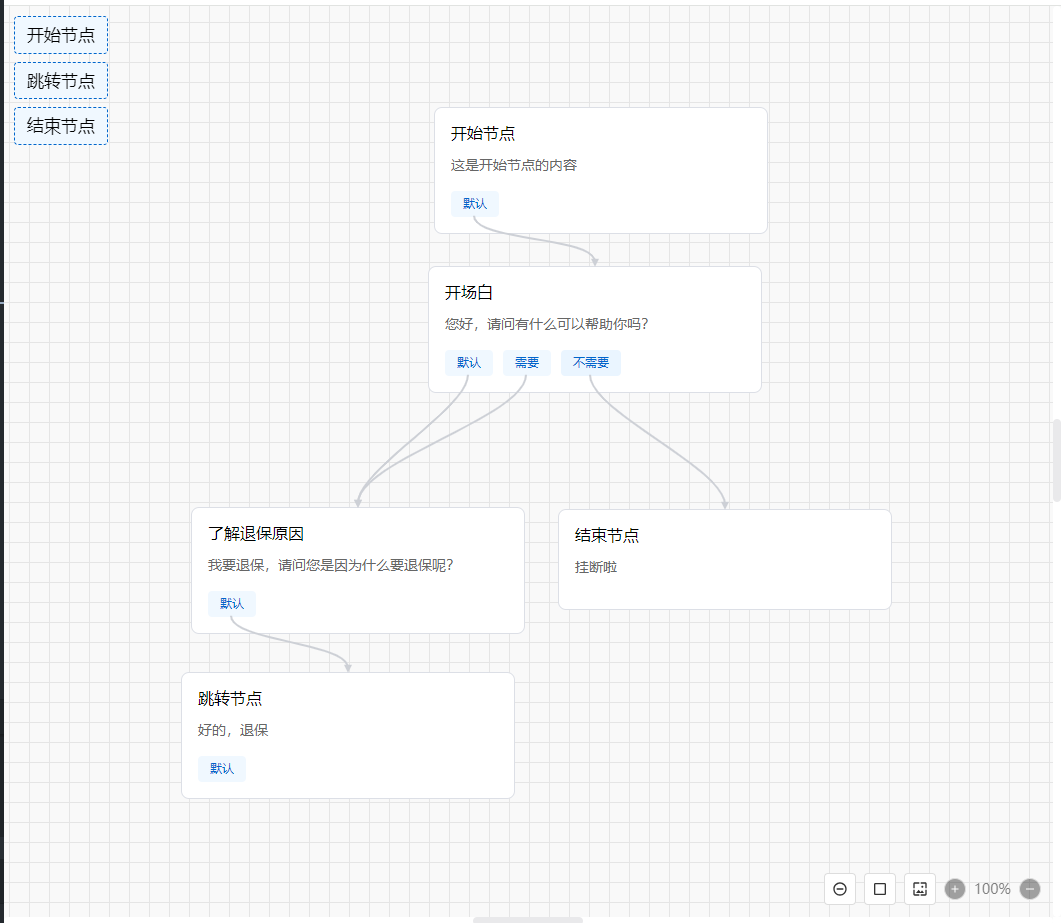
## flow-topology-vue3 是一个用于创建流拓扑图的 Vue 3 组件库, 导出 Topology、TemplateWrapper、AnchorWrapper 组件。
### 示例图:
### 留言板:
[留言板](https://blog.csdn.net/qq_40040585/article/details/148478175?sharetype=blogdetail&sharerId=148478175&sharerefer=PC&sharesource=qq_40040585&spm=1011.2480.3001.8118)
### 特性
- 纯 div + svg 实现,无依赖。
- 支持拖拽节点、连线。
- 支持自定义节点样式和锚点(分支)样式。
- 模板化节点开发(通过 TemplateWrapper)。
- 支持全选、放大、缩小、截图。
- 支持锚点(分支)连接多个节点。
### 环境
- Vue3
- Node.js 18.x+(兼容更高版本)
## 安装
```bash
npm install flow-topology-vue3
```
## 使用
- 全局引入
```js
<!-- main.ts -->
import { createApp } from 'vue'
import App from './App.vue'
import FlowTopologyVue3 from 'flow-topology-vue3'
import 'flow-topology-vue3/dist/flow-topology-vue3.css'
const app = createApp(App)
app.use(FlowTopologyVue3)
app.mount('#app')
```
- 按需引入
```js
<!-- page.vue -->
<template>
<div class="contianer">
<Topology v-model="nodes"></Topology>
<div class="quick-elements">
<TemplateWrapper v-for="item in templateNode" :key="item.id" :generator="item">
<div class="quick-element">{{ item.title }}</div>
</TemplateWrapper>
</div>
</div>
</template>
<script setup>
import { Topology, TemplateWrapper, AnchorWrapper } from 'flow-topology-vue3'
import 'flow-topology-vue3/dist/flow-topology-vue3.css'
const nodes = ref([])
</script>
```
- 自动引入
```js
npm install unplugin-vue-components -D
```
```js
// vite.config.js
import { defineConfig } from 'vite'
import Components from 'unplugin-vue-components/vite'
import { FlowTopologyVue3Resolver } from 'flow-topology-vue3/dist/flow-topology-vue3.es.js'
export default defineConfig({
plugins: [
Components({
resolvers: [FlowTopologyVue3Resolver()]
})
]
})
<!-- page.vue -->
<template>
<div class="contianer">
<Topology v-model="nodes"></Topology>
<div class="quick-elements">
<TemplateWrapper v-for="item in templateNode" :key="item.id" :generator="item">
<div class="quick-element">{{ item.title }}</div>
</TemplateWrapper>
</div>
</div>
</template>
<script setup>
import 'flow-topology-vue3/dist/flow-topology-vue3.css'
const nodes = ref([])
</script>
```
### 数据据类型
<table>
<thead>
<tr>
<th>类型名称</th>
<th>值</th>
<th>说明</th>
</tr>
</thead>
<tbody>
<tr>
<td>Ftv3BranchVO</td>
<td>
{
id: string | number,
label: string,
to?: (string | number)[],
}
</td>
<td>
分支数据类型,用于定义节点的分支信息。
</td>
</tr>
<tr>
<td>Ftv3LineVO</td>
<td>{
id: string | number
label: string
to?: Array<number | string>
}
</td>
<td>
连线数据类型,用于定义节点之间的连接线信息。
</td>
</tr>
<tr>
<td>Ftv3NodeVO</td>
<td>
{
id: string | number,
position: {
x: number,
y: number,
},
canDrag?: boolean,
title?: string,
content?: string,
width?: number,
branches: Ftv3LineVO[],
[prop: string]: any,
}
</td>
<td>
节点数据类型,用于定义节点的位置、大小、分支等信息。
</td>
</tr>
</tbody>
</table>
```
import { Ftv3NodeVO, Ftv3BranchVO, Ftv3LineVO } from 'flow-topology-vue3'
```
### 组件
#### Topology
主流程图组件
- 属性
<table>
<thead>
<tr>
<th>参数</th>
<th>类型</th>
<th>是否必需</th>
<th>默认值</th>
<th>说明</th>
</tr>
</thead>
<tbody>
<tr>
<td>v-model/model-value</td>
<td>Array as PropType<{
id: string | number,
position: {
x: number,
y: number,
},
canDrag?: boolean,
title?: string,
content?: string,
width?: number,
branches: {
id: string | number,
label: string,
to?: (string | number)[],
}[],
[prop: string]: any,
}[]></td>
<td>是</td>
<td>[]</td>
<td>所有节点和连线数据</td>
</tr>
<tr>
<td>containerWidth</td>
<td>[Number, String]</td>
<td>否</td>
<td>100%</td>
<td>画布外容器宽度 支持数字 px % 等</td>
</tr>
<tr>
<td>containerHeight</td>
<td>[Number, String]</td>
<td>否</td>
<td>100vh</td>
<td>画布外容器高度 支持数字 px % 等</td>
</tr>
<tr>
<td>containerBackgroundColor</td>
<td>String</td>
<td>否</td>
<td>#f9f9f9</td>
<td>画布外容器背景</td>
</tr>
<tr>
<td>canvasWidth</td>
<td>Number </td>
<td>否</td>
<td>100vh</td>
<td>画布宽度 仅支持数字</td>
</tr>
<tr>
<td>canvasHeight</td>
<td>Number </td>
<td>否</td>
<td>100vh</td>
<td>画布高度 仅支持数字</td>
</tr>
<tr>
<td>showGridPattern</td>
<td>Boolean </td>
<td>否</td>
<td>true</td>
<td>是否显示网格</td>
</tr>
<tr>
<td>gridPatternColor</td>
<td>String </td>
<td>否</td>
<td>#e5e5e5</td>
<td>网格线颜色</td>
</tr>
<tr>
<td>gridPatternGap</td>
<td>Number </td>
<td>否</td>
<td>20</td>
<td>网格大小</td>
</tr>
<tr>
<td>showToolsBar</td>
<td>Boolean </td>
<td>否</td>
<td>true</td>
<td>是否显示工具栏</td>
</tr>
<tr>
<td>toolsBarList</td>
<td>Array as PropType<{
ViewCenter = 'viewCenter',
ToggleSelect = 'toggleSelect',
Zoom = 'zoom',
Capture = 'capture'
}[]></td>
<td>否</td>
<td>['viewCenter', 'toggleSelect', 'zoom', 'capture']</td>
<td>工具栏种类(定位中心、全选/反选、缩放、截图)</td>
</tr>
<tr>
<td>toolsBarPosition</td>
<td>String as PropType<{
Top = 'top',
TopStart = 'top-start',
TopEnd = 'top-end',
Bottom = 'bottom',
BottomStart = 'bottom-start',
BottomEnd = 'bottom-end',
Left = 'left',
Right = 'right'
}></td>
<td>否</td>
<td>bottom-end</td>
<td>工具栏位置</td>
</tr>
<tr>
<td>toolsBarPositionOffset</td>
<td>Number</td>
<td>否</td>
<td>20</td>
<td>工具栏距离容器边距位置</td>
</tr>
<tr>
<td>readOnly</td>
<td>Boolean</td>
<td>否</td>
<td>false</td>
<td>是否只读</td>
</tr>
<tr>
<td>beforeDeleteLine</td>
<td> Function as PropType<(line: {
fromNodeId: string | number
fromBranchId: string | number
toNodeId: string | number
}) => boolean | Promise<boolean>></td>
<td>否</td>
<td>() => true</td>
<td>
删除连线前的钩子,参数是删除的线 若返回false时或者Promise.reject()阻止删除
</td>
</tr>
<tr>
<td>beforeDeleteNode</td>
<td> Function as PropType<(node: {
id: string | number,
position: {
x: number,
y: number,
},
canDrag?: boolean,
title?: string,
content?: string,
width?: number,
branches: {
id: string | number,
label: string,
to?: string | number,
}[],
[prop: string]: any,
}) => boolean | Promise<boolean>></td>
<td>否</td>
<td>() => true</td>
<td>
删除节点前的钩子,参数是删除的节点,若返回false时或者Promise.reject()阻止删除
</td>
</tr>
<tr>
<td>beforeDeleteAllNode</td>
<td> Function as PropType<() => boolean | Promise<boolean>></td>
<td>否</td>
<td>() => true</td>
<td>
删除所有节点前的钩子,若返回false时或者Promise.reject()阻止删除
</td>
</tr>
<tr>
<td>renderItem</td>
<td> Function as PropType<(nodeVO: NodeVO) => any></td>
<td>否</td>
<td>null</td>
<td>
自定义函数渲染节点内容,参数是节点数据对象,返回自定义渲染内容
</td>
</tr>
<tr>
<td>captureBackgroundColor</td>
<td> String </td>
<td>否</td>
<td>容器背景色</td>
<td>
截图背景色, 若不设置则使用容器背景色
</td>
</tr>
<tr>
<td>canConnectMultiLines</td>
<td> Boolean </td>
<td>否</td>
<td>false</td>
<td>
是否允许多条连线, 若为true则连线时一个锚点(分支)支持多个连线, 若为false则连线时一个锚点(分支)只支持一条连线
</td>
</tr>
</tbody>
</table>
- 事件
<table>
<thead>
<tr>
<th>事件名</th>
<th>参数</th>
<th>说明</th>
</tr>
</thead>
<tbody>
<tr>
<td>change</td>
<th>{ type: 'add_node' | 'delete_node' | 'update_node_position' | 'add_line' | 'delete_line' | 'delete_node_line' , data: any}</th>
<td>节点和线改变,参数为响应操作的数据,tips:删除接点和连接线请使用键盘delete键</td>
</tr>
<tr>
<td>selectNode</td>
<th>NodeVO</th>
<td>选中节点,参数为选中的节点数据</td>
</tr>
<tr>
<td>capture</td>
<th>string</th>
<td>截图, 参数为base64</td>
</tr>
</tbody>
</table>
- 插槽
默认插槽用于自定义渲染节点内容,可通过插槽参数获取到当前节点的数据;
- 使用方法
```html
<Topology
v-model="nodes"
>
<!--
1、 插槽用于自定义渲染节点内容,可通过插槽参数获取到当前节点的数据;
2、 可通过renderItem渲染;
3、 插槽优先级高于renderItem;
4、 不使用插槽或者renderItem有节点内容渲染;
<template #default="{ node }">
<template v-if="node.branches && node.branches.length">
<AnchorWrapper v-for="branch in node.branches" :key="branch.id" :node="node" :branch="branch">
<span>{{ branch.label }}</span>
</AnchorWrapper>
</template>
</template> -->
</Topology>
</>
```
#### TemplateWrapper
TemplateWrapper 组件用于包裹模板内容,并提供插槽供自定义渲染。
- 属性
- 插槽
默认插槽用于自定义渲染模板内容。
<table>
<thead>
<tr>
<th>参数</th>
<th>类型</th>
<th>是否必需</th>
<th>默认值</th>
<th>说明</th>
</tr>
</thead>
<tbody>
<tr>
<td>generator</td>
<td>{
id: string | number,
position: {
x: number,
y: number,
},
canDrag?: boolean,
title?: string,
content?: string,
width?: number,
branches: {
id: string | number,
label: string,
to?: string | number,
}[],
[prop: string]: any,
}</td>
<td>是</td>
<td>-</td>
<td>节点的数据</td>
</tr>
<tr>
<td>disabled</td>
<td>Boolean</td>
<td>否</td>
<td>false</td>
<td>是否允许拖拽</td>
</tr>
</tbody>
</table>
- 使用方法
- 模版中使用
```html
<div class="quick-elements">
<TemplateWrapper v-for="item in templateNode" :key="item.id" :generator="item">
<div class="quick-element">{{ item.title }}</div>
</TemplateWrapper>
</div>
```
- h 函数渲染
```js
h(
'div',
{...你的属性...},
templateNode.branches.map(t => {
return h(
TemplateWrapper,
{
generator: t,
disabled: t.disabled,
},
[
h('div', { class: 'quick-element' }, t.title)
]
)
})
)
```
#### AnchorWrapper
AnchorWrapper 组件用于包裹锚点内容,并提供插槽供自定义渲染。
- 属性
<table>
<thead>
<tr>
<th>参数</th>
<th>类型</th>
<th>是否必需</th>
<th>默认值</th>
<th>说明</th>
</tr>
</thead>
<tbody>
<tr>
<td>node</td>
<td>{
id: string | number,
position: {
x: number,
y: number,
},
canDrag?: boolean,
title?: string,
content?: string,
width?: number,
branches: {
id: string | number,
label: string,
to?: string | number,
}[],
[prop: string]: any,
}</td>
<td>是</td>
<td>-</td>
<td>节点的数据</td>
</tr>
<tr>
<td>branch</td>
<td> {
id: string | number
label: string
to?: string | number
}</td>
<td>是</td>
<td></td>
<td>当前节点分支</td>
</tr>
</tbody>
</table>
- 插槽
默认插槽用于自定义渲染锚点内容。
- 使用方法
- 模版中使用
```html
<AnchorWrapper v-for="branch in node.branches" :key="branch.id" :node="node" :branch="branch">
<span>{{ branch.label }}</span>
</AnchorWrapper>
```
- h 函数渲染
```js
h(
'div',
{...你的属性...},
node.branches.map(branch => {
return h(
AnchorWrapper,
{
class: `topo-branch ${!branch.to ? 'free' : ''}`,
node: toRaw(node),
branch: toRaw(branch)
},
() => branch.label
)
})
)
```
### 组件实例的方法
<table>
<thead>
<tr>
<th>方法名</th>
<th>参数</th>
<th>说明</th>
</tr>
</thead>
<tbody>
<tr>
<td>selectNode</td>
<td>id:string | number</td>
<td>选中节点</td>
</tr>
<tr>
<td>deleteNode</td>
<td>id:string | number</td>
<td>删除单个节点</td>
</tr>
<tr>
<td>deleteAllNode</td>
<td>-</td>
<td>删除所有节点</td>
</tr>
</tbody>
</table>
使用示例
```js
const handleDel = () => {
topologyRef.value.deleteNode('48da386a-016a-4e49-a26f-f0dfec0d3880')
}
const handleDelAll = () => {
topologyRef.value.deleteAllNode()
}
const handleSelect = () => {
topologyRef.value.selectNode('500e4096-78a8-465b-b0f3-e748cf5716b3')
}
```
### DEMO
```js
<template>
<div class="contianer">
<Topology
v-model="nodes"
:beforeDeleteLine="beforeDeleteLine"
:beforeDeleteAllNode="onBeforeDeleteAllNode"
@capture="onCapture"
ref="topologyRef"
>
<!-- <template #default="{ node }">
{{ node }}
<template v-if="node.branches && node.branches.length">
<AnchorWrapper v-for="branch in node.branches" :node="node" :branch="branch">
<span>{{ branch.label }}</span>
</AnchorWrapper>
</template>
</template> -->
</Topology>
<div class="quick-elements">
<TemplateWrapper v-for="item in templateNode" :key="item.id" :generator="item">
<div class="quick-element">{{ item.title }}</div>
</TemplateWrapper>
</div>
<div style="position: fixed; top: 0; left: 50%; transform: translateX(-50%); z-index: 1000">
<button @click="handleDel">删除节点</button>
<button @click="handleDelAll">删除全部节点</button>
<button @click="handleSelect">选中节点</button>
</div>
</div>
</template>
<script setup lang="ts">
import { ref, h, toRaw } from 'vue'
import { Topology, TemplateWrapper, AnchorWrapper } from 'flow-topology-vue3'
import 'flow-topology-vue3/dist/flow-topology-vue3.css'
import { Ftv3NodeVO, Ftv3BranchVO, Ftv3LineVO } from 'flow-topology-vue3'
const topologyRef = ref(null)
const nodes = ref<Ftv3NodeVO[]>([
{
id: 'bb80fa18-6a4a-49fd-9d33-a7f414a58b6a',
title: '开始节点',
score: 0,
status: '待录音',
content: '这是开始节点的内容',
type: 1,
position: { x: 4905, y: 4645 },
canDrag: false,
branches: [
{ id: '2c3602cc-609b-4246-a2c6-d7f19a418368', label: '默认', to: ['46ca30d5-b9cd-48e3-9814-497aab383e0d'] }
]
},
{
id: '46ca30d5-b9cd-48e3-9814-497aab383e0d',
title: '开场白',
score: 0,
status: '待录音',
content: '您好,请问有什么可以帮助你吗?',
type: 1,
position: { x: 4899, y: 4804 },
canDrag: true,
branches: [
{ id: '53419a2f-5141-4fb2-9134-0a0986e88268', label: '默认', to: ['500e4096-78a8-465b-b0f3-e748cf5716b3'] },
{ id: 'cc9bd42c-11b0-46be-9910-5e121c6bf18c', label: '需要', to: ['500e4096-78a8-465b-b0f3-e748cf5716b3'] },
{ id: '07aead90-fd4f-4a4b-a889-d191819aef9b', label: '不需要', to: ['82009f5b-28fd-4514-a52e-41293823ca0d'] }
]
},
{
id: '500e4096-78a8-465b-b0f3-e748cf5716b3',
title: '了解退保原因',
score: 0,
status: '待录音',
content: '我要退保,请问您是因为什么要退保呢?',
type: 1,
position: { x: 4662, y: 5045 },
canDrag: true,
branches: [
{ id: 'e1b45c8c-6d7c-4b2c-b90c-3a1e155b4b82', label: '默认', to: ['48da386a-016a-4e49-a26f-f0dfec0d3880'] }
]
},
{
id: '48da386a-016a-4e49-a26f-f0dfec0d3880',
title: '跳转节点',
score: 0,
status: '待录音',
content: '好的,退保',
type: 1,
position: { x: 4652, y: 5210 },
canDrag: true,
branches: [{ id: '82009f5b-28fd-4514-a52e-41293823ca0d', label: '默认' }]
},
{
id: '82009f5b-28fd-4514-a52e-41293823ca0d',
title: '结束节点',
score: 0,
status: '待录音',
content: '挂断啦',
type: 1,
position: { x: 5029, y: 5047 },
canDrag: true,
branches: null
}
])
const templateNode: Array<Ftv3NodeVO> = [
{
id: '',
title: '开始节点',
score: 0,
status: '待录音',
content: 'sdfasfasfasdfasdfasdfasdfasdfsadf',
type: 1,
position: {
x: 0,
y: 0
},
canDrag: true,
branches: [{ id: '', label: '默认' }]
},
{
id: '',
title: '跳转节点',
score: 0,
status: '待录音',
content: '',
type: 1,
position: {
x: 0,
y: 0
},
canDrag: true,
branches: [
{ id: '', label: '默认' },
{ id: '', label: '分支1' },
{ id: '', label: '分支2' }
]
},
{
id: '',
title: '结束节点',
score: 0,
status: '待录音',
content: 'sdfasfasfasdfasdfasdfasdfasdfsadf',
type: 1,
position: {
x: 0,
y: 0
},
canDrag: true,
branches: null
}
]
const beforeDeleteLine = (line: Ftv3LineVO) => {
return new Promise((resolve, reject) => {
resolve(confirm('你确定要删除这条线吗?'))
})
}
const beforeDeleteNode = (node: Ftv3NodeVO) => {
return Promise.resolve(confirm('你确定要删除这个节点吗?'))
}
const onBeforeDeleteAllNode = () => {
return Promise.resolve(confirm('你确定要删除所有节点吗?'))
}
const renderItem = (node: Ftv3NodeVO) => {
return h('div', { style: 'color: red;' }, [
h('div', {}, node.title),
h('div', {}, node.content),
h(
'div',
{},
node.branches.map(branch => {
return h(
AnchorWrapper,
{
class: `topo-branch ${!branch.to ? 'free' : ''}`,
node: toRaw(node),
branch: toRaw(branch)
},
() => branch.label
)
})
)
])
}
const handleDel = () => {
topologyRef.value.deleteNode('48da386a-016a-4e49-a26f-f0dfec0d3880')
}
const handleDelAll = () => {
topologyRef.value.deleteAllNode()
}
const handleSelect = () => {
topologyRef.value.selectNode('500e4096-78a8-465b-b0f3-e748cf5716b3')
}
const onCapture = img => {}
</script>
<style>
body {
overflow: hidden;
}
</style>
<style scoped>
.contianer {
overflow: hidden;
}
.quick-elements {
position: fixed;
top: 10px;
left: 10px;
z-index: 10;
display: flex;
flex-direction: column;
gap: 8px;
font-size: 17px;
}
.quick-element {
padding: 8px 12px;
background-color: #f0f8ff;
border: 1px dashed #0066cc;
border-radius: 4px;
cursor: grab;
user-select: none;
}
.quick-element:active {
cursor: grabbing;
}
</style>
```