flmngr
Version:
Flmngr file manager (Local disk / Amazon S3 / Azure Blob)
75 lines (47 loc) • 2.9 kB
Markdown
<p align="center">
<a href="https://flmngr.com/"><img src="https://flmngr.com/img/Flmngr.png" alt="Flmngr" width="90" /></a>
</p>
<h1 align="center" style="margin-top:-20px">Flmngr</h1>
<p align="center">
<strong>Flmngr file manager SDK for JavaScript.<br/>PHP and Node.js backends are included.</strong>
</p>
<p align="center">
<a href="https://flmngr.com/">Website</a> ∙ <a href="#install">Install</a> ∙ <a href="#api">API</a> ∙ <a href="https://flmngr.com/doc/samples">Live demos</a>
</p>
[](https://flmngr.com)
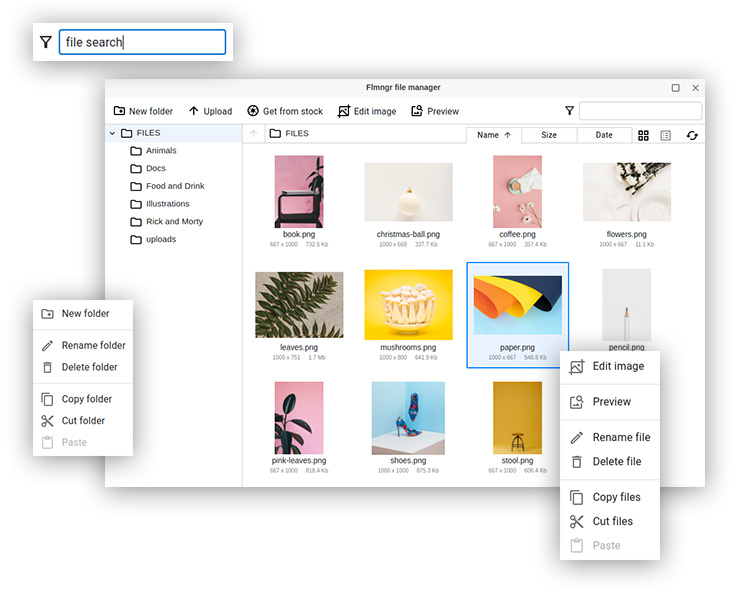
Flmngr is a **JavaScript** / **TypeScript** library which lets you upload, manage files, edit images and re-upload them onto your server, and create different image formats (resized variants).
It can be used as a **file manager** when you wish to let the user have a feature just to manage files on the server.
Also, you can use it in **file picker** mode when you need to let the user select some file or image on your server. This is useful for handling **file inputs** and **managing image galleries** (you can pass to the file manager preselected files and retrieve a new set after a user closes the dialog).
Built-in **image editor** gives you a feature to edit images right in the browser.
**Powerful API** is a base for creating very custom scenarios.
Your files are your files, Flmngr does not lock you in a cloud: **PHP backend** for your server is available. But when you need **Amazon S3** and **Azure Blob** adapters can be installed.
You can use Flmngr in any application from custom ones (by using this **NPM package**) to **React**, **Vue**, or **any framework** apps.
Flmngr is so flexible that has integration for popular CMSs like **Drupal** and WYSIWYG editors such as **TinyMCE**, **CKEditor 4**, and **CKEditor 5**.
<h2 id="install">Install</h2>
Full [installation manual](https://flmngr.com/doc/install-npm-package) is available on official website.
Using NPM:
```
npm i --save flmngr
```
Using Yarn:
```
yarn add flmngr
```
<h2 id="api">API</h2>
[](https://flmngr.com/doc/api) is available on official website.
Here is a sample of just one feature - to open a file manager to select a single file.
Hint: we also have many [live demos](https://flmngr.com/doc/samples) with CodePens.
```js
import {Flmngr} from "flmngr";
Flmngr.open({
apiKey: "FLMNFLMN", // default free key
urlFileManager: 'https://fm.flmngr.com/fileManager', // demo server
urlFiles: 'https://fm.flmngr.com/files', // demo file storage
onFinish: (files) => {
console.log("User picked:");
console.log(files);
}
});
```
This NPM package is licensed under LGPL 3.0 or later.