flave
Version:
A Razor like View transpiler for JavaScript
174 lines (149 loc) • 5.54 kB
Markdown
# Flave - Beta
[](https://travis-ci.org/varubi/flave) 
# Description
*Flave* was created to bring *ASP.NET Razor* to Node. Along the way some liberties on the implementation were made. While there is no shortage of very powerful templating engines that exist for JavaScript. There seems to be a very common theme of reducing/removing logic from the view. *Flave* isn't about that. In fact that's where *Flave* gets it's name. *Flave* stands for **Full Logic Access View Engine**. It aims to allow as much control of the markup and how it's generated, and because the views are all plain old JavaScript functions that return strings. There is no DOM needed. Which means that the functions are isomorphic, allowing you to create code that is usable server-side and client-side. Also because *Flave* transpiles to basic functions, if there is some sort of JavaScript functionality that isn't implemented you can always place it in a code block within the view. With that in mind there are things that it won't do. It won't bind events. It won't change states for you. It won't two way data bind. Those things are more of a *WebForms* thing.
# Install
npm install flave
# Editor Extensions
- [Atom](https://atom.io/packages/language-flave)
- [VSCode](https://marketplace.visualstudio.com/items?itemName=varubi.flave-vscode)
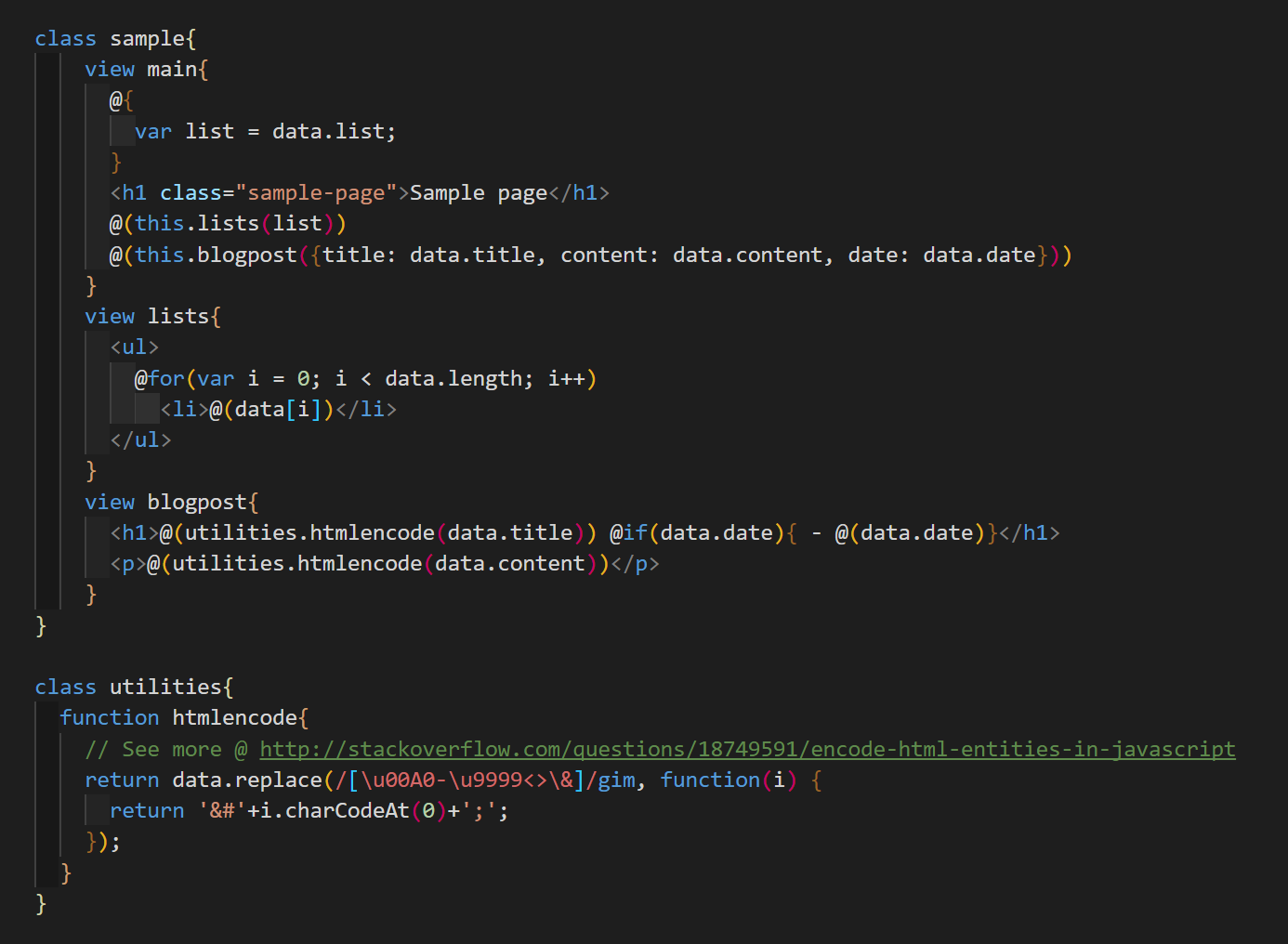
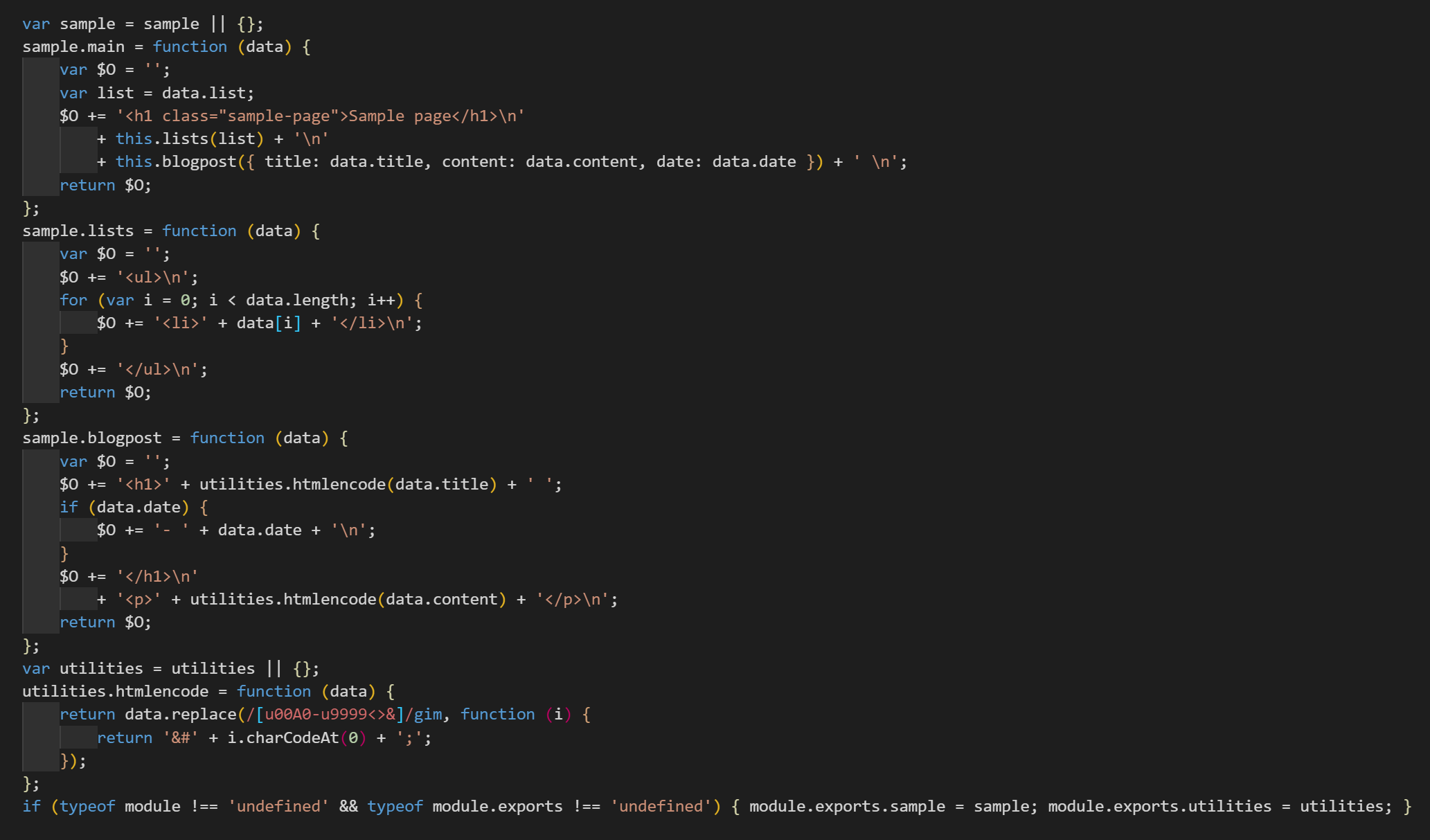
# Preview
## Flave
## JavaScript
# Quick Guide
## Methods
__Method__
```flave.transpile(flavestring, configuration)```
__Description__
There is currently only one function exposed. It's first argument is the flave code and the second argument is the configuration. See further below for configuration options.
__Example__
```JavaScript
const flave = require('../index.js');
const fs = require('fs');
const config = {
format: false,
}
transpile('./sample/sample.flave', './sample/sample.js');
function transpile(src, dest) {
fs.readFile(src, function (error, data) {
if (!error)
fs.writeFileSync(dest, flave.transpile(data.toString(), config))
})
}
```
___
## Configuration
- **quote** *string*
Default: `'`
The quote type used around the HTML strings in the transpiled version.
- **stripcomments** *boolean*
Default: `true`
Remove comments from `view` and `function` in final version.
- **output** *string*
Default: `$O`
Variable name that HTML strings are stored into
- **trim** *boolean*
Default: `true`
Trim whitespace at the beginning of lines. _Note: White space at the end is always removed._
- **newlines** *boolean*
Default: `true`
Preserve new lines between HTML. If set to false new lines are replaced with a single space.
- **format** *boolean*
Default: `true`
Attempt to indent code generated.
- **export** *boolean*
Default: `true`
Add `export.modules` code at the end for use with Node.
___
## Structure
__Syntax__
```HTML
class classname{
view viewname{
}
function functionname{
}
}
```
__Description__
Wrapping everything in a class is optional, it allows to encapsulate methods under a namespace.
The `view` keyword defines a section that uses the `flave` syntax. The `function` keyword defines just that, a JavaScript function. Both `view` and `function` accept one argument, named `data`. See the screenshot above for an example.
___
## Syntax
### Variables
- __Syntax__
```@( **JavaScriptCode** )```
- __Description__
Use to insert dynamic text into the views.
- __Examples__
```HTML
<span>@(data.title)</span>
```
```HTML
<a href="?query=@(encodeURIComponent(data.title))">Query</a>
```
### Codeblocks
- __Syntax__
```@{ **JavaScript Statements** }```
- __Description__
Use to insert raw JavaScript
- __Examples__
```JavaScript
@{var lists = data.split('\n')}
```
```JavaScript
@{
var lists = data.split('\n');
lists = lists
.map((list) => list.trim())
.filter((list) => list)
}
```
### Iterators
- __Syntax__
```@for(**Initialization**; **Condition**; **Final-expression**) Markup```
```@while( **Condition** ){ Markup }```
- __Description__
These iterators map to JavaScript's iterators, so if works in JavaScript it should work here. Just like in Javascript, curly brackets are optional.
- __Examples__
```JavaScript
@for(var i = 0; i < data.imgs; i++)
<img src="@(data.imgs[i])" />
```
```JavaScript
@for(var key in data.list){
<li><b>@(key)</b> @(data[key])</li>
}
```
### Conditionals
- __Syntax__
```@if( **Condition** ){ Markup } @else(**Condition){ Markup } @else{ Markup }```
- __Description__
Like iterators these all map to native JavaScript conditionals. Curly brackets are optional.
- __Examples__
```HTML
@if(typeof data == 'number'){
<input type="number" value="@(data)"/>
}
@elseif(typeof data == 'string'){
<input type="text" value="@(data)"/>
}@else
<input type="text" disabled />
```
### Comments
- __Syntax__
```// Comment```
```/* Comment Block */```
- __Description__
Comment code
- __Examples__
```JavaScript
// Comment Line
```
```JavaScript
/*
Multiline Comment Block
*/
```