firebaseui-angular-i18n
Version:
[](https://badge.fury.io/js/firebaseui-angular-i18n)
432 lines (327 loc) • 13.7 kB
Markdown
[](https://badge.fury.io/js/firebaseui-angular-i18n)
# firebaseui-angular-i18n
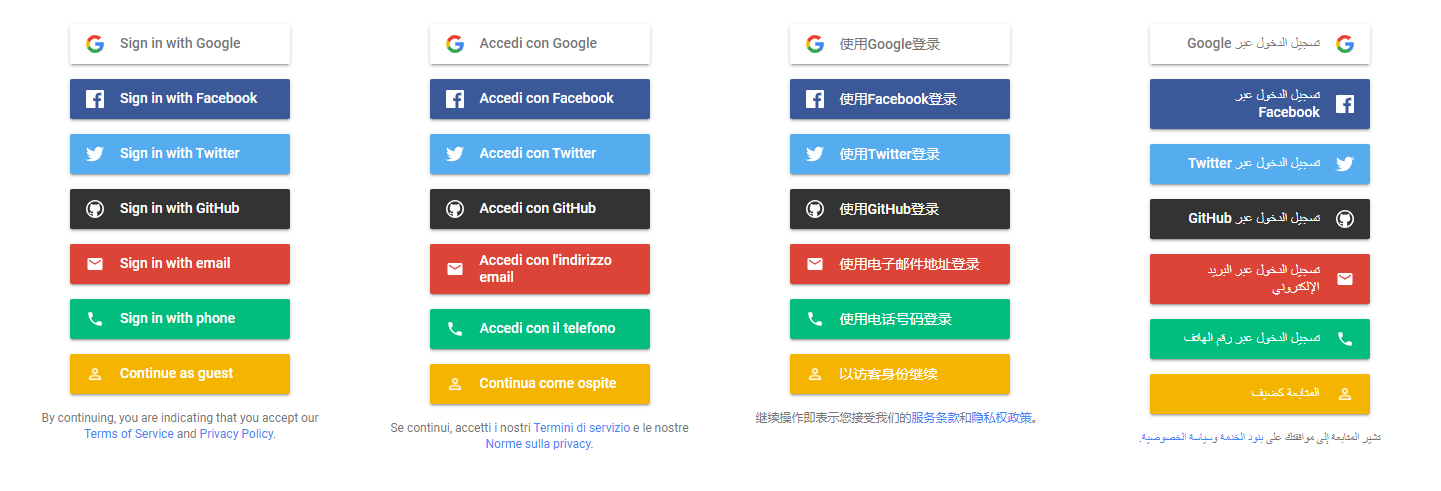
## Demo
You can try this project out for yourself at [this link](https://fui-angular-i18n.web.app/)
## Why does this fork exist?
This is a fork of the original [RaphaelJenni/FirebaseUI-Angular](https://github.com/RaphaelJenni/FirebaseUI-Angular) project.
This version adds support for internationalization of the FirebaseUI widget in several languages, both LtR and RtL, as shown in the screenshots above.
The i18n process is handled directly by the FirebaseUI library, except for the fact that it's not. Yeah, I'm not crazy, it's really like that.
An [issue about this stuff](https://github.com/firebase/firebaseui-web/issues/242) was opened way back in the end of 2017 (in the official FirebaseUI repo).
Since then almost nothing as changed, so I decided to implement it :)
The [firebaseui](https://www.npmjs.com/package/firebaseui) NPM package ships with only one language: English.
That's not the only way of including a library in your project, though. You could also include it from a CDN.
As it turns out, the official CDN has a localized version of each script we need to show the FirebaseUI widget.
So, this fork internally does some tricks to dynamically load those localized versions.
This forked version tackles these issues:
- [firebase/firebaseui-web#242](https://github.com/firebase/firebaseui-web/issues/242)
- [RaphaelJenni/FirebaseUI-Angular#115](https://github.com/RaphaelJenni/FirebaseUI-Angular/issues/115)
- [RaphaelJenni/FirebaseUI-Angular#102](https://github.com/RaphaelJenni/FirebaseUI-Angular/issues/102)
- [RaphaelJenni/FirebaseUI-Angular#42](https://github.com/RaphaelJenni/FirebaseUI-Angular/issues/42)
- [RaphaelJenni/FirebaseUI-Angular#39](https://github.com/RaphaelJenni/FirebaseUI-Angular/issues/39)
Changes included in this fork were discussed [here in the original pull request](https://github.com/RaphaelJenni/FirebaseUI-Angular/pull/120)
## Compatibility
| Angular | Firebase | AngularFire | FirebaseUI | firebaseui-angular-i18n | Note |
| --------|----------|--------------|------------|-------------------------|---------------------------------|
| 15.0.0 | ^9.14.0 | ^7.5.0 | ^6.0.2 | 6.1.3 | |
| 14.0.2 | ^9.8.3 | ^7.4.1 | ^6.0.1 | 6.1.2 | |
| 13.0.0 | ^9.3.0 | ^7.1.1 | ^6.0.0 | 6.1.0 | |
| 12.1.0 | ^9.0.2 | ^7.0.4 | ^6.0.0 | 6.0.0 | |
| 11.0.2 | ^8.2.4 | ^6.1.1 | ^4.7.2 | 5.1.3 | *support for i18n* |
| 11.0.2 | ^8.2.4 | ^6.1.1 | ^4.7.2 | 5.1.2 | *support for [auth emulator](https://firebase.google.com/docs/emulator-suite/connect_auth)* |
| 11.0.2 | ^8.1.1 | ^6.1.1 | ^4.7.1 | 5.1.1 | |
| 10.2.2 | ^8.0.1 | ^6.0.4 | ^4.7.1 | 5.1.0 | |
| ~8.2.13 | ^7.23.0 | ~5.2.1 | ~4.7.1 | ~4.0.1 | |
_Note_: Versions prior to v5.1.3 of this lib are available in the [original project](https://github.com/RaphaelJenni/FirebaseUI-Angular).
<sub>Version combinations not documented here __may__ work but are untested.</sub>
## Installation
To install this library, run:
```bash
$ npm install firebaseui-angular-i18n --save
```
To run this library you need to have [AngularFire2](https://github.com/angular/angularfire2)
, [Firebase](https://firebase.google.com/docs/web/setup),
[FirebaseUI-Web](https://github.com/firebase/firebaseui-web) installed.
Fast install:
```bash
$ npm install firebase firebaseui @angular/fire firebaseui-angular-i18n --save
```
## How to use
Add the `FirebaseUIModule` with the config to your imports. Make sure you have
initialized [AngularFire](https://github.com/angular/angularfire2) correctly.
```typescript
import {BrowserModule} from '@angular/platform-browser';
import {NgModule} from '@angular/core';
import {FormsModule} from '@angular/forms';
import {AppComponent} from './app.component';
import {ExtendedFirebaseUIAuthConfig, firebase, firebaseui, FirebaseUIModule} from 'firebaseui-angular-i18n';
import {environment} from '../environments/environment';
import {AppRoutingModule} from './app-routing.module';
import {AngularFireModule} from "@angular/fire/compat";
import {AngularFireAuthModule, USE_EMULATOR as USE_AUTH_EMULATOR} from "@angular/fire/compat/auth";
const firebaseUiAuthConfig: ExtendedFirebaseUIAuthConfig = {
signInFlow: 'popup',
signInOptions: [
firebase.auth.GoogleAuthProvider.PROVIDER_ID,
{
scopes: [
'public_profile',
'email',
'user_likes',
'user_friends'
],
customParameters: {
'auth_type': 'reauthenticate'
},
provider: firebase.auth.FacebookAuthProvider.PROVIDER_ID
},
firebase.auth.TwitterAuthProvider.PROVIDER_ID,
firebase.auth.GithubAuthProvider.PROVIDER_ID,
{
requireDisplayName: false,
provider: firebase.auth.EmailAuthProvider.PROVIDER_ID
},
firebase.auth.PhoneAuthProvider.PROVIDER_ID,
firebaseui.auth.AnonymousAuthProvider.PROVIDER_ID
],
tosUrl: '<your-tos-link>',
privacyPolicyUrl: '<your-privacyPolicyUrl-link>',
credentialHelper: firebaseui.auth.CredentialHelper.GOOGLE_YOLO,
// Optional. Set it to override the default language (English)
language: "it"
};
@NgModule({
declarations: [
AppComponent
],
imports: [
BrowserModule,
FormsModule,
AppRoutingModule,
AngularFireModule.initializeApp(environment.firebaseConfig),
AngularFireAuthModule,
FirebaseUIModule.forRoot(firebaseUiAuthConfig)
],
providers: [
{provide: USE_AUTH_EMULATOR, useValue: !environment.production ? ['localhost', 9099] : undefined},
],
bootstrap: [AppComponent]
})
export class AppModule {
}
```
You could optionally specify the language id directly in the `firebase-ui` HTML element like in the following snippet:
```html
<firebase-ui
[language]="'it'"
(signInSuccessWithAuthResult)="onFirebaseUiSuccess($event)"
(signInFailure)="onFirebaseUiError($event)"></firebase-ui>
```
For a comprehensive list of supported languages, you can refer to `FirebaseUILanguages` variable exposed by this library.
### Add the firebaseui css to your imports:
**Option 1: CSS Import**
*May be incompatible with older browsers.*
Import the firebaseui css to your `src/styles.css` file:
```css
@import '~firebaseui/dist/firebaseui.css';
```
**Option 2: Angular-CLI**
File: `angular.json`
Path: `"node_modules/firebaseui/dist/firebaseui.css"`
```json
{
"projects": {
[
your-project-name
]: {
...
"architect": {
"build": {
"options": {
...
"styles": [
"src/styles.css",
"node_modules/firebaseui/dist/firebaseui.css"
]
}
},
...
"test": {
"options": {
...
"styles": [
"src/styles.css",
"node_modules/firebaseui/dist/firebaseui.css"
]
}
}
}
}
}
}
```
**Option 3: HTML Link**
Put this in the `<head>` tag of your `index.html` file:
```html
<link type="text/css" rel="stylesheet" href="https://cdn.firebase.com/libs/firebaseui/3.0.0/firebaseui.css"/>
```
Make sure the version number matches the version of firebaseui you have installed with npm.
Once everything is set up, you can use the component in your Angular application:
```angular2html
<firebase-ui></firebase-ui>
```
### Configuration
For the configuration of the module see the official firebaseui
documentation: [Config](https://github.com/firebase/firebaseui-web#configuration)
_If you use a version prior to 3.3.0 check
the [old README](https://github.com/RaphaelJenni/FirebaseUI-Angular/blob/v3.2.0/README.MD)_
#### forRoot/forFeature
To configure the plugin the first time (`main.module.ts`) the `forRoot()` method is used.
It builds the basis for all further uses of the plugin.
But you have the possibility to overwrite the entire or just parts of the configuration in any (sub-)module.
##### forRoot
To overwrite the entire configuration use:
```
FirebaseUIModule.forRoot(firebaseUiAuthConfig: NativeFirebaseUIAuthConfig)
```
##### forFeature
To overwrite just parts of the configuration use:
```
FirebaseUIModule.forFeature(firebaseUiAuthConfig: NativeFirebaseUIAuthConfig)
```
This will use the in `forRoot` provided configuration and overwrite just the newly provided values.
##### Using a Provider Factory
You may need to dynamically create the firebaseui configuration object based on application settings or the like. An
example of this might be to conditionally enable certain providers for different deployments of the application.
To do this you can use a provider factory to inject the `firebaseUIAuthConfig` in your module like so:
```typescript
providers: [
{
provide: 'appConfig',
useValue: {googleAuthEnabled: true, emailAuthEnabled: false}
},
{
provide: 'firebaseUIAuthConfig',
useFactory: (config) => {
// build firebase UI config object using settings from `config`
const fbUiConfig: firebaseui.auth.Config = {
signInFlow: 'redirect',
signInOptions: [],
tosUrl: null,
privacyPolicyUrl: null,
credentialHelper: firebaseui.auth.CredentialHelper.GOOGLE_YOLO
};
if (config.googleAuthEnabled) {
fbUiConfig.signInOptions.push(firebase.auth.GoogleAuthProvider.PROVIDER_ID);
}
if (config.emailAuthEnabled) {
fbUiConfig.signInOptions.push({
provider: firebase.auth.EmailAuthProvider.PROVIDER_ID,
requireDisplayName: true,
signInMethod: firebase.auth.EmailAuthProvider.EMAIL_PASSWORD_SIGN_IN_METHOD
});
}
// other providers as needed
return fbUiConfig;
},
deps: ['appConfig']
}
]
```
In this case we are injecting a settings object `appConfig` into the provider factory. This object contains flags, such
as `googleAuthEnabled` and `emailAuthEnabled` which are used to conditionally build the firebaseui config object. You
would likely use a provider factory for this that reads settings from the environment or database.
### Listen to auth state changes
```typescript
this.angularFireAuth.authState.subscribe(this.firebaseAuthChangeListener);
private
firebaseAuthChangeListener(response)
{
// if needed, do a redirect in here
if (response) {
console.log('Logged in :)');
} else {
console.log('Logged out :(');
}
}
```
Don't forget to unsubscribe at the end.
### Sign-in success / failure callbacks
```html
<firebase-ui
(signInSuccessWithAuthResult)="successCallback($event)"
(signInFailure)="errorCallback($event)"
(uiShown)="uiShownCallback()"></firebase-ui>
```
```typescript
successCallback(signInSuccessData
:
FirebaseUISignInSuccessWithAuthResult
)
{
...
}
errorCallback(errorData
:
FirebaseUISignInFailure
)
{
...
}
uiShownCallback()
{
...
}
```
### Disable auto sign-in
```typescript
constructor(private
firebaseuiAngularLibraryService: FirebaseuiAngularLibraryService
)
{
firebaseuiAngularLibraryService.firebaseUiInstance.disableAutoSignIn();
}
```
## Contributing / Sample Application
Step 1: Fork and clone the repo from Github.
Step 2: There is a sample project in the root folder. Execute the following command in the root folder i.e. .../firebaseui-angular-i18n > `npm install`
Step 3: Ensure that you are using Angular CLI version >10. You can check your version with `ng --version` in the
terminal.
Step 4: Replace with your firebase config in `src\environments\environment.ts`.
Step 5: .../firebaseui-angular-i18n > `npm run build-lib`
Step 6: .../firebaseui-angular-i18n > `ng serve`
You're welcome to fork the repo and contribute to library sources
in `projects` > `firebaseui-angular-library` > `src` > `lib`.
There are test files, but they are empty at the moment. Writing unit test is a good start.
## Troubleshoot
### UI not rendered
The UI only gets rendered if the user isn't signed in. So if the UI isn't shown, sign out the user via angular-fire.
### Prod build error
```
ERROR in ./src/app/app.module.ngfactory.js
Module not found: Error: Can't resolve 'firebase/index' in '...'
ERROR in ./src/app/app.module.ngfactory.js
Module not found: Error: Can't resolve 'firebaseui/dist/index' in '...'
```
Use the firebase and firebaseui instances exposed by the plugin:
`import {..., firebase, firebaseui} from 'firebaseui-angular-i18n';`
### CSS not loaded
If you have added the css to the angular.json but nothing happened. Try to restart the server (`Ctrl-C` and `ng serve`)
### ERROR in ./~/firebase/app/shared_promise.js
This is a know issue in the firebase project. To fix that (for now), do that:
`npm install promise-polyfill --save-exact`
### `http://localhost:4200/images/buffer.svg?embed` 404 (Not Found)
Put this into your styles.scss file:
```
@supports (-webkit-appearance:none) {
.mdl-progress:not(.mdl-progress--indeterminate):not(.mdl-progress--indeterminate) > .auxbar,
.mdl-progress:not(.mdl-progress__indeterminate):not(.mdl-progress__indeterminate) > .auxbar {
mask: url(/assets/images/buffer.svg?embed) !important;
}
}
```
and put a `buffer.svg` file into `assets/images`.
This will stop this error message.
## License
MIT © [Raphael Jenni](mailto:info@rjenni.ch) <br>
MIT © [l0ll098](https://github.com/l0ll098/)