fastest-validator
Version:
The fastest JS validator library for NodeJS
1,716 lines (1,433 loc) • 50.4 kB
Markdown


[](https://coveralls.io/github/icebob/fastest-validator?branch=master)
[](https://www.codacy.com/app/mereg-norbert/fastest-validator?utm_source=github.com&utm_medium=referral&utm_content=icebob/fastest-validator&utm_campaign=Badge_Grade)
[](https://snyk.io/test/github/icebob/fastest-validator)
[](https://bundlephobia.com/result?p=fastest-validator)
# fastest-validator [](https://www.npmjs.com/package/fastest-validator) [](https://twitter.com/intent/tweet?text=The%20fastest%20JS%20validator%20library%20for%20NodeJS&url=https://github.com/icebob/fastest-validator&via=Icebobcsi&hashtags=nodejs,javascript)
:zap: The fastest JS validator library for NodeJS | Browser | Deno.
## Key features
* blazing fast! Really!
* 20+ built-in validators
* many sanitizations
* custom validators & aliases
* nested objects & array handling
* strict object validation
* multiple validators
* customizable error messages
* programmable error object
* no dependencies
* unit tests & 100% coverage
## How fast?
Very fast! 8 million validations/sec (on Intel i7-4770K, Node.JS: 12.14.1)
```
√ validate 8,678,752 rps
```
Compared to other popular libraries:
[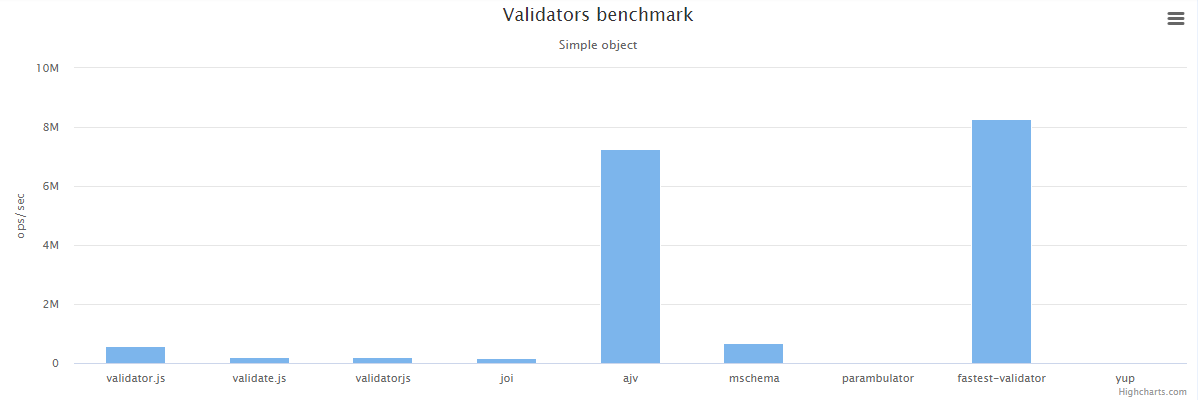](https://github.com/icebob/validator-benchmark#result)
> 50x faster than Joi.
**Would you like to test it?**
```
$ git clone https://github.com/icebob/fastest-validator.git
$ cd fastest-validator
$ npm install
$ npm run bench
```
## Approach
In order to achieve lowest cost/highest performance redaction fastest-validator creates and compiles functions using the `Function` constructor. It's important to distinguish this from the dangers of a runtime eval, no user input is involved in creating the validation schema that compiles into the function. This is as safe as writing code normally and having it compiled by V8 in the usual way.
# Installation
## NPM
You can install it via [NPM](http://npmjs.org/).
```
$ npm i fastest-validator --save
```
or
```
$ yarn add fastest-validator
```
# Usage
## Validate
The first step is to compile the schema to a compiled "checker" function. After that, to validate your object, just call this "checker" function.
> This method is the fastest.
```js
const Validator = require("fastest-validator");
const v = new Validator();
const schema = {
id: { type: "number", positive: true, integer: true },
name: { type: "string", min: 3, max: 255 },
status: "boolean" // short-hand def
};
const check = v.compile(schema);
console.log("First:", check({ id: 5, name: "John", status: true }));
// Returns: true
console.log("Second:", check({ id: 2, name: "Adam" }));
/* Returns an array with errors:
[
{
type: 'required',
field: 'status',
message: 'The \'status\' field is required!'
}
]
*/
```
[Try it on Repl.it](https://repl.it/@icebob/fastest-validator-fast)
### Halting
If you want to halt immediately after the first error:
```js
const v = new Validator({ haltOnFirstError: true });
```
## Browser usage
```html
<script src="https://unpkg.com/fastest-validator"></script>
```
```js
const v = new FastestValidator();
const schema = {
id: { type: "number", positive: true, integer: true },
name: { type: "string", min: 3, max: 255 },
status: "boolean" // short-hand def
};
const check = v.compile(schema);
console.log(check({ id: 5, name: "John", status: true }));
// Returns: true
```
## Deno usage
With `esm.sh`, now Typescript is supported
```js
import FastestValidator from "https://esm.sh/fastest-validator@1"
const v = new FastestValidator();
const check = v.compile({
name: "string",
age: "number",
});
console.log(check({ name: "Erf", age: 18 })); //true
```
## Supported frameworks
- *Moleculer*: Natively supported
- *Fastify*: By using [fastify-fv](https://github.com/erfanium/fastify-fv)
- *Express*: By using [fastest-express-validator](https://github.com/muturgan/fastest-express-validator)
# Optional, Required & Nullable fields
## Optional
Every field in the schema will be required by default. If you'd like to define optional fields, set `optional: true`.
```js
const schema = {
name: { type: "string" }, // required
age: { type: "number", optional: true }
}
const check = v.compile(schema);
check({ name: "John", age: 42 }); // Valid
check({ name: "John" }); // Valid
check({ age: 42 }); // Fail because name is required
```
## Nullable
If you want disallow `undefined` value but allow `null` value, use `nullable` instead of `optional`.
```js
const schema = {
age: { type: "number", nullable: true }
}
const check = v.compile(schema);
check({ age: 42 }); // Valid
check({ age: null }); // Valid
check({ age: undefined }); // Fail because undefined is disallowed
check({}); // Fail because undefined is disallowed
```
### Nullable and default values
`null` is a valid input for nullable fields that has default value.
```js
const schema = {
about: { type: "string", nullable: true, default: "Hi! I'm using javascript" }
}
const check = v.compile(schema)
const object1 = { about: undefined }
check(object1) // Valid
object1.about // is "Hi! I'm using javascript"
const object2 = { about: null }
check(object2) // valid
object2.about // is null
check({ about: "Custom" }) // Valid
```
### Considering `null` as a value
In specific case, you may want to consider `null` as a valid input even for a `required` field.
It's useful in cases you want a field to be:
- `required` and `null` without specifying `nullable: true` in its definition.
- `required` and not `null` by specifying `nullable: false` in its definition.
- `optional` **but specifically not** `null`.
To be able to achieve this you'll have to set the `considerNullAsAValue` validator option to `true`.
```js
const v = new Validator({considerNullAsAValue: true});
const schema = {foo: {type: "number"}, bar: {type: "number", optional: true, nullable: false}, baz: {type: "number", nullable: false}};
const check = v.compile(schema);
const object1 = {foo: null, baz: 1};
check(object1); // valid (foo is required and can be null)
const object2 = {foo: 3, bar: null, baz: 1};
check(object2); // not valid (bar is optional but can't be null)
const object3 = {foo: 3, baz: null};
check(object3); // not valid (baz is required but can't be null)
```
With this option set all fields will be considered _nullable_ by default.
# Strict validation
Object properties which are not specified on the schema are ignored by default. If you set the `$$strict` option to `true` any additional properties will result in an `strictObject` error.
```js
const schema = {
name: { type: "string" }, // required
$$strict: true // no additional properties allowed
}
const check = v.compile(schema);
check({ name: "John" }); // Valid
check({ name: "John", age: 42 }); // Fail
```
## Remove additional fields
To remove the additional fields in the object, set `$$strict: "remove"`.
# Multiple validators
It is possible to define more validators for a field. In this case, only one validator needs to succeed for the field to be valid.
```js
const schema = {
cache: [
{ type: "string" },
{ type: "boolean" }
]
}
const check = v.compile(schema);
check({ cache: true }); // Valid
check({ cache: "redis://" }); // Valid
check({ cache: 150 }); // Fail
```
# Root element schema
Basically the validator expects that you want to validate a Javascript object. If you want others, you can define the root level schema, as well. In this case set the `$$root: true` property.
**Example to validate a `string` variable instead of `object`**
```js
const schema = {
$$root: true,
type: "string",
min: 3,
max: 6
};
const check = v.compile(schema);
check("John"); // Valid
check("Al"); // Fail, too short.
```
# Sanitizations
The library contains several sanitizers. **Please note, the sanitizers change the original checked object.**
## Default values
The most common sanitizer is the `default` property. With it, you can define a default value for all properties. If the property value is `null`* or `undefined`, the validator set the defined default value into the property.
**Static Default value example**:
```js
const schema = {
roles: { type: "array", items: "string", default: ["user"] },
status: { type: "boolean", default: true },
};
const check = v.compile(schema);
const obj = {}
check(obj); // Valid
console.log(obj);
/*
{
roles: ["user"],
status: true
}
*/
```
**Dynamic Default value**:
Also you can use dynamic default value by defining a function that returns a value. For example, in the following code, if `createdAt` field not defined in object`, the validator sets the current time into the property:
```js
const schema = {
createdAt: {
type: "date",
default: (schema, field, parent, context) => new Date()
}
};
const check = v.compile(schema);
const obj = {}
check(obj); // Valid
console.log(obj);
/*
{
createdAt: Date(2020-07-25T13:17:41.052Z)
}
*/
```
# Shorthand definitions
You can use string-based shorthand validation definitions in the schema.
```js
const schema = {
password: "string|min:6",
age: "number|optional|integer|positive|min:0|max:99", // additional properties
state: ["boolean", "number|min:0|max:1"] // multiple types
}
```
### Array of X
```js
const schema = {
foo: "string[]" // means array of string
}
const check = v.compile(schema);
check({ foo: ["bar"] }) // true
```
### Nested objects
```js
const schema = {
dot: {
$$type: "object",
x: "number", // object props here
y: "number", // object props here
},
circle: {
$$type: "object|optional", // using other shorthands
o: {
$$type: "object",
x: "number",
y: "number",
},
r: "number"
}
};
```
# Alias definition
You can define custom aliases.
```js
v.alias('username', {
type: 'string',
min: 4,
max: 30
// ...
});
const schema = {
username: "username|max:100", // Using the 'username' alias
password: "string|min:6",
}
```
# Default options
You can set default rule options.
```js
const v = new FastestValidator({
defaults: {
object: {
strict: "remove"
}
}
});
```
# Label Option
You can use label names in error messages instead of property names.
```js
const schema = {
email: { type: "email", label: "Email Address" },
};
const check = v.compile(schema);
console.log(check({ email: "notAnEmail" }));
/* Returns
[
{
type: 'email',
message: "The 'Email Address' field must be a valid e-mail.",
field: 'email',
actual: 'notAnEmail',
label: 'Email Address'
}
]
*/
```
# Built-in validators
## `any`
This does not do type validation. Accepts any types.
```js
const schema = {
prop: { type: "any" }
}
const check = v.compile(schema)
check({ prop: true }); // Valid
check({ prop: 100 }); // Valid
check({ prop: "John" }); // Valid
```
## `array`
This is an `Array` validator.
**Simple example with strings:**
```js
const schema = {
roles: { type: "array", items: "string" }
}
const check = v.compile(schema)
check({ roles: ["user"] }); // Valid
check({ roles: [] }); // Valid
check({ roles: "user" }); // Fail
```
**Example with only positive numbers:**
```js
const schema = {
list: { type: "array", min: 2, items: {
type: "number", positive: true, integer: true
} }
}
const check = v.compile(schema)
check({ list: [2, 4] }); // Valid
check({ list: [1, 5, 8] }); // Valid
check({ list: [1] }); // Fail (min 2 elements)
check({ list: [1, -7] }); // Fail (negative number)
```
**Example with an object list:**
```js
const schema = {
users: { type: "array", items: {
type: "object", props: {
id: { type: "number", positive: true },
name: { type: "string", empty: false },
status: "boolean"
}
} }
}
const check = v.compile(schema)
check({
users: [
{ id: 1, name: "John", status: true },
{ id: 2, name: "Jane", status: true },
{ id: 3, name: "Bill", status: false }
]
}); // Valid
```
**Example for `enum`:**
```js
const schema = {
roles: { type: "array", items: "string", enum: [ "user", "admin" ] }
}
const check = v.compile(schema)
check({ roles: ["user"] }); // Valid
check({ roles: ["user", "admin"] }); // Valid
check({ roles: ["guest"] }); // Fail
```
**Example for `unique`:**
```js
const schema = {
roles: { type: "array", unique: true }
}
const check = v.compile(schema);
check({ roles: ["user"] }); // Valid
check({ roles: [{role:"user"},{role:"admin"},{role:"user"}] }); // Valid
check({ roles: ["user", "admin", "user"] }); // Fail
check({ roles: [1, 2, 1] }); // Fail
```
**Example for `convert`:**
```js
const schema = {
roles: { type: "array", items: 'string', convert: true }
}
const check = v.compile(schema);
check({ roles: ["user"] }); // Valid
check({ roles: "user" }); // Valid
// After both validation: roles = ["user"]
```
### Properties
Property | Default | Description
-------- | -------- | -----------
`empty` | `true` | If `true`, the validator accepts an empty array `[]`.
`min` | `null` | Minimum count of elements.
`max` | `null` | Maximum count of elements.
`length` | `null` | Fix count of elements.
`contains` | `null` | The array must contain this element too.
`unique` | `null` | The array must be unique (array of objects is always unique).
`enum` | `null` | Every element must be an element of the `enum` array.
`items` | `null` | Schema for array items.
`convert`| `null` | Wrap value into array if different type provided
## `boolean`
This is a `Boolean` validator.
```js
const schema = {
status: { type: "boolean" }
}
const check = v.compile(schema);
check({ status: true }); // Valid
check({ status: false }); // Valid
check({ status: 1 }); // Fail
check({ status: "true" }); // Fail
```
### Properties
Property | Default | Description
-------- | -------- | -----------
`convert` | `false` | if `true` and the type is not `Boolean`, it will be converted. `1`, `"true"`, `"1"`, `"on"` will be true. `0`, `"false"`, `"0"`, `"off"` will be false. _It's a sanitizer, it will change the value in the original object._
**Example for `convert`:**
```js
const schema = {
status: { type: "boolean", convert: true}
};
const check = v.compile(schema);
check({ status: "true" }); // Valid
```
## `class`
This is a `Class` validator to check the value is an instance of a Class.
```js
const schema = {
rawData: { type: "class", instanceOf: Buffer }
}
const check = v.compile(schema);
check({ rawData: Buffer.from([1, 2, 3]) }); // Valid
check({ rawData: 100 }); // Fail
```
### Properties
Property | Default | Description
-------- | -------- | -----------
`instanceOf` | `null` | Checked Class.
## `currency`
This is a `Currency` validator to check if the value is a valid currency string.
```js
const schema = {
money_amount: { type: "currency", currencySymbol: '$' }
}
const check = v.compile(schema);
check({ money_amount: '$12.99'}); // Valid
check({ money_amount: '$0.99'}); // Valid
check({ money_amount: '$12,345.99'}); // Valid
check({ money_amount: '$123,456.99'}); // Valid
check({ money_amount: '$1234,567.99'}); // Fail
check({ money_amount: '$1,23,456.99'}); // Fail
check({ money_amount: '$12,34.5.99' }); // Fail
```
### Properties
Property | Default | Description
-------- | -------- | -----------
`currencySymbol` | `null` | The currency symbol expected in string (as prefix).
`symbolOptional` | `false` | Toggle to make the symbol optional in string, although, if present it would only allow the currencySymbol.
`thousandSeparator` | `,` | Thousand place separator character.
`decimalSeparator` | `.` | Decimal place character.
`customRegex` | `null` | Custom regular expression, to validate currency strings (For eg: /[0-9]*/g).
## `date`
This is a `Date` validator.
```js
const schema = {
dob: { type: "date" }
}
const check = v.compile(schema);
check({ dob: new Date() }); // Valid
check({ dob: new Date(1488876927958) }); // Valid
check({ dob: 1488876927958 }); // Fail
```
### Properties
Property | Default | Description
-------- | -------- | -----------
`convert` | `false`| if `true` and the type is not `Date`, try to convert with `new Date()`. _It's a sanitizer, it will change the value in the original object._
**Example for `convert`:**
```js
const schema = {
dob: { type: "date", convert: true}
};
const check = v.compile(schema);
check({ dob: 1488876927958 }, ); // Valid
```
## `email`
This is an e-mail address validator.
```js
const schema = {
email: { type: "email" }
}
const check = v.compile(schema);
check({ email: "john.doe@gmail.com" }); // Valid
check({ email: "james.123.45@mail.co.uk" }); // Valid
check({ email: "abc@gmail" }); // Fail
```
### Properties
Property | Default | Description
-------- | -------- | -----------
`empty` | `false` | If `true`, the validator accepts an empty array `""`.
`mode` | `quick` | Checker method. Can be `quick` or `precise`.
`normalize` | `false` | Normalize the e-mail address (trim & lower-case). _It's a sanitizer, it will change the value in the original object._
`min` | `null` | Minimum value length.
`max` | `null` | Maximum value length.
## `enum`
This is an enum validator.
```js
const schema = {
sex: { type: "enum", values: ["male", "female"] }
}
const check = v.compile(schema);
check({ sex: "male" }); // Valid
check({ sex: "female" }); // Valid
check({ sex: "other" }); // Fail
```
### Properties
Property | Default | Description
-------- | -------- | -----------
`values` | `null` | The valid values.
## `equal`
This is an equal value validator. It checks a value with a static value or with another property.
**Example with static value**:
```js
const schema = {
agreeTerms: { type: "equal", value: true, strict: true } // strict means `===`
}
const check = v.compile(schema);
check({ agreeTerms: true }); // Valid
check({ agreeTerms: false }); // Fail
```
**Example with other field**:
```js
const schema = {
password: { type: "string", min: 6 },
confirmPassword: { type: "equal", field: "password" }
}
const check = v.compile(schema);
check({ password: "123456", confirmPassword: "123456" }); // Valid
check({ password: "123456", confirmPassword: "pass1234" }); // Fail
```
### Properties
Property | Default | Description
-------- | -------- | -----------
`value` | `undefined`| The expected value. It can be any primitive types.
`strict` | `false`| if `true`, it uses strict equal `===` for checking.
## `forbidden`
This validator returns an error if the property exists in the object.
```js
const schema = {
password: { type: "forbidden" }
}
const check = v.compile(schema);
check({ user: "John" }); // Valid
check({ user: "John", password: "pass1234" }); // Fail
```
### Properties
Property | Default | Description
-------- | -------- | -----------
`remove` | `false` | If `true`, the value will be removed in the original object. _It's a sanitizer, it will change the value in the original object._
**Example for `remove`:**
```js
const schema = {
user: { type: "string" },
token: { type: "forbidden", remove: true }
};
const check = v.compile(schema);
const obj = {
user: "John",
token: "123456"
}
check(obj); // Valid
console.log(obj);
/*
{
user: "John",
token: undefined
}
*/
```
## `function`
This a `Function` type validator.
```js
const schema = {
show: { type: "function" }
}
const check = v.compile(schema);
check({ show: function() {} }); // Valid
check({ show: Date.now }); // Valid
check({ show: "function" }); // Fail
```
## `luhn`
This is an Luhn validator.
[Luhn algorithm](https://en.wikipedia.org/wiki/Luhn_algorithm) checksum
Credit Card numbers, IMEI numbers, National Provider Identifier numbers and others
```js
const schema = {
cc: { type: "luhn" }
}
const check = v.compile(schema);
check({ cc: "452373989901198" }); // Valid
check({ cc: 452373989901198 }); // Valid
check({ cc: "4523-739-8990-1198" }); // Valid
check({ cc: "452373989901199" }); // Fail
```
## `mac`
This is an MAC addresses validator.
```js
const schema = {
mac: { type: "mac" }
}
const check = v.compile(schema);
check({ mac: "01:C8:95:4B:65:FE" }); // Valid
check({ mac: "01:c8:95:4b:65:fe"); // Valid
check({ mac: "01C8.954B.65FE" }); // Valid
check({ mac: "01c8.954b.65fe"); // Valid
check({ mac: "01-C8-95-4B-65-FE" }); // Valid
check({ mac: "01-c8-95-4b-65-fe" }); // Valid
check({ mac: "01C8954B65FE" }); // Fail
```
## `multi`
This is a multiple definitions validator.
```js
const schema = {
status: { type: "multi", rules: [
{ type: "boolean" },
{ type: "number" }
], default: true }
}
const check = v.compile(schema);
check({ status: true }); // Valid
check({ status: false }); // Valid
check({ status: 1 }); // Valid
check({ status: 0 }); // Valid
check({ status: "yes" }); // Fail
```
**Shorthand multiple definitions**:
```js
const schema = {
status: [
"boolean",
"number"
]
}
const check = v.compile(schema);
check({ status: true }); // Valid
check({ status: false }); // Valid
check({ status: 1 }); // Valid
check({ status: 0 }); // Valid
check({ status: "yes" }); // Fail
```
## `number`
This is a `Number` validator.
```js
const schema = {
age: { type: "number" }
}
const check = v.compile(schema);
check({ age: 123 }); // Valid
check({ age: 5.65 }); // Valid
check({ age: "100" }); // Fail
```
### Properties
Property | Default | Description
-------- | -------- | -----------
`min` | `null` | Minimum value.
`max` | `null` | Maximum value.
`equal` | `null` | Fixed value.
`notEqual` | `null` | Can't be equal to this value.
`integer` | `false` | The value must be a non-decimal value.
`positive` | `false`| The value must be greater than zero.
`negative` | `false`| The value must be less than zero.
`convert` | `false`| if `true` and the type is not `Number`, it's converted with `Number()`. _It's a sanitizer, it will change the value in the original object._
## `object`
This is a nested object validator.
```js
const schema = {
address: { type: "object", strict: true, props: {
country: { type: "string" },
city: "string", // short-hand
zip: "number" // short-hand
} }
}
const check = v.compile(schema);
check({
address: {
country: "Italy",
city: "Rome",
zip: 12345
}
}); // Valid
check({
address: {
country: "Italy",
city: "Rome"
}
}); // Fail ("The 'address.zip' field is required!")
check({
address: {
country: "Italy",
city: "Rome",
zip: 12345,
state: "IT"
}
}); // Fail ("The 'address.state' is an additional field!")
```
### Properties
Property | Default | Description
-------- | -------- | -----------
`strict` | `false`| If `true` any properties which are not defined on the schema will throw an error. If `remove` all additional properties will be removed from the original object. _It's a sanitizer, it will change the original object._
`minProps` | `null` | If set to a number N, will throw an error if the object has fewer than N properties.
`maxProps` | `null` | If set to a number N, will throw an error if the object has more than N properties.
```js
schema = {
address: { type: "object", strict: "remove", props: {
country: { type: "string" },
city: "string", // short-hand
zip: "number" // short-hand
} }
}
let obj = {
address: {
country: "Italy",
city: "Rome",
zip: 12345,
state: "IT"
}
};
const check = v.compile(schema);
check(obj); // Valid
console.log(obj);
/*
{
address: {
country: "Italy",
city: "Rome",
zip: 12345
}
}
*/
```
```js
schema = {
address: {
type: "object",
minProps: 2,
props: {
country: { type: "string" },
city: { type: "string", optional: true },
zip: { type: "number", optional: true }
}
}
}
const check = v.compile(schema);
obj = {
address: {
country: "Italy",
city: "Rome",
zip: 12345,
state: "IT"
}
}
check(obj); // Valid
obj = {
address: {
country: "Italy",
}
}
check(obj); // Fail
// [
// {
// type: 'objectMinProps',
// message: "The object 'address' must contain at least 2 properties.",
// field: 'address',
// expected: 2,
// actual: 1
// }
// ]
```
## `record`
This validator allows to check an object with arbitrary keys.
```js
const schema = {
surnameGroups: {
type: 'record',
key: { type: 'string', alpha: true },
value: { type: 'array', items: 'string' }
}
};
const check = v.compile(schema);
check({ surnameGroups: { Doe: ['Jane', 'John'], Williams: ['Bill'] } }); // Valid
check({ surnameGroups: { Doe1: ['Jane', 'John'] } }); // Fail
check({ surnameGroups: { Doe: [1, 'Jane'] } }); // Fail
```
### Properties
Property | Default | Description
-------- |----------| -----------
`key` | `string` | Key validation rule (It is reasonable to use only the `string` rule).
`value` | `any` | Value validation rule.
## `string`
This is a `String` validator.
```js
const schema = {
name: { type: "string" }
}
const check = v.compile(schema);
check({ name: "John" }); // Valid
check({ name: "" }); // Valid
check({ name: 123 }); // Fail
```
### Properties
Property | Default | Description
-------- | -------- | -----------
`empty` | `true` | If `true`, the validator accepts an empty string `""`.
`min` | `null` | Minimum value length.
`max` | `null` | Maximum value length.
`length` | `null` | Fixed value length.
`pattern` | `null` | Regex pattern.
`contains` | `null` | The value must contain this text.
`enum` | `null` | The value must be an element of the `enum` array.
`alpha` | `null` | The value must be an alphabetic string.
`numeric` | `null` | The value must be a numeric string.
`alphanum` | `null` | The value must be an alphanumeric string.
`alphadash` | `null` | The value must be an alphabetic string that contains dashes.
`hex` | `null` | The value must be a hex string.
`singleLine` | `null` | The value must be a single line string.
`base64` | `null` | The value must be a base64 string.
`trim` | `null` | If `true`, the value will be trimmed. _It's a sanitizer, it will change the value in the original object._
`trimLeft` | `null` | If `true`, the value will be left trimmed. _It's a sanitizer, it will change the value in the original object._
`trimRight` | `null` | If `true`, the value will be right trimmed. _It's a sanitizer, it will change the value in the original object._
`padStart` | `null` | If it's a number, the value will be left padded. _It's a sanitizer, it will change the value in the original object._
`padEnd` | `null` | If it's a number, the value will be right padded. _It's a sanitizer, it will change the value in the original object._
`padChar` | `" "` | The padding character for the `padStart` and `padEnd`.
`lowercase` | `null` | If `true`, the value will be lower-cased. _It's a sanitizer, it will change the value in the original object._
`uppercase` | `null` | If `true`, the value will be upper-cased. _It's a sanitizer, it will change the value in the original object._
`localeLowercase` | `null` | If `true`, the value will be locale lower-cased. _It's a sanitizer, it will change the value in the original object._
`localeUppercase` | `null` | If `true`, the value will be locale upper-cased. _It's a sanitizer, it will change the value in the original object._
`convert` | `false`| if `true` and the type is not a `String`, it's converted with `String()`. _It's a sanitizer, it will change the value in the original object._
**Sanitization example**
```js
const schema = {
username: { type: "string", min: 3, trim: true, lowercase: true}
}
const check = v.compile(schema);
const obj = {
username: " Icebob "
};
check(obj); // Valid
console.log(obj);
/*
{
username: "icebob"
}
*/
```
## `tuple`
This validator checks if a value is an `Array` with the elements order as described by the schema.
**Simple example:**
```js
const schema = { list: "tuple" };
const check = v.compile(schema);
check({ list: [] }); // Valid
check({ list: [1, 2] }); // Valid
check({ list: ["RON", 100, true] }); // Valid
check({ list: 94 }); // Fail (not an array)
```
**Example with items:**
```js
const schema = {
grade: { type: "tuple", items: ["string", "number"] }
}
const check = v.compile(schema);
check({ grade: ["David", 85] }); // Valid
check({ grade: [85, "David"] }); // Fail (wrong position)
check({ grade: ["Cami"] }); // Fail (require 2 elements)
```
**Example with a more detailed schema:**
```js
const schema = {
location: { type: "tuple", items: [
"string",
{ type: "tuple", empty: false, items: [
{ type: "number", min: 35, max: 45 },
{ type: "number", min: -75, max: -65 }
] }
] }
}
const check = v.compile(schema);
check({ location: ['New York', [40.7127281, -74.0060152]] }); // Valid
check({ location: ['New York', [50.0000000, -74.0060152]] }); // Fail
check({ location: ['New York', []] }); // Fail (empty array)
```
### Properties
Property | Default | Description
-------- | -------- | -----------
`empty` | `true` | If `true`, the validator accepts an empty array `[]`.
`items` | `undefined` | Exact schema of the value items
## `url`
This is an URL validator.
```js
const schema = {
url: { type: "url" }
}
const check = v.compile(schema);
check({ url: "http://google.com" }); // Valid
check({ url: "https://github.com/icebob" }); // Valid
check({ url: "www.facebook.com" }); // Fail
```
### Properties
Property | Default | Description
-------- | -------- | -----------
`empty` | `false` | If `true`, the validator accepts an empty string `""`.
## `uuid`
This is an UUID validator.
```js
const schema = {
uuid: { type: "uuid" }
}
const check = v.compile(schema);
check({ uuid: "00000000-0000-0000-0000-000000000000" }); // Valid Nil UUID
check({ uuid: "10ba038e-48da-487b-96e8-8d3b99b6d18a" }); // Valid UUIDv4
check({ uuid: "9a7b330a-a736-51e5-af7f-feaf819cdc9f" }); // Valid UUIDv5
check({ uuid: "10ba038e-48da-487b-96e8-8d3b99b6d18a", version: 5 }); // Fail
```
### Properties
Property | Default | Description
-------- | -------- | -----------
`version` | `null` | UUID version in range 0-6. The `null` disables version checking.
## `objectID`
You can validate BSON/MongoDB ObjectID's
```js
const { ObjectID } = require("mongodb") // or anywhere else
const schema = {
id: {
type: "objectID",
ObjectID // passing the ObjectID class
}
}
const check = v.compile(schema);
check({ id: "5f082780b00cc7401fb8e8fc" }) // ok
check({ id: new ObjectID() }) // ok
check({ id: "5f082780b00cc7401fb8e8" }) // Error
```
**Pro tip:** By using defaults props for objectID rule, No longer needed to pass `ObjectID` class in validation schema:
```js
const { ObjectID } = require("mongodb") // or anywhere else
const v = new Validator({
defaults: {
objectID: {
ObjectID
}
}
})
const schema = {
id: "objectID"
}
```
### Properties
Property | Default | Description
-------- | -------- | -----------
`convert` | `false` | If `true`, the validator converts ObjectID HexString representation to ObjectID `instance`, if `hexString` the validator converts to HexString
# Custom validator
You can also create your custom validator.
```js
const v = new Validator({
messages: {
// Register our new error message text
evenNumber: "The '{field}' field must be an even number! Actual: {actual}"
}
});
// Register a custom 'even' validator
v.add("even", function({ schema, messages }, path, context) {
return {
source: `
if (value % 2 != 0)
${this.makeError({ type: "evenNumber", actual: "value", messages })}
return value;
`
};
});
const schema = {
name: { type: "string", min: 3, max: 255 },
age: { type: "even" }
};
const check = v.compile(schema);
console.log(check({ name: "John", age: 20 }, schema));
// Returns: true
console.log(check({ name: "John", age: 19 }, schema));
/* Returns an array with errors:
[{
type: 'evenNumber',
expected: null,
actual: 19,
field: 'age',
message: 'The \'age\' field must be an even number! Actual: 19'
}]
*/
```
Or you can use the `custom` type with an inline checker function:
```js
const v = new Validator({
useNewCustomCheckerFunction: true, // using new version
messages: {
// Register our new error message text
weightMin: "The weight must be greater than {expected}! Actual: {actual}"
}
});
const schema = {
name: { type: "string", min: 3, max: 255 },
weight: {
type: "custom",
minWeight: 10,
check(value, errors, schema) {
if (value < minWeight) errors.push({ type: "weightMin", expected: schema.minWeight, actual: value });
if (value > 100) value = 100
return value
}
}
};
const check = v.compile(schema);
console.log(check({ name: "John", weight: 50 }, schema));
// Returns: true
console.log(check({ name: "John", weight: 8 }, schema));
/* Returns an array with errors:
[{
type: 'weightMin',
expected: 10,
actual: 8,
field: 'weight',
message: 'The weight must be greater than 10! Actual: 8'
}]
*/
const o = { name: "John", weight: 110 }
console.log(check(o, schema));
/* Returns: true
o.weight is 100
*/
```
>Please note: the custom function must return the `value`. It means you can also sanitize it.
## Custom validation for built-in rules
You can define a `custom` function in the schema for built-in rules. With it you can extend any built-in rules.
```js
const v = new Validator({
useNewCustomCheckerFunction: true, // using new version
messages: {
// Register our new error message text
phoneNumber: "The phone number must be started with '+'!"
}
});
const schema = {
name: { type: "string", min: 3, max: 255 },
phone: { type: "string", length: 15, custom: (v, errors) => {
if (!v.startsWith("+")) errors.push({ type: "phoneNumber" })
return v.replace(/[^\d+]/g, ""); // Sanitize: remove all special chars except numbers
}
}
};
const check = v.compile(schema);
console.log(check({ name: "John", phone: "+36-70-123-4567" }));
// Returns: true
console.log(check({ name: "John", phone: "36-70-123-4567" }));
/* Returns an array with errors:
[{
message: "The phone number must be started with '+'!",
field: 'phone',
type: 'phoneNumber'
}]
*/
```
>Please note: the custom function must return the `value`. It means you can also sanitize it.
### Chaining custom functions and global definitions
You can define the `custom` property as an array of functions, allowing you to chain various validation logics.
Additionally, you can define custom functions globally, making them reusable.
```js
let v = new Validator({
debug: true,
useNewCustomCheckerFunction: true,
messages: {
// Register our new error message text
evenNumber: "The '{field}' field must be an even number! Actual: {actual}",
realNumber: "The '{field}' field must be a real number! Actual: {actual}",
notPermitNumber: "The '{field}' cannot have the value {actual}",
compareGt: "The '{field}' field must be greater than {gt}! Actual: {actual}",
compareGte: "The '{field}' field must be greater than or equal to {gte}! Actual: {actual}",
compareLt: "The '{field}' field must be less than {lt}! Actual: {actual}",
compareLte: "The '{field}' field must be less than or equal to {lte}! Actual: {actual}"
},
customFunctions:{
even: (value, errors)=>{
if(value % 2 != 0 ){
errors.push({ type: "evenNumber", actual: value });
}
return value;
},
real: (value, errors)=>{
if(value <0 ){
errors.push({ type: "realNumber", actual: value });
}
return value;
},
compare: (value, errors, schema)=>{
if( typeof schema.custom.gt==="number" && value <= schema.custom.gt ){
errors.push({ type: "compareGt", actual: value, gt: schema.custom.gt });
}
if( typeof schema.custom.gte==="number" && value < schema.custom.gte ){
errors.push({ type: "compareGte", actual: value, gte: schema.custom.gte });
}
if( typeof schema.custom.lt==="number" && value >= schema.custom.lt ){
errors.push({ type: "compareLt", actual: value, lt: schema.custom.lt });
}
if( typeof schema.custom.lte==="number" && value > schema.custom.lte ){
errors.push({ type: "compareLte", actual: value, lte: schema.custom.lte });
}
return value;
}
}
});
const schema = {
people:{
type: "number",
custom: [
"compare|gte:-100|lt:200", // extended definition with additional parameters - equal to: {type:"compare",gte:-100, lt:200},
"even",
"real",
function (value, errors){
if(value === "3" ){
errors.push({ type: "notPermitNumber", actual: value });
}
return value;
}
]
}
};
console.log(v.validate({people:-200}, schema));
console.log(v.validate({people:200}, schema));
console.log(v.validate({people:5}, schema));
console.log(v.validate({people:-5}, schema));
console.log(v.validate({people:3}, schema));
```
## Asynchronous custom validations
You can also use async custom validators. This can be useful if you need to check something in a database or in a remote location.
In this case you should use `async/await` keywords, or return a `Promise` in the custom validator functions.
>This implementation uses `async/await` keywords. So this feature works only on environments which [supports async/await](https://caniuse.com/async-functions):
>
> - Chrome > 55
> - Firefox > 52
> - Edge > 15
> - NodeJS > 8.x (or 7.6 with harmony)
> - Deno (all versions)
To enable async mode, you should set `$$async: true` in the root of your schema.
**Example with custom checker function**
```js
const v = new Validator({
useNewCustomCheckerFunction: true, // using new version
messages: {
// Register our new error message text
unique: "The username is already exist"
}
});
const schema = {
$$async: true,
name: { type: "string" },
username: {
type: "string",
min: 2,
custom: async (v, errors) => {
// E.g. checking in the DB that the value is unique.
const res = await DB.checkUsername(v);
if (!res)
errors.push({ type: "unique", actual: value });
return v;
}
}
// ...
};
const check = v.compile(schema);
const res = await check(user);
console.log("Result:", res);
```
The compiled `check` function contains an `async` property, so you can check if it returns a `Promise` or not.
```js
const check = v.compile(schema);
console.log("Is async?", check.async);
```
## Meta information for custom validators
You can pass any extra meta information for the custom validators which is available via `context.meta`.
```js
const schema = {
name: { type: "string", custom: (value, errors, schema, name, parent, context) => {
// Access to the meta
return context.meta.a;
} },
};
const check = v.compile(schema);
const res = check(obj, {
// Passes meta information
meta: { a: "from-meta" }
});
```
# Custom error messages (l10n)
You can set your custom messages in the validator constructor.
```js
const Validator = require("fastest-validator");
const v = new Validator({
messages: {
stringMin: "A(z) '{field}' mező túl rövid. Minimum: {expected}, Jelenleg: {actual}",
stringMax: "A(z) '{field}' mező túl hosszú. Minimum: {expected}, Jelenleg: {actual}"
}
});
const schema = {
name: { type: "string", min: 6 }
}
const check = v.compile(schema);
check({ name: "John" });
/* Returns:
[
{
type: 'stringMin',
expected: 6,
actual: 4,
field: 'name',
message: 'A(z) \'name\' mező túl rövid. Minimum: 6, Jelenleg: 4'
}
]
*/
```
# Personalised Messages
Sometimes the standard messages are too generic. You can customize messages per validation type per field:
```js
const Validator = require("fastest-validator");
const v = new Validator();
const schema = {
firstname: {
type: "string",
min: 6,
messages: {
string: "Please check your firstname",
stringMin: "Your firstname is too short"
}
},
lastname: {
type: "string",
min: 6,
messages: {
string: "Please check your lastname",
stringMin: "Your lastname is too short"
}
}
}
const check = v.compile(schema);
check({ firstname: "John", lastname: 23 });
/* Returns:
[
{
type: 'stringMin',
expected: 6,
actual: 4,
field: 'firstname',
message: 'Your firstname is too short'
},
{
type: 'string',
expected: undefined,
actual: undefined,
field: 'lastname',
message: 'Please check your lastname'
}
]
*/
```
# Plugins
You can apply plugins:
```js
// Plugin Side
function myPlugin(validator){
// you can modify validator here
// e.g.: validator.add(...)
}
// Validator Side
const v = new Validator();
v.plugin(myPlugin)
```
# Message types
Name | Default text
------------------- | -------------
`required` | The '{field}' field is required.
`string` | The '{field}' field must be a string.
`stringEmpty` | The '{field}' field must not be empty.
`stringMin` | The '{field}' field length must be greater than or equal to {expected} characters long.
`stringMax` | The '{field}' field length must be less than or equal to {expected} characters long.
`stringLength` | The '{field}' field length must be {expected} characters long.
`stringPattern` | The '{field}' field fails to match the required pattern.
`stringContains` | The '{field}' field must contain the '{expected}' text.
`stringEnum` | The '{field}' field does not match any of the allowed values.
`stringNumeric` | The '{field}' field must be a numeric string.
`stringAlpha` | The '{field}' field must be an alphabetic string.
`stringAlphanum` | The '{field}' field must be an alphanumeric string.
`stringAlphadash` | The '{field}' field must be an alphadash string.
`stringHex` | The '{field}' field must be a hex string.
`stringSingleLine` | The '{field}' field must be a single line string.
`stringBase64` | The '{field}' field must be a base64 string.
`number` | The '{field}' field must be a number.
`numberMin` | The '{field}' field must be greater than or equal to {expected}.
`numberMax` | The '{field}' field must be less than or equal to {expected}.
`numberEqual` | The '{field}' field must be equal to {expected}.
`numberNotEqual` | The '{field}' field can't be equal to {expected}.
`numberInteger` | The '{field}' field must be an integer.
`numberPositive` | The '{field}' field must be a positive number.
`numberNegative` | The '{field}' field must be a negative number.
`array` | The '{field}' field must be an array.
`arrayEmpty` | The '{field}' field must not be an empty array.
`arrayMin` | The '{field}' field must contain at least {expected} items.
`arrayMax` | The '{field}' field must contain less than or equal to {expected} items.
`arrayLength` | The '{field}' field must contain {expected} items.
`arrayContains` | The '{field}' field must contain the '{expected}' item.
`arrayUnique` | The '{actual}' value in '{field}' field does not unique the '{expected}' values.
`arrayEnum` | The '{actual}' value in '{field}' field does not match any of the '{expected}' values.
`tuple` | The '{field}' field must be an array.
`tupleEmpty` | The '{field}' field must not be an empty array.
`tupleLength` | The '{field}' field must contain {expected} items.
`boolean` | The '{field}' field must be a boolean.
`function` | The '{field}' field must be a function.
`date` | The '{field}' field must be a Date.
`dateMin` | The '{field}' field must be greater than or equal to {expected}.
`dateMax` | The '{field}' field must be less than or equal to {expected}.
`forbidden` | The '{field}' field is forbidden.
`email` | The '{field}' field must be a valid e-mail.
`emailEmpty` | The '{field}' field must not be empty.
`emailMin` | The '{field}' field length must be greater than or equal to {expected} characters long.
`emailMax` | The '{field}' field length must be less than or equal to {expected} characters long.
`url` | The '{field}' field must be a valid URL.
`enumValue` | The '{field}' field value '{expected}' does not match any of the allowed values.
`equalValue` | The '{field}' field value must be equal to '{expected}'.
`equalField` | The '{field}' field value must be equal to '{expected}' field value.
`object` | The '{field}' must be an Object.
`objectStrict` | The object '{field}' contains forbidden keys: '{actual}'.
`objectMinProps` | "The object '{field}' must contain at least {expected} properties.
`objectMaxProps` | "The object '{field}' must contain {expected} properties at most.
`uuid` | The '{field}' field must be a valid UUID.
`uuidVersion` | The '{field}' field must be a valid UUID version provided.
`mac` | The '{field}' field must be a valid MAC address.
`luhn` | The '{field}' field must be a valid checksum luhn.
## Message fields
Name | Description
----------- | -------------
`field` | The field name
`expected` | The expected value
`actual` | The actual value
# Pass custom metas
In some case, you will need to do something with the validation schema .
Like reusing the validator to pass custom settings, you can use properties starting with `$$`
````typescript
const check = v.compile({
$$name: 'Person',
$$description: 'write a description about this schema',
firstName: { type: "string" },
lastName: { type: "string" },
birthDate: { type: "date" }
});
````
# Development
```
npm run dev
```
# Test
```
npm test
```
## Coverage report
```
-----------------|----------|----------|----------|----------|-------------------|
File | % Stmts | % Branch | % Funcs | % Lines | Uncovered Line #s |
-----------------|----------|----------|----------|----------|-------------------|
All files | 100 | 97.73 | 100 | 100 | |
lib | 100 | 100 | 100 | 100 | |
messages.js | 100 | 100 | 100 | 100 | |
validator.js | 100 | 100 | 100 | 100 | |
lib/helpers | 100 | 100 | 100 | 100 | |
deep-extend.js | 100 | 100 | 100 | 100 | |
flatten.js | 100 | 100 | 100 | 100 | |
lib/rules | 100 | 96.43 | 100 | 100 | |
any.js | 100 | 100 | 100 | 100 | |
array.js | 100 | 100 | 100 | 100 | |
boolean.js | 100 | 100 | 100 | 100 | |
custom.js | 100 | 50 | 100 | 100 | 6 |
date.js | 100 | 100 | 100 | 100 | |
email.js | 100 | 100 | 100 | 100 | |
enum.js | 100 | 50 | 100 | 100 | 6 |
equal.js | 100 | 100 | 100 | 100 | |
forbidden.js | 100 | 100 | 100 | 100 | |
function.js | 100 | 100 | 100 | 100 | |
luhn.js | 100 | 100 | 100 | 100 | |
mac.js | 100 | 100 | 100 | 100 | |
multi.js | 100 | 100 | 100 | 100 | |
number.js | 100 | 100 | 100 | 100 | |
object.js | 100 | 100 | 100 | 100 | |
string.js | 100 | 95.83 | 100 | 100 | 55,63 |
tuple.js | 100 | 100 | 100 | 100 | |
url.js | 100 | 100 | 100 | 100 | |
uuid.js | 100 | 100 | 100 | 100 | |
-----------------|----------|----------|----------|----------|-------------------|
```
# Contribution
Please send pull requests improving the usage and fixing bugs, improving documentation and providing better examples, or providing some tests, because these things are important.
# Li