fakeit-facet
Version:
Command-line utility that generates fake data which can be output as JSON, YAML, CSON, or CSV formats based on models defined in YAML.
784 lines (641 loc) • 28.5 kB
Markdown
# FakeIt Data Generator
Utility that generates fake data in `json`, `yaml`, `yml`, `cson`, or `csv` formats based on models which are defined in `yaml`. Data can be generated using any combination of [FakerJS](http://marak.github.io/faker.js), [ChanceJS](http://chancejs.com), or Custom Functions.
[](https://travis-ci.org/bentonam/fakeit)
[](https://coveralls.io/github/bentonam/fakeit?branch=master)
[](https://david-dm.org/bentonam/fakeit)
[](https://david-dm.org/bentonam/fakeit#info=devDependencies)
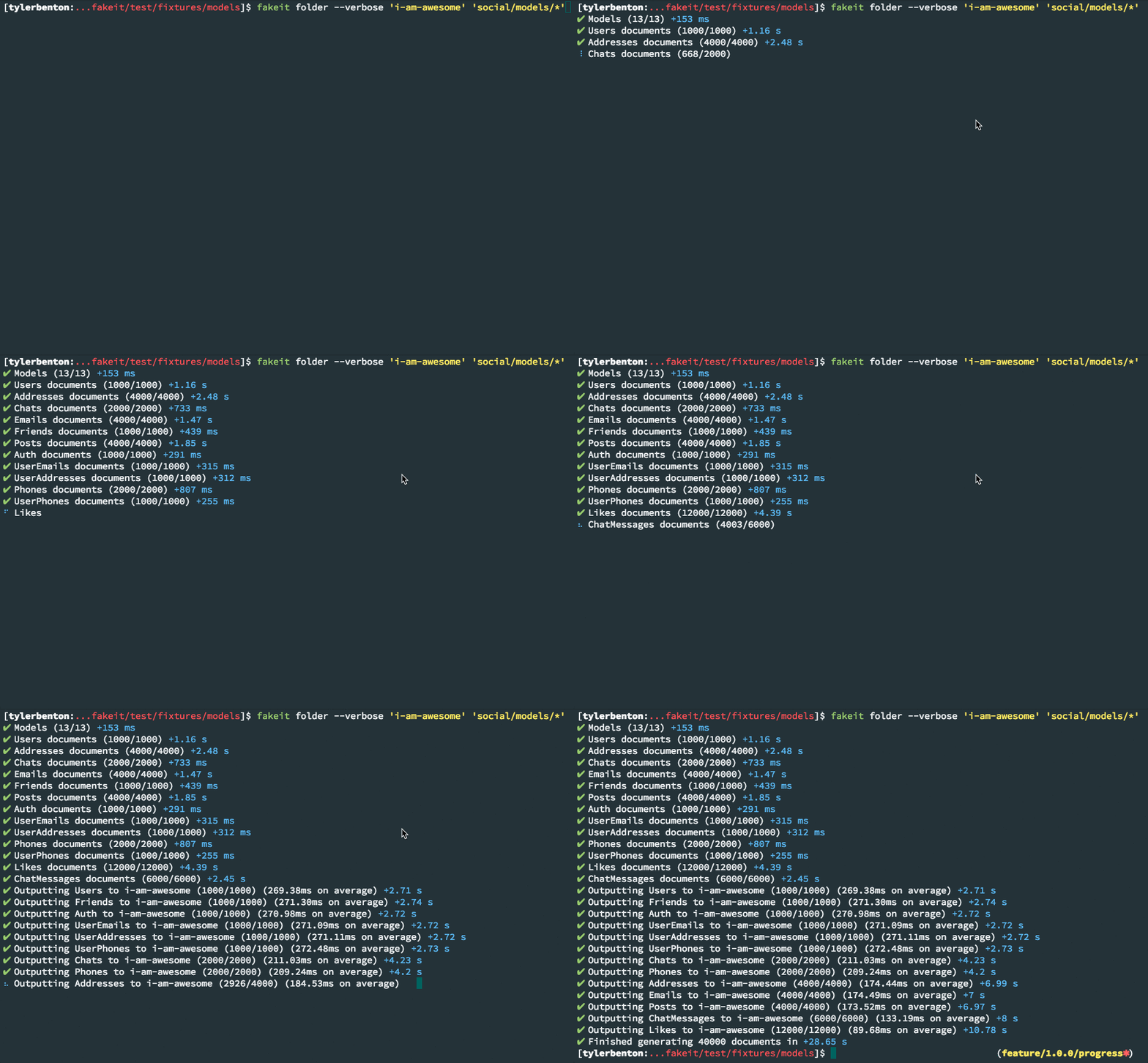
Generated data can be output in the following formats and destinations:
- `json`
- `yaml`
- `yml`
- `cson`
- `csv`
- Zip Archive of `json`, `yaml`, `yml`, `cson` or `csv` files
- Couchbase Server
- Couchbase Sync Gateway Server
## Install
```bash
npm install fakeit --save-dev
# or
npm install fakeit --global
```
## CLI Usage
```bash
Usage: fakeit [command] [<file|directory|glob> ...]
Commands:
console [options] outputs the result to the console
couchbase [options] This will output to couchbase
sync-gateway [options] no idea
directory|folder [options] [<dir|file.zip>] [<models...>] Output the file(s) into a directory
help
Options:
-h, --help output usage information
-V, --version output the version number
--root <directory> Defines the root directory from which paths are resolve from (process.cwd())
--babel <glob> The location to the babel config (+(.babelrc|package.json))
-c, --count <n> Overrides the number of documents to generate specified by the model. Defaults to model defined count
-v, --verbose Enables verbose logging mode (false)
-S, --no-spinners Disables progress spinners
-L, --no-log Disables all logging except for errors
-T, --no-timestamp Disables timestamps from logging output
-f, --format <type> this determines the output format to use. Supported formats: json, csv, yaml, yml, cson. (json)
-n, --spacing <n> the number of spaces to use for indention (2)
-l, --limit <n> limit how many files are output at a time (100)
-x, --seed <seed> The global seed to use for repeatable data
```
### Console Specific CLI Options
```bash
Options:
-h, --no-highlight This turns off the cli-table when a csv format
```
#### FakeIt Console usage example
```bash
fakeit console ../test/fixtures/models/simple/models
```
### Couchbase Specific CLI Options
```bash
Options:
-s, --server The server IP address
-b, --bucket The name of the bucket to insert data to
-u, --username The RBAC username to use (optional pre-5.0)
-p, --password The RBAC password for the account (optional)
-t, --timeout Timeout for the servers
-r, --use-streams Whether or not to use node streams. Used for high output documents and can only be used when there are no dependencies (experimental)
-w, --high-water-mark The number of objects to process through the stream at a time (experimental)
```
#### FakeIt Couchbase usage example
```bash
fakeit couchbase -s 127.0.0.1 -b "sample" -u "Administrator" -p "password" ../test/fixtures/models/simple/models
```
### Sync Gateway Specific CLI Options
```bash
Options:
-s, --server The server IP address
-b, --bucket The name of the bucket to insert data to
-u, --username The RBAC username to use (optional pre-5.0)
-p, --password The RBAC password for the account (optional)
-t, --timeout Timeout for the servers
```
#### FakeIt Couchbase Sync Gateway usage example
```bash
fakeit couchbase -s 127.0.0.1 -b "sample" -u "Administrator" -p "password" ../test/fixtures/models/simple/models
```
### Directory Specific CLI Options
```bash
Options:
-a, --archive If an archive file is passed, then the data will be output as a zip file
```
#### FakeIt Directory usage example
```bash
fakeit directory 'output' '../test/fixtures/models/simple/models'
```
## Models
All data is generated from one or more [YAML](http://yaml.org/) files. Models are defined similarly to how models are defined in [Swagger](http://swagger.io/), with the addition of a few more properties that are used for data generation:
At the root of a model the following keys are used, if it's not required then it's optional
#### `name` *(required)*
The name of the model
#### `type`
The data type of the model to be generated. This needs to be set top level, as well as a per property/items basis. It determines the starting data type, and how the result of the build loop will be converted once complete
**Note:** If type isn't set it defaults to `'null'`.
#### `scope`
The scope to use within Couchbase.
**NOTE:** This only applies to Couchbase Server 7.0+ **If you are not using Couchbase 7.0+ and define this property, it will cause an error.** Additionally, make sure the scope exists in Couchbase before you set this property.
#### `collection`
The collection to use within Couchbase.
**NOTE:** This only applies to Couchbase Server 7.0+ **If you are not using Couchbase 7.0+ and define this property, it will cause an error.** Additionally, make sure the collection exists in Couchbase before you set this property
###### Available types
| types | data type | description |
|------------------------------------|-------------|-----------------------------------------------------------------------------------------------------------------------------------------------|
| number, long, integer | `0` | Converts result to number using parseInt |
| double, float | `0` | Converts result to number using parseFloat |
| string | `''` | Converts result to a string using result.toString() |
| boolean, bool | `false` | Converts result to a boolean if it's not already, if result is a string and is `'false'`, `'0'`, `'undefined'`, `'null'` it will return false |
| array | `[]` | returns the result from the build loop |
| object, structure | `{}` | returns the result from the build loop |
| null, undefined, * (anything else) | `null` | returns the result from the build loop |
###### Places where it can be set
```yaml
name: Types example
# typically object or array
type: object
key:
build: faker.datatype.uuid()
properties:
foo:
# can be set on properties of an object
type: object
properties:
bar:
# can be set on nested properties
type: string
data:
value: FakeIt ftw
bar:
type: array
items:
# can be set on items
type: string
data:
min: 1
max: 10
build: faker.random.word()
```
#### `data`
This is the main data object that is uses the same properties in several different situations.
- `min`: The minimum number of documents to generate
- `max`: The maximum number of documents to generate
- `count`: A fixed number of documents to generate. If this is defined then `min` and `max` are ignored. If `min`, `max`, and `count` aren't defined `count` defaults to 1
- `pre_run`: A function that runs before the documents are generated
- `pre_build`: A function to be run *before each document* is generated
- `value`: Returns a value (can't be a function).
- `build`: The function to be run when the property is built. Only runs if `value` isn't defined
- `fake:` A template string to be used by Faker i.e. `"{{name.firstName}}"`. This will only run if `build`, and `value` aren't defined.
- `post_build`: A function to be run *after each document* is generated
- `post_run`: A function that runs after all the documents are generated for that model
The following keys can only be defined in the top level data object:
- `dependencies`: An array of dependencies of file paths to the dependencies of the current model. They are relative to the model, and or they can be absolute paths.
Don't worry about the order, we will resolve all dependencies automagically #yourwelcome
- `inputs`: A object/string of input(s) that's required for this model to run. If it's a string the file name is used as the key.
The key is what you reference when you want to get data (aka `this.inputs[key]`). The value is the file path to the inputs location.
It can be relative to the model or an absolute path.
#### `key` *(required)*
This determines the name of the document that's being generated. It only needs to be defined once per document. This is a reference to a generated property and is used for the filename or Document ID.
If the key is an object it needs the `data` option defined above, it will only work with `value`, `build`, and `fake` since this already runs after the document has been built.
If the key is a string then it use the string value to find the value of the document that was just built (using the [lodash get](https://lodash.com/docs/4.17.4#get) method).
###### Examples of setting a key
In this example after each document is built it will look for the `_id` property and return it's result (aka `user_1`, `user_2`, etc.)
```yaml
name: Key String Example
type: object
key: _id
data:
pre_run: |
globals.user_counter = 0;
properties:
_id:
type: string
description: The document id
data:
post_build: `user_${this.user_id}`
user_id:
type: integer
description: The users id
data:
build: ++globals.user_counter
```
In this example the key will be `'user_' + the current user_id` (aka `user_1`, `user_2`, etc.)
```yaml
name: Key Object Example
type: object
key:
data:
build: `user_${this.user_id}`
data:
pre_run: |
globals.user_counter = 0;
properties:
user_id:
type: integer
description: The users id
data:
build: ++globals.user_counter
```
#### `seed`
If a seed is defined it will ensure that the documents created repeatable results. If you have a model with a data range of 2-10 a random number between 2 and 10 documents will be created no matter what the seed is. Let's say that 4 documents are generated the first time you run the model, each of those documents will be completely different than the next (as expected). Later you come back and you generate the data again this time it might generate 6 documents. The first 4 documents generated the second time will be exactly the same as the first time you generated the data. The seed can be number or string.
###### Note:
This only works if you use `faker` and `chance` to generate your random fake data. It can be produced with other fake data generation libraries if they support seeds.
`faker.date` functions will not produce the same fake data each time.
##### Functions
For any function defined above be sure to use `|` for multi line functions and **NOT** `>`. To see an in depth explanation see this [issue](https://github.com/bentonam/fakeit/issues/84#issuecomment-266905423)
Each of these functions is passed the following variables that can be used at the time of it's execution:
- `documents` - An object containing a key for each model whose value is an array of each document that has been generated
- `globals` - An object containing any global variables that may have been set by any of the run or build functions
- `inputs` - An object containing a key for each input file used whose value is the deserialized version of the files data
- `faker` - A reference to [FakerJS](http://marak.github.io/faker.js/)
- `chance` - A reference to [ChanceJS](http://chancejs.com/)
- `document_index` - This is a number that represents the currently generated document's position in the run order
- `require` - This is the node `require` function, it allows you to require your own packages. Should require and set them in the pre_run functions for better performance.
For the `pre_run`, and `post_run` the `this` context refers to the current model.
For the `pre_build`, `build`, and `post_build` the `this` context refers to the object currently being generated.
If you have a nested object being created in an array or something, `this` will refer to closest object not the outer object/array.
#### Example `users.yaml` Model
```yaml
name: Users
type: object
scope: test
collection: users
key:
data:
build: `user_${this.user_id}`
data:
min: 200
max: 500
pre_run: |
globals.user_counter = 0;
properties:
user_id:
description: The users id
data:
build: faker.datatype.uuid()
name:
description: The users first name
data:
fake: '{{name.firstName}}'
last_name:
description: The users last name
data:
fake: '{{name.lastName}}'
username:
description: The users username
data:
fake: '{{internet.userName}}'
password:
description: The users password
data:
fake: '{{internet.password}}'
email:
description: The users email address
data:
fake: '{{internet.email}}'
phone:
description: The users mobile phone
data:
fake: '{{phone.phoneNumber}}'
post_build: this.phone.replace(/x[0-9]+$/, '')
```
Results in the following
```json
{
"user_id": "4d9ec95c-f45d-42f4-9d32-4ac81d83f95b",
"name": "Sandy",
"last_name": "Turner",
"username": "Zella61",
"password": "gi7NVXsUoARHhyU",
"email": "Buck_Cormier@hotmail.com",
"phone": "715.612.8609"
}
{
"user_id": "7f513d5b-f944-4a80-b52a-4876627368b7",
"name": "Duane",
"last_name": "VonRueden",
"username": "Mafalda92",
"password": "3uXo4hFZJTdf1hp",
"email": "Rickie_Braun@hotmail.com",
"phone": "(356) 009-7477 "
}
...etc
```
#### `properties`
This is used to define out the properties for an object.
Each key inside of the `properties` will be apart of the generated object. Each of the keys use the following properties to build the values.
- `type`: The data type of the property. Values can be: `string`, `object`, `structure`, `number`, `integer`, `double`, `long`, `float`, `array`, `boolean`, `bool`
- `description`: A description of the property. This is just extra notes for the developer and doesn't affect the data.
- `data`: The same data options as defined above
```yaml
name: test
key:
build: faker.datatype.uuid()
type: object
properties:
id:
data:
build: faker.datatype.uuid()
title:
type: string
description: The main title to use
data:
# single line is returned just like arrow functions
build: |
faker.random.word()
phone:
type: object
# This can be nested under another key
properties:
home:
type: string
data:
# this will also be returned
build: faker.phone.phoneNumber().replace(/x[0-9]+$/, '')
work:
type: string
data:
# this will also be returned
build: chance.bool({ likelihood: 35 }) ? faker.phone.phoneNumber().replace(/x[0-9]+$/, '') : null
```
This will return a object like this
```json
{
"id": "4ce4da5c-0614-47d3-8fd6-3614c5461830",
"title": "alliance",
"phone": {
"home": "(949) 194-3347",
"work": "314-939-0541"
}
}
{
"id": "a649bbec-d629-4594-8fc8-ae34d97811a2",
"title": "Unbranded",
"phone": {
"home": "012-296-9810",
"work": null
}
}
etc...
```
#### `items`
This is used to define out how each item in an array is built
It uses the same structure as `properties` does but it will return an array of values.
```yaml
name: Array example
key:
data:
build: faker.datatype.uuid()
type: object
properties:
keywords:
type: array
description: An array of keywords
items:
type: string
data:
min: 3
max: 10
build: faker.random.word()
# You can also create a array of objects
phones:
type: array
description: An array of phone numbers
items:
type: object
data:
min: 1
max: 3
properties:
cell:
type: string
data:
build: faker.phone.phoneNumber().replace(/x[0-9]+$/, '')
home:
type: string
data:
build: chance.bool({ likelihood: 45 }) ? faker.phone.phoneNumber().replace(/x[0-9]+$/, '') : null
work:
type: string
data:
build: chance.bool({ likelihood: 10 }) ? faker.phone.phoneNumber().replace(/x[0-9]+$/, '') : null
```
```json
{
"keywords": [ "GB", "Sports", "redundant", "Plastic", ],
"phones": [
{
"cell": "(555) 555 - 5555",
"home": "(666) 666 - 6666",
"work": null
},
{
"cell": "(777) 777 - 7777",
"home": null
"work": "(888) 888 - 8888",
}
]
}
```
### Model References
It can be beneficial to define definitions that can be referenced one or more times throughout a model. This can be accomplished by using the `$ref:` property. Consider the following example:
<!-- @todo update this link after launch of 1.0.0 -->
**[contacts.yaml](https://github.com/bentonam/fakeit-examples/tree/master/contacts/models/contacts.yaml)**
```yaml
name: Contacts
type: object
key: contact_id
scope: development
collection: contacts
data:
min: 1
max: 4
properties:
contact_id:
data:
build: "chance.guid()"
details:
schema:
$ref: '#/definitions/Details'
phones:
type: array
items:
$ref: '#/definitions/Phone'
data:
min: 1
max: 4
emails:
type: array
items:
$ref: '#/definitions/Email'
data:
min: 0
max: 3
addresses:
type: array
items:
$ref: '#/definitions/Address'
data:
min: 0
max: 3
definitions:
Email:
data:
build: "faker.internet.email()"
Phone:
type: object
properties:
phone_type:
data:
build: "faker.random.arrayElement([ 'Home', 'Work', 'Mobile', 'Main', 'Other' ])"
phone_number:
data:
build: "faker.phone.phoneNumber().replace(/x[0-9]+$/, '')"
extension:
data:
build: "chance.bool({ likelihood: 20 }) ? chance.integer({min: 1000, max: 9999}).toString() : ''"
Address:
type: object
properties:
address_type:
data:
build: "faker.random.arrayElement([ 'Home', 'Work', 'Other' ]);"
address_1:
data:
# This uses es6 and only works if your project already has it install or you're on node 6+
build: "`${faker.address.streetAddress()} ${faker.address.streetSuffix()}`"
address_2:
data:
build: "chance.bool({ likelihood: 35 }) ? faker.address.secondaryAddress() : ''"
city:
data:
build: "faker.address.city()"
state:
data:
build: "faker.address.stateAbbr()"
postal_code:
data:
build: "faker.address.zipCode()"
country:
data:
build: "faker.address.countryCode()"
Details:
type: object
properties:
first_name:
data:
fake: "{{name.firstName}}"
last_name:
data:
build: "return chance.bool({ likelihood: 70 }) ? faker.name.lastName() : ''"
company:
type: string
description: The contacts company
data:
build: "return chance.bool({ likelihood: 30 }) ? faker.company.companyName() : ''"
job_title:
type: string
description: The contacts job_title
data:
build: "return chance.bool({ likelihood: 30 }) ? faker.name.jobTitle() : ''"
```
For this model we used 4 references:
- `$ref: '#/definitions/Details'`
- `$ref: '#/definitions/Phone'`
- `$ref: '#/definitions/Email'`
- `$ref: '#/definitions/Address'`
These could have been defined inline but that would make it more difficult to see our model definition, and each of these definitions can be reused. References are processed and included before a model is run and it's documents are generated.
### Overriding Model Defaults
The model defaults can be overwritten at run time by executing the `pre_run` function. The `this` keyword in both the `pre_run` and `post_run` functions is the processed model. Below are some examples of changing the number of documents the model should generate before the generation process starts.
```yaml
name: Users
type: object
key: _id
data:
pre_run: |
this.data.count = 100
# etc...
```
This becomes beneficial if you are providing input data and want to generate a fixed number of documents. Take the following command for example:
Here we want to generate a countries model but we might not necessarily know the exact amount of data being provided by the input. We can reference the input data in our model's `pre_run` function and set the number to generate based on the input array.
```yaml
name: Countries
type: object
key: _id
data:
inputs: '../inputs/countries.csv'
pre_run: |
this.data.count = inputs.countries.length;
# etc...
```
**IMPORTANT:** When creating the input data in CSV format, the first column will not be used. You must make the first row in the CSV file, column header values. The column header names can be used in the yaml files to reference the correct data field from the CSV. The first column should have a name of id, the remaining columns can be whatever you want them to be. The id column will not be used so just make it an arbitrary number. If you need/want to specify an id value in the CSV file to be used in the yaml file just make the second column be the actual id value used in the yaml file. Here's an example of how your CSV file should be setup:
```csv
id,countryId,code,name,continent
1,country::gb,GB,United Kingdom,EU
2,country::us,US,United States,NA
```
## JS API
If you don't want to use the CLI version of this app you can always use the JS api.
```js
import Fakeit from 'fakeit'
const fakeit = new Fakeit()
fakeit.generate('glob/to/models/**/*.yaml')
.then((data) => {
console.log(data)
})
```
### Fakeit Options
Below are the default options that are used unless overwritten.
```js
import Fakeit from 'fakeit'
const fakeit = new Fakeit({
root: process.cwd(), // The root directory to operate from
babel_config: '+(.babelrc|package.json)', // glob to search for the babel config. This search starts from the closest instance of `node_modules`
seed: 0, // the seed to use. If it's 0 then a random seed is used each time. A string or a number can be passed in as an seed
log: true, // if then logging to the console is enable
verbose: false, // if true then verbose logging is enable
timestamp: true, // if true the logging output to console has timestamps
})
// models can be an a comma delimited string of globs, or an array of globs
// any models that are passed will output/returned.
const models = 'glob/to/models/**/*.yaml'
fakeit.generate(models, {
// this is the format to output it in
// available formats `json`, `csv`, `yaml`, `yml`, `cson`
format: 'json',
// the character(s) to use for spacing
spacing: 2,
// The type of output to use. Below are the available types
// `return`: This will the data in an array
// `console`: This will output the data to the console
// `couchbase`: This will output the data to a Couchbase server.
// `sync-gateway`: This will output the data to a Couchbase Sync Gateway server
// `directory`: The directory path to output the files (aka `path/to/the/destination`)
output: 'return',
// limit how many files are output at a time, this is useful
// to not overload a server or lock up your computer
limit: 100,
// this is used in the console output and if true it will
// format and colorize the output
highlight: true,
// the file name of the zip file. Currently this can only be used if you're
// outputting the data to a directory. It can't be used to output a zip file
// to a server, the console, or returned. (aka `archive.zip`)
archive: '',
// These options are used if the `output` option is `sync-gateway`,
// or `couchbase`. Otherwise they're ignored.
server: '127.0.0.1', // the server address to use for the server
bucket: 'default', // the bucket name
username: '', // the username to use if applicable
password: '', // the password for the account if applicable
timeout: 5000, // timeout for the servers
})
.then((data) => {
// the data returned will always be a string in the format that was set
data = JSON.parse(data)
// do something with data array of arrays
})
```
### Examples
To see more examples of some of the things you can do take a look at the [test cases](https://github.com/bentonam/fakeit/tree/master/test/fixtures/models) that are in this repo
### Changelog
#### 2.1.3
- Update package dependencies to resolve yarn audit issues
- Update make file to remove lint commands that do not apply
#### 2.1.2
- Update package dependencies to resolve yarn audit issues
#### 2.0.10
- Set `stream` argument to ORA to be `process.stdout`
- Fix option to ORA as it was `enabled` but should have been `isEnabled`
#### 2.0.9
- Revert `discardStdin` option of `ora` to be true
- Utilize the CLI option `-S` to set if `isEnabled` should be true or false when passed to a new instance of ORA.
#### 2.0.8
- Update dependencies
- Set `discardStdin` option of `ora` to be false
#### 2.0.5
- Removed Couchbase parameters `scopeName` and `collectionName` in favor of defining these values in each model
- Fixed an error with the **directory/folder** output method that caused models with an id or key containing a backslash to not be output due to the directory not existing.
#### 2.0.0
- Updated all library dependencies to the latest versions
- Migrated from Babel 6 to Babel 7
- Updated Couchbase logic to take `scopeName` and `collectionName` parameters to support these new features in Couchbase Server 7+
- Update commander to the latest version which required code to be refactored due to changes in the Commander library
- Updated AVA to the latest version which required tests to be refactored due to changes in the AVA library
- Updated existing tests to fix a few test issues
- Specify that Node v10 or less should be utilized
- Update readme documentation
- Fix typo's throughout code documentation
#### 1.4.0 & prior
- Model Dependencies are now defined in the model it's self by the file path to the model that the current one depends on. It doesn't matter what order they're because they will be resolve automagically.
- Model Inputs are now defined in the model it's self by the file path to the inputs location that the current model depends on. It can be a string or an object.
- Babel +6 support now exists. We don't install any presets or plugins for you but if `.babelrc` or `babelConfig` exists in the `package.json` of your project then all the functions are transpiled.
- Better error handling has been added so you know what went wrong and where it happened.
- JS support has also been added so you are no longer required to use the command line to create fake data.
- Added support for seeds to allow repeatable data.
- Added a progress indicator to show how many documents have been created