ez-cli-color
Version:
Set the colors for the text on the cli
67 lines (47 loc) • 1.89 kB
Markdown

Colorful Text Formatting
This code provides a utility for formatting text with different colors and styles in a terminal or console.
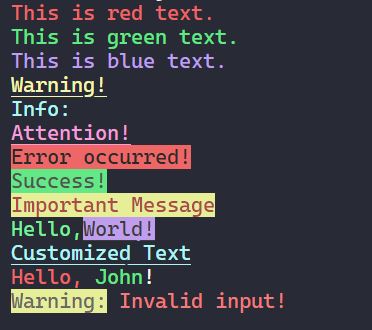
1. Install the necessary dependencies:
```shell
npm install ez-cli-color
```
2. Import the ez object to access the available formatting options:
```js
const ez = require("ez-cli-color");
```
3. Format your text using the available options:
```javascript
const formattedText = ez.<color>(text, options); // for text color
const formattedText = ez.background.<color>(text, options); // for background color
```
Replace <color> with one of the available color options, such as black, red, green, etc. You can also specify additional formatting options by providing an options object.
```js
const formattedText = ez.red("Hello, world!", { bold: true });
```
- `black`
- `red`
- `green`
- `yellow`
- `blue`
- `magenta`
- `cyan`
- `white`
The options object accepts the following properties:
- `underline` (boolean): Set to true to underline the text. Default: false.
- `bold` (boolean): Set to true to make the text bold. Default: false.
Format text with different colors and options:
```js
const ez = require("./path/to/ez");
const formattedText1 = ez.red("Error occurred!", { bold: true });
console.log(formattedText1);
const formattedText2 = ez.yellow("Warning: Invalid input", { underline: true });
console.log(formattedText2);
```
This code is licensed under the MIT License. See the LICENSE file for more information.