esewa-pay
Version:
A TypeScript SDK for integrating eSewa payments (supports both ESM & CJS)
230 lines (163 loc) • 5.72 kB
Markdown
# 💰 eSewa Pay SDK (TypeScript)
A modern **TypeScript SDK** for integrating **eSewa Payment Gateway** into your Node.js or TypeScript backend applications.
Supports **both ESM and CommonJS** environments.
## 📸 Transaction Flow
The payment process follows this official eSewa flow:
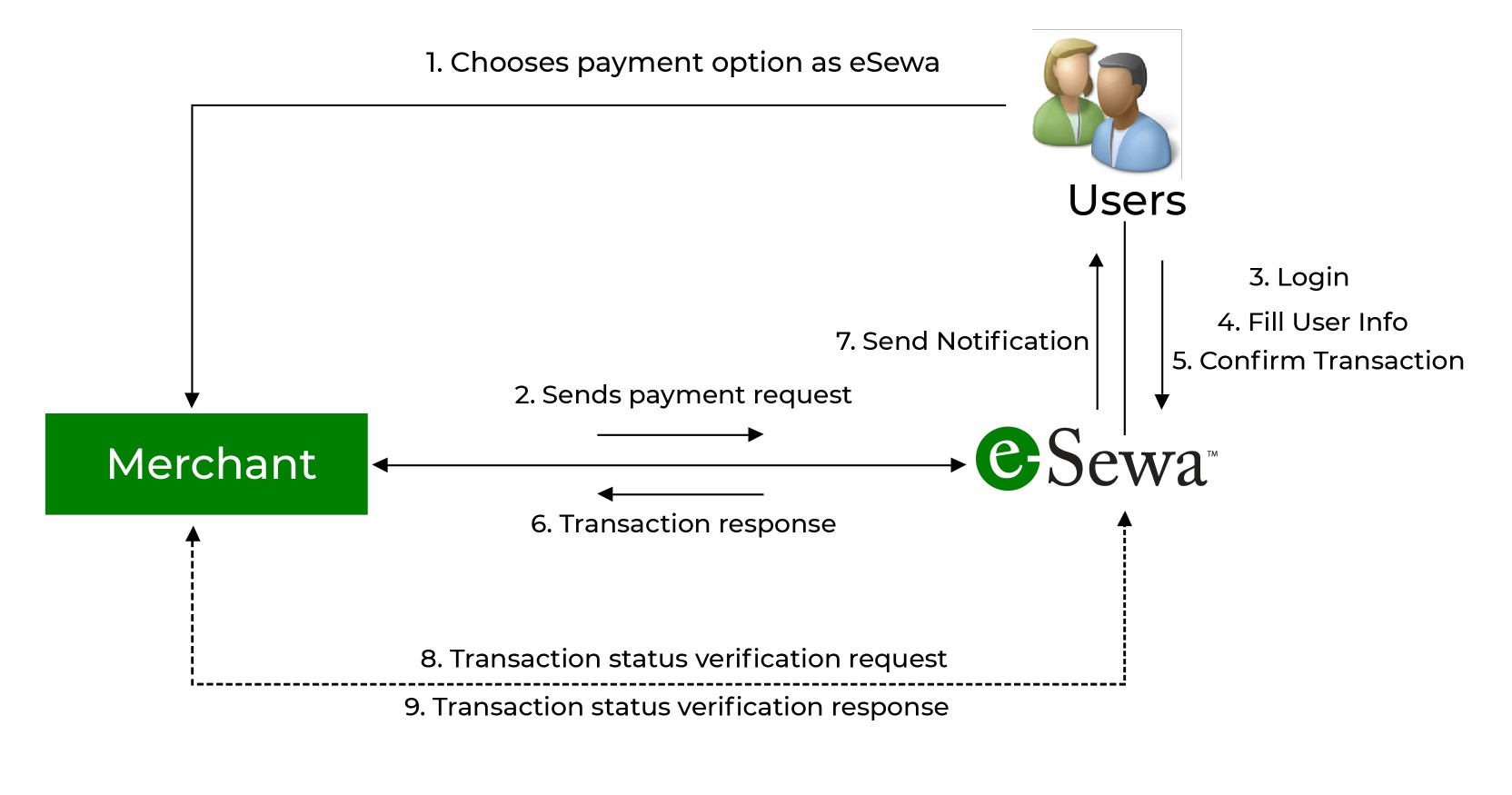
🔗 **Official Docs:** [https://developer.esewa.com.np/pages/Epay#transactionflow](https://developer.esewa.com.np/pages/Epay#transactionflow)
## ⚙️ Installation
```bash
npm install esewa-pay
```
## 🧠 Overview
This SDK helps you:
Initiate payments with eSewa
Verify transactions after payment
Handle secure signature generation using HMAC (SHA256)
Support both development and production environments
Integrate webhooks for payment success/failure
## Usage
## Import the SDK
ESM (TypeScript / ES Modules)
```ts
import { EsewaClient } from "esewa-pay";
```
```ts
const { EsewaClient } = require("esewa-pay");
```
## Example: Initialize and Make a Payment
```ts
import { EsewaClient } from "esewa-pay";
const esewa = new EsewaClient({
secretKey: "8gBm/:&EnhH.1/q", // Test key (sandbox)
productCode: "EPAYTEST",
successUrl: "https://yourserver.com/esewa/success", //give your own end point and handle the processing here. Make a webhook in this url.
failureUrl: "https://yourserver.com/esewa/failure", //give your own end point and handle the processing here.
env: "development", // or "production"
});
(async () => {
const txn_uuid = "txn-" + Date.now();
//you can save the transaction id into database so that it will help in referencing the data later.
const paymentUrl = await esewa.initiatePayment({
amount: "100", //string
total_amount: "100", //string
transaction_uuid: txn_uuid, //string
});
console.log("Redirect user to this URL:", paymentUrl);
})();
```
## Example: Verify a Payment
After the user pays, eSewa redirects to your success webhook URL with query parameters.
You can verify the transaction on your backend:
```ts
const response = await esewa.verifyPayment({
amount: "100",
product_code: "EPAYTEST",
transaction_uuid: "txn-123456789"
});
console.log(response);
```
## Webhook Setup
Create a backend route to handle successful payments.
Example using Express.js:
```ts
import express from "express";
import bodyParser from "body-parser";
import { EsewaClient } from "esewa-pay";
const app = express();
app.use(bodyParser.urlencoded({ extended: true }));
app.use(bodyParser.json());
const esewa = new EsewaClient({
secretKey: "8gBm/:&EnhH.1/q",
productCode: "EPAYTEST",
successUrl: "https://yourserver.com/esewa/success",
failureUrl: "https://yourserver.com/esewa/failure",
env: "development", // or "production"
});
// Webhook for successful payments
// post for production(data getting in body), get for local(data getting in query)
app.all("/esewa/success", async (req, res) => {
try {
const data =
req.method === "POST" ? req.body.data : req.query.data;
if (!data) {
return res.status(400).send("Missing payment data");
}
// Decode and verify payment
const result = await esewa.verifyPayment(String(data));
console.log("Payment Verified:", result);
res.send("Payment verified successfully!");
} catch (err) {
console.error("Verification failed:", err);
res.status(500).send("Verification failed");
}
});
// Webhook for failed payments
app.all("/esewa/failure", (req, res) => {
console.log("Payment failed:", req.body || req.query);
res.send("Payment failed");
});
app.listen(3000, () =>
console.log("🚀 Server running at http://localhost:3000")
);
```
## Get transaction status
After the user pays, eSewa redirects to your success webhook URL with query parameters.
You can verify the transaction on your backend:
```ts
const response = await esewa.getTransactionStatus(
'txn-123456789', '100'
);
console.log(response);
```
## Environments
🧪 Development (Testing)
Use the following test credentials to simulate payments.
Field Value
eSewa ID: 9806800001 / 9806800002 / 9806800003 / 9806800004 / 9806800005
Password: Nepal@123
MPIN:: 1122(for application only)
Merchant ID / Service Code: EPAYTEST
Token: 123456
Secret Key (for ePay v2): 8gBm/:&EnhH.1/q
👉 Use env: "development" in your client initialization.
## 💼 Production
After successful test transactions, eSewa will provide your live merchant credentials and secret key.
Set:
```ts
env: "production"
```
The SDK automatically switches between:
https://uat.esewa.com.np/epay/main (Development)
https://esewa.com.np/epay/main (Production)
## 📄 License
MIT License
© 2025 Shishir Subedi
## 🧭 Links
🔗 Official Docs: https://developer.esewa.com.np/pages/Epay#transactionflow
💬 eSewa Merchant Portal: https://esewa.com.np
🧑💻 Author: Shishir Subedi
## CONTRIBUTING
🧠 Version Bump Logic (Using phips28/gh-action-bump-version)
That GitHub Action checks the commit messages merged into main.
Depending on what they contain, it bumps the version as follows:
Commit Message Resulting Version Bump
fix: 🔹 patch → 1.0.0 → 1.0.1
feat: 🔸 minor → 1.0.0 → 1.1.0
BREAKING CHANGE: or ! 🔺 major → 1.0.0 → 2.0.0
others (chore:, docs:, test:) no bump
✅ Examples in Your Project
fix: resolve timeout issue in esewa client(npm version becomes 1.0.1)
feat: add status verification API(npm version becomes 1.1.0)
feat!: change constructor to accept options object(npm version becomes 2.0.0)
docs: update README for new config options(version stays the same)