epd2in13
Version:
Nodejs driver for the Waveshare 2.13inch (B) e-Paper Hat
106 lines (84 loc) • 3.89 kB
Markdown
This is a port of the epd2in13bc [Python driver from Waveshare](https://github.com/waveshare/e-Paper/tree/master/RaspberryPi_JetsonNano/python/lib/waveshare_epd).
Key features of this library:
* Fast, uses native GPIO and SPI libraries
* Supports Red Color
* Remappable Pins
* Promises based
* Can render from a Canvas or an Image
Since this device is only capble of single tone (black or white, or red), it uses a frame buffer of 1 bit per pixel.
Although this device natively uses a portrait layout per the diagram below, it is mapped to a landscape layout instead for practical rendering of images or canvas.
Hence, Width > Height for `prepareImageFile` or `prepareCanvas` function calls.
<a name="layout"></a>
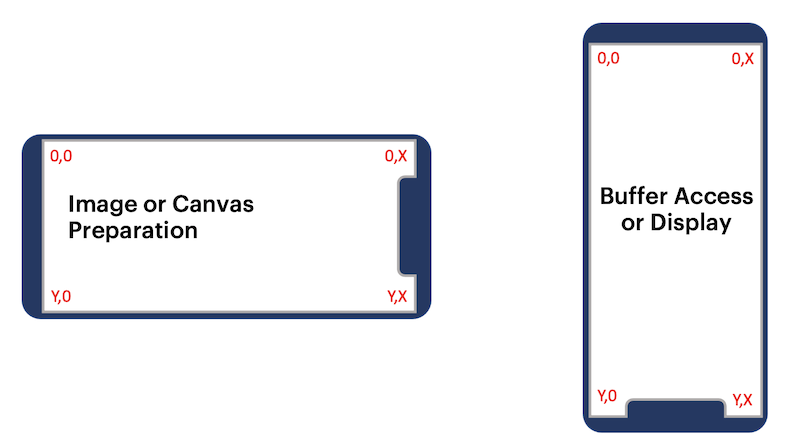
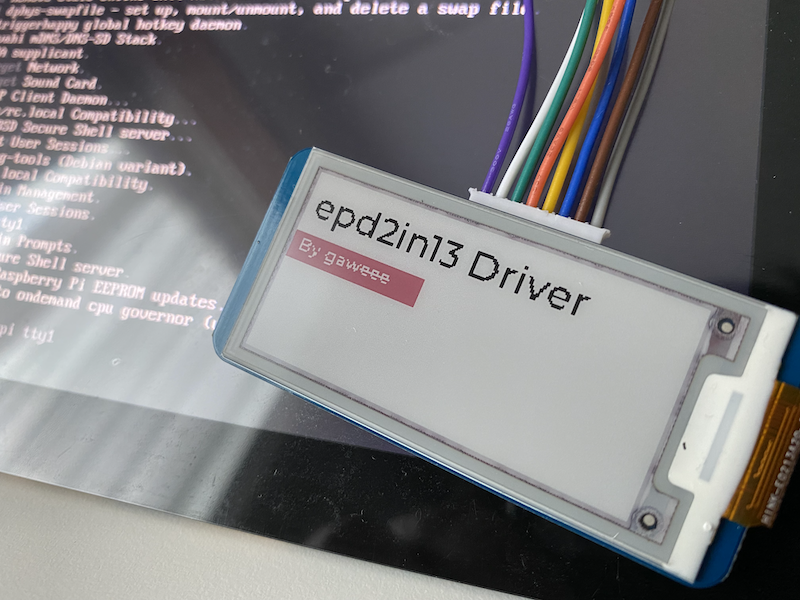
1. [GPIO](https://github.com/jperkin/node-rpio)
2. [SPI-Devicve](https://github.com/fivdi/spi-device)
3. [ImageJS](https://github.com/image-js/image-js) for buffer rendering
```sh
npm install epd2in13
```
```js
const epd2in13 = require('epd2in13');
const { createCanvas, registerFont } = require('canvas');
const display = new epd2in13(); // Or potentially call new epd2in13({ RST_PIN: 10, BUSY_PIN: 11 }) if the pins are remapped for any reason
// Setup the canvases and context here
registerFont('./fonts/Montserrat-Medium.ttf', { family: 'Montserrat' });
const black = createCanvas(display.width, display.height);
const bctx = black.getContext('2d');
const red = createCanvas(display.width, display.height);
const rctx = red.getContext('2d');
// Black context here
bctx.fillStyle = 'white';
bctx.fillRect(0, 0, display.width, display.height);
bctx.font = '20px Montserrat';
bctx.textBaseline = 'top';
bctx.fillStyle = 'black';
bctx.fillText('epd2in13 Driver', 5, 5);
// Red context here
rctx.fillStyle = 'white';
rctx.fillRect(0, 0, display.width, display.height);
rctx.fillStyle = 'black';
rctx.fillRect(0, 35, 80, 16);
rctx.font = '10px Montserrat';
rctx.fillStyle = 'white';
rctx.fillText('By gaweee', 5, 45);
display.init()
.then(() => display.clear())
.then(() => Promise.all([display.prepareCanvas(black), display.prepareCanvas(red)]))
.then(([blackBuffer, redBuffer]) => display.display(blackBuffer, redBuffer))
.then((buffer) => display.wait())
.then(() => display.clear())
.then(() => display.prepareImageFile('./test.png'))
.then((buffer) => display.display(buffer))
.then((buffer) => display.wait())
.then(() => display.clear())
.then(() => display.sleep())
```
`epd2in13.init()`
Runs the initialization sequence (Required).
`epd2in13.reset()`
Resets the display, runs already as part of the initialization sequence.
`epd2in13.display(black=[], red=[])`
Renders a combination of black and red optional buffers that follows a portrait layout.
Refer to [layout diagram](#layout) above.
`epd2in13.prepareCanvas`
Translates the canvas into an image and sends to `prepareImageBuffer` call below.
`epd2in13.prepareImageFile`
Loads an image by fileaname and sends to `prepareImageBuffer` call below.
`epd2in13.prepareImageBuffer`
Takes in the image buffer and prepares it (pixel by pixel) for display, in the process maps the output from landscape to portrait layout.
`epd2in13.clear(0xFF)`
Flushes the screen to white, optionally send 0x00 for black.
`epd2in13.wait()`
GPIO delay before the next event.
`epd2in13.sleep()`
Power down (retains ink on screen) the hat and stop listening to events.
## TODO
* Abstract the driver to support multiple other displays in the future
* Optional rotation