elm-review
Version:
Run elm-review from Node.js
196 lines (130 loc) • 8.87 kB
Markdown
# elm-review CLI
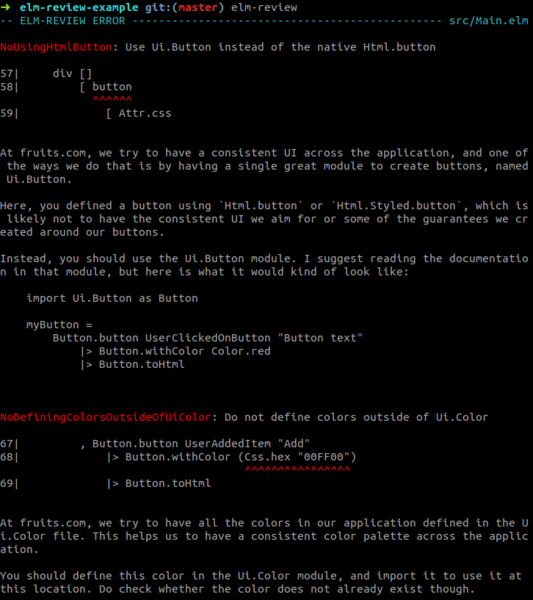
Run [`elm-review`] from Node.js.
## Installation
```sh
# Save it to your package.json, if you use npm in your project.
# This is the recommended way.
npm install elm-review --save-dev
# Install globally. This is not recommended.
npm install -g elm-review
```
See [below](#try-it-out) if you want to try it out without installing it.
## Usage
```sh
# Print the help
elm-review --help
# Review your project
elm-review
# Create an empty review configuration
elm-review init
# Create a new project containing elm-review rules
# aimed at being published on the Elm package registry
elm-review new-package
# Create an empty new rule to get started.
# Very helpful for projects created with new-package
elm-review new-rule
```
## Try it out
You can try `elm-review` out without setting up anything!
First of all, if you have `node` installed, it comes with `npx`, which lets you run `elm-review` without installing it by prepending the command by `npx`, like `npx elm-review`. It is a bit slower and requires Internet access, but it's useful to try it out.
You can also run a configuration you found on GitHub, using the `--template` flag. Even if you already have a configuration, you can use this to try out the rules from a new package before adding them to your configuration.
For instance, if you want to find and remove the dead code in your project, you can use the [example configuration](https://github.com/jfmengels/elm-review-unused/tree/main/example) from the [`jfmengels/elm-review-unused` package](https://package.elm-lang.org/packages/jfmengels/elm-review-unused/latest/).
```sh
npx elm-review --template jfmengels/elm-review-unused/example
# You can even use the configuration to fix all the errors that can be auto-fixed.
npx elm-review --template jfmengels/elm-review-unused/example --fix-all
```
If you are happy with the configuration, you can base your own configuration off of it, and then edit it:
```sh
npx elm-review init --template jfmengels/elm-review-unused/example
```
I **highly** recommend reading [this section on when to enable rules][when-to-write-or-enable-a-rule] in your configuration though.
You can use the same mechanics to try out a single rule before adding the dependency to your existing configuration and adding it to your configuration.
```sh
npx elm-review --template jfmengels/elm-review-unused/example --rules NoUnused.Variables
```
## Configuration
`elm-review` is configured through a `review/` folder in your project. It is a self-contained Elm project where you can
specify your dependencies, and write, import, and configure review rules.
Rules are configured in the `review/ReviewConfig.elm` file:
```elm
module ReviewConfig exposing (config)
import Review.Rule exposing (Rule)
import Third.Party.Rule
import My.Own.Custom.rule
import Another.Rule
config : List Rule
config =
[ Third.Party.Rule.rule
, My.Own.Custom.rule
, Another.Rule.rule { ruleOptions = [] }
]
```
## Get started
You can get started with an empty configuration by running the `elm-review init` command with the command line tool installed,
which will add a `review` folder to your project.
You can also use an existing configuration using `elm-review init --template <some configuration>`.
I created [some configurations](https://github.com/jfmengels/elm-review-config) that I believe can be good **starting** points.
```sh
# Start with an empty configuration
elm-review init
# Starter configuration for an Elm application
elm-review init --template jfmengels/elm-review-config/application
# Starter configuration for an Elm package
elm-review init --template jfmengels/elm-review-config/package
```
Once you have set up an initial configuration, you can add new rules. As `elm-review` does not
[come with built-in rules](https://github.com/jfmengels/elm-review/blob/main/documentation/design/no-built-in-rules.md),
you can look for packages with rules on the [Elm package registry](https://package.elm-lang.org/) by searching for packages named `elm-review-`.
Once you've found a package that you like, you can install it with the `elm install` command, just like any other Elm project dependency.
```sh
cd review/ # Go inside your review configuration directory
elm install authorName/packageName
# then update your `review/src/ReviewConfig.elm` to add the rule
# as explained in the package's documentation
```
Before you start adding rules or an unfamiliar existing configuration, I suggest reading the rest of this document, especially the section on [when to enable a rule][when-to-write-or-enable-a-rule].
## Run a review
Once you're done configuring, run `elm-review` to analyze your project.
You can also run `elm-review --fix`. The CLI will present you fixes for the errors that offer an automatic fix, which you can then accept or not. When there are no more fixable errors left, `elm-review` will report the remaining errors as if it was called without `--fix`. Fixed errors will be reformatted using [`elm-format`].
Run `elm-review --help` for more information on the available flags.
```sh
elm-review # Analyze your project
elm-review --fix # Analyze your project and potentially proposes automatic fixes
elm-review --help # for more information and the available flags
```
## Which parts of the project will be analyzed?
`elm-review` targets a project, and therefore requires an `elm.json`. By default, it will review all the Elm files of the project and of the tests.
- For packages: all the Elm files in `src/` and `tests/`
- For applications: all the Elm files in `tests/` and in the project's `elm.json`'s `source-directories`
If you wish to, you can list the directories you wish to have reviewed, so as to review additional directories or to remove ignore some of directories, by adding them as arguments to the command line.
```sh
# Review `src/` if project is a package, or the "source-directories" otherwise, along with `tests/`
elm-review
# Review only the Elm files in the `src/Dashboard/`
elm-review src/Dashboard/
# Review all the Elm files in the src/, tests/ and review/ directories
elm-review src/ tests/ review/
# Review a specific file
elm-review src/Dashboard.elm
```
The recommended way to use `elm-review` is without arguments. It is best not to "remove" directories from the project, because some rules expect to have access to all the files in order to make the best analysis. If some data is missing, they may make incorrect reports. If you wish to ignore some files, it is best to handle that in the implementation and/or configuration of your rules.
If you add files that are not part of the project, you may run into different problems, such as conflicting module names (two `Main.elm` files), relying on different dependencies, etc. It is best to run `elm-review` once for each project, and depending on your needs, with different configurations (using the `--config` flag).
## Exit status
If any rule from your configuration reports an error in one of the analyzed files, the process will exit with status 1. Otherwise, it will exit with status 0.
If the process fails for any other reason (crash, misconfiguration, ...), it will exit with status 1.
## Why is there a need for a review/ directory?
When the CLI looks at your configuration, it is in practice compiling an application using the configuration in your project, then running that application to analyze your project.
The CLI need at least two pieces of information from your configuration:
- An `elm.json` file to know the external packages your configuration depends upon (like the ones that contain the rules you enabled), and the Elm version of your project
- A `ReviewConfig.elm` file that sets the rules to enforce for your project
Your custom rules, unless you want to share them in the Elm package registry, should be in the `review/` directory too, so as not to pollute your project's dependencies. If they are in here, we need to include these custom rules and their dependencies in the application files.
## Tooling integration
If you are interested in using `elm-review` inside a different environment than a terminal (like editors, CI, other Elm tools, ...), check out the documentation for [tooling integration](./documentation/tooling-integration.md).
## Thanks
Thanks to [**@MartinSStewart**][martinsstewart] for working on reducing the file cache size (and therefore speeding up the whole execution).
[`elm-review`]: https://github.com/jfmengels/elm-review
[`elm-format`]: https://github.com/avh4/elm-format
[martinsstewart]: https://github.com/MartinSStewart
[when-to-write-or-enable-a-rule]: https://package.elm-lang.org/packages/jfmengels/elm-review/latest/#when-to-write-or-enable-a-rule