eksi-sozluk
Version:
Eksi Sozluk NodeJS client.
88 lines (58 loc) • 2.91 kB
Markdown
There are 2 different ways to use this library; You can use it by logging into your Eksi Sozluk account or as a guest.
If you login, you can do many things that a guest cannot do, for example, only logged in users can create Entries, send messages to other users, follow users and much more.
```javascript
const { EksiSozluk } = require('eksi-sozluk');
// create a guest session
// you don't have to login, you can proceed with guest session
const session = new EksiSozluk({
httpClient: {
timeout: 10000 // in ms, default is 3000ms (3 seconds)
}
});
const main = async () => {
// this method not recommended, eksisozluk mostly requires solve a recaptcha to pass login
const member = await session.login('<your-email>', '<your-secret-password>');
// ...or you can login with token
const member = await session.loginWithToken('<your-secret-token>');
}
main();
```
The easiest way to use this library with your account is to create a token once and use this token continuously in the future. If you login with your credentials a few times, Eksi Sozluk will ask for a reCAPTCHA at the end. Check below to learn how to create token.
#### **!!! BE CAREFUL !!!**
**DO NOT SHARE YOUR TOKEN WITH ANYONE.**
**THERE IS NO DIFFERENCE BETWEEN SHARING YOUR PASSWORD AND SHARING YOUR TOKEN.**
**IF YOU WANT YOUR TOKEN TO BE INVALID, CHANGE YOUR PASSWORD.**
### Creating Token with Library
```javascript
// create token, recaptcha may needed
// ...if recaptcha needed, pass this section and create the token manually
const token = await session.createToken('<your-email>', '<your-secret-password>', {
extendTime: true // the token works for 2 weeks, default is false
});
// your secret token
console.log(token.value);
// when will token expire
console.log(token.expiresAt);
```
### Creating Token with Manually
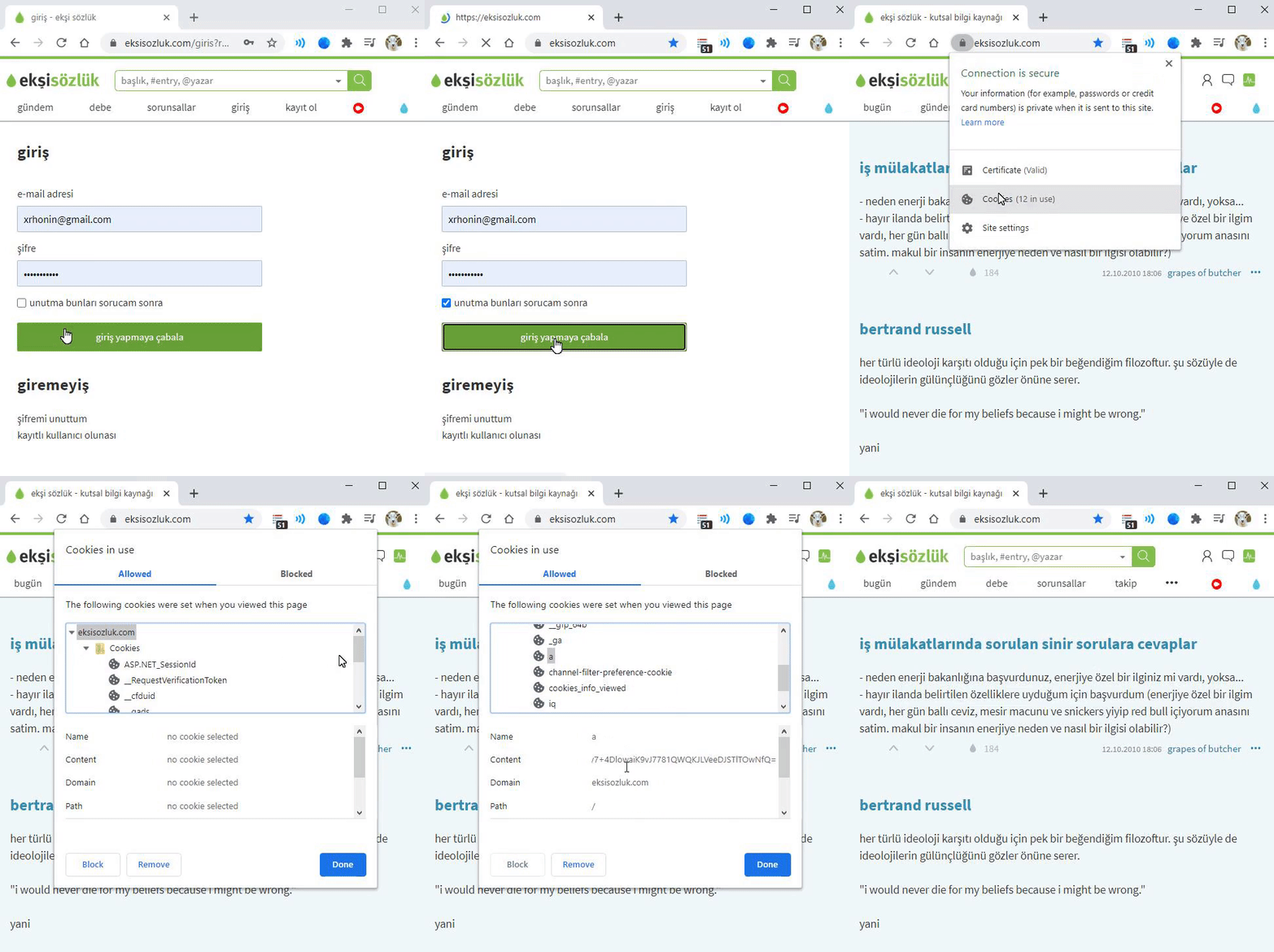
Eksi Sozluk keep the token in your cookies. You can take the token using browser.
**NOTE:** Don't forget to check the checkbox on the login page for ability to use token for 2 weeks.
Otherwise your token will invalid in a short time period.
##### Example: Google Chrome
### Find Out If reCAPTCHA Is Necessary Or Not
You can use this method to find out if you will get a reCAPTCHA related error before attempting to login with your credentials.
```javascript
// check is recaptcha required
const isRecaptchaRequired = await session.isRecaptchaRequired();
// returns true or false
console.log(isRecaptchaRequired);
```
### Check Authentication Status
Sometimes you may need to test if the token you have is working, because tokens do not works forever.
```javascript
// check if you logged in and your token still valid
const isAuthenticated = await session.isAuthenticated();
// returns true or false
console.log(isAuthenticated);
```