ehsas_react-papaparse
Version:
The fastest in-browser CSV (or delimited text) parser for React. It is full of useful features such as CSVReader, CSVDownloader, readString, jsonToCSV, readRemoteFile, ... etc.
1,196 lines (1,071 loc) • 32.4 kB
Markdown
# react-papaparse
react-papaparse is the fastest in-browser CSV (or delimited text) parser for React. It is full of useful features such as CSVReader, CSVDownloader, readString, jsonToCSV, readRemoteFile, ... etc.
[](https://www.npmjs.com/package/react-papaparse) [](https://www.npmjs.com/package/react-papaparse)
[](https://www.npmjs.com/package/react-papaparse)  [](https://travis-ci.com/Bunlong/react-papaparse) [](https://standardjs.com)
## 🎁 Features
* Compatible with both JavaScript and TypeScript
* Easy to use
* Parse CSV files directly (local or over the network)
* Fast mode (is really fast)
* Stream large files (even via HTTP)
* Reverse parsing (converts JSON to CSV)
* Auto-detect delimiter
* Worker threads to keep your web page reactive
* Header row support
* Pause, resume, abort
* Can convert numbers and booleans to their types
* One of the only parsers that correctly handles line-breaks and quotations
## 🔧 Install
react-papaparse is available on npm. It can be installed with the following command:
```
npm install react-papaparse --save
```
react-papaparse is available on yarn as well. It can be installed with the following command:
```
yarn add react-papaparse --save
```
## 📖 Demo & Documentation
* [Demo](https://react-papaparse.github.io/demo)
To learn how to use react-papaparse:
* [Documentation](https://react-papaparse.github.io/docs)
<!-- FAQ:
* [Sample of using CSVReader isSet](https://github.com/Bunlong/react-papaparse/wiki/Sample-of-using-CSVReader-isSet) -->
## 📚 Useful Features
* [CSVReader](https://github.com/Bunlong/react-papaparse#-csvreader) – React component that handles csv files input and returns its content as array.
* [CSVDownloader](https://github.com/Bunlong/react-papaparse#-csvdownloader) – React component that render the link/button which is clicked to download the data provided in CSV format.
* [readString](https://github.com/Bunlong/react-papaparse#-readstring) – The function that read CSV comma separated string and returns its content as array.
* [readRemoteFile](https://github.com/Bunlong/react-papaparse#-readremotefile) – The function that read remote CSV files and returns its content as array.
* [jsonToCSV](https://github.com/Bunlong/react-papaparse#-jsontocsv) – The function that read an array of object (json) and returns its content as CSV comma separated string.
## 💡 Usage
### 🎀 CSVReader
#### Basic Upload

```javascript
import React, { CSSProperties } from 'react';
import { useCSVReader } from 'react-papaparse';
const styles = {
csvReader: {
display: 'flex',
flexDirection: 'row',
marginBottom: 10,
} as CSSProperties,
browseFile: {
width: '20%',
} as CSSProperties,
acceptedFile: {
border: '1px solid #ccc',
height: 45,
lineHeight: 2.5,
paddingLeft: 10,
width: '80%',
} as CSSProperties,
remove: {
borderRadius: 0,
padding: '0 20px',
} as CSSProperties,
progressBarBackgroundColor: {
backgroundColor: 'red',
} as CSSProperties,
};
export default function CSVReader() {
const { CSVReader } = useCSVReader();
return (
<CSVReader
onUploadAccepted={(results: any) => {
console.log('---------------------------');
console.log(results);
console.log('---------------------------');
}}
>
{({
getRootProps,
acceptedFile,
ProgressBar,
getRemoveFileProps,
}: any) => (
<>
<div style={styles.csvReader}>
<button type='button' {...getRootProps()} style={styles.browseFile}>
Browse file
</button>
<div style={styles.acceptedFile}>
{acceptedFile && acceptedFile.name}
</div>
<button {...getRemoveFileProps()} style={styles.remove}>
Remove
</button>
</div>
<ProgressBar style={styles.progressBarBackgroundColor} />
</>
)}
</CSVReader>
);
}
```
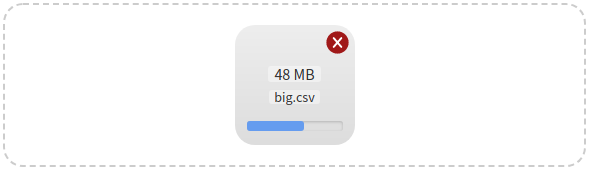
#### Click and Drag Upload
```javascript
import React, { useState, CSSProperties } from 'react';
import {
useCSVReader,
lightenDarkenColor,
formatFileSize,
} from 'react-papaparse';
const GREY = '#CCC';
const GREY_LIGHT = 'rgba(255, 255, 255, 0.4)';
const DEFAULT_REMOVE_HOVER_COLOR = '#A01919';
const REMOVE_HOVER_COLOR_LIGHT = lightenDarkenColor(
DEFAULT_REMOVE_HOVER_COLOR,
40
);
const GREY_DIM = '#686868';
const styles = {
zone: {
alignItems: 'center',
border: `2px dashed ${GREY}`,
borderRadius: 20,
display: 'flex',
flexDirection: 'column',
height: '100%',
justifyContent: 'center',
padding: 20,
} as CSSProperties,
file: {
background: 'linear-gradient(to bottom, #EEE, #DDD)',
borderRadius: 20,
display: 'flex',
height: 120,
width: 120,
position: 'relative',
zIndex: 10,
flexDirection: 'column',
justifyContent: 'center',
} as CSSProperties,
info: {
alignItems: 'center',
display: 'flex',
flexDirection: 'column',
paddingLeft: 10,
paddingRight: 10,
} as CSSProperties,
size: {
backgroundColor: GREY_LIGHT,
borderRadius: 3,
marginBottom: '0.5em',
justifyContent: 'center',
display: 'flex',
} as CSSProperties,
name: {
backgroundColor: GREY_LIGHT,
borderRadius: 3,
fontSize: 12,
marginBottom: '0.5em',
} as CSSProperties,
progressBar: {
bottom: 14,
position: 'absolute',
width: '100%',
paddingLeft: 10,
paddingRight: 10,
} as CSSProperties,
zoneHover: {
borderColor: GREY_DIM,
} as CSSProperties,
default: {
borderColor: GREY,
} as CSSProperties,
remove: {
height: 23,
position: 'absolute',
right: 6,
top: 6,
width: 23,
} as CSSProperties,
};
export default function CSVReader() {
const { CSVReader } = useCSVReader();
const [zoneHover, setZoneHover] = useState(false);
const [removeHoverColor, setRemoveHoverColor] = useState(
DEFAULT_REMOVE_HOVER_COLOR
);
return (
<CSVReader
onUploadAccepted={(results: any) => {
console.log('---------------------------');
console.log(results);
console.log('---------------------------');
setZoneHover(false);
}}
onDragOver={(event: DragEvent) => {
event.preventDefault();
setZoneHover(true);
}}
onDragLeave={(event: DragEvent) => {
event.preventDefault();
setZoneHover(false);
}}
>
{({
getRootProps,
acceptedFile,
ProgressBar,
getRemoveFileProps,
Remove,
}: any) => (
<>
<div
{...getRootProps()}
style={Object.assign(
{},
styles.zone,
zoneHover && styles.zoneHover
)}
>
{acceptedFile ? (
<>
<div style={styles.file}>
<div style={styles.info}>
<span style={styles.size}>
{formatFileSize(acceptedFile.size)}
</span>
<span style={styles.name}>{acceptedFile.name}</span>
</div>
<div style={styles.progressBar}>
<ProgressBar />
</div>
<div
{...getRemoveFileProps()}
style={styles.remove}
onMouseOver={(event: Event) => {
event.preventDefault();
setRemoveHoverColor(REMOVE_HOVER_COLOR_LIGHT);
}}
onMouseOut={(event: Event) => {
event.preventDefault();
setRemoveHoverColor(DEFAULT_REMOVE_HOVER_COLOR);
}}
>
<Remove color={removeHoverColor} />
</div>
</div>
</>
) : (
'Drop CSV file here or click to upload'
)}
</div>
</>
)}
</CSVReader>
);
}
```
#### Drag ( No Click ) Upload

```javascript
import React, { useState, CSSProperties } from 'react';
import {
useCSVReader,
lightenDarkenColor,
formatFileSize,
} from 'react-papaparse';
const GREY = '#CCC';
const GREY_LIGHT = 'rgba(255, 255, 255, 0.4)';
const DEFAULT_REMOVE_HOVER_COLOR = '#A01919';
const REMOVE_HOVER_COLOR_LIGHT = lightenDarkenColor(
DEFAULT_REMOVE_HOVER_COLOR,
40
);
const GREY_DIM = '#686868';
const styles = {
zone: {
alignItems: 'center',
border: `2px dashed ${GREY}`,
borderRadius: 20,
display: 'flex',
flexDirection: 'column',
height: '100%',
justifyContent: 'center',
padding: 20,
} as CSSProperties,
file: {
background: 'linear-gradient(to bottom, #EEE, #DDD)',
borderRadius: 20,
display: 'flex',
height: 120,
width: 120,
position: 'relative',
zIndex: 10,
flexDirection: 'column',
justifyContent: 'center',
} as CSSProperties,
info: {
alignItems: 'center',
display: 'flex',
flexDirection: 'column',
paddingLeft: 10,
paddingRight: 10,
} as CSSProperties,
size: {
backgroundColor: GREY_LIGHT,
borderRadius: 3,
marginBottom: '0.5em',
justifyContent: 'center',
display: 'flex',
} as CSSProperties,
name: {
backgroundColor: GREY_LIGHT,
borderRadius: 3,
fontSize: 12,
marginBottom: '0.5em',
} as CSSProperties,
progressBar: {
bottom: 14,
position: 'absolute',
width: '100%',
paddingLeft: 10,
paddingRight: 10,
} as CSSProperties,
zoneHover: {
borderColor: GREY_DIM,
} as CSSProperties,
default: {
borderColor: GREY,
} as CSSProperties,
remove: {
height: 23,
position: 'absolute',
right: 6,
top: 6,
width: 23,
} as CSSProperties,
};
export default function CSVReader() {
const { CSVReader } = useCSVReader();
const [zoneHover, setZoneHover] = useState(false);
const [removeHoverColor, setRemoveHoverColor] = useState(
DEFAULT_REMOVE_HOVER_COLOR
);
return (
<CSVReader
onUploadAccepted={(results: any) => {
console.log('---------------------------');
console.log(results);
console.log('---------------------------');
setZoneHover(false);
}}
onDragOver={(event: DragEvent) => {
event.preventDefault();
setZoneHover(true);
}}
onDragLeave={(event: DragEvent) => {
event.preventDefault();
setZoneHover(false);
}}
noClick
>
{({
getRootProps,
acceptedFile,
ProgressBar,
getRemoveFileProps,
Remove,
}: any) => (
<>
<div
{...getRootProps()}
style={Object.assign(
{},
styles.zone,
zoneHover && styles.zoneHover
)}
>
{acceptedFile ? (
<>
<div style={styles.file}>
<div style={styles.info}>
<span style={styles.size}>
{formatFileSize(acceptedFile.size)}
</span>
<span style={styles.name}>{acceptedFile.name}</span>
</div>
<div style={styles.progressBar}>
<ProgressBar />
</div>
<div
{...getRemoveFileProps()}
style={styles.remove}
onMouseOver={(event: Event) => {
event.preventDefault();
setRemoveHoverColor(REMOVE_HOVER_COLOR_LIGHT);
}}
onMouseOut={(event: Event) => {
event.preventDefault();
setRemoveHoverColor(DEFAULT_REMOVE_HOVER_COLOR);
}}
>
<Remove color={removeHoverColor} />
</div>
</div>
</>
) : (
'Drop CSV file here to upload'
)}
</div>
</>
)}
</CSVReader>
);
}
```
#### Click ( No Drag ) Upload

```javascript
import React, { useState, CSSProperties } from 'react';
import {
useCSVReader,
lightenDarkenColor,
formatFileSize,
} from 'react-papaparse';
const GREY = '#CCC';
const GREY_LIGHT = 'rgba(255, 255, 255, 0.4)';
const DEFAULT_REMOVE_HOVER_COLOR = '#A01919';
const REMOVE_HOVER_COLOR_LIGHT = lightenDarkenColor(
DEFAULT_REMOVE_HOVER_COLOR,
40
);
const GREY_DIM = '#686868';
const styles = {
zone: {
alignItems: 'center',
border: `2px dashed ${GREY}`,
borderRadius: 20,
display: 'flex',
flexDirection: 'column',
height: '100%',
justifyContent: 'center',
padding: 20,
} as CSSProperties,
file: {
background: 'linear-gradient(to bottom, #EEE, #DDD)',
borderRadius: 20,
display: 'flex',
height: 120,
width: 120,
position: 'relative',
zIndex: 10,
flexDirection: 'column',
justifyContent: 'center',
} as CSSProperties,
info: {
alignItems: 'center',
display: 'flex',
flexDirection: 'column',
paddingLeft: 10,
paddingRight: 10,
} as CSSProperties,
size: {
backgroundColor: GREY_LIGHT,
borderRadius: 3,
marginBottom: '0.5em',
justifyContent: 'center',
display: 'flex',
} as CSSProperties,
name: {
backgroundColor: GREY_LIGHT,
borderRadius: 3,
fontSize: 12,
marginBottom: '0.5em',
} as CSSProperties,
progressBar: {
bottom: 14,
position: 'absolute',
width: '100%',
paddingLeft: 10,
paddingRight: 10,
} as CSSProperties,
zoneHover: {
borderColor: GREY_DIM,
} as CSSProperties,
default: {
borderColor: GREY,
} as CSSProperties,
remove: {
height: 23,
position: 'absolute',
right: 6,
top: 6,
width: 23,
} as CSSProperties,
};
export default function CSVReader() {
const { CSVReader } = useCSVReader();
const [zoneHover, setZoneHover] = useState(false);
const [removeHoverColor, setRemoveHoverColor] = useState(
DEFAULT_REMOVE_HOVER_COLOR
);
return (
<CSVReader
onUploadAccepted={(results: any) => {
console.log('---------------------------');
console.log(results);
console.log('---------------------------');
setZoneHover(false);
}}
onDragOver={(event: DragEvent) => {
event.preventDefault();
setZoneHover(true);
}}
onDragLeave={(event: DragEvent) => {
event.preventDefault();
setZoneHover(false);
}}
noDrag
>
{({
getRootProps,
acceptedFile,
ProgressBar,
getRemoveFileProps,
Remove,
}: any) => (
<>
<div
{...getRootProps()}
style={Object.assign(
{},
styles.zone,
zoneHover && styles.zoneHover
)}
>
{acceptedFile ? (
<>
<div style={styles.file}>
<div style={styles.info}>
<span style={styles.size}>
{formatFileSize(acceptedFile.size)}
</span>
<span style={styles.name}>{acceptedFile.name}</span>
</div>
<div style={styles.progressBar}>
<ProgressBar />
</div>
<div
{...getRemoveFileProps()}
style={styles.remove}
onMouseOver={(event: Event) => {
event.preventDefault();
setRemoveHoverColor(REMOVE_HOVER_COLOR_LIGHT);
}}
onMouseOut={(event: Event) => {
event.preventDefault();
setRemoveHoverColor(DEFAULT_REMOVE_HOVER_COLOR);
}}
>
<Remove color={removeHoverColor} />
</div>
</div>
</>
) : (
'Click to upload'
)}
</div>
</>
)}
</CSVReader>
);
}
```
### 🎀 CSVDownloader
Just pass in the js object with an optional [configuration](https://react-papaparse.js.org/docs#config) ( setting delimiter / separator ).
**Note:** If you want to open your CSV files in Excel, you might want to set `bom={true}` or `bom`, default is `false`. This option adds the so called BOM byte `'\ufeff'` to the beginning of your CSV files and tells Excel that the encoding is UTF8.
#### Button
```javascript
import React from 'react';
import { useCSVDownloader } from 'react-papaparse';
export default function CSVDownloader() {
const { CSVDownloader, Type } = useCSVDownloader();
return (
<CSVDownloader
type={Type.Button}
filename={'filename'}
bom={true}
config={{
delimiter: ';',
}}
data={[
{
'Column 1': '1-1',
'Column 2': '1-2',
'Column 3': '1-3',
'Column 4': '1-4',
},
{
'Column 1': '2-1',
'Column 2': '2-2',
'Column 3': '2-3',
'Column 4': '2-4',
},
{
'Column 1': '3-1',
'Column 2': '3-2',
'Column 3': '3-3',
'Column 4': '3-4',
},
{
'Column 1': 4,
'Column 2': 5,
'Column 3': 6,
'Column 4': 7,
},
]}
>
Download
</CSVDownloader>
);
}
```
#### Link
```javascript
import React from 'react';
import { useCSVDownloader } from 'react-papaparse';
export default function CSVDownloader() {
const { CSVDownloader, Type } = useCSVDownloader();
return (
<CSVDownloader
type={Type.Link}
filename={'filename'}
bom={true}
data={`Column 1,Column 2,Column 3,Column 4
1-1,1-2,1-3,1-4
#2-1,मुकेश,ខ្ញុំ,2-4
3-1,3-2,អ្នក,3-4
4,5,6,7`}
>
Download
</CSVDownloader>
);
}
```
#### Data as a Function/Callback
`data={}` can be a function that returns a data object.
```javascript
import React from 'react';
import { useCSVDownloader } from 'react-papaparse';
export default function CSVDownloader() {
const { CSVDownloader } = useCSVDownloader();
return (
<CSVDownloader
filename={'filename'}
data={() => {
return [
{
"Column 1": "1-1",
"Column 2": "1-2",
"Column 3": "1-3",
"Column 4": "1-4",
}
]}
}
>
Download
</CSVDownloader>
);
}
```
### 🎀 readString
```javascript
import React from 'react';
import { usePapaParse } from 'react-papaparse';
export default function ReadString() {
const { readString } = usePapaParse();
const handleReadString = () => {
const csvString = `Column 1,Column 2,Column 3,Column 4
1-1,1-2,1-3,1-4
2-1,2-2,2-3,2-4
3-1,3-2,3-3,3-4
4,5,6,7`;
readString(csvString, {
worker: true,
complete: (results) => {
console.log('---------------------------');
console.log(results);
console.log('---------------------------');
},
});
};
return <button onClick={() => handleReadString()}>readString</button>;
}
```
### 🎀 readRemoteFile
```javascript
import React from 'react';
import { usePapaParse } from 'react-papaparse';
export default function ReadRemoteFile() {
const { readRemoteFile } = usePapaParse();
const handleReadRemoteFile = () => {
readRemoteFile(url, {
complete: (results) => {
console.log('---------------------------');
console.log('Results:', results);
console.log('---------------------------');
},
});
};
return <button onClick={() => handleReadRemoteFile()}>readRemoteFile</button>;
}
```
### 🎀 jsonToCSV
```javascript
import React from 'react';
import { usePapaParse } from 'react-papaparse';
export default function JsonToCSV() {
const { jsonToCSV } = usePapaParse();
const handleJsonToCSV = () => {
const jsonData = `[
{
"Column 1": "1-1",
"Column 2": "1-2",
"Column 3": "1-3",
"Column 4": "1-4"
},
{
"Column 1": "2-1",
"Column 2": "2-2",
"Column 3": "2-3",
"Column 4": "2-4"
},
{
"Column 1": "3-1",
"Column 2": "3-2",
"Column 3": "3-3",
"Column 4": "3-4"
},
{
"Column 1": 4,
"Column 2": 5,
"Column 3": 6,
"Column 4": 7
}
]`;
const results = jsonToCSV(jsonData);
console.log('---------------------------');
console.log('Results:', results);
console.log('---------------------------');
};
return <button onClick={() => handleJsonToCSV()}>jsonToCSV</button>;
}
```
#### Header Row Support
If you tell react-papaparse there is a header row, each row will be organized by field name instead of index.
```javascript
import { usePapaParse } from 'react-papaparse';
const { readString } = usePapaParse();
readString(csvString, {
header: true,
worker: true,
complete: (results) => {
console.log('---------------------------');
console.log(results);
console.log('---------------------------');
},
});
```
#### Stream
That's what streaming is for. Specify a step callback to receive the results row-by-row. This way, you won't load the whole file into memory and crash the browser.
```javascript
import { usePapaParse } from 'react-papaparse';
const { readRemoteFile } = usePapaParse();
readRemoteFile(url, {
step: (row) => {
console.log('Row:', row.data);
},
complete: () => {
console.log('All done!');
}
});
```
## 📜 Changelog
Latest version 4.0.2 (2022-01-26):
* Fix onUploadAccepted signature when a preview is set
Version 4.0.1 (2022-01-21):
* Fix config props does not work in CSVReader
Version 4.0.0 (2022-01-18):
* Improve code performance
* Rewrite any existing based components to hooks
Details changes for each release are documented in the [CHANGELOG.md](https://github.com/Bunlong/react-papaparse/blob/master/CHANGELOG.md).
## 🛣️ Roadmap
### 🆕 v4.1.x
* CSVReader multiple files drag and drop
## ❗ Issues
If you think any of the `react-papaparse` can be improved, please do open a PR with any updates and submit any issues. Also, I will continue to improve this, so you might want to watch/star this repository to revisit.
## 💪 Contribution
We'd love to have your helping hand on contributions to `react-papaparse` by forking and sending a pull request!
Your contributions are heartily ♡ welcome, recognized and appreciated. (✿◠‿◠)
How to contribute:
- Open pull request with improvements
- Discuss ideas in issues
- Spread the word
- Reach out with any feedback
## 🏆 Contributors
<table>
<tr>
<td align="center">
<a href="https://github.com/Bunlong">
<img src="https://avatars0.githubusercontent.com/u/1308397?s=400&u=945dc6b97571e2b98b659d34b1c81ae2514046bf&v=4" width="100" alt="Bunlong" />
<br />
<sub>
<b>Bunlong</b>
</sub>
</a>
</td>
<td align="center">
<a href="https://github.com/timtutt">
<img src="https://avatars0.githubusercontent.com/u/1517492?s=400&u=5aa483a9df5cdeb0824dd9db92348dbda483df22&v=4" width="100" alt="Tim Tutt" />
<br />
<sub>
<b>Tim Tutt</b>
</sub>
</a>
</td>
<td align="center">
<a href="https://github.com/pkuppens">
<img src="https://avatars2.githubusercontent.com/u/8671392?s=460&u=fe33bd06c7fd8bb7637a7dbe9681932b065f29f6&v=4" width="100" alt="Pieter Kuppens" />
<br />
<sub>
<b>Pieter Kuppens</b>
</sub>
</a>
</td>
<td align="center">
<a href="https://github.com/bugzpodder">
<img src="https://avatars1.githubusercontent.com/u/14841421?s=460&u=9e9735544217bc05e7ac7f94c398d98924089fb1&v=4" width="100" alt="Jack Zhao" />
<br />
<sub>
<b>Jack Zhao</b>
</sub>
</a>
</td>
<td align="center">
<a href="https://github.com/pabloameni">
<img src="https://avatars3.githubusercontent.com/u/52842336?s=460&v=4" width="100" alt="Pablo Menichini" />
<br />
<sub>
<b>Pablo Menichini</b>
</sub>
</a>
</td>
<td align="center">
<a href="https://github.com/mysticaltech">
<img src="https://avatars0.githubusercontent.com/u/518555?s=400&u=0537eaf44c5fe646aa0831d88d726c10ccdc317f&v=4" width="100" alt="Mystical Tech" />
<br />
<sub>
<b>Mystical Tech</b>
</sub>
</a>
</td>
</tr>
<tr>
<td align="center">
<a href="https://github.com/takebo">
<img src="https://avatars1.githubusercontent.com/u/5289210?s=400&u=0d0abca823b6e45d07eb521bcdfad5287b9cfb3e&v=4" width="100" alt="Bruno" />
<br />
<sub>
<b>Bruno</b>
</sub>
</a>
</td>
<td align="center">
<a href="https://github.com/samuelhulla">
<img src="https://avatars0.githubusercontent.com/u/17268815?s=400&u=dbfc4d951f2df4a202ec037794b6e3dfa1bac88e&v=4" width="100" alt="Samuel Hulla" />
<br />
<sub>
<b>Samuel Hulla</b>
</sub>
</a>
</td>
<td align="center">
<a href="https://github.com/glinkot">
<img src="https://avatars0.githubusercontent.com/u/13640691?s=400&v=4" width="100" alt="glinkot" />
<br />
<sub>
<b>glinkot</b>
</sub>
</a>
</td>
<td align="center">
<a href="https://github.com/pleavitt">
<img src="https://avatars2.githubusercontent.com/u/33077532?s=400&u=ecfdf7ac6e89d66329fb409b7b0c5c3c2e7494ca&v=4" width="100" alt="Paul Leavitt" />
<br />
<sub>
<b>Paul Leavitt</b>
</sub>
</a>
</td>
<td align="center">
<a href="https://github.com/gtupak">
<img src="https://avatars2.githubusercontent.com/u/5834876?s=400&u=8c38f633c231b53f58d8f4d091994cf9ec98f594&v=4" width="100" alt="Gabriel" />
<br />
<sub>
<b>Gabriel</b>
</sub>
</a>
</td>
<td align="center">
<a href="https://github.com/sakkie6yster">
<img src="https://avatars0.githubusercontent.com/u/20445565?s=400&u=9db346c3217e36514bda7af2cd66a08146608757&v=4" width="100" alt="Izaak" />
<br />
<sub>
<b>Izaak</b>
</sub>
</a>
</td>
</tr>
<tr>
<td align="center">
<a href="https://github.com/Olovorr">
<img src="https://avatars0.githubusercontent.com/u/15366622?s=400&u=deb7491f406673d6dffbf7f2d16554b5155c08ab&v=4" width="100" alt="Oliver" />
<br />
<sub>
<b>Oliver</b>
</sub>
</a>
</td>
<td align="center">
<a href="https://github.com/OleSkaar">
<img src="https://avatars0.githubusercontent.com/u/5891010?s=400&u=bf64ec4f21d9ec2373829e053886b6dd09ed63dc&v=4" width="100" alt="Ole Skaar" />
<br />
<sub>
<b>Ole Skaar</b>
</sub>
</a>
</td>
<td align="center">
<a href="https://github.com/des09">
<img src="https://avatars3.githubusercontent.com/u/3218179?s=400&v=4" width="100" alt="Des" />
<br />
<sub>
<b>Des</b>
</sub>
</a>
</td>
<td align="center">
<a href="https://github.com/karland">
<img src="https://avatars1.githubusercontent.com/u/4803370?s=400&u=506eec3afe53f1d938a2402d25bc172424b875c4&v=4" width="100" alt="Karl" />
<br />
<sub>
<b>Karl</b>
</sub>
</a>
</td>
<td align="center">
<a href="https://github.com/MaxAst">
<img src="https://avatars2.githubusercontent.com/u/13224092?s=400&u=c4a728e34f4ce465df4ad0989676acef7eb3faff&v=4" width="100" alt="Max" />
<br />
<sub>
<b>Max</b>
</sub>
</a>
</td>
<td align="center">
<a href="https://github.com/kapekost">
<img src="https://avatars1.githubusercontent.com/u/5909422?s=400&u=da9aa28b557b80144cc46241dd56220dcc41cff3&v=4" width="100" alt="Kostas" />
<br />
<sub>
<b>Kostas</b>
</sub>
</a>
</td>
</tr>
<tr>
<td align="center">
<a href="https://github.com/Dalitzky">
<img src="https://avatars0.githubusercontent.com/u/12782201?s=400&v=4" width="100" alt="Dalitzky" />
<br />
<sub>
<b>Dalitzky</b>
</sub>
</a>
</td>
<td align="center">
<a href="https://github.com/jqrtr">
<img src="https://avatars.githubusercontent.com/u/54841915?s=400&v=4" width="100" alt="John Quinlivan" />
<br />
<sub>
<b>John Quinlivan</b>
</sub>
</a>
</td>
<td align="center">
<a href="https://github.com/G-Rath">
<img src="https://avatars.githubusercontent.com/u/3151613?v=4" width="100" alt="Gareth Jones" />
<br />
<sub>
<b>Gareth Jones</b>
</sub>
</a>
</td>
<td align="center">
<a href="https://github.com/exaucae">
<img src="https://avatars.githubusercontent.com/u/64139733?v=4" width="100" alt="Chrys Exaucet" />
<br />
<sub>
<b>Chrys Exaucet</b>
</sub>
</a>
</td>
<td align="center">
<a href="https://github.com/stefee">
<img src="https://avatars.githubusercontent.com/u/18026180?v=4" width="100" alt="Stefee" />
<br />
<sub>
<b>Stefee</b>
</sub>
</a>
</td>
<td align="center">
<a href="https://github.com/BirdTho">
<img src="https://avatars.githubusercontent.com/u/10731513?v=4" width="100" alt="Christopher Thomas" />
<br />
<sub>
<b>Christopher Thomas</b>
</sub>
</a>
</td>
</tr>
<tr>
<td align="center">
<a href="https://github.com/Graveheart">
<img src="https://avatars.githubusercontent.com/u/6318562?v=4" width="100" alt="Venelin Banov" />
<br />
<sub>
<b>Venelin Banov</b>
</sub>
</a>
</td>
<td align="center">
<a href="https://github.com/joey-b">
<img src="https://avatars.githubusercontent.com/u/3277786?v=4" width="100" alt="Joey Baker" />
<br />
<sub>
<b>Joey Baker</b>
</sub>
</a>
</td>
<td align="center">
<a href="https://github.com/MichielDeMey">
<img src="https://avatars.githubusercontent.com/u/793406?v=4" width="100" alt="Michiel De Mey" />
<br />
<sub>
<b>Michiel De Mey</b>
</sub>
</a>
</td>
</tr>
</table>
## 👨👩👦 Advertisement
You maybe interested.
* [React Patterns](https://github.com/reactpatterns/reactpatterns) – React patterns & techniques to use in development for React Developer.
* [React Patterns Blog](https://reactpatterns.js.org/blog) – The latest React news and articles.
* [Next Share](https://github.com/Bunlong/next-share) – Social media share buttons for your next React apps.
## ⚖️ License
The MIT License [](https://opensource.org/licenses/MIT)