efficy-enterprise-api
Version:
The Efficy Enterprise API is developed for server-side usage in a Node.js environment (e.g. for integrations) and also bundled for usage inside an Efficy browser session for client-side JSON RPC requests.
126 lines (90 loc) • 5.13 kB
Markdown
<img src="https://raw.githubusercontent.com/Pauwris/efficy-enterprise-api/master/assets/efficy-crm-logo.svg" style="width:18rem">
# Efficy Enterprise API
## Introduction
The Efficy Enterprise API is developed for server-side usage in a [Node.js](https://nodejs.org/en/) environment (e.g. for integrations) and also bundled for usage inside an Efficy browser session for client-side JSON RPC requests.
## Node.js instructions
In your [Node.js](https://nodejs.org/en/) project, first install the [efficy-enterprise-api](https://www.npmjs.com/package/efficy-enterprise-api) npm package.
**powershell**
```powershell
npm i efficy-enterprise-api
```
```javascript
import { CrmEnv, CrmRpc} from "efficy-enterprise-api";
const crmEnv = new CrmEnv({
"url": "https://mycompany.efficy.cloud/",
"apiKey": "{Create API key in Designer}"
});
const crm = new CrmRpc(crmEnv); // See CrmEnv class
const compSearch = crm.search("comp", "SEARCHFAST", "Efficy");
await crm.executeBatch();
// Debug output
compSearch.items; // An array of row items
```
## Efficy in browser instructions
Consider reading this Efficy Project Guide about using the [Efficy Enterprise API - for browser](https://help.efficy.io/edn/projectguides/efficy-enterprise-api-browser)
Switch and use the [efficy-enterprise-api-browser](https://www.npmjs.com/package/efficy-enterprise-api-browser) npm package.
**powershell**
```powershell
npm i efficy-enterprise-api-browser
```
Use [ES import](https://developer.mozilla.org/en-US/docs/Web/JavaScript/Reference/Statements/import) and not [AMD RequireJs](https://requirejs.org/docs/whyamd.html), to benefit from the [jsDoc](https://jsdoc.app/) instructions and intellisense in supporting IDE's such as Visual Studio Code.
```javascript
async function editNewDocu() {
const {CrmRpc} = await import('../../../node_modules/efficy-enterprise-api-browser/es.js');
const crm = new CrmRpc();
// Get all products of the Opportunity, using the consultHandle available in the page Model object.
// This is faster then crm.openConsultObject("Oppo", Model("key"));
const opportunity = crm.getConsultObject(Model("consultHandle"), "Oppo");
const oppoProds = opportunity.getDetailDataSet("Prod");
await crm.executeBatch();
// Create a new Document
const invoiceDocu = crm.openEditObject("docu", 0);
// Set master and category fields
invoiceDocu.updateFields({
"NAME": "Non committed invoice"
});
invoiceDocu.activateCategory("DOCU$INVOICING");
invoiceDocu.updateCategoryFields("DOCU$INVOICING", {
"D_INVOICE": moment().format(Model('shortDateFormat')), // Now
"TYPE": 1 // Manual invoice
});
// Link the main details of the Opportunity
invoiceDocu.insertDetail("Oppo", Model("key"));
invoiceDocu.insertDetail("Comp", Model("K_COMPANY"));
invoiceDocu.insertDetail("Cont", Model("K_CONTACT"));
// Insert each product from the Opportunity on the invoice
oppoProds.items.forEach(oppoProd => {
invoiceDocu.insertDetail("Prod", oppoProd["K_PRODUCT"]);
invoiceDocu.updateDetail("Prod", 0, {
"QUANTITY": oppoProd["QUANTITY"],
"PRICE": oppoProd["PRICE"],
"DISCOUNT": oppoProd["DISCOUNT"],
"VAT": oppoProd["VAT"],
"TOTAL": oppoProd["TOTAL"]
});
})
// Note that we do not commit! All queued operations are now sent to the server
await crm.executeBatch();
// With the returned editHandle, the edit dialog is opened!
var url = `edit?page=edit/edit&entity=docu&action=refreshOpener&edithandle=${invoiceDocu.edithandle}`,
options = {url: url, width: 640, height: 640, name: 'edit_docu'};
WindowManager.open('dialog', options);
}
```
## Intellisense
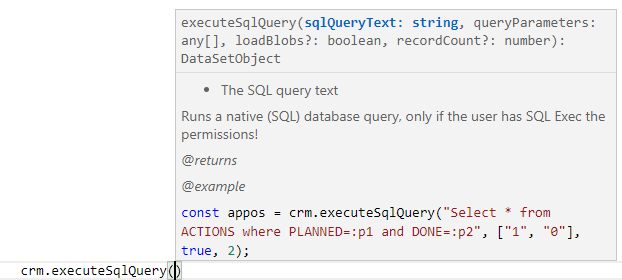
Use [ES import](https://developer.mozilla.org/en-US/docs/Web/JavaScript/Reference/Statements/import) and not [AMD RequireJs](https://requirejs.org/docs/whyamd.html), to benefit from the [jsDoc](https://jsdoc.app/) instructions and [intellisense](https://code.visualstudio.com/docs/languages/javascript#_intellisense
) in supporting IDE's such as Visual Studio Code.
Methods on the general [CrmRpc](CrmRpc.html) object
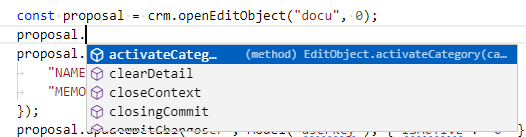
Methods from [EditObject](EditObject.html)
## Get started
Learn the available public [CrmRpc](CrmRpc.html) methods and properties
## Tutorials
1. [How to configure your CRM environment](tutorial-CRM%20Environment.html)
2. [How to insert a document with relations, categories and reference](tutorial-Insert%20document.html)
3. [How to execute Queries and Searches](tutorial-Execute%20Queries%20and%20Searches.html)
## Contribute
The Efficy Enterprise API is developed with Visual Studio Code and [Node.js](https://nodejs.org/en/) v16.13.2.
Follow these [contribution instructions](tutorial-Contribute.html) to configure your development environment.
The sources are available on [github.com/Pauwris/efficy-enterprise-api](https://github.com/Pauwris/efficy-enterprise-api)