edge-cookies-secure
Version:
Extract encrypted Google Chrome and Microsoft Edge cookies for a url on a Mac, Linux or Windows
196 lines (138 loc) • 6.08 kB
Markdown
# edge-cookies-secure
Extract encrypted Google Chrome and Microsoft Edge cookies for a url on Mac OS X, Windows, or Linux
## Installation
```
npm install edge-cookies-secure
```
## Optional Dependencies
Because this package is designed to work cross-platform, two operating system specific dependencies are declared as `optionalDependencies`.
If you are working on these platforms you should install these manually after running `npm i`.
### For Windows
- `win-dpapi` is required
- `npm i win-dpapi@1.1.0`
### For macOS
- `keytar` is required
- `npm i keytar@7.9.0`
## API
getCookies(url[,format],callback,profile,browser)
---------------------------------
`url` should be a fully qualified url, e.g. `https://www.example.com/path`
`format` is optional and can be one of the following values:
format | description
------------ | -------------
curl | [Netscape HTTP Cookie File](http://curl.haxx.se/docs/http-cookies.html) contents usable by curl and wget
jar | cookie jar compatible with [tough-cookie]
set-cookie | Array of Set-Cookie header values
header | `cookie` header string, similar to what a browser would send
puppeteer | an array of objects that can be loaded into puppeteer using the `setCookie(...)` method
object | (default) Object where key is the cookie name and value is the cookie value. These are written in order so it's possible that duplicate cookie names will be overriden by later values
If `format` is not specified, `object` will be used as the format by default.
`browser` is optional and can be either `'chrome'` (default) or `'edge'` to specify which browser's cookies to extract.
Cookie order tries to follow [RFC 6265 - Section 5.4, step 2](http://tools.ietf.org/html/rfc6265#section-5.4) as best as possible.
## Examples
basic usage
-----------
```javascript
const chrome = require('edge-cookies-secure');
chrome.getCookies('https://www.example.com/path/', function(err, cookies) {
console.log(cookies);
});
```
```javascript
const chrome = require('edge-cookies-secure');
const cookies = await chrome.getCookiesPromised('https://www.example.com/path/', 'jar')
```
basic usage with Microsoft Edge
-----------
```javascript
const chrome = require('edge-cookies-secure');
chrome.getCookies('https://www.example.com/path/', function(err, cookies) {
console.log(cookies);
}, 'Default', 'edge');
```
```javascript
const chrome = require('edge-cookies-secure');
const cookies = await chrome.getCookiesPromised('https://www.example.com/path/', 'jar', 'Default', 'edge')
```
puppeteer with specific Chrome profile
---------------------
```javascript
const chrome = require('edge-cookies-secure');
const puppeteer = require('puppeteer');
const url = 'https://www.yourUrl.com/';
const getCookies = (callback) => {
chrome.getCookies(url, 'puppeteer', function(err, cookies) {
if (err) {
console.log(err, 'error');
return
}
console.log(cookies, 'cookies');
callback(cookies);
}, 'yourProfile') // e.g. 'Profile 2'
}
getCookies(async (cookies) => {
const browser = await puppeteer.launch({
headless: false
});
const page = await browser.newPage();
await page.setCookie(...cookies);
await page.goto(url);
await page.waitFor(1000);
browser.close();
});
```
puppeteer with Microsoft Edge profile
---------------------
```javascript
const chrome = require('edge-cookies-secure');
const puppeteer = require('puppeteer');
const url = 'https://www.yourUrl.com/';
const getCookies = (callback) => {
chrome.getCookies(url, 'puppeteer', function(err, cookies) {
if (err) {
console.log(err, 'error');
return
}
console.log(cookies, 'cookies');
callback(cookies);
}, 'Default', 'edge') // Extract from Microsoft Edge
}
getCookies(async (cookies) => {
const browser = await puppeteer.launch({
headless: false
});
const page = await browser.newPage();
await page.setCookie(...cookies);
await page.goto(url);
await page.waitFor(1000);
browser.close();
});
```
Calling using async/await
---------------------
```javascript
const chrome = require('edge-cookies-secure');
const url = 'https://www.yourUrl.com/';
const myFunction = async () => {
// Get cookies from Chrome
const chromeCookies = await chrome.getCookiesPromised(url, 'puppeteer', 'Profile 28')
// Get cookies from Edge
const edgeCookies = await chrome.getCookiesPromised(url, 'puppeteer', 'Default', 'edge')
// ..... Use the cookies
}
```
## Limitations
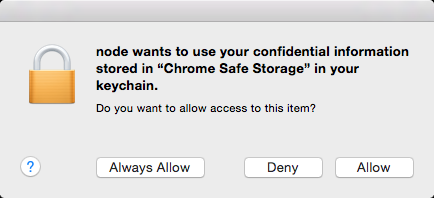
On OS X, this module requires Keychain Access to read the browser encryption key. The first time you use it, it will popup a dialog asking for permission:
- For Chrome: "edge-cookies-secure wants to use your confidential information stored in 'Chrome Safe Storage' in your keychain."
- For Edge: "edge-cookies-secure wants to use your confidential information stored in 'Microsoft Edge Safe Storage' in your keychain."
The SQLite database that browsers store cookies in is only persisted every 30 seconds or so, so this can explain why you'll see a delay between which cookies your browser has access to and this module.
## Supported Browsers
- **Google Chrome**: Fully supported on Windows, macOS, and Linux
- **Microsoft Edge** (Chromium-based): Fully supported on Windows, macOS, and Linux
The module automatically detects the correct cookie storage location and encryption method for each browser.
## Credits
This package is based on the excellent [chrome-cookies-secure](https://github.com/bertrandom/chrome-cookies-secure) by Bertrand Fan and Reece Daniels. This version extends the original work to include full Microsoft Edge support alongside Chrome.
## License
This software is free to use under the MIT license. See the [LICENSE file][] for license text and copyright information.
[LICENSE file]: https://github.com/itai/edge-cookies-secure/blob/master/LICENSE.md