dynamic-mat-table
Version:
dynamic-mat-table is an Angular component for presenting large and complex data with a lightning fast performance (at least 10x faster) and excellent level of control over the presentation.
379 lines (317 loc) • 11.7 kB
Markdown
# Dynamic Table for Angular
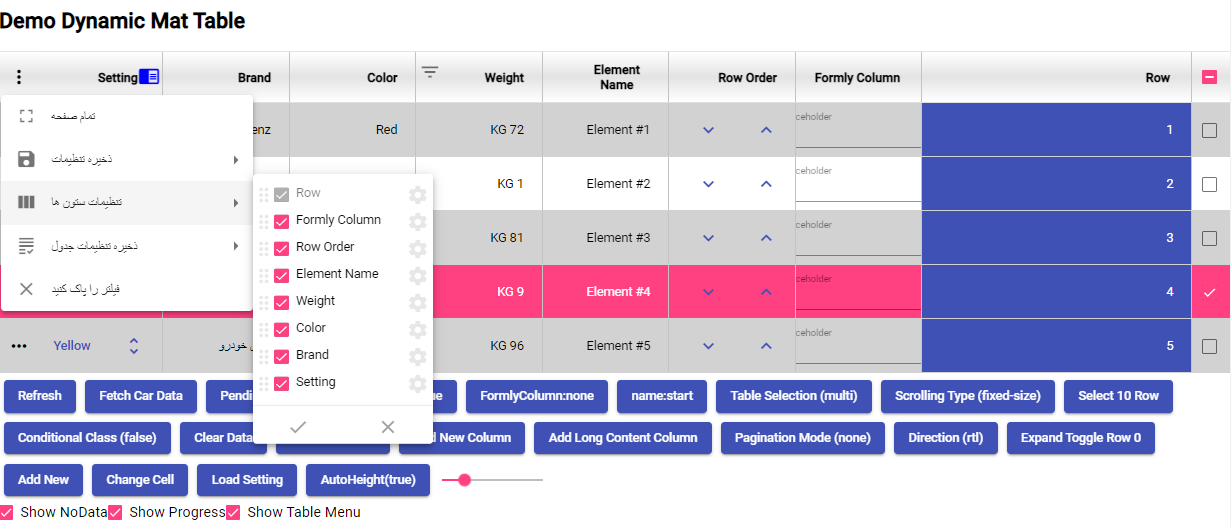
## Online Demo
You can view the table in stackblitz here:
https://stackblitz.com/edit/angular-ivy-wge9lp
version (1.3.2):
https://stackblitz.com/edit/angular-ivy-s4ne42
A full demo can be found on the github repository.
## Getting Started
### 1. First you need to install with npm:
Write `npm i dynamic-mat-table` in your terminal to install the package
### 2. After installation you need to include `DynamicMatTableModule` in your module imports:
```javascript
import { DynamicMatTableModule } from 'dynamic-mat-table';
...
imports: [
DynamicMatTableModule
],
...
```
---
### How Use The Table
## Creating the table html element
first you need to write the html element like so:
```html
<dynamic-mat-table
tableName="my-table"
[columns]="columns"
[setting]="setting"
[dataSource]="dataSource$"
></dynamic-mat-table>
```
Full Specification:
```html
<dynamic-mat-table
tableName="demo_table"
[scrollStrategyType]="scrollStrategyType"
[contextMenuItems]="contextMenuItems"
[showReload]="showReloadData"
[direction]="direction"
[expandComponent]="expandComponent"
[rowHeight]="rowHeight"
[columns]="fields"
[pending]="pending"
[setting]="setting"
[sticky]="stickyHeader"
[dataSource]="dataSource$"
[pagingMode]="paginationMode"
[pagination]="pagination"
[showNoData]="showNoData"
[printConfig]="printConfig"
[rowSelectionMode]="rowSelectionMode"
[rowSelectionModel]="selectionModel"
[showProgress]="showProgress"
[rowContextMenuItems]="contextMenuItems"
(onTableEvent)="tableEvent_onClick($event)"
(onRowEvent)="rowEvent_onClick($event)"
[class.conditional-class]="conditinalClass"
(settingChange)="table_onChangeSetting($event)"
(rowSelectionChange)="table_onRowSelectionChange($event)"
>
</dynamic-mat-table>
```
by binding the properties you can set columns, set the table settings , set a datasource and more to the table
## Setting the columns
to set the columns you first need to import `TableField ` and creat a porpery that takes this type as an arry like so:
```typescript
import { TableField } from 'dynamic-mat-table'
...
export class MyTable {
columns:TableField<any>[] = [];
}
```
then you can set each column as an object of this arry
```typescript
...
const colusmnsConfig:TableField<any>[] = [
{
name: 'column-one', //this is a key for data
header: 'column-one', //this is the name displayed
type:'number', //type of the data
},
{
name:'column-two',
header:'column-two',
type:'number',
},
...
];
```
The full column type is defined as follow:
```typescript
export interface TableField<R extends TableRow> extends AbstractField {
classNames?: string;
rowClass?: string | AtClassFunc;
customSortFunction?: AtSortFunc<R>;
customFilterFunction?: AtSortFunc<R>;
toPrint?: ToPrint;
toExport?: ToExport;
}
export interface AbstractField {
index?: number;
name: string; //data key
type?: FieldType; //data type
width?: number; //width of the column
header?: string; //displayed name of the column
isKey?: boolean; // turn column in to unique key column
inlineEdit?: boolean; // allows column to have inline edit
display?: FieldDisplay; // allow column to be hidden or visible
sticky?: FieldSticky; // allow column to stick in horizontal scrolling
filter?: FieldFilter; // sets data filtering mode(none: hidden filter button)
sort?: FieldSort; // set data sorting mode( none: hidden sort button)
cellClass?: string; // set a class for column cells
cellStyle?: any; //set a style for column cells
icon?: string; // displays a mat-icon in column header
iconColor?: string; // set a color for column header icon
dynamicCellComponent?: any; // set the component used in column cells
draggable?: boolean; // allows column to be rearranged with drag and drop
// filterable?: boolean; // allows column to filter its data (shows filter button)
clickable?: boolean; // allows column to have a function when clicked
clickType?: 'cell' | 'label' | 'custom'; // sets the click ability region
printable?: boolean; // allows column to print its data
exportable?: boolean; // allows column data to be exported
enableContextMenu?: boolean; // enables context menu in columns
rowSelectable?: boolean; // Coming soon...
footer?: FooterCell[]; // creates footers for column
cellEllipsisRow?: number; // maximum number of cells shown before ellipses
cellTooltipEnable?: boolean; // allows column cell to have a tooltip
headerEllipsisRow?: number; // maximum number of rows shown in column before ellipses
headerTooltipEnable?: boolean; // allows column header to have a tooltip
option?: any; // a spacial object for storing data state (like saving in inline edit)
categoryData?: any[]; // Coming soon...
toString?: (column: TableField<any>, row: TableRow) => string; // turns column data to a string (used mostly for exporting data)
customSort?: (column: TableField<any>, row: any) => string; // allows you customize data sorting in column
}
```
## Ceateing a data source
after setting the columns you need to set the data you want to use in your table.
Your data source must be a `BehaviourSubject<any[]>`
so in order to **creat a data source** you must do so like wise:
```typescript
import { BehaviourSubject } from 'rx-js';
...
type dataType = {...};
const data:dataType[] = [
{ "row": 1, "name": "Element #4", "weight": "65 KG", "color": "Magenta", "brand": "Zanjan Benz", "type": "Van" }, ...];
...
export class MyTable implements OnInit {
public dataSource$: BehaviorSubject<any[]>;
constructor(){}
ngOnInit(){
this.dataSource$.next(data);
}
}
```
## Configureing the table settings
next thing is configuring the table settings.
to do so we need to create a property that takes the `TableSetting` type like so:
```typescript
import { TableSetting } from 'dynamic-mat-table';
...
export class MyTable {
settings:TableSettings = {};
}
```
then we can set the values of this **object** to customize our table.
For Exmaple:
```typescript
const tableSettinsConfig:TableSetting = {
direction: 'ltr',
visibleActionMenu: actionMenu,
rowStyle: {
'background-color': '#70e181',
color: 'ffffff',
},
alternativeRowStyle: {
'background-color': 'afafaf',
color: '55fab3',
},
autoHeight: true,
}
```
the full interface is described below:
```typescript
export interface TableSetting {
direction?: Direction; // sets the directopn of the table
columnSetting?: AbstractField[]; //
visibleActionMenu?: VisibleActionMenu; // configures the actoin menu
visibleTableMenu?: boolean; // controls the table men's visablity
alternativeRowStyle?: any; // sets a style for the odd rows
normalRowStyle?: any; // sets a style for the even rows
scrollStrategy?: TableScrollStrategy; // sets a scroll strategy
rowStyle?: any; //
enableContextMenu?: boolean; // controls the context menu visablity
autoHeight?: boolean; // allows the table to automaticly controls its height
saveSettingMode?: 'simple' | 'multi' | 'none'; // controls the saving mode
settingName?: string; // name for the setting
settingList?: TableSetting[]; //
currentSetting?: string; //
}
```
## Adding a paginator
adding a paginator is just like columns and setting.
first we add the Property with the TablePagination type then we configure it like so:
```typescript
import { TablePagination } from 'dynamic-mat-table';
...
export class MyTable {
pagination:TablePagination = {};
}
```
the full description for the TablePagination is as below:
```typescript
export interface TablePagination {
length?: number; // total number of data records
pageIndex?: number; // initial page
pageSize?: number; // number of rows in each page
pageSizeOptions?: number[]; // page ination options
showFirstLastButtons?: boolean; // controls the first/last button display
}
```
## How to add international
to support new language you must declare new class and implement LanguagePack for example this is persian language:
```javascript
import { MatPaginatorIntl } from "@angular/material/paginator";
import {
FilterLabels,
LanguagePack,
MenuLabels,
TableLabels,
} from "dynamic-mat-table";
export class PersionLanguage implements LanguagePack {
constructor() {}
menuLabels: MenuLabels = {
saveData: "ذخیره داده ها ",
columnSetting: "تنظیمات ستون ها ",
saveTableSetting: "ذخیره تنظیمات جدول",
clearFilter: "فیلتر را پاک کنید",
jsonFile: "Json فایل",
csvFile: "CSV فایل",
printTable: "چاپ جدول",
filterMode: "نوع فیلتر",
filterLocalMode: "محلی",
filterServerMode: "سرور",
sortMode: "حالت مرتب سازی",
sortLocalMode: "سمت کاربر",
sortServerMode: "سمت سرور",
printMode: "حالت چاپ",
printYesMode: "بله",
printNoMode: "خیر",
pinMode: "حالت پین ",
pinNoneMode: "هیچ کدام",
pinStartMode: "شروع",
pinEndMode: "پایان",
};
paginatorLabels: MatPaginatorIntl = {
changes: null,
itemsPerPageLabel: "ایتم های هر صفحه:",
nextPageLabel: "صفحه بعدی:",
previousPageLabel: "صفحه قبلی:",
firstPageLabel: "اولین صفحه:",
lastPageLabel: "آخرین صفحه:",
getRangeLabel: (page: number, pageSize: number, length: number) => {
if (length === 0 || pageSize === 0) {
return `0 از ${length}`;
}
length = Math.max(length, 0);
const startIndex = page * pageSize;
const endIndex =
startIndex < length
? Math.min(startIndex + pageSize, length)
: startIndex + pageSize;
return `${startIndex + 1} - ${endIndex} از ${length}`;
},
};
tableLabels: TableLabels = {
NoData: "هیچ رکوردی پیدا نشد",
};
filterLabels: FilterLabels = {
Clear: "پاک کردن",
Search: "جستجو",
And: "و",
Or: "یا",
/* Text Compare */
Text: "متن",
TextContains: "دربرگرفتن",
TextEmpty: "خالی بودن",
TextStartsWith: "شروع شدن با",
TextEndsWith: " پایان گرفتن با",
TextEquals: "مساوی بودن",
TextNotEmpty: "خالی نبودن",
/* Number Compare */
Number: "تعداد",
NumberEquals: "مساوی",
NumberNotEquals: "مساوی نبودن",
NumberGreaterThan: " بزرگ تر از",
NumberLessThan: "کم تر از ",
NumberEmpty: "خالی بودن",
NumberNotEmpty: "خالی نبودن",
/* Category List Compare */
CategoryContains: "در برگرفتن",
CategoryNotContains: "در بر نگرفتن",
/* Boolean Compare */
/* Date Compare */
};
}
```
and passed this class to grid so :
```javascript
providers: [{ provide: TableIntl, useFactory: languageIntl }];
```
And
```javascript
export function languageIntl() {
return new PersionLanguage();
}
```