ds-algo-study
Version:
Just experimenting with publishing a package
745 lines • 53.6 kB
HTML
<h4 id="curated-by-bryan-guner">Curated by Bryan Guner</h4>
<h2 id="the-idea-behind-big-o-notation">The idea behind big O notation</h2>
<p><strong>Big O notation is the language we use for talking about how long an algorithm takes to run</strong>. It's how
we compare the efficiency of different approaches to a problem.</p>
<p>With big O notation we express the runtime in terms of</p>
<h3 id="how-quickly-it-grows-relative-to-the-input-as-the-input-gets-arbitrarily-large_.">how quickly it grows relative
to the input, as the input gets arbitrarily large_.</h3>
<ol type="1">
<li><strong>how quickly the runtime grows</strong>— It's hard to pin down the <em>exact runtime</em> of an algorithm.
</li>
</ol>
<ul>
<li>It depends on the speed of the processor,</li>
<li>what else the computer is running, etc.</li>
</ul>
<p>So instead of talking about the runtime directly, we use big O notation to talk about <em>how quickly the runtime
grows</em>.</p>
<ol start="2" type="1">
<li><strong>relative to the input</strong>—If we were measuring our runtime directly,</li>
</ol>
<p>we could express our speed in seconds. Since we're measuring <em>how quickly our runtime grows</em>, we need to
express our speed in terms of…something else. With Big O notation, we use the size of the input, which we call "n." So
we can say things like the runtime grows "on the order of the size of the input" () or "on the order of the square of
the size of the input" (). 3. <strong>as the input gets arbitrarily large</strong>—</p>
<p>Our algorithm may have steps that seem expensive when n is small but are eclipsed eventually by other steps as n gets
huge. For big O analysis, we care most about the stuff that grows fastest as the input grows, because everything else
is quickly eclipsed as n gets very large. (If you know what an asymptote is, you might see why "big O analysis" is
sometimes called "asymptotic analysis.")hy "big O analysis" is sometimes called "asymptotic analysis.")</p>
<h2 id="section">——</h2>
<h2 id="section-1"></h2>
<table style="width:10%;">
<colgroup>
<col style="width: 9%" />
</colgroup>
<tbody>
<tr>
<td># Data Structures Reference</td>
</tr>
</tbody>
</table>
<h2 id="array">Array</h2>
<p>Stores things in order. Has quick lookups by index. <img src="arr1.png" /> <img src="array.png" /></p>
<h2 id="linked-list">Linked List</h2>
<p><img src="queue.gif" /></p>
<p>Also stores things in order. Faster insertions and deletions than arrays, but slower lookups (you have to "walk down"
the whole list).</p>
<p>!</p>
<h2 id="queue">Queue</h2>
<p>Like the line outside a busy restaurant. "First come, first served." <a class="btn" href="linked-list.png"></a> <img
src="queue.png" /></p>
<h2 id="stack">Stack</h2>
<p><img src="stack.gif" /> <img src="stack.png" /> Like a stack of dirty plates in the sink. The first one you take off
the top is the last one you put down.</p>
<h2 id="tree">Tree</h2>
<p>Good for storing hierarchies. Each node can have "child" nodes. <img src="tree.png" /> <img
src="leaves-depth-height.png" /> <img src="traversals.png" /> <img src="dfs.png" /> <img
src="pre-and-in-order-traversal.png" /> <img src="post-order.png" /></p>
<h2 id="binary-search-tree">Binary Search Tree</h2>
<p>Everything in the left subtree is smaller than the current node, everything in the right subtree is larger. lookups,
but only if the tree is balanced! <img src="binary-tree.png" /></p>
<h2 id="binary-search-tree-1">Binary Search Tree</h2>
<h2 id="graph">Graph</h2>
<p>Good for storing networks, geography, social relationships, etc. <img src="graph.png" /> <img
src="directed-or-undirected-cycles.png" /> <img src="weighted-or-unweighted.png" /></p>
<h2 id="heap">Heap</h2>
<p>A binary tree where the smallest value is always at the top. Use it to implement a priority queue.</p>
<p>[A binary heap is a binary tree where the nodes are organized to so that the smallest value is always at the top.]
</p>
<h3 id="adjacency-list">Adjacency list</h3>
<p>A list where the index represents the node and the value at that index is a list of the node's neighbors:</p>
<p>graph = [ [1], [0, 2, 3], [1, 3], [1, 2], ]</p>
<p>Since node 3 has edges to nodes 1 and 2, graph[3] has the adjacency list [1, 2].</p>
<p>We could also use <a class="btn" href="https://www.interviewcake.com/concept/hash-map">a dictionary</a> where the
keys represent
the node and the values are the lists of neighbors.</p>
<p>graph = { 0: [1], 1: [0, 2, 3], 2: [1, 3], 3: [1, 2], }</p>
<p>This would be useful if the nodes were represented by strings, objects, or otherwise didn't map cleanly to list
indices.</p>
<h3 id="adjacency-matrix">Adjacency matrix</h3>
<p>A matrix of 0s and 1s indicating whether node x connects to node y (0 means no, 1 means yes).</p>
<p>graph = [ [0, 1, 0, 0], [1, 0, 1, 1], [0, 1, 0, 1], [0, 1, 1, 0], ]</p>
<p>Since node 3 has edges to nodes 1 and 2, graph[3][1] and graph[3][2] have value 1.</p>
<p>a = LinkedListNode(5) b = LinkedListNode(1) c = LinkedListNode(9) a.next = b b.next = c</p>
<h2 id="section-2">——</h2>
<h2 id="section-3"></h2>
<hr />
<h2 id="arrays">Arrays</h2>
<p>Ok, so we know how to store individual numbers. Let's talk about storing <em>several numbers</em>.</p>
<p>That's right, things are starting to <em>heat up</em>.</p>
<p>Suppose we wanted to keep a count of how many bottles of kombucha we drink every day.</p>
<p>Let's store each day's kombucha count in an 8-bit, fixed-width, unsigned integer. That should be plenty—we're not
likely to get through more than 256 (2^8) bottles in a <em>single day</em>, right?</p>
<p>And let's store the kombucha counts right next to each other in RAM, starting at memory address 0:</p>
<figure>
<img src="https://www.interviewcake.com/images/svgs/cs_for_hackers__array_kombucha_counts.svg?bust=209"
alt="A stack of RAM in which we store kombucha counts starting at index 0."/>
<figcaption>A stack of RAM in which we store kombucha counts starting at index 0.</figcaption>
</figure>
<p>Bam. That's an <strong>array</strong>. RAM is <em>basically</em> an array already.</p>
<p>Just like with RAM, the elements of an array are numbered. We call that number the <strong>index</strong> of the
array element (plural: indices). In <em>this</em> example, each array element's index is the same as its address in
RAM.</p>
<p>But that's not usually true. Suppose another program like Spotify had already stored some information at memory
address 2:</p>
<figure>
<img src="https://www.interviewcake.com/images/svgs/cs_for_hackers__array5_occupied.svg?bust=209"
alt="A column of 9 RAM slots representing an array. The row at index 2 is highlighted because it is being used by Spotify."/>
<figcaption>A column of 9 RAM slots representing an array. The row at index 2 is highlighted because it is being used
by Spotify.</figcaption>
</figure>
<p>We'd have to start our array below it, for example at memory address 3. So index 0 in our array would be at memory
address 3, and index 1 would be at memory address 4, etc.:</p>
<figure>
<img src="https://www.interviewcake.com/images/svgs/cs_for_hackers__array5.svg?bust=209"
alt="A column of 9 RAM slots representing an array. The row at index 2 is highlighted, and the rows at indices 3 through 7 are selected with a bracket."/>
<figcaption>A column of 9 RAM slots representing an array. The row at index 2 is highlighted, and the rows at indices
3 through 7 are selected with a bracket.</figcaption>
</figure>
<p>Suppose we wanted to get the kombucha count at index 4 in our array. How do we figure out what <em>address in
memory</em> to go to? Simple math:</p>
<p>Take the array's starting address (3), add the index we're looking for (4), and that's the address of the item we're
looking for. 3 + 4 = 7. In general, for getting the nth item in our array:</p>
<p>\text{address of nth item in array} = \text{address of array start} + n</p>
<p>This works out nicely because the size of the addressed memory slots and the size of each kombucha count are
<em>both</em> 1 byte. So a slot in our array corresponds to a slot in RAM.
</p>
<p>But that's not always the case. In fact, it's <em>usually not</em> the case. We <em>usually</em> use <em>64-bit</em>
integers.</p>
<p>So how do we build an array of <em>64-bit</em> (8 byte) integers on top of our <em>8-bit</em> (1 byte) memory slots?
</p>
<p>We simply give each array index <em>8</em> address slots instead of 1:</p>
<figure>
<img src="https://www.interviewcake.com/images/svgs/cs_for_hackers__array64_long.svg?bust=209"
alt="A column of RAM slots representing an array of 64-bit integers. Every 8 buckets of RAM represents one integer."/>
<figcaption>A column of RAM slots representing an array of 64-bit integers. Every 8 buckets of RAM represents one
integer.</figcaption>
</figure>
<p>So we can still use simple math to grab the start of the nth item in our array—just gotta throw in some
multiplication:</p>
<p>\text{address of nth item in array} = \text{address of array start} + (n * \text{size of each item in bytes})</p>
<p>Don't worry—adding this multiplication doesn't really slow us down. Remember: addition, subtraction, multiplication,
and division of fixed-width integers takes time. So <em>all</em> the math we're using here to get the address of the
nth item in the array takes time.</p>
<p>And remember how we said the memory controller has a <em>direct connection</em> to each slot in RAM? That means we
can read the stuff at any given memory address in time.</p>
<figure>
<img
src="https://www.interviewcake.com/images/svgs/cs_for_hackers__arrays_no_processor_ram_memory_controller.svg?bust=209"
alt="A memory controller connected to a section of RAM."/>
<figcaption>A memory controller connected to a section of RAM.</figcaption>
</figure>
<p><strong>Together, this means looking up the contents of a given array index is time.</strong> This fast lookup
capability is the most important property of arrays.</p>
<p>But the formula we used to get the address of the nth item in our array only works <em>if</em>:</p>
<ol type="1">
<li><strong>Each item in the array is the <em>same size</em></strong> (takes up the same</li>
</ol>
<p>number of bytes).</p>
<ol start="2" type="1">
<li><strong>The array is <em>uninterrupted</em> (contiguous) in memory</strong>. There can't</li>
</ol>
<p>be any gaps in the array…like to "skip over" a memory slot Spotify was already using.</p>
<p>These things make our formula for finding the nth item <em>work</em> because they make our array
<em>predictable</em>. We can <em>predict</em> exactly where in memory the nth element of our array will be.
</p>
<p>But they also constrain what kinds of things we can put in an array. Every item has to be the same size. And if our
array is going to store a <em>lot</em> of stuff, we'll need a <em>bunch</em> of uninterrupted free space in RAM. Which
gets hard when most of our RAM is already occupied by other programs (like Spotify).</p>
<p>That's the tradeoff. Arrays have fast lookups ( time), but each item in the array needs to be the same size, and you
need a big block of uninterrupted free memory to store the array.</p>
<h2 id="section-4">——</h2>
<h2 id="section-5"></h2>
<hr />
<p>## Pointers</p>
<p>Remember how we said every item in an array had to be the same size? Let's dig into that a little more.</p>
<p>Suppose we wanted to store a bunch of ideas for baby names. Because we've got some <em>really</em> cute ones.</p>
<p>Each name is a string. Which is really an array. And now we want to store <em>those arrays</em> in an array.
<em>Whoa</em>.
</p>
<p>Now, what if our baby names have different lengths? That'd violate our rule that all the items in an array need to be
the same size!</p>
<p>We could put our baby names in arbitrarily large arrays (say, 13 characters each), and just use a special character
to mark the end of the string within each array…</p>
<figure>
<img src="https://www.interviewcake.com/images/svgs/cs_for_hackers__pointers_baby_names.svg?bust=209"
alt="Strings represented in RAM as arrays of 13 characters, with the end of the strings being denoted by a special
"null" character. The last 8 rows are marked as wasted space because the name Bill (along with the null character)
only takes up 5 out of 13 available characters."/>
<figcaption>Strings represented in RAM as arrays of 13 characters, with the end of the strings being denoted by a
special "null" character. The last 8 rows are marked as wasted space because the name Bill (along with the null
character) only takes up 5 out of 13 available characters.</figcaption>
</figure>
<p>"Wigglesworth" is a cute baby name, right?</p>
<p>But look at all that wasted space after "Bill". And what if we wanted to store a string that was <em>more</em> than
13 characters? We'd be out of luck.</p>
<p>There's a better way. Instead of storing the strings right inside our array, let's just put the strings wherever we
can fit them in memory. Then we'll have each element in our array hold the <em>address in memory</em> of its
corresponding string. Each address is an integer, so really our outer array is just an array of integers. We can call
each of these integers a <strong>pointer</strong>, since it points to another spot in memory.</p>
<figure>
<img src="https://www.interviewcake.com/images/svgs/cs_for_hackers__pointers_pointer_array.svg?bust=209"
alt="An array of names represented in RAM. The names are stored out of order, but an array holds the address in memory of each of name with arrows pointing from the number to the memory address."/>
<figcaption>An array of names represented in RAM. The names are stored out of order, but an array holds the address in
memory of each of name with arrows pointing from the number to the memory address.</figcaption>
</figure>
<p>The pointers are marked with a * at the beginning.</p>
<p>Pretty clever, right? This fixes <em>both</em> the disadvantages of arrays:</p>
<ol type="1">
<li>The items don't have to be the same length—each string can be as</li>
</ol>
<p>long or as short as we want.</p>
<ol start="2" type="1">
<li>We don't need enough uninterrupted free memory to store all our</li>
</ol>
<p>strings next to each other—we can place each of them separately, wherever there's space in RAM.</p>
<p>We fixed it! No more tradeoffs. Right?</p>
<p>Nope. Now we have a <em>new</em> tradeoff:</p>
<p>Remember how the memory controller sends the contents of <em>nearby</em> memory addresses to the processor with each
read? And the processor caches them? So reading sequential addresses in RAM is <em>faster</em> because we can get most
of those reads right from the cache?</p>
<figure>
<img src="https://www.interviewcake.com/images/svgs/cs_for_hackers__ram_cache.svg?bust=209"
alt="A series of caches inside of the memory controller, where the processor stores what it has recently read from RAM."/>
<figcaption>A series of caches inside of the memory controller, where the processor stores what it has recently read
from RAM.</figcaption>
</figure>
<p>Our original array was very <strong>cache-friendly</strong>, because everything was sequential. So reading from the
0th index, then the 1st index, then the 2nd, etc. got an extra speedup from the processor cache.</p>
<p><strong>But the pointers in this array make it <em>not</em> cache-friendly</strong>, because the baby names are
scattered randomly around RAM. So reading from the 0th index, then the 1st index, etc. doesn't get that extra speedup
from the cache.</p>
<p>That's the tradeoff. This pointer-based array requires less uninterrupted memory and can accommodate elements that
aren't all the same size, <em>but</em> it's <em>slower</em> because it's not cache-friendly.</p>
<p>This slowdown isn't reflected in the big O time cost. Lookups in this pointer-based array are <em>still</em> time.
</p>
<h2 id="section-6">——</h2>
<h2 id="section-7"></h2>
<hr />
<h2 id="linked-lists">Linked lists</h2>
<p>Our word processor is definitely going to need fast appends—appending to the document is like the <em>main thing</em>
you do with a word processor.</p>
<p>Can we build a data structure that can store a string, has fast appends, <em>and</em> doesn't require you to say how
long the string will be ahead of time?</p>
<p>Let's focus first on not having to know the length of our string ahead of time. Remember how we used
<em>pointers</em> to get around length issues with our array of baby names?
</p>
<p>What if we pushed that idea even further?</p>
<p>What if each <em>character</em> in our string were a <em>two-index array</em> with:</p>
<ol type="1">
<li>the character itself 2. a pointer to the next character</li>
</ol>
<figure>
<img src="https://www.interviewcake.com/images/svgs/cs_for_hackers__linked_lists_sample.svg?bust=209"
alt="An example of a linked list storing the string "DEAR." Each element of the linked list is an array composed of
two items: a character and a pointer that points to the next element."/>
<figcaption>An example of a linked list storing the string "DEAR." Each element of the linked list is an array
composed of two items: a character and a pointer that points to the next element.</figcaption>
</figure>
<p>We would call each of these two-item arrays a <strong>node</strong> and we'd call this series of nodes a
<strong>linked list</strong>.
</p>
<p>Here's how we'd actually implement it in memory:</p>
<figure>
<img src="https://www.interviewcake.com/images/svgs/cs_for_hackers__linked_lists_in_memory.svg?bust=209"
alt="The same linked list represented in RAM, showing the nodes scattered in memory but connected by pointers."/>
<figcaption>The same linked list represented in RAM, showing the nodes scattered in memory but connected by pointers.
</figcaption>
</figure>
<p>Notice how we're free to store our nodes wherever we can find two open slots in memory. They don't have to be next to
each other. They don't even have to be <em>in order</em>:</p>
<figure>
<img src="https://www.interviewcake.com/images/svgs/cs_for_hackers__linked_lists_in_memory_out_of_order.svg?bust=209"
alt="The same linked list represented in RAM. This time the characters are stored out of order to show that the pointers still keep everything in place."/>
<figcaption>The same linked list represented in RAM. This time the characters are stored out of order to show that the
pointers still keep everything in place.</figcaption>
</figure>
<p>"But that's not cache-friendly," you may be thinking. Good point! We'll get to that.</p>
<p>The first node of a linked list is called the <strong>head</strong>, and the last node is usually called the
<strong>tail</strong>.
</p>
<p>Confusingly, some people prefer to use "tail" to refer to <em>everything after the head</em> of a linked list. In an
interview it's fine to use either definition. Briefly say which definition you're using, just to be clear.</p>
<p>It's important to have a pointer variable referencing the head of the list—otherwise we'd be unable to find our way
back to the start of the list!</p>
<p>We'll also sometimes keep a pointer to the tail. That comes in handy when we want to add something new to the end of
the linked list. In fact, let's try that out:</p>
<p>Suppose we had the string "LOG" stored in a linked list:</p>
<figure>
<img src="https://www.interviewcake.com/images/svgs/cs_for_hackers__linked_lists_log_string.svg?bust=209"
alt="A linked list with head and tail pointers storing the word "LOG." The *head points to the first character "L,"
and the tail points to the last letter "G.""/>
<figcaption>A linked list with head and tail pointers storing the word "LOG." The *head points to the first
character
"L," and the tail points to the last letter "G."</figcaption>
</figure>
<p>Suppose we wanted to add an "S" to the end, to make it "LOGS". How would we do that?</p>
<p>Easy. We just put it in a new node:</p>
<figure>
<img src="https://www.interviewcake.com/images/svgs/cs_for_hackers__linked_lists_log_string_add_node.svg?bust=209"
alt="A linked list with head and tail pointers storing the word "LOG." A new unconnected node storing the character
"S" is added to the bottom and bolded."/>
<figcaption>A linked list with head and tail pointers storing the word "LOG." A new unconnected node storing the
character "S" is added to the bottom and bolded.</figcaption>
</figure>
<p>And tweak some pointers:</p>
<p>1. Grab the last letter, which is "G". Our tail pointer lets us do this in time.</p>
<figure>
<img
src="https://www.interviewcake.com/images/svgs/cs_for_hackers__linked_lists_logs_string_grab_last_letter.svg?bust=209"
alt="A linked list with head and tail pointers storing the word "LOG." The *tail pointer and the character "G" are
bolded."/>
<figcaption>A linked list with head and tail pointers storing the word "LOG." The *tail pointer and the character
"G"
are bolded.</figcaption>
</figure>
<p>2. Point the last letter's next to the letter we're appending ("S").</p>
<figure>
<img src="https://www.interviewcake.com/images/svgs/cs_for_hackers__linked_lists_logs_string_point_next.svg?bust=209"
alt="A linked list with head and tail pointers storing the word "LOG." The "G"'s *next pointer is bolded and
pointing to the appended "S"."/>
<figcaption>A linked list with head and tail pointers storing the word "LOG." The "G"'s *next pointer is bolded and
pointing to the appended "S".</figcaption>
</figure>
<p>3. Update the tail pointer to point to our <em>new</em> last letter, "S".</p>
<figure>
<img
src="https://www.interviewcake.com/images/svgs/cs_for_hackers__linked_lists_logs_string_tweak_pointers.svg?bust=209"
alt="A linked list with head and tail pointers storing the word "LOGS." The *tail pointer is now pointed to the new
last letter: "S"."/>
<figcaption>A linked list with head and tail pointers storing the word "LOGS." The *tail pointer is now pointed to
the
new last letter: "S".</figcaption>
</figure>
<p>That's time.</p>
<p>Why is it time? Because the runtime doesn't get bigger if the string gets bigger. No matter how many characters are
in our string, we still just have to tweak a couple pointers for any append.</p>
<p>Now, what if instead of a linked list, our string had been a <em>dynamic array</em>? We might not have any room at
the end, forcing us to do one of those doubling operations to make space:</p>
<figure>
<img
src="https://www.interviewcake.com/images/svgs/cs_for_hackers__linked_lists_log_string_doubled_array.svg?bust=209"
alt="A dynamic array containing the word "LOG" going through a doubling operation to make space for an appended
letter."/>
<figcaption>A dynamic array containing the word "LOG" going through a doubling operation to make space for an
appended
letter.</figcaption>
</figure>
<p>So with a dynamic array, our append would have a <em>worst-case</em> time cost of .</p>
<p><strong>Linked lists have worst-case -time appends, which is better than the worst-case time of dynamic
arrays.</strong></p>
<p>That <em>worst-case</em> part is important. The <em>average case</em> runtime for appends to linked lists and dynamic
arrays is the same: .</p>
<p>Now, what if we wanted to <em>pre</em>pend something to our string? Let's say we wanted to put a "B" at the
beginning.</p>
<p>For our linked list, it's just as easy as appending. Create the node:</p>
<figure>
<img src="https://www.interviewcake.com/images/svgs/cs_for_hackers__linked_lists_logs_string_add_node.svg?bust=209"
alt="A linked list with head and tail pointers storing the word "LOGS." A new unconnected node storing the character
"B" is added to the top and bolded."/>
<figcaption>A linked list with head and tail pointers storing the word "LOGS." A new unconnected node storing the
character "B" is added to the top and bolded.</figcaption>
</figure>
<p>And tweak some pointers:</p>
<ol type="1">
<li>Point "B"'s next to "L". 2. Point the head to "B".</li>
</ol>
<figure>
<img
src="https://www.interviewcake.com/images/svgs/cs_for_hackers__linked_lists_blogs_string_tweak_pointers.svg?bust=209"
alt="A linked list with head and tail pointers storing the word "LOGS." The "B"'s next pointer is bolded and
pointing to the letter "L," and the head pointer is bolded and pointing to the prepended letter "B"."/>
<figcaption>A linked list with head and tail pointers storing the word "LOGS." The "B"'s <em>next pointer is bolded
and pointing to the letter "L," and the </em>head pointer is bolded and pointing to the prepended letter "B".
</figcaption>
</figure>
<p>Bam. time again.</p>
<p>But if our string were a <em>dynamic array</em>…</p>
<figure>
<img
src="https://www.interviewcake.com/images/svgs/cs_for_hackers__linked_lists_log_string_dynamic_array.svg?bust=209"
alt="A dynamic array storing the string "LOGS.""/>
<figcaption>A dynamic array storing the string "LOGS."</figcaption>
</figure>
<p>And we wanted to add in that "B":</p>
<figure>
<img
src="https://www.interviewcake.com/images/svgs/cs_for_hackers__linked_lists_log_string_dynamic_array_add_b.svg?bust=209"
alt="A dynamic array storing the string "LOGS." A bolded "B" is added above the array."/>
<figcaption>A dynamic array storing the string "LOGS." A bolded "B" is added above the array.</figcaption>
</figure>
<p>Eep. We have to <em>make room</em> for the "B"!</p>
<p>We have to move <em>each character</em> one space down:</p>
<figure>
<img
src="https://www.interviewcake.com/images/svgs/cs_for_hackers__linked_lists_log_string_dynamic_array_move_s.svg?bust=209"
alt="A dynamic array storing the string "LOGS" with the letter "B" floating above. The "S" is bolded with an arrow
attached showing how the character is being moved one index up."/>
<figcaption>A dynamic array storing the string "LOGS" with the letter "B" floating above. The "S" is bolded with an
arrow attached showing how the character is being moved one index up.</figcaption>
</figure>
<figure>
<img
src="https://www.interviewcake.com/images/svgs/cs_for_hackers__linked_lists_log_string_dynamic_array_move_g.svg?bust=209"
alt="A dynamic array storing the string "LOGS" with the letter "B" floating above. The "G" is bolded with an arrow
attached showing how the character is being moved one index up."/>
<figcaption>A dynamic array storing the string "LOGS" with the letter "B" floating above. The "G" is bolded with an
arrow attached showing how the character is being moved one index up.</figcaption>
</figure>
<figure>
<img
src="https://www.interviewcake.com/images/svgs/cs_for_hackers__linked_lists_log_string_dynamic_array_move_o.svg?bust=209"
alt="A dynamic array storing the string "LOGS" with the letter "B" floating above. The "O" is bolded with an arrow
attached showing how the character is being moved one index up."/>
<figcaption>A dynamic array storing the string "LOGS" with the letter "B" floating above. The "O" is bolded with an
arrow attached showing how the character is being moved one index up.</figcaption>
</figure>
<figure>
<img
src="https://www.interviewcake.com/images/svgs/cs_for_hackers__linked_lists_log_string_dynamic_array_move_l.svg?bust=209"
alt="A dynamic array storing the string "LOGS" with the letter "B" floating above. The "L" is bolded with an arrow
attached showing how the character is being moved one index up."/>
<figcaption>A dynamic array storing the string "LOGS" with the letter "B" floating above. The "L" is bolded with an
arrow attached showing how the character is being moved one index up.</figcaption>
</figure>
<p><em>Now</em> we can drop the "B" in there:</p>
<figure>
<img
src="https://www.interviewcake.com/images/svgs/cs_for_hackers__linked_lists_log_string_dynamic_array_chars_moved.svg?bust=209"
alt="A dynamic array storing the string "LOGS" with the letter "B" floating above. The "B" is bolded with an arrow
attached showing how the character is now being placed in the first index."/>
<figcaption>A dynamic array storing the string "LOGS" with the letter "B" floating above. The "B" is bolded with an
arrow attached showing how the character is now being placed in the first index.</figcaption>
</figure>
<p>What's our time cost here?</p>
<p>It's all in the step where we made room for the first letter. We had to move <em>all n</em> characters in our string.
One at a time. That's time.</p>
<p><strong>So linked lists have faster <em>pre</em>pends ( time) than dynamic arrays ( time).</strong></p>
<p>No "worst case" caveat this time—prepends for dynamic arrays are <em>always</em> time. And prepends for linked lists
are <em>always</em> time.</p>
<p>These quick appends and prepends for linked lists come from the fact that linked list nodes can go anywhere in
memory. They don't have to sit right next to each other the way items in an array do.</p>
<p>So if linked lists are so great, why do we usually store strings in an array? <strong>Because <a
href="#constant-time-array-lookups">arrays have -time lookups</a>.</strong> And those constant-time lookups
<em>come from</em> the fact that all the array elements are lined up next to each other in memory.
</p>
<p>Lookups with a linked list are more of a process, because we have no way of knowing where the ith node is in memory.
So we have to walk through the linked list node by node, counting as we go, until we hit the ith item.</p>
<p>def get_ith_item_in_linked_list(head, i): if i < 0: raise ValueError("i can't be negative: %d" % i) current_node =
head current_position = 0 while current_node: if current_position == i: # Found it! return current_node # Move on to
the next node current_node = current_node.next current_position += 1 raise ValueError(‘List has fewer than i + 1 (%d)
nodes' % (i + 1))</p>
<p>That's i + 1 steps down our linked list to get to the ith node (we made our function zero-based to match indices in
arrays). <strong>So linked lists have -time lookups.</strong> Much slower than the -time lookups for arrays and
dynamic arrays.</p>
<p>Not only that—<strong>walking down a linked list is <em>not</em> cache-friendly.</strong> Because the next node could
be <em>anywhere</em> in memory, we don't get any benefit from the processor cache. This means lookups in a linked list
are even slower.</p>
<p>So the tradeoff with linked lists is they have faster prepends and faster appends than dynamic arrays, <em>but</em>
they have slower lookups.</p>
<h2 id="section-8">——</h2>
<h2 id="section-9"></h2>
<hr />
<p>## Doubly Linked Lists</p>
<p>In a basic linked list, each item stores a single pointer to the next element.</p>
<p>In a <strong>doubly linked list</strong>, items have pointers to the next <em>and the previous</em> nodes.</p>
<figure>
<img src="https://www.interviewcake.com/images/svgs/linked_list__doubly_linked_nodes_and_pointers.svg?bust=209"
alt="A doubly-linked list with 3 nodes. The first node has value 5 with a "next" arrow pointing ahead to the second
node and a "previous" arrow pointing back to "None." The second node has value 1 with a "next" arrow pointing ahead
to the third node and a "previous" arrow pointing back to the first node. The third node has value 9 with a "next"
arrow pointing ahead to "None" and a "previous" arrow pointing back to the second node."/>
<figcaption>A doubly-linked list with 3 nodes. The first node has value 5 with a "next" arrow pointing ahead to the
second node and a "previous" arrow pointing back to "None." The second node has value 1 with a "next" arrow
pointing
ahead to the third node and a "previous" arrow pointing back to the first node. The third node has value 9 with a
"next" arrow pointing ahead to "None" and a "previous" arrow pointing back to the second node.</figcaption>
</figure>
<p>Doubly linked lists allow us to traverse our list <em>backwards</em>. In a <em>singly</em> linked list, if you just
had a pointer to a node in the <em>middle</em> of a list, there would be <em>no way</em> to know what nodes came
before it. Not a problem in a doubly linked list.</p>
<h2 id="not-cache-friendly">Not cache-friendly</h2>
<p>Most computers have <a class="btn"
href="https://www.interviewcake.com/article/data-structures-coding-interview#ram">caching
systems that make reading from sequential addresses in memory faster than reading from scattered addresses</a>.</p>
<p><a class="btn" href="https://www.interviewcake.com/concept/array">Array</a> items are always located right next to
each other in
computer memory, but linked list nodes can be scattered all over.</p>
<p>So iterating through a linked list is usually quite a bit slower than iterating through the items in an array, even
though they're both theoretically time.</p>
<h2 id="section-10">——</h2>
<h2 id="section-11"></h2>
<hr />
<p>## Hash tables</p>
<p>Quick lookups are often really important. For that reason, we tend to use arrays (-time lookups) much more often than
linked lists (-time lookups).</p>
<p>For example, suppose we wanted to count how many times each ASCII character appears in <a
href="https://raw.githubusercontent.com/GITenberg/The-Tragedy-of-Romeo-and-Juliet_1112/master/1112.txt">Romeo and
Juliet</a>. How would we store those counts?</p>
<p>We can use arrays in a clever way here. Remember—characters are just numbers. In ASCII (a common character encoding)
‘A' is 65, ‘B' is 66, etc.</p>
<p>So we can use the character('s number value) as the <em>index</em> in our array, and store the <em>count</em> for
that character <em>at that index</em> in the array:</p>
<figure>
<img src="https://www.interviewcake.com/images/svgs/cs_for_hackers__hash_tables_chars_to_ints.svg?bust=209"
alt="An array showing indices 63 through 68. To the left of the indices are the ASCII characters that correspond to the numeric indices with arrows pointing from each character to its corresponding number."/>
<figcaption>An array showing indices 63 through 68. To the left of the indices are the ASCII characters that
correspond to the numeric indices with arrows pointing from each character to its corresponding number.</figcaption>
</figure>
<p>With this array, we can look up (and edit) the count for any character in constant time. Because we can access any
index in our array in constant time.</p>
<p>Something interesting is happening here—this array isn't just a list of values. This array is storing <em>two</em>
things: characters and counts. The characters are <em>implied</em> by the indices.</p>
<p><strong>So we can think of an array as a <em>table</em> with <em>two columns</em>…except you don't really get to pick
the values in one column (the indices)—they're always 0, 1, 2, 3, etc.</strong></p>
<p>But what if we wanted to put <em>any</em> value in that column and still get quick lookups?</p>
<p>Suppose we wanted to count the number of times each <em>word</em> appears in Romeo and Juliet. Can we adapt our
array?</p>
<p>Translating a <em>character</em> into an array index was easy. But we'll have to do something more clever to
translate a <em>word</em> (a string) into an array index…</p>
<figure>
<img src="https://www.interviewcake.com/images/svgs/cs_for_hackers__hash_tables_lies_key_unlabeled.svg?bust=209"
alt="A blank array except for the value 20 stored at index 9. To the left the array is the word "lies" with an arrow
pointing to the right at diamond with a question mark in the middle. The diamond points to the 9th index of the
array."/>
<figcaption>A blank array except for the value 20 stored at index 9. To the left the array is the word "lies" with
an
arrow pointing to the right at diamond with a question mark in the middle. The diamond points to the 9th index of
the array.</figcaption>
</figure>
<p>Here's one way we could do it:</p>
<p>Grab the number value for each character and add those up.</p>
<figure>
<img src="https://www.interviewcake.com/images/svgs/cs_for_hackers__hash_tables_lies_chars.svg?bust=209"
alt="The word "lies" in quotes. Arrows point from each character down to their corresponding number values, which
are separated by plus signs and shown in sum to equal 429."/>
<figcaption>The word "lies" in quotes. Arrows point from each character down to their corresponding number values,
which are separated by plus signs and shown in sum to equal 429.</figcaption>
</figure>
<p>The result is 429. But what if we only have <em>30</em> slots in our array? We'll use a common trick for forcing a
number into a specific range: the modulus operator (%). Modding our sum by 30 ensures we get a whole number that's
less than 30 (and at least 0):</p>
<p>429 \: \% \: 30 = 9</p>
<p>Bam. That'll get us from a word (or any string) to an array index.</p>
<p>This data structure is called a <strong>hash table</strong> or <strong>hash map</strong>. In our hash table, the
<em>counts</em> are the <strong>values</strong> and the <em>words</em> ("lies," etc.) are the <strong>keys</strong>
(analogous to the <em>indices</em> in an array). The process we used to translate a key into an array index is called
a <strong>hashing function</strong>.
</p>
<p>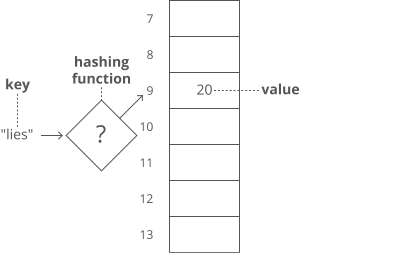</p>
<p>The hashing functions used in modern systems get pretty complicated—the one we used here is a simplified example.</p>
<p>Note that our quick lookups are only in one direction—we can quickly get the value for a given key, but the only way
to get the key for a given value is to walk through all the values and keys.</p>
<p>Same thing with arrays—we can quickly look up the value at a given index, but the only way to figure out the index
for a given value is to walk through the whole array.</p>
<p>One problem—what if two keys hash to the same index in our array? Look at "lies" and "foes":</p>
<figure>
<img src="https://www.interviewcake.com/images/svgs/cs_for_hackers__hash_tables_lies_and_foes_addition.svg?bust=209"
alt="The word "lies" in quotes and the word "foes" in quotes. Arrows point from the characters of each word to their
corresponding number values. The sum of the characters of both words is shown to equal 429."/>
<figcaption>The word "lies" in quotes and the word "foes" in quotes. Arrows point from the characters of each word
to
their corresponding number values. The sum of the characters of both words is shown to equal 429.</figcaption>
</figure>
<p>They both sum up to 429! So of course they'll have the same answer when we mod by 30:</p>
<p>429 \: \% \: 30 = 9</p>
<p>So our hashing function gives us the same answer for "lies" and "foes." This is called a <strong>hash
collision</strong>. There are a few different strategies for dealing with them.</p>
<p>Here's a common one: instead of storing the actual values in our array, let's have each array slot hold a
<em>pointer</em> to a <em>linked list</em> holding the counts for all the words that hash to that index:
</p>
<figure>
<img src="https://www.interviewcake.com/images/svgs/cs_for_hackers__hash_tables_hash_collision.svg?bust=209"
alt="An array storing pointers. Three of the pointers have arrows pointing to linked lists to the right of the array."/>
<figcaption>An array storing pointers. Three of the pointers have arrows pointing to linked lists to the right of the
array.</figcaption>
</figure>
<p>One problem—how do we know which count is for "lies" and which is for "foes"? To fix this, we'll store the
<em>word</em> as well as the count in each linked list node:
</p>
<figure>
<img src="https://www.interviewcake.com/images/svgs/cs_for_hackers__hash_tables_hash_collision_key_val.svg?bust=209"
alt="An array storing pointers. The pointer at index 9 has an arrow pointing to a linked list to the right of the array. Each linked list node now stores the word as well as its count and a pointer."/>
<figcaption>An array storing pointers. The pointer at index 9 has an arrow pointing to a linked list to the right of
the array. Each linked list node now stores the word as well as its count and a pointer.</figcaption>
</figure>
<p>"But wait!" you may be thinking, "Now lookups in our hash table take time in the worst case, since we have to walk
down a linked list." That's true! You could even say that in the worst case <em>every</em> key creates a hash
collision, so our whole hash table <em>degrades to a linked list</em>.</p>
<p>In industry though, we usually wave our hands and say <strong>collisions are rare enough that on <em>average</em>
lookups in a hash table are time</strong>. And there are fancy algorithms that keep the number of collisions low and
keep the lengths of our linked lists nice and short.</p>
<p>But that's sort of the tradeoff with hash tables. You get fast lookups by key…except <em>some</em> lookups could be
slow. And of course, you only get those fast lookups in one direction—looking up the <em>key</em> for a given
<em>value</em> still takes time. —— — <==(——————————————————————————————————)==> — ——
</p>
<h1 id="breadth-first-search-bfs-and-breadth-first-traversal">Breadth-First Search (BFS) and Breadth-First Traversal
</h1>
<p><strong>Breadth-first search</strong> (BFS) is a method for exploring a tree or graph. In a BFS, you first explore
all the nodes one step away, then all the nodes two steps away, etc.</p>
<p>Breadth-first search is like throwing a stone in the center of a pond. The nodes you explore "ripple out" from the
starting point.</p>
<p>Here's a how a BFS would traverse this tree, starting with the root:</p>
<figure>
<img src="https://www.interviewcake.com/images/svgs/breadth_first_search_root.svg?bust=209"
alt="A 4-row binary tree represented by circles connected with lines. Our breadth-first search has us start at the root node at the top of the tree."/>
<figcaption>A 4-row binary tree represented by circles connected with lines. Our breadth-first search has us start at
the root node at the top of the tree.</figcaption>
</figure>
<p>We'd visit all the immediate children (all the nodes that're one step away from our starting node):</p>
<figure>
<img src="https://www.interviewcake.com/images/svgs/breadth_first_search_first_level.svg?bust=209"
alt="The same 4-row binary tree with all nodes at depth 1 (second row) bolded after being visited."/>
<figcaption>The same 4-row binary tree with all nodes at depth 1 (second row) bolded after being visited.</figcaption>
</figure>
<p>Then we'd move on to all <em>those</em> nodes' children (all the nodes that're <em>two steps</em> away from our
starting node):</p>
<figure>
<img src="https://www.interviewcake.com/images/svgs/breadth_first_search_second_level.svg?bust=209"
alt="The same 4-row binary tree with all nodes at depth 2 (third row) bolded after being visited."/>
<figcaption>The same 4-row binary tree with all nodes at depth 2 (third row) bolded after being visited.</figcaption>
</figure>
<p>And so on:</p>
<figure>
<img src="https://www.interviewcake.com/images/svgs/breadth_first_search_third_level.svg?bust=209"
alt="The same 4-row binary tree with all nodes at depth 3 (fourth and final row) bolded after being visited."/>
<figcaption>The same 4-row binary tree with all nodes at depth 3 (fourth and final row) bolded after being visited.
</figcaption>
</figure>
<p>Until we reach the end.</p>
<p>Breadth-first search is often compared with <strong>depth-first search</strong>.</p>
<p>Advantages:</p>
<ul>
<li>A BFS will find the <strong>shortest path</strong> between the starting point and</li>
</ul>
<p>any other reachable node. A depth-first search will not necessarily find the shortest path.</p>
<p>Disadvantages</p>
<ul>
<li>A BFS on a binary tree <em>generally</em> requires more memory than a DFS.</li>
</ul>
<figure>
<img src="https://www.interviewcake.com/images/svgs/binary_search_tree__preview.svg?bust=209"
alt="A binary search tree with nodes containing integers. The root node contains the integer 50. Each child node to the left of the root contains integers less than 50, and each child node to the right of the root contains integers greater than 50."/>
<figcaption>A binary search tree with nodes containing integers. The root node contains the integer 50. Each child
node to the left of the root contains integers less than 50, and each child node to the right of the root contains
integers greater than 50.</figcaption>
</figure>
<h1 id="binary-search-tree-2">Binary Search Tree</h1>
<p>A <strong>binary tree</strong> is a <strong>tree</strong> where <==(<em><strong>every node has two or fewer
children</strong></em>)==>. The children are usually called <strong><em>left</em></strong> and
<em><strong>right</strong></em>.
</p>
<p>class BinaryTreeNode(object):</p>
<p>This lets us build a structure like this:</p>
<figure>
<img src="https://www.interviewcake.com/images/svgs/binary_tree__depth_5.svg?bust=209"
alt="A tree represented by circles connected with lines. The root node is on top, and connects to 2 children below it. Each of those children connect to 2 children below them, which all connect to their own 2 children, which all connect to their own 2 children."/>
<figcaption>A tree represented by circles connected with lines. The root node is on top, and connects to 2 children
below it. Each of those children connect to 2 children below them, which all connect to their own 2 children, which
all connect to their own 2 children.</figcaption>
</figure>
<p>That particular example is special because every level of the tree is completely full. There are no "gaps." We call
this kind of tree "<strong>perfect</strong>."</p>
<p>Binary trees have a few interesting properties when they're perfect:</p>
<p><strong>Property 1: the number of total nodes on each "level" doubles as we move down the tree.</strong></p>
<figure>
<img src="https://www.interviewcake.com/images/svgs/binary_tree__depth_5_with_number_of_nodes_labelled.svg?bust=209"
alt="A binary tree with 5 rows of nodes. The root node is on top, and every node has 2 children in the row below. Each row is labelled with the number of nodes in the row, which doubles from the top down: 1, 2, 4, 8, 16."/>
<figcaption>A binary tree with 5 rows of nodes. The root node is on top, and every node has 2 children in the row
below. Each row is labelled with the number of nodes in the row, which doubles from the top down: 1, 2, 4, 8, 16.
</figcaption>
</figure>
<p><strong>Property 2: the number of nodes on the last level is equal to the sum of the number of nodes on all other
levels (plus 1).</strong> In other words, about <em>half</em> of our nodes are on the last level.</p>
<p><==(<em><strong>Let's call the number of nodes n,</strong></em>)==></p>
<p><==(<strong><em><strong>and the height of the tree h. </strong></em></strong>)==></p>
<p><strong>h can also be thought of as the "number of levels."</strong></p>
<p>If we had h, how could we calculate n?</p>
<p>Let's just add up the number of nodes on each level!</p>
<p>If we zero-index the levels, the number of nodes on the xth level is exactly 2^x.</p>
<ol type="1">
<li>Level 0: 2^0 nodes,</li>
<li>
<ol start="2" type="1">
<li>Level 1: 2^1 nodes,</li>
</ol>
</li>
<li>
<ol start="3" type="1">
<li>Level 2: 2^2 nodes,</li>
</ol>
</li>
<li>
<ol start="4" type="1">
<li>Level 3: 2^3 nodes,</li>
</ol>
</li>
<li>
<ol start="5" type="1">
<li><em>etc</em></li>
</ol>
</li>
</ol>
<p>So our total number of nodes is:</p>
<p><strong>n = 2^0 + 2^1 + 2^2 + 2^3 + … + 2^{h-1}</strong></p>
<p>Why only up to 2^{h-1}?</p>
<p>Notice that we <strong>started counting our levels at 0.</strong></p>
<ul>
<li>So if we have h levels in total,</li>
<li>the last level is actually the "h-1"-th level.</li>
<li>That means the number of nodes on the last level is 2^{h-1}.</li>
</ul>
<p>But we can simplify.</p>
<p><strong>Property 2 tells us that the number of nodes on the last level is (1 more than) half of the total number of
nodes</strong>,</p>
<p><strong>so we can just take the number of nodes on the last level, multiply it by 2, and subtract 1 to get the number
of nodes overall</strong>.</p>
<ul>
<li>
<p>We know the number of nodes on the last level is 2^{h-1},</p>
</li>
<li>
<p>So:</p>
</li>
</ul>
<p><strong>n = 2^{h-1} * 2 - 1 n = 2^{h-1} * 2^1 - 1 n = 2^{h-1+1}- 1 n = 2^{h} - 1</strong></p>
<p>So that's how we can go from h to n. What about the other direction?</p>
<p>We need to bring the h down from the exponent.</p>
<p>That's what logs are for!</p>
<p>First, some quick review.</p>
<p><==(log_{10} (100) )==></p>
<p>simply means,</p>
<p><strong>"What power must you raise 10 to in order to get 100?"</strong>.</p>
<p>Which is 2,</p>
<p>because .</p>
<p><==(10^2 = 100 )==></p>
<h1 id="graph-data-structure-directed-acyclic-etc">Graph Data Structure: Directed, Acyclic, etc</h1>
<p>Graph ===== <img src="graph-md.png" /></p>
<h2 id="binary-numbers">Binary numbers</h2>
<p>Let's put those bits to use. Le