ds-algo-study
Version:
Just experimenting with publishing a package
1,063 lines (768 loc) • 88.5 kB
Markdown
# 
> Its always good to have a look at worst-case time complexities of common data structure operations frequently.
Its always good to have a look at worst-case time complexities of common data structure operations frequently.

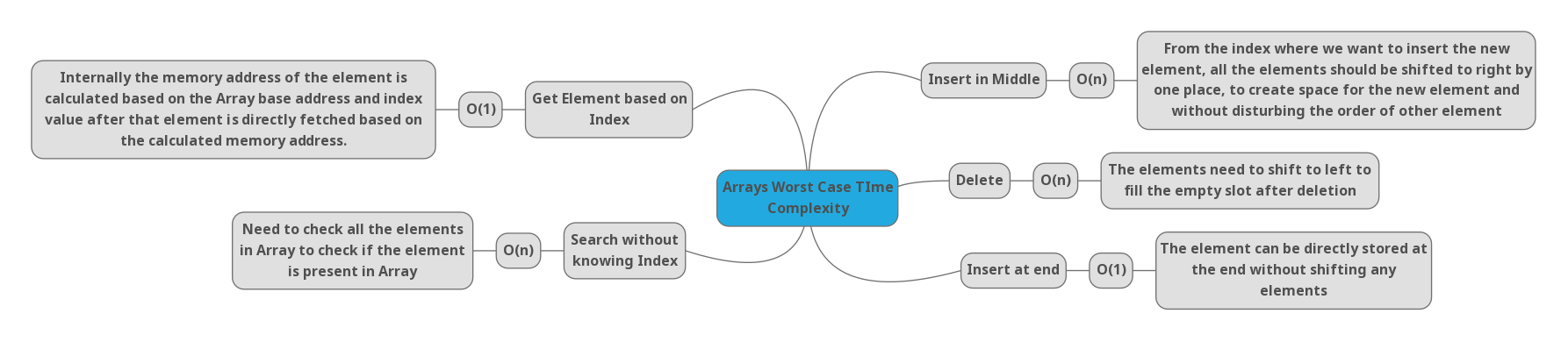
Arrays are one of the basic and important data structures to learn, They take constant time to read and Insert elements at the end and takes a linear time for the remaining.


Stack takes constant time for Push, Pop & Peek operations.

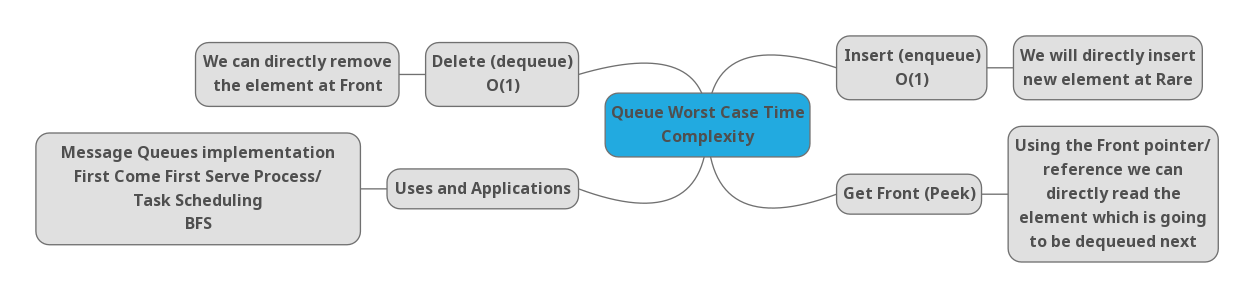
In Queue for Enqueue, Dequeue & Peek operations it takes only Constant time.

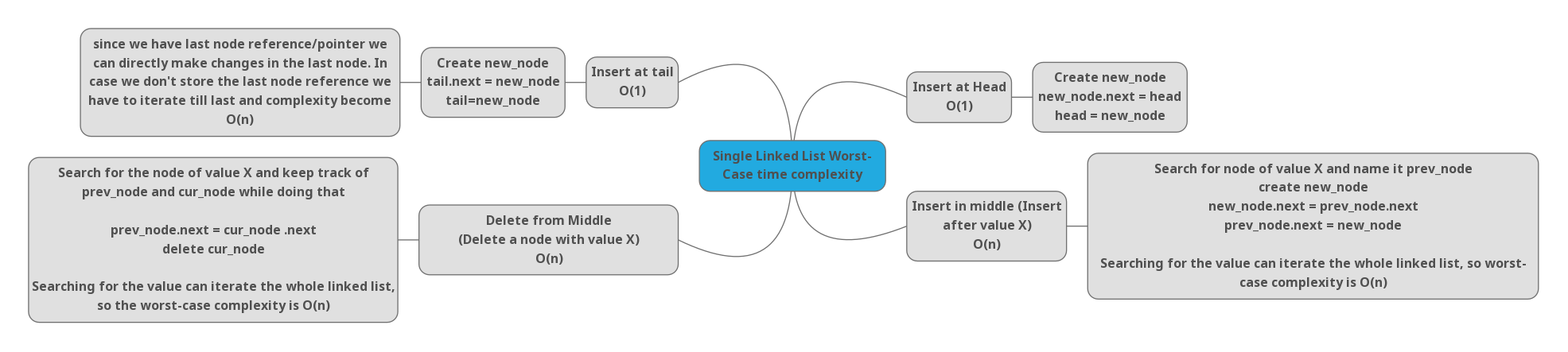
Here we are considering we are using tails for all single linked lists (Some implementations might not have it).
Linked List is the data structure that comes with a lot of different operational scenarios, we have to think about head & tail usage in every operation we are doing. And operation logic and complexity changes at the head, tail, and middle. Typically insertion at head & tail takes constant time and insertion in middle takes linear time. Search can take linear time. Deletion at the head takes constant time and it can take linear time in remaining scenarios.
---
## [](#Trees-basic-concepts "Trees: basic concepts")Trees: basic concepts
A tree is a data structure where a node can have zero or more children. Each node contains a **value**. Like graphs, the connection between nodes is called **edges**. A tree is a type of graph, but not all of them are trees (more on that later).
These data structures are called "trees" because the data structure resembles a tree 🌳. It starts with a **root** node and **branch** off with its descendants, and finally, there are **leaves**.

Here are some properties of trees:
- The top-most node is called **root**.
- A node without children is called **leaf** node or **terminal** node.
- **Height** (_h_) of the tree is the distance (edge count) between the farthest leaf to the root.
- `A` has a height of 3
- `I` has a height of 0
- **Depth** or **level** of a node is the distance between the root and the node in question.
- `H` has a depth of 2
- `B` has a depth of 1
### [](#Implementing-a-simple-tree-data-structure "Implementing a simple tree data structure")Implementing a simple tree data structure
As we saw earlier, a tree node is just a data structure that has a value and has links to their descendants.
Here's an example of a tree node:
<table><tbody><tr><td><pre><span>1</span><br><span>2</span><br><span>3</span><br><span>4</span><br><span>5</span><br><span>6</span><br></pre></td><td><pre><span><span><span>class</span> <span>TreeNode</span> </span>{</span><br><span> <span>constructor</span>(value) {</span><br><span> <span>this</span>.value = value;</span><br><span> <span>this</span>.descendents = [];</span><br><span> }</span><br><span>}</span><br></pre></td></tr></tbody></table>
We can create a tree with 3 descendents as follows:
<table><tbody><tr><td><pre><span>1</span><br><span>2</span><br><span>3</span><br><span>4</span><br><span>5</span><br><span>6</span><br><span>7</span><br><span>8</span><br><span>9</span><br><span>10</span><br></pre></td><td><pre><span></span><br><span><span>const</span> abe = <span>new</span> TreeNode(<span>'Abe'</span>);</span><br><span><span>const</span> homer = <span>new</span> TreeNode(<span>'Homer'</span>);</span><br><span><span>const</span> bart = <span>new</span> TreeNode(<span>'Bart'</span>);</span><br><span><span>const</span> lisa = <span>new</span> TreeNode(<span>'Lisa'</span>);</span><br><span><span>const</span> maggie = <span>new</span> TreeNode(<span>'Maggie'</span>);</span><br><span></span><br><span></span><br><span>abe.descendents.push(homer);</span><br><span>homer.descendents.push(bart, lisa, maggie);</span><br></pre></td></tr></tbody></table>
That's all; we have a tree data structure!

The node `abe` is the **root** and `bart`, `lisa` and `maggie` are the **leaf** nodes of the tree. Notice that the tree's node can have a different number of descendants: 0, 1, 3, or any other value.
Tree data structures have many applications such as:
- [Maps](https://adrianmejia.com/blog/2018/04/28/data-structures-time-complexity-for-beginners-arrays-hashmaps-linked-lists-stacks-queues-tutorial/#HashMaps)
- [Sets](https://adrianmejia.com/blog/2018/04/28/data-structures-time-complexity-for-beginners-arrays-hashmaps-linked-lists-stacks-queues-tutorial/#Sets)
- Databases
- Priority Queues
- Querying an LDAP (Lightweight Directory Access Protocol)
- Representing the Document Object Model (DOM) for HTML on Websites.
## [](#Binary-Trees "Binary Trees")Binary Trees
Trees nodes can have zero or more children. However, when a tree has at the most two children, then it's called **binary tree**.
### [](#Full-Complete-and-Perfect-binary-trees "Full, Complete and Perfect binary trees")Full, Complete and Perfect binary trees
Depending on how nodes are arranged in a binary tree, it can be **full**, **complete** and **perfect**:
- **Full binary tree**: each node has exactly 0 or 2 children (but never 1).
- **Complete binary tree**: when all levels except the last one are **full** with nodes.
- **Perfect binary tree**: when all the levels (including the last one) are full of nodes.
Look at these examples:

These properties are not always mutually exclusive. You can have more than one:
- A perfect tree is **always** complete and full.
- Perfect binary trees have precisely 2k\-1 nodes, where _`k`_ is the last level of the tree (starting with 1).
- A complete tree is **not** always `full`.
- Like in our "complete" example, since it has a parent with only one child. If we remove the rightmost gray node, then we would have a **complete** and **full** tree but not perfect.
- A full tree is not always complete and perfect.
## [](#Binary-Search-Tree-BST "Binary Search Tree (BST)")Binary Search Tree (BST)
Binary Search Trees or BST for short are a particular application of binary trees. BST has at most two nodes (like all binary trees). However, the values are in such a way that the left children value must be less than the parent, and the right children is must be higher.
**Duplicates:** Some BST doesn't allow duplicates while others add the same values as a right child. Other implementations might keep a count on a case of the duplicity (we are going to do this one later).
Let's implement a Binary Search Tree!
### [](#BST-Implementation "BST Implementation")BST Implementation
BST are very similar to our previous [implementation of a tree](#Implementing-a-simple-tree-data-structure). However, there are some differences:
- Nodes can have at most, only two children: left and right.
- Nodes values has to be ordered as `left < parent < right`.
Here's the tree node. Very similar to what we did before, but we added some handy getters and setters for left and right children. Notice that is also keeping a reference to the parent and we update it every time add children.
TreeNode.js[Code](https://github.com/amejiarosario/dsa.js/blob/master/src/data-structures/trees/tree-node.js)
<table><tbody><tr><td><pre><span>1</span><br><span>2</span><br><span>3</span><br><span>4</span><br><span>5</span><br><span>6</span><br><span>7</span><br><span>8</span><br><span>9</span><br><span>10</span><br><span>11</span><br><span>12</span><br><span>13</span><br><span>14</span><br><span>15</span><br><span>16</span><br><span>17</span><br><span>18</span><br><span>19</span><br><span>20</span><br><span>21</span><br><span>22</span><br><span>23</span><br><span>24</span><br><span>25</span><br><span>26</span><br><span>27</span><br><span>28</span><br><span>29</span><br><span>30</span><br><span>31</span><br><span>32</span><br></pre></td><td><pre><span><span>const</span> LEFT = <span>0</span>;</span><br><span><span>const</span> RIGHT = <span>1</span>;</span><br><span></span><br><span><span><span>class</span> <span>TreeNode</span> </span>{</span><br><span> <span>constructor</span>(value) {</span><br><span> <span>this</span>.value = value;</span><br><span> <span>this</span>.descendents = [];</span><br><span> <span>this</span>.parent = <span>null</span>;</span><br><span> }</span><br><span></span><br><span> <span>get</span> <span>left</span>() {</span><br><span> <span>return</span> <span>this</span>.descendents[LEFT];</span><br><span> }</span><br><span></span><br><span> <span>set</span> <span>left</span>(<span>node</span>) {</span><br><span> <span>this</span>.descendents[LEFT] = node;</span><br><span> <span>if</span> (node) {</span><br><span> node.parent = <span>this</span>;</span><br><span> }</span><br><span> }</span><br><span></span><br><span> <span>get</span> <span>right</span>() {</span><br><span> <span>return</span> <span>this</span>.descendents[RIGHT];</span><br><span> }</span><br><span></span><br><span> <span>set</span> <span>right</span>(<span>node</span>) {</span><br><span> <span>this</span>.descendents[RIGHT] = node;</span><br><span> <span>if</span> (node) {</span><br><span> node.parent = <span>this</span>;</span><br><span> }</span><br><span> }</span><br><span>}</span><br></pre></td></tr></tbody></table>
Ok, so far we can add a left and right child. Now, let's do the BST class that enforces the `left < parent < right` rule.
BinarySearchTree.js linkUrl linkText
<table><tbody><tr><td><pre><span>1</span><br><span>2</span><br><span>3</span><br><span>4</span><br><span>5</span><br><span>6</span><br><span>7</span><br><span>8</span><br><span>9</span><br><span>10</span><br><span>11</span><br><span>12</span><br><span>13</span><br></pre></td><td><pre><span></span><br><span><span><span>class</span> <span>BinarySearchTree</span> </span>{</span><br><span> <span>constructor</span>() {</span><br><span> <span>this</span>.root = <span>null</span>;</span><br><span> <span>this</span>.size = <span>0</span>;</span><br><span> }</span><br><span></span><br><span> add(value) { }</span><br><span> find(value) { }</span><br><span> remove(value) { }</span><br><span> getMax() { }</span><br><span> getMin() { }</span><br><span>}</span><br></pre></td></tr></tbody></table>
Let's implementing insertion.
### [](#BST-Node-Insertion "BST Node Insertion")BST Node Insertion
To insert a node in a binary tree, we do the following:
1. If a tree is empty, the first node becomes the **root** and you are done.
2. Compare root/parent's value if it's _higher_ go **right**, if it's _lower_ go **left**. If it's the same, then the value already exists so you can increase the duplicate count (multiplicity).
3. Repeat #2 until we found an empty slot to insert the new node.
Let's do an illustration how to insert 30, 40, 10, 15, 12, 50:

We can implement insert as follows:
BinarySearchTree.prototype.add[Full Code](https://github.com/amejiarosario/dsa.js/blob/master/src/data-structures/trees/binary-search-tree.js#L11)
<table><tbody><tr><td><pre><span>1</span><br><span>2</span><br><span>3</span><br><span>4</span><br><span>5</span><br><span>6</span><br><span>7</span><br><span>8</span><br><span>9</span><br><span>10</span><br><span>11</span><br><span>12</span><br><span>13</span><br><span>14</span><br><span>15</span><br><span>16</span><br><span>17</span><br><span>18</span><br><span>19</span><br></pre></td><td><pre><span>add(value) {</span><br><span> <span>const</span> newNode = <span>new</span> TreeNode(value);</span><br><span></span><br><span> <span>if</span> (<span>this</span>.root) {</span><br><span> <span>const</span> { found, parent } = <span>this</span>.findNodeAndParent(value);</span><br><span> <span>if</span> (found) { </span><br><span> found.meta.multiplicity = (found.meta.multiplicity || <span>1</span>) + <span>1</span>;</span><br><span> } <span>else</span> <span>if</span> (value < parent.value) {</span><br><span> parent.left = newNode;</span><br><span> } <span>else</span> {</span><br><span> parent.right = newNode;</span><br><span> }</span><br><span> } <span>else</span> {</span><br><span> <span>this</span>.root = newNode;</span><br><span> }</span><br><span></span><br><span> <span>this</span>.size += <span>1</span>;</span><br><span> <span>return</span> newNode;</span><br><span>}</span><br></pre></td></tr></tbody></table>
We are using a helper function called `findNodeAndParent`. If we found that the node already exists in the tree, then we increase the `multiplicity` counter. Let's see how this function is implemented:
BinarySearchTree.prototype.findNodeAndParent[Full Code](https://github.com/amejiarosario/dsa.js/blob/master/src/data-structures/trees/binary-search-tree.js#L44)
<table><tbody><tr><td><pre><span>1</span><br><span>2</span><br><span>3</span><br><span>4</span><br><span>5</span><br><span>6</span><br><span>7</span><br><span>8</span><br><span>9</span><br><span>10</span><br><span>11</span><br><span>12</span><br><span>13</span><br><span>14</span><br></pre></td><td><pre><span>findNodeAndParent(value) {</span><br><span> <span>let</span> node = <span>this</span>.root;</span><br><span> <span>let</span> parent;</span><br><span></span><br><span> <span>while</span> (node) {</span><br><span> <span>if</span> (node.value === value) {</span><br><span> <span>break</span>;</span><br><span> }</span><br><span> parent = node;</span><br><span> node = ( value >= node.value) ? node.right : node.left;</span><br><span> }</span><br><span></span><br><span> <span>return</span> { <span>found</span>: node, parent };</span><br><span>}</span><br></pre></td></tr></tbody></table>
`findNodeAndParent` goes through the tree searching for the value. It starts at the root (line 2) and then goes left or right based on the value (line 10). If the value already exists, it will return the node `found` and also the parent. In case that the node doesn't exist, we still return the `parent`.
### [](#BST-Node-Deletion "BST Node Deletion")BST Node Deletion
We know how to insert and search for value. Now, we are going to implement the delete operation. It's a little trickier than adding, so let's explain it with the following cases:
**Deleting a leaf node (0 children)**
<table><tbody><tr><td><pre><span>1</span><br><span>2</span><br><span>3</span><br><span>4</span><br><span>5</span><br><span>6</span><br><span>7</span><br></pre></td><td><pre><span> 30 30</span><br><span> / \ remove(12) / \</span><br><span>10 40 ---------> 10 40</span><br><span> \ / \ \ / \</span><br><span> 15 35 50 15 35 50</span><br><span> /</span><br><span>12*</span><br></pre></td></tr></tbody></table>
We just remove the reference from node's parent (15) to be null.
**Deleting a node with one child.**
<table><tbody><tr><td><pre><span>1</span><br><span>2</span><br><span>3</span><br><span>4</span><br><span>5</span><br></pre></td><td><pre><span> 30 30</span><br><span> / \ remove(10) / \</span><br><span>10* 40 ---------> 15 40</span><br><span> \ / \ / \</span><br><span> 15 35 50 35 50</span><br></pre></td></tr></tbody></table>
In this case, we go to the parent (30) and replace the child (10), with a child's child (15).
**Deleting a node with two children**
<table><tbody><tr><td><pre><span>1</span><br><span>2</span><br><span>3</span><br><span>4</span><br><span>5</span><br></pre></td><td><pre><span> 30 30</span><br><span> / \ remove(40) / \</span><br><span>15 40* ---------> 15 50</span><br><span> / \ /</span><br><span> 35 50 35</span><br></pre></td></tr></tbody></table>
We are removing node 40, that has two children (35 and 50). We replace the parent's (30) child (40) with the child's right child (50). Then we keep the left child (35) in the same place it was before, so we have to make it the left child of 50.
Another way to do it to remove node 40, is to move the left child (35) up and then keep the right child (50) where it was.
<table><tbody><tr><td><pre><span>1</span><br><span>2</span><br><span>3</span><br><span>4</span><br><span>5</span><br></pre></td><td><pre><span> 30</span><br><span> / \</span><br><span>15 35</span><br><span> \</span><br><span> 50</span><br></pre></td></tr></tbody></table>
Either way is ok as long as you keep the binary search tree property: `left < parent < right`.
**Deleting the root.**
<table><tbody><tr><td><pre><span>1</span><br><span>2</span><br><span>3</span><br><span>4</span><br><span>5</span><br></pre></td><td><pre><span> 30* 50</span><br><span> / \ remove(30) / \</span><br><span>15 50 ---------> 15 35</span><br><span> /</span><br><span> 35</span><br></pre></td></tr></tbody></table>
Deleting the root is very similar to removing nodes with 0, 1, or 2 children that we discussed earlier. The only difference is that afterward, we need to update the reference of the root of the tree.
Here's an animation of what we discussed.

In the animation, it moves up the left child/subtree and keeps the right child/subtree in place.
Now that we have a good idea how it should work, let's implement it:
BinarySearchTree.prototype.remove[Full Code](https://github.com/amejiarosario/dsa.js/blob/master/src/data-structures/trees/binary-search-tree.js#L89)
<table><tbody><tr><td><pre><span>1</span><br><span>2</span><br><span>3</span><br><span>4</span><br><span>5</span><br><span>6</span><br><span>7</span><br><span>8</span><br><span>9</span><br><span>10</span><br><span>11</span><br><span>12</span><br><span>13</span><br><span>14</span><br><span>15</span><br><span>16</span><br><span>17</span><br><span>18</span><br><span>19</span><br><span>20</span><br><span>21</span><br><span>22</span><br><span>23</span><br></pre></td><td><pre><span>remove(value) {</span><br><span> <span>const</span> nodeToRemove = <span>this</span>.find(value);</span><br><span> <span>if</span> (!nodeToRemove) <span>return</span> <span>false</span>;</span><br><span></span><br><span> </span><br><span> <span>const</span> nodeToRemoveChildren = <span>this</span>.combineLeftIntoRightSubtree(nodeToRemove);</span><br><span></span><br><span> <span>if</span> (nodeToRemove.meta.multiplicity && nodeToRemove.meta.multiplicity > <span>1</span>) {</span><br><span> nodeToRemove.meta.multiplicity -= <span>1</span>; </span><br><span> } <span>else</span> <span>if</span> (nodeToRemove === <span>this</span>.root) {</span><br><span> </span><br><span> <span>this</span>.root = nodeToRemoveChildren;</span><br><span> <span>this</span>.root.parent = <span>null</span>; </span><br><span> } <span>else</span> {</span><br><span> <span>const</span> side = nodeToRemove.isParentLeftChild ? <span>'left'</span> : <span>'right'</span>;</span><br><span> <span>const</span> { parent } = nodeToRemove; </span><br><span> </span><br><span> parent[side] = nodeToRemoveChildren;</span><br><span> }</span><br><span></span><br><span> <span>this</span>.size -= <span>1</span>;</span><br><span> <span>return</span> <span>true</span>;</span><br><span>}</span><br></pre></td></tr></tbody></table>
Here are some highlights of the implementation:
- First, we search if the node exists. If it doesn't, we return false and we are done!
- If the node to remove exists, then combine left and right children into one subtree.
- Replace node to delete with the combined subtree.
The function that combines left into right subtree is the following:
BinarySearchTree.prototype.combineLeftIntoRightSubtree[Full Code](https://github.com/amejiarosario/dsa.js/blob/master/src/data-structures/trees/binary-search-tree.js#L89)
<table><tbody><tr><td><pre><span>1</span><br><span>2</span><br><span>3</span><br><span>4</span><br><span>5</span><br><span>6</span><br><span>7</span><br><span>8</span><br></pre></td><td><pre><span>combineLeftIntoRightSubtree(node) {</span><br><span> <span>if</span> (node.right) {</span><br><span> <span>const</span> leftmost = <span>this</span>.getLeftmost(node.right);</span><br><span> leftmost.left = node.left;</span><br><span> <span>return</span> node.right;</span><br><span> }</span><br><span> <span>return</span> node.left;</span><br><span>}</span><br></pre></td></tr></tbody></table>
For instance, let's say that we want to combine the following tree and we are about to delete node `30`. We want to mix 30's left subtree into the right one. The result is this:
<table><tbody><tr><td><pre><span>1</span><br><span>2</span><br><span>3</span><br><span>4</span><br><span>5</span><br><span>6</span><br><span>7</span><br></pre></td><td><pre><span> 30* 40</span><br><span> / \ / \</span><br><span>10 40 combine(30) 35 50</span><br><span> \ / \ -----------> /</span><br><span> 15 35 50 10</span><br><span> \</span><br><span> 15</span><br></pre></td></tr></tbody></table>
Now, and if we make the new subtree the root, then node `30` is no more!
## [](#Binary-Tree-Transversal "Binary Tree Transversal")Binary Tree Transversal
There are different ways of traversing a Binary Tree, depending on the order that the nodes are visited: in-order, pre-order, and post-order. Also, we can use them [DFS](chrome-extension://cjedbglnccaioiolemnfhjncicchinao/blog/2018/05/14/Data-Structures-for-Beginners-Graphs-Time-Complexity-tutorial/#Depth-first-search-DFS-Graph-search) and [BFS](chrome-extension://cjedbglnccaioiolemnfhjncicchinao/blog/2018/05/14/Data-Structures-for-Beginners-Graphs-Time-Complexity-tutorial/#Breadth-frirst-search-BFS-Graph-search) that we learned from the [graph post.](chrome-extension://cjedbglnccaioiolemnfhjncicchinao/blog/2018/05/14/Data-Structures-for-Beginners-Graphs-Time-Complexity-tutorial/) Let's go through each one.
**In-Order Traversal**
In-order traversal visit nodes on this order: left, parent, right.
BinarySearchTree.prototype.inOrderTraversal[Full Code](https://github.com/amejiarosario/dsa.js/blob/master/src/data-structures/trees/binary-search-tree.js)
<table><tbody><tr><td><pre><span>1</span><br><span>2</span><br><span>3</span><br><span>4</span><br><span>5</span><br></pre></td><td><pre><span>* inOrderTraversal(node = <span>this</span>.root) {</span><br><span> <span>if</span> (node.left) { <span>yield</span>* <span>this</span>.inOrderTraversal(node.left); }</span><br><span> <span>yield</span> node;</span><br><span> <span>if</span> (node.right) { <span>yield</span>* <span>this</span>.inOrderTraversal(node.right); }</span><br><span>}</span><br></pre></td></tr></tbody></table>
Let's use this tree to make the example:
<table><tbody><tr><td><pre><span>1</span><br><span>2</span><br><span>3</span><br><span>4</span><br><span>5</span><br><span>6</span><br><span>7</span><br></pre></td><td><pre><span> 10</span><br><span> / \</span><br><span> 5 30</span><br><span> / / \</span><br><span> 4 15 40</span><br><span> /</span><br><span>3</span><br></pre></td></tr></tbody></table>
In-order traversal would print out the following values: `3, 4, 5, 10, 15, 30, 40`. If the tree is a BST, then the nodes will be sorted in ascendent order as in our example.
**Post-Order Traversal**
Post-order traversal visit nodes on this order: left, right, parent.
BinarySearchTree.prototype.postOrderTraversal[Full Code](https://github.com/amejiarosario/dsa.js/blob/master/src/data-structures/trees/binary-search-tree.js)
<table><tbody><tr><td><pre><span>1</span><br><span>2</span><br><span>3</span><br><span>4</span><br><span>5</span><br></pre></td><td><pre><span>* postOrderTraversal(node = <span>this</span>.root) {</span><br><span> <span>if</span> (node.left) { <span>yield</span>* <span>this</span>.postOrderTraversal(node.left); }</span><br><span> <span>if</span> (node.right) { <span>yield</span>* <span>this</span>.postOrderTraversal(node.right); }</span><br><span> <span>yield</span> node;</span><br><span>}</span><br></pre></td></tr></tbody></table>
Post-order traversal would print out the following values: `3, 4, 5, 15, 40, 30, 10`.
**Pre-Order Traversal and DFS**
In-order traversal visit nodes on this order: parent, left, right.
BinarySearchTree.prototype.preOrderTraversal[Full Code](https://github.com/amejiarosario/dsa.js/blob/master/src/data-structures/trees/binary-search-tree.js)
<table><tbody><tr><td><pre><span>1</span><br><span>2</span><br><span>3</span><br><span>4</span><br><span>5</span><br></pre></td><td><pre><span>* preOrderTraversal(node = <span>this</span>.root) {</span><br><span> <span>yield</span> node;</span><br><span> <span>if</span> (node.left) { <span>yield</span>* <span>this</span>.preOrderTraversal(node.left); }</span><br><span> <span>if</span> (node.right) { <span>yield</span>* <span>this</span>.preOrderTraversal(node.right); }</span><br><span>}</span><br></pre></td></tr></tbody></table>
Pre-order traversal would print out the following values: `10, 5, 4, 3, 30, 15, 40`. This order of numbers is the same result that we would get if we run the Depth-First Search (DFS).
BinarySearchTree.prototype.dfs[Full Code](https://github.com/amejiarosario/dsa.js/blob/master/src/data-structures/trees/binary-search-tree.js)
<table><tbody><tr><td><pre><span>1</span><br><span>2</span><br><span>3</span><br><span>4</span><br><span>5</span><br><span>6</span><br><span>7</span><br><span>8</span><br><span>9</span><br><span>10</span><br><span>11</span><br><span>12</span><br></pre></td><td><pre><span>* dfs() {</span><br><span> <span>const</span> stack = <span>new</span> Stack();</span><br><span></span><br><span> stack.add(<span>this</span>.root);</span><br><span></span><br><span> <span>while</span> (!stack.isEmpty()) {</span><br><span> <span>const</span> node = stack.remove();</span><br><span> <span>yield</span> node;</span><br><span> </span><br><span> node.descendents.reverse().forEach(<span><span>child</span> =></span> stack.add(child));</span><br><span> }</span><br><span>}</span><br></pre></td></tr></tbody></table>
If you need a refresher on DFS, we covered in details on [Graph post](chrome-extension://cjedbglnccaioiolemnfhjncicchinao/blog/2018/05/14/Data-Structures-for-Beginners-Graphs-Time-Complexity-tutorial/#Depth-first-search-DFS-Graph-search).
**Breadth-First Search (BFS)**
Similar to DFS, we can implement a BFS by switching the `Stack` by a `Queue`:
BinarySearchTree.prototype.bfs[Full Code](https://github.com/amejiarosario/dsa.js/blob/master/src/data-structures/trees/binary-search-tree.js)
<table><tbody><tr><td><pre><span>1</span><br><span>2</span><br><span>3</span><br><span>4</span><br><span>5</span><br><span>6</span><br><span>7</span><br><span>8</span><br><span>9</span><br><span>10</span><br><span>11</span><br></pre></td><td><pre><span>* bfs() {</span><br><span> <span>const</span> queue = <span>new</span> Queue();</span><br><span></span><br><span> queue.add(<span>this</span>.root);</span><br><span></span><br><span> <span>while</span> (!queue.isEmpty()) {</span><br><span> <span>const</span> node = queue.remove();</span><br><span> <span>yield</span> node;</span><br><span> node.descendents.forEach(<span><span>child</span> =></span> queue.add(child));</span><br><span> }</span><br><span>}</span><br></pre></td></tr></tbody></table>
The BFS order is: `10, 5, 30, 4, 15, 40, 3`
## [](#Balanced-vs-Non-balanced-Trees "Balanced vs. Non-balanced Trees")Balanced vs. Non-balanced Trees
So far, we have discussed how to `add`, `remove` and `find` elements. However, we haven't talked about runtimes. Let's think about the worst-case scenarios.
Let's say that we want to add numbers in ascending order.

We will end up with all the nodes on the left side! This unbalanced tree is no better than a LinkedList, so finding an element would take _O(n)_. 😱
Looking for something in an unbalanced tree is like looking for a word in the dictionary page by page. When the tree is balanced, you can open the dictionary in the middle and from there you know if you have to go left or right depending on the alphabet and the word you are looking for.
We need to find a way to balance the tree!
If the tree was **balanced**, then we could find elements in _O(log n)_ instead of going through each node. Let's talk about what balanced tree means.

If we are searching for `7` in the non-balanced tree, we have to go from 1 to 7. However, in the balanced tree, we visit: `4`, `6`, and `7`. It gets even worse with larger trees. If you have one million nodes, searching for a non-existing element might require to visit all million while on a balanced tree it just requires 20 visits! That's a huge difference!
We are going to solve this issue in the next post using self-balanced trees (AVL trees).
## Big O Notation
### time complexity
it allow us to talk formally about how the runtime of an algorithm grows as the input grows.
n = number of operation the computer has to do can be:
f(n) = n
f(n) = n^2
f(n) = 1
f(n) = could be something entirely different !
O(n):
```javascript
function addUpToSimple(n: number) {
let total = 0;
for (let i = 0; i < n; i++) {
total += i;
}
return total;
}
```
O(1):
```javascript
function addUpComplex(n: number) {
return (n * (n + 1)) / 2;
}
```
O(n): maybe thinking O(2n) but we see big picture! BigONotation doesn't care about precision only about general trends _linear? quadric? constant?_
```javascript
function printUpAndDown(n: number) {
console.log("Going up");
for (let i = 0; i < n; i++) {
console.log(i);
}
console.log("Going down");
for (let j = n - 1; j > 0; j--) {
console.log(j);
}
}
```
O(n^2)
```javascript
function printAllPairs(n: number) {
for (let i = 0; i < n; i++) {
console.log(i);
for (let j = 0; j < n; j++) {
console.log(j);
}
}
}
```
O(n) : cuz as soon as n grows complexity grows too
```javascript
function logAtLeastFive(n: number) {
for (let i = 0; i <= Math.max(5, n); i++) {
console.log(i);
}
}
```
O(1)
```javascript
function logAtMostFive(n: number) {
for (let i = 0; i <= Math.min(5, n); i++) {
console.log(i);
}
}
```
### space complexity
Rules of Thumb
- <==(_**most primitive booleans numbers undefined null are constant space**_)==>.
- <==(_\*\*strings and reference types like objects an arrays require O(n) space \_n is string length or number of keys_\*\*\_)==>
O(1)
```javascript
function sum(arr: number[]) {
let total = 0;
for (let i = 0; i < arr.length; i++) {
total += arr[i];
}
}
```
O(n)
```javascript
function double(arr: number[]) {
const newArr = [];
for (let i = 0; i < arr.length; i++) {
array.push(arr[i] * 2);
}
return newArr;
}
```
### quick note around object, array through BigO lens!
- object:
```javascript
const person = { name: "John", age: 22, hobbies: ["reading", "sleeping"] };
Object.keys(person); // ["name", "age", "hobbies"] ---> O(n)
Object.values(person); // ["John", 22, Array(2)]---> O(n)
Object.entries(person); // [Array(2), Array(2), Array(2)]---> O(n)
person.hasOwnProperty("name"); // true ---> O(1)
```
- array:
**_push() and pop()_ are always faster than _unshift() and shift()_ because inserting or removing element from beginning of an array requires reIndexing all elements**
## Common Patterns
```javascript
function binarySearch(sortedArr: number[], value: number): number {
let min = 0;
let max = sortedArr.length - 1;
while (min <= max) {
let middle = Math.floor((min + max) / 2);
if (sortedArr[middle] < value) {
min = middle + 1;
} else if (sortedArr[middle] > value) {
max = middle - 1;
} else {
return middle;
}
}
return -1;
}
```
## Recursion
a process that calls itself
quick note around callStack
```javascript
function wakeUp() {
// callStack [wakeUp]
takeShower();
eatBreakfast();
console.log("Ready to go ... ");
} // callStack []
function takeShower() {
// callStack [takeShower, wakeUp]
console.log("taking shower");
} // callStack[wakeUp]
function eatBreakfast() {
// callStack [eatBreakfast, wakeUp]
const meal = cookBreakFast();
console.log(`eating ${meal}`);
} // callStack [wakeUp]
function cookBreakFast() {
// callStack [cookBreakFast, eatBreakfast, wakeUp]
const meals = ["Cheese", "Protein Shake", "Coffee"];
return meals[Math.floor(Math.random() * meals.length)]; // callStack [eatBreakFast, wakeUp]
}
wakeUp();
```
two essential part of recursive functions
- **base case : end of the line**
- **different input : recursive should call by different piece of data**
```javascript
function sumRange(num: number) {
if (num === 1) return 1;
return num + sumRange(num - 1);
}
function factorial(num: number) {
if (num === 1) return 1;
return num * factorial(num - 1);
}
```
helper method recursion vs pure recursion
```javascript
// helper method recursion approach
function collectOdd(arr: number[]) {
const result = [];
function helper(helperArr: number[]) {
if (!helperArr.length) {
return;
}
if (helperArr[0] % 2 !== 0) {
result.push(helperArr[0]);
}
helper(helperArr.slice(1));
}
helper(arr);
return result;
}
// pure recursion approach
function collectOdd(arr: number[]): number[] {
let result = [];
if (!arr.length) {
return result;
}
if (arr[0] % 2 !== 0) {
result.push(arr[0]);
}
result = collectOdd(result.concat(arr.slice(1)));
return result;
}
```
## Searching Algorithms
### linear search
_indexOf() includes() find() findIndex()_ all this methods doing linear search behind the scene
O(n)
```javascript
function linearSearch(arr: number[], value: number): number {
for (let i = 0; i < arr.length; i++) {
if (arr[i] === value) {
return i;
}
return -1;
}
}
```
### binary search
O(Log n)
```javascript
function binarySearch(sortedArr: number[], value: number): number {
let left = 0;
let right = sortedArr.length - 1;
while (left <= right) {
const middle = Math.round((right + left) / 2);
if (sortedArr[middle] > value) {
right = middle - 1;
} else if (sortedArr[middle] < value) {
left = middle + 1;
} else {
return middle;
}
}
return -1;
}
```
## Sorting Algorithms
### array.sort()
array.sort(cb) will turn all values to _string_ then sort it based on it's _unicode_
```javascript
["a", "c", "b", "f", "d"].sort(); // (5) ["a", "b", "c", "d", "f"]
[1, 10, 6, 8, 2, 3, 5].sort(); //(7) [1, 10, 2, 3, 5, 6, 8]
/*
also receive callback function by two arguments:
a: previous number
b: next number
*/
// if callback return NEGATIVE number a will placed before b
[1, 10, 6, 8, 2, 3, 5].sort((a, b) => a - b); // (7) [1, 2, 3, 5, 6, 8, 10]
// if callback return POSITIVE number a will placed after b
(7)[(1, 2, 3, 5, 6, 8, 10)].sort((a, b) => b - a); // (7) [10, 8, 6, 5, 3, 2, 1]
// if callback return ZERO a and b will placed at the same position
```
## Quadric
### bubble sort
general: O(n^2)
nearlySortedData: O(n)
```javascript
function bubbleSort(arr: number[]): number[] {
for (let i = 0; i < arr.length; i++) {
let noSwap = true;
for (let j = 0; j < arr.length - i; j++) {
if (arr[j] > arr[j + 1]) {
[arr[j], arr[j + 1]] = [arr[j + 1], arr[j]];
noSwap = false;
}
}
if (noSwap) break;
}
return arr;
}
// or
function bubbleSort(arr: number[]): number[] {
for (let i = arr.length; i > 0; i--) {
let noSwap = true;
for (let j = 0; j < i - 1; j++) {
if (arr[j] > arr[j + 1]) {
[arr[j], arr[j + 1]] = [arr[j + 1], arr[j]];
noSwap = false;
}
}
if (noSwap) break;
}
return arr;
}
```
### selection sort
O(n^2)
```javascript
function selectionSort(arr: number[]) {
for (let i = 0; i < arr.length; i++) {
let min = i;
for (let j = i + 1; j < arr.length; j++) {
if (arr[j] < arr[min]) {
min = j;
}
}
if (min !== i) {
[arr[i], arr[min]] = [arr[min], arr[i]];
}
}
return arr;
}
```
### insertion sort
general: O(n^2)
nearlySortedData: O(n)
```javascript
function insertionSort(arr) {
var currentVal;
for (let i = 1; i < arr.length; i++) {
currentVal = arr[i];
for (var j = i - 1; j >= 0 && arr[j] > currentVal; j--) {
arr[j + 1] = arr[j];
}
arr[j + 1] = currentVal;
}
return arr;
}
```
### quadric sorting algorithms comparison
| Algorithm | Time Complexity (Best) | Time Complexity (Average) | Time Complexity (worst) | Space Complexity |
| :------------: | :--------------------: | :-----------------------: | :---------------------: | :--------------: |
| bubble sort | O(n) | O(n^2) | O(n^2) | O(1) |
| insertion sort | O(n) | O(n^2) | O(n^2) | O(1) |
| selection sort | O(n^2) | O(n^2) | O(n^2) | O(1) |
## Fancy
### merge sort
O(n Log n)
```javascript
// merge two sorted array
function merge(arr1: number[], arr2: number[]): number[] {
let result = [];
let i = 0;
let j = 0;
while (i < arr1.length && j < arr2.length) {
if (arr1[i] < arr2[j]) {
result.push(arr1[i]);
i++;
} else {
result.push(arr2[j]);
j++;
}
}
while (i < arr1.length) {
result.push(arr1[i]);
i++;
}
while (j < arr2.length) {
result.push(arr2[j]);
j++;
}
return result;
}
function mergeSort(arr: number[]): number[] {
if (arr.length <= 1) return arr;
const middle = Math.floor(arr.length / 2);
const left = mergeSort(arr.slice(0, middle));
const right = mergeSort(arr.slice(middle));
return merge(left, right);
}
```
### quick sort

in following implementation we always assume _first item_ as pivot
general: O(n Log n)
sorted: O(n^2)
```javascript
// place pivot in the right index and return pivot index
function pivot(arr: number[], start = 0, end = arr.length - 1) {
const pivot = arr[start];
let pivotIndex = start;
for (let i = start + 1; i < end; i++) {
if (arr[i] < pivot) {
pivotIndex++;
[arr[pivotIndex], arr[i]] = [arr[i], arr[pivotIndex]];
}
}
[arr[start], arr[pivotIndex]] = [arr[pivotIndex], arr[start]];
}
function quickSort(arr: number[], start = 0, end = arr.length - 1) {
if (left < right) {
const pivot = pivot(arr, start, end);
// left
quickSort(arr, start, pivotIndex - 1);
// right
quickSort(arr, pivotIndex + 1, end);
}
return arr;
}
```
### radix sort
O(nk)
n: the number of items we sorting
k: average length of those numbers
```javascript
// get the actual number at the given index
function getDigit(num: number, i: number): number {
return Math.floor(Math.abs(num) / Math.pow(10, i)) % 10;
}
// get number length
function digitCount(num: number): number {
if (num === 0) return 1;
return Math.floor(Math.log10(Math.abs(num))) + 1;
}
// return number by most length
function mostDigits(arr: number[]): number {
let maxDigits = 0;
for (let i = 0; i < arr.length; i++) {
maxDigits = Math.max(maxDigits, digitCount(arr[i]));
}
return maxDigits;
}
function radixSort(arr: number[]): number[] {
let maxDigitCount = mostDigits(arr);
for (let k = 0; k < maxDigitCount; k++) {
let digitBuckets = Array.from({ length: 10 }, () => []);
for (let j = 0; j < arr.length; j++) {
digitBuckets[getDigit(arr[j], k)].push(arr[j]);
}
arr = [].concat(...digitBuckets);
}
return arr;
}
```
### fancy sorting algorithms comparison
| Algorithm | Time Complexity (Best) | Time Complexity (Average) | Time Complexity (worst) | Space Complexity |
| :--------: | :--------------------: | :-----------------------: | :---------------------: | :--------------: |
| merge sort | O(n Log n) | O(n Log n) | O(n Log n) | O(n) |
| quick sort | O(n Log n) | O(n Log n) | O(n^2) | O(Log n) |
| radix sort | O(nk) | O(nk) | O(nk) | O(n + k) |
## Data Structure
### complexity comparison
| DataStructure | Insertion | Removal | Searching | Access |
| :----------------: | :-------: | :------------------------------------------------------: | :---------------------------------------: | :----: |
| Singly Linked List | O(1) | bestCase(very beginning): O(1) worstCase(very end): O(n) | O(n) | O(n) |
| Doubly Linked List | O(1) | O(1) | O(n) it is faster than Singly Linked List | O(n) |
| Stack | O(1) | O(1) | O(n) | O(n) |
| Queue | O(1) | O(1) | O(n) | O(n) |
| Binary Search Tree | O( Log n) | - | O(Log n) | - |
| Binary Heap | O( Log n) | O( Log n) | O( n ) | - |
| Hash Tables | O( 1 ) | O( 1 ) | - | O( 1 ) |
## Singly Linked list
```javascript
class _Node {
constructor(public value: any) {}
public next: _Node | null = null;
}
class SinglyLinkedList {
private _length: number = 0;
private head: _Node | null = null;
private tail: _Node | null = null;
get length() {
return this._length;
}
get print(): null | _Node[] {
if (!this._length) return null;
const arr = [];
let currentNode = this.head;
while (currentNode) {
arr.push(currentNode.value);
currentNode = currentNode.next;
}
return arr;
}
public push(value: any): SinglyLinkedList {
const node = new _Node(value);
if (!this.head || !this.tail) {
this.head = node;
this.tail = this.head;
} else {
this.tail.next = node;
this.tail = node;
}
this._length += 1;
return this;
}
public pop(): _Node | null {
if (!this.head) return null;
let currentNode = this.head;
if (!currentNode.next) {
this.head = null;
this.tail = null;
this._length -= 1;
return currentNode;
}
while (currentNode.next && currentNode.next.next) {
currentNode = currentNode.next;
}
this.tail = currentNode;
this.tail.next = null;
this._length -= 1;
return currentNode.next as _Node;
}
public unShift(value: any): SinglyLinkedList {
const currentHead = this.head;
this.head = new _Node(value);
if (currentHead) {
this.head.next = currentHead;
} else {
this.tail = this.head;
}
this._length += 1;
return this;
}
public shift(): _Node | null {
if (!this.head) return null;
const currentHead = this.head;
this.head = currentHead.next;
this._length -= 1;
if (currentHead === this.tail) this.tail = null;
return currentHead;
}
public get(index: number): _Node | null {
if (index < 0 || index >= this._length) return null;
let currentNode = this.head;
for (let j = 0; j < index; j++) {
if (currentNode && currentNode.next) {
currentNode = currentNode.next;
}
}
return currentNode;
}
public set(index: number, value: any): _Node | null {
const node = this.get(index);
if (node) {
node.value = value;
}
return node;
}
public insert(index: number, value: any): SinglyLinkedList | null {
if (index < 0 || index >= this._length) {
return null;
} else if (index === 0) {
return this.unShift(value);
} else if (index === this._length) {
return this.push(value);
} else {
const prevNode = this.get(index - 1);
if (prevNode) {
const newNode = new _Node(value);
newNode.next = prevNode.next;
prevNode.next = newNode;
this._length += 1;
return this;
}
return prevNode;
}
}
public remove(index: number): _Node | null {
if (index === 0) {
return this.shift();
} else if (index === this._length - 1) {
return this.pop();
} else {
const prevNode = this.get(index - 1);
const currentNode = this.get(index);
if (prevNode && currentNode) {
prevNode.next = currentNode.next;
this._length -= 1;
}
return currentNode;
}
}
public reverse(): SinglyLinkedList | false {
if (this._length <= 1) return false;
let node = this.head;
this.head = this.tail;
this.tail = node;
let next: _Node | null;
let prev: _Node | null = null;
for (let i = 0; i < this._length; i++) {
if (node) {
next = node.next;
node.next = prev;
prev = node;
node = next;
}
}
return this;
}
}
```
## Doubly Linked List
```javascript
class _Node {
public next: _Node | null = null;
public prev: _Node | null = null;
constructor(public value: any) {}
}
class DoublyLinkedList {
private head: _Node | null = null;
private tail: _Node | null = null;
private _length = 0;
get length() {
return this._length;
}
get print(): null | _Node[] {
if (!this._length) return null;
const arr = [];
let currentNode = this.head;
while (currentNode) {
arr.push(currentNode.value);
currentNode = currentNode.next;
}
return arr;
}
public push(value: any): DoublyLinkedList {
const node = new _Node(value);
if (!this.tail) {
this.head = node;
} else {
this.tail.next = node;
node.prev = this.tail;
}
this._length += 1;
this.tail = node;
return this;
}
public pop(): _Node | null {
if (!this.tail) {
return null;
}
const currentTail = this.tail;
if (currentTail.prev) {