droplr-cli
Version:
Simple command-line droplr utility
36 lines (19 loc) • 1.51 kB
Markdown
# droplr-cli
Super simple Droplr command-line utility for viewing and updating "drops".
One of the things I frequently do when capturing and uploading a screenshot is setting a specific expiration date for it. If I'm taking a work screenshot, I typically want it to last forever. I'll manually clean them up later, or have them auto-expire after a year.
On the other hand, if it's just a screenshot for Slack, IRC, or to send to some friends... I generally don't want it to live longer than a day or so. Sometimes not longer than a few minutes.
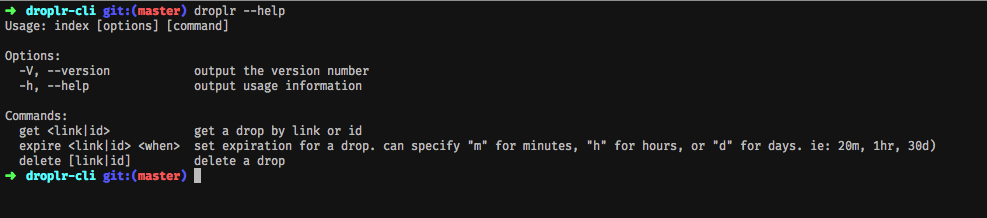
With droplr-cli, I can simply do something like: `droplr expire https://d.pr/i/id-here 30m` and it will set that drop to expire in 30 minutes. Available durations are **(m)inute, (h)our, (d)ay, (y)ear**.
## Getting Started
### Prerequisites
- Node.js (I like using `nvm` personally. See more: [Node Version Manager](https://github.com/creationix/nvm))
### Steps
- `npm install -g droplr-cli`
- `droplr set-auth <username> <password>` (This will create a `droplr-cli.json` file in your config directory. Typically `~/.config` on macOS/UNIX.)
## Running the tests
- `npm run test`
## License
This project is licensed under the [MIT License](https://github.com/mikerogne/droplr-cli/blob/f033c84a3b78e56d98e80f6cf7dd7a4b8ee5adee/LICENSE).
## Acknowledgments
- https://github.com/Droplr/droplr-js
- Thanks to [FatBoyXPC](https://github.com/FatBoyXPC/) for the XDG Base Directory assistance!